This thread has been locked.

If you have a related question, please click the "Ask a related question" button in the top right corner. The newly created question will be automatically linked to this question.

AM2434: Am2434 - Network dropping of cards when connected in daisy chain

Part Number: AM2434
Other Parts Discussed in Thread: DP83869, SYSCONFIG

Hi 

we are using AM2434 - ind_comms_sdk_am243x_09_02_00_24 , We have a DAC  connected with am2434 which is communicating through I2C communication. so we have created a new task for the DAC process in our EIP code implementation. As we need to control the motor speed, our DAC process task needs to be invoked in every 10ms. To achieve this, we've added a 10ms schedule, based on the system tick.

Since the PLC input is processed in the Ethernet task, and to avoid data loss, we have added the EIP task also in 10ms.

Here's the logic we've used for the 10ms run(both EIP and DAC tasks):

```c

void EI_APP_TASK_main(void* pvTaskArg_p)

{

    uint32_t lastCalled = OSAL_getMsTick();


    for (;;)

    {

        uint32_t now = OSAL_getMsTick();

        uint32_t elapsed = now - lastCalled;

        if (elapsed < 10) {

            OSAL_SCHED_sleep(10 - elapsed);

        }

        lastCalled += 10; // Keeps the schedule tight


    }

}

```

However, after integrating this 10ms schedule in both tasks, the network goes offline after ~2hours in a few cards that are connected in a daisy chain of 20 cards.

Interestingly, if I use `OSAL_SCHED_sleep()` in both tasks, there are no offline issues.

Could there be a problem with my tight schedule implementation?

Additionally, could you please explain the recommended approach in both tasks to resolve the offline issue?

  • Hi Yashaswini,

    I don't quite understand the logic for putting 10ms sleep in the main task. What is that has to do with your DAC task?
    My basic question is, what was the actual problem, that led you to introduce delay in main task in first place?

    Best regards,
    Pourya

  • Hi Pourya,

    It’s not actually an LED that we are controlling. We are using a Digital-to-Analog Converter (DAC) to control the motor speed. To accelerate the motor, we apply the speed command in an incremental manner, which currently involves adding a delay. However, introducing this delay is causing the cards to go out of sync or, in some cases, go offline.

    Thank you

  • Hi Yashaswini,

    I'm not sure where the LED reference is coming from; I didn't ask about any LED.

    My main point was that the control loop in the DAC task should be completely separate from the main task (EI_APP_TASK_main).
    That's why I was asking for clarification:
    What was the reasoning behind adding a delay in the main task (EI_APP_TASK_main)?
    Could you please explain the logic or motivation for introducing the delay?

    Best regards,
    Pourya

  • Hi  , 

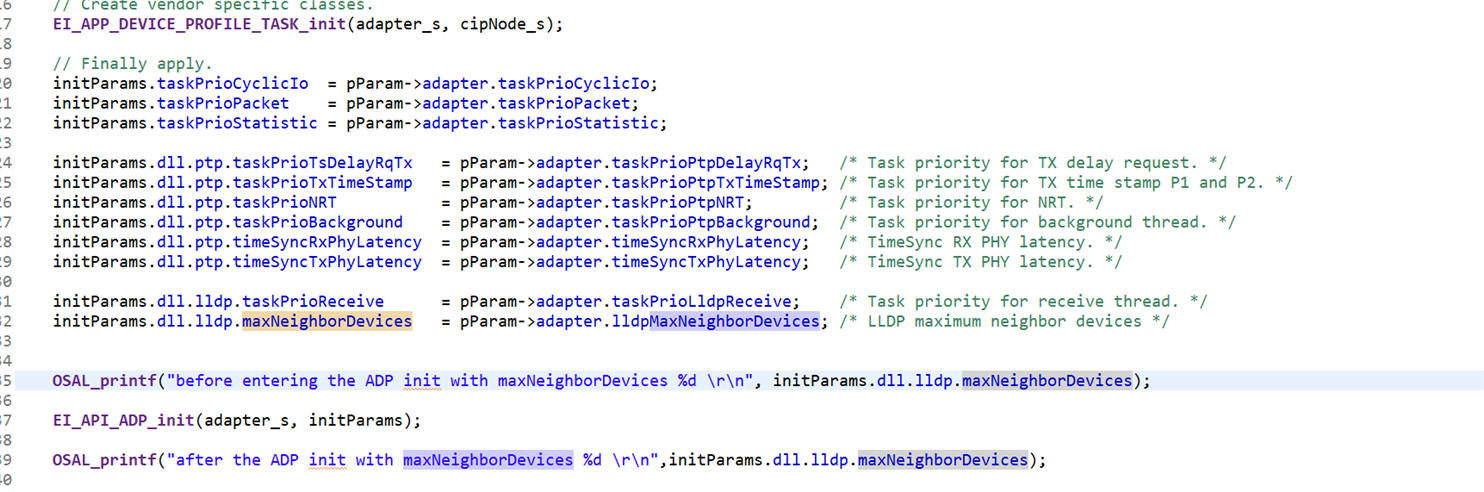
    We tried your suggestions and testing of the Cards is in progress, Currently we are testing with 20 cards to evaluate the network and it seems to be working. As soon as we add cards in the network e.g. 30 Cards the network drops and the cards do not respond (All 30 of them) and our expectation is to work with 60 cards. The team here has tried to work with the suggestions on the firmware that were given previously but it hasn't shown any improvement. Question here is, firmware has MaxNeighborDevices to increase the devcies in the network (which we have tried and to not effect) are there any other settings that need to be taken care in the fw. Attaching screenshot for reference. 

  • Hi Yash,

    If you plan to connect up to 60 cards in a daisy chain configuration, you must set the "lldpMaxNeighborDevices" parameter to 60. No other special settings are required to increase the number of supported devices in the daisy chain.

    If you encounter communication failures again, try to identify the problematic node. When all 30 nodes stop responding simultaneously, this typically indicates that the first node has failed. To confirm this, remove node1 from the chain and connect your PLC directly to node2, then check if communication resumes.

    Once you've isolated the faulty node, please provide both the UART log from that specific node and a Wireshark capture of the communication for further diagnosis.


    Best regards,
    Pourya 

  • Hi  , 

    So we tried following the advice. We flashed cards one by one and went uptill 27 Cards at this point "lldpMaxNeighborDevices" value is 27. When we pushed the value to 28 there are some Status LEDs on our Card to indicate Network up or Down. That LED turns off when we flash the value 28 or above. In the debug mode the observation is the code gets stuck at EIP_API_ADP_init(adapster_s, initparams). and no other tasks are executed. Also, this was the log that we were able to print on the console. 

    [BOOTLOADER_PROFILE] Boot Media       : NOR SPI FLASH 
    [BOOTLOADER_PROFILE] Boot Media Clock : 100.000 MHz 
    [BOOTLOADER_PROFILE] Boot Image Size  : 399 KB 
    [BOOTLOADER_PROFILE] Cores present    : 
    r5f0-0
    [BOOTLOADER PROFILE] SYSFW init                       :      12161us 
    [BOOTLOADER PROFILE] System_init                      :    5366302us 
    [BOOTLOADER PROFILE] Drivers_open                     :        279us 
    [BOOTLOADER PROFILE] Board_driversOpen                :     152772us 
    [BOOTLOADER PROFILE] Sciclient Get Version            :       9917us 
    [BOOTLOADER PROFILE] CPU load                         :      43913us 
    [BOOTLOADER_PROFILE] SBL Total Time Taken             :     216641us


    Image loading done, switching to application ...
    Pruicss  max =3 selected PRU:3
    addsel = 229
    pRuntimeData = 172939023
    DP83869 detected
    DP83869 detected
    PRU_PHY_detect:152 Phy 3 alive
    PRU_PHY_detect:152 Phy 15 alive
    Phy 3 : Disable GBit ANEG
    Phy 15 : Disable GBit ANEG
    Phy 3 : RGMII enable low latency
    Phy 15 : RGMII enable low latency
    Phy 3 : RGMII set TX Half/Full Threshold: 1
    Phy 15 : RGMII set TX Half/Full Threshold: 1
    Phy 3 : RGMII set RX Half/Full Threshold: 1
    Phy 15 : RGMII set RX Half/Full Threshold: 1


    ************************************
    PRU Firmware Version 5.5.6
    EtherNet/IP Commit ID: 0xea4cae4d
    ************************************


    before entering the ADP init with maxNeighborDevices = 28 „     Añ 
    Local interface IP is 10.78.215.229
    CALLOC 70,1 return NULL (did alloc 0x1e798)
    Func: kbEI_DLL_LPO_createInstance, Line: 106: Memory allocation of 70 bytes failed.
    kbEI_DLL_LPO_createInstance: 0x80000000 EC is fatal=0, SRC:kbEI_DLL_LPO_createInstance:108


    Error: 0x80000000, Fatal: noCALLOC 70,1 return NULL (did alloc 0x1e7e6)
    Func: kbEI_DLL_LPO_createInstance, Line: 106: Memory allocation of 70 bytes failed.
    kbEI_DLL_LPO_createInstance: 0x80000000 EC is fatal=0, SRC:kbEI_DLL_LPO_createInstance:108


    Error: 0x80000000, Fatal: noCALLOC 70,1 return NULL (did alloc 0x1e834)
    Func: kbEI_DLL_LPO_createInstance, Line: 106: Memory allocation of 70 bytes failed.
    kbEI_DLL_LPO_createInstance: 0x80000000 EC is fatal=0, SRC:kbEI_DLL_LPO_createInstance:108


    Error: 0x80000000, Fatal: noCALLOC 70,1 return NULL (did alloc 0x1e882)

    Attached is the screeshot of the code line

  • Hi Yash,

    Thank you for providing the UART log, the problem stems from insufficient heap memory.
    Please increase the Heap memory size in your project sysconfig file, this should resolve the problem.
    For example 153600. The heap size must be memory aligned with other memory regions.
    As a general rule of thumb you can increase the heap with this formula (not guaranteed to always be memory aligned! If it is not memory aligned you will get error at link time): 
    Heap size: 131072 + n * (16384)
    Choose 'n' according to your requirement (all the required lldpMaxNeighborDevices must be successfully allocated).

    Best regards,
    Pourya

  • Hi Pourya 

    We are facing some issue where few cards are continuously running but we see cards are online with the PLC but not responding to the commands. I have attached the Wireshark capture also and 10.78.215.218 is the card which is continuously running. what might be the issue , is there anything related to I2C communication? And We are running Ethernet IP task on high priority than DAC task 

     wireshark daisy .zip

    Our required number of cards to run in daisy chain is 75, as per your suggestion we calculated updated to below value and we are getting error of memory overflow.Is there any other way we can check for increased number of cards?

  • Hi Yashaswini,

    I believe you have misinterpreted the heap size calculation formula. In the expression 131072 + n*(16384), the variable 'n' does not represent the number of LLDP Neighbor Devices. Rather, 'n' is simply a positive integer that increases the heap in 16384-byte increments to maintain proper memory alignment.

    Regarding your LLDP Neighbor Devices: each one requires approximately 2004 bytes of memory. That means you would need approximately 2004*75 = 150300  of extra heap.

    This means you would only need to set n=10 in the formula, which would be more than sufficient. Your current setting of n=70 is far too large and exceeds the available memory on your device!
    I didn't understand what you mean by "not responding to commands". In the Wireshark you've shared I only see IO data, no explicit messages is visible (is that what you meant by "command"?).

    Best regards,
    Pourya
  • Hi Pourya 

    We increased the heap size, and the memory issue has now been resolved. However, we observed another scenario: after running for approximately 4 hours, the EtherNet/IP (EIP) cards stop responding to PLC commands. Specifically, the Run/Stop command and speed change are not responding, even though the cards still appear online.

    The Run/Stop and speed update functionality is handled in a separate DAC task, where we invoke
    I2C_transfer(i2cHandle, i2cTransaction); every 30 ms. Is it possible for the system to get stuck inside I2C_transfer()? Also, is a 30 ms interval sufficient to reliably complete the I2C_transfer() operation?

  • Hi Yashaswini,

    I'm pleased to hear that the heap problem has been resolved.

    Regarding the I2C transfer issue, I cannot determine with certainty if the I2C_transfer function call is being blocked somewhere in the process. I recommend opening a separate E2E ticket specifically focused on this potential driver issue for proper follow-up and investigation.
    Best regards,
    Pourya