AM2432: Can't detect SubDevice by Bus search on CTT tool

Part Number: AM2432
Other Parts Discussed in Thread: TMDS243EVM, SYSCONFIG

Hi,

My customer is now evaluating EtherCAT SubDevice of ISDK 11.0.0.13 on AM2432 by connecting some kinds of MainDevices.

As for the connection with TwinCAT, they were able to confirm that the EtherCAT communication transitions to Op after detection by bus search as expected.

However, in the combination with CTT tool, SubDevice is not detected by Search.


They checked the packet data by Wireshark when the Search failed, and found that the SubDevice on their custom board did not respond at all to the first BWR command issued by the CTT tool.

When they compared the contents of packets on the CTT tool and TwinCAT, there was the difference in the MAC destination of the BWR. That was Unicast (01:01:05:01:05:01:00:00) in the case of TwinCAT, but that’s BroadCast (FF:FF:FF:FF:FF:FF:FF) in the CTT tool.

Their custom board as SubDevice is directly connected with MainDevice (PC).

From these results, they’re presuming that Broadcast packets are being read/discarded on the AM2432, but they’re not sure.

Could you provide them any advice or suggestion to figure out a root cause and to solve this issue ?


Here are the logs of BWR command sent from CTT tool and TwinCAT below.


BWR Log sent from CTT Tool

CTT.jpg


BWR Log sent from TwinCAT

TwinCAT.jpg


Thanks and regards,

Hideaki


  • Additional information, 

    They confirmed the Wireshark logs by connecting PC with the OUT port (Port 1) on their custom board when the above issue occurred.

    The BWR packets issued by the CTT tool could be retrieved. At this time, the WC (Working Counter) is incrementing by one count.


    ESC DL STATUS (0x0110) before connecting PC to OUT port is 0x5611, it shows only Port 0 is on the Link state.

    ESC DL STATUS (0x0110) after connecting PC to OUT port is 0x5a31, it shows Port 0 and 1 are on the Link state.

    From these results, it seems that the Data write and the Command response to BWR command processing:0x0100,0x0101 are not working even though the ESC can receive BWR commands from the CTT tool as EtherCAT packets.


    Another information,

    They confirmed that TMDS243EVM was able to communicate with CTT tool correctly.

    These SW (EtherCAT stack, ESI file, etc..) solution have been ported from EVM to their custom board. Just modified the Sysconfig setting for the difference between EVM and their board.


    Thanks and regards,

    Hideaki

  • Can they share full CTT session logs

  • Hi Pratheesh,

    Thank you for your reply.

    Here is the CTT log below.

    sep=;
    cult=ja-JP;
    2026/01/21 10:24:05; Information; CTT is started from C:\Program Files (x86)\EtherCAT Conformance Test
    2026/01/21 10:24:05; Information; Running installed version: 2.7.0.0
    2026/01/21 10:24:05; Information; 'EtherCAT Conformance Test' (ThreadID: 1, Time: 2026/01/21 10:24:05);
    2026/01/21 10:24:05; Information; ECConformanceTest, Version=2.7.0.0, Culture=neutral, PublicKeyToken=180016cd49e5e8c3;
    2026/01/21 10:24:05; Information; FSoE, Version=1.4.0.0, Culture=neutral, PublicKeyToken=180016cd49e5e8c3;
    2026/01/21 10:24:05; Information; Loading Plugin: CrcVerifier, Version=1.2.5.0, Culture=neutral, PublicKeyToken=180016cd49e5e8c3;
    2026/01/21 10:24:05; Information; Loading Plugin: CTTReportingTool, Version=1.0.14.0, Culture=neutral, PublicKeyToken=180016cd49e5e8c3;
    2026/01/21 10:24:05; Information; Loading Plugin: TF-12xx_Settings, Version=1.0.5.0, Culture=neutral, PublicKeyToken=null;
    2026/01/21 10:24:05; Information; ==========================================================================================================;
    2026/01/21 10:24:05; Information; CttService | Adding test files;
    2026/01/21 10:24:05; Information; Test Set: Reading 'C:\Program Files (x86)\EtherCAT Conformance Test\TestFiles\TF-Set_V1.8_Default_CTT_V2.7.0.0.xml.ctfs';
    2026/01/21 10:24:05; Information; Test Set: Reading 'C:\Program Files (x86)\EtherCAT Conformance Test\TestFiles\tf-set_v1.8_ethercat_ctt_v2.7.0.0.ctfs';
    2026/01/21 10:24:05; Information; Test Set: Reading 'C:\Program Files (x86)\EtherCAT Conformance Test\TestFiles\tf-set_v1.8_profiles_ctt_v2.7.0.0.ctfs';
    2026/01/21 10:24:05; Information; Test Set: Reading 'C:\Program Files (x86)\EtherCAT Conformance Test\TestFiles\tf-set_v1.8_semi_device_profiles_ctt_v2.7.0.0.ctfs';
    2026/01/21 10:24:05; Information; Test Set: Reading 'C:\Program Files (x86)\EtherCAT Conformance Test\TestFiles\tf-set_v1.5_fsoe_subinstance_ctt_v2.7.0.0.ctfs';
    2026/01/21 10:24:05; Information; Test Set: Reading 'C:\Program Files (x86)\EtherCAT Conformance Test\TestFiles\tf-set_v1.1_fsoe_maininstance_ctt_v2.7.0.0.ctfs';
    2026/01/21 10:24:06; Information; Adding test file 'C:\Program Files (x86)\EtherCAT Conformance Test\TestFiles\tf-1300_v1i9i0_esi_test.xml';
    2026/01/21 10:24:06; Information; Adding test file 'C:\Program Files (x86)\EtherCAT Conformance Test\TestFiles\tf-1301_v1i2i0_esi_ethercat_p.xml';
    2026/01/21 10:24:06; Information; Adding test file 'C:\Program Files (x86)\EtherCAT Conformance Test\TestFiles\tf-1100_v1i5i0_dll_test.xml';
    2026/01/21 10:24:07; Information; Adding test file 'C:\Program Files (x86)\EtherCAT Conformance Test\TestFiles\tf-1200_v1i6i0_esm.xml';
    2026/01/21 10:24:07; Information; Adding test file 'C:\Program Files (x86)\EtherCAT Conformance Test\TestFiles\tf-1201_v1i6i0_expldevident.xml';
    2026/01/21 10:24:07; Information; CttService | Adding Test files cancelled;
    2026/01/21 10:24:59; Information; CttService | Get MainDevice Guid: bbe0f900-2d13-4cd8-969b-17c3550fae5f;
    2026/01/21 10:24:59; Information; CttService | MainDevice Scan: MasterGuid: bbe0f900-2d13-4cd8-969b-17c3550fae5f
    2026/01/21 10:25:00; Warning; EcMaster: Lost Frame (ecat.cmd == 8 && ecat.idx == 0x91 && ecat.adp == 0x0 && ecat.ado == 0x100)
    2026/01/21 10:25:01; Warning; EcMaster: Lost Frame (ecat.cmd == 8 && ecat.idx == 0x92 && ecat.adp == 0x0 && ecat.ado == 0x100)
    2026/01/21 10:25:02; Warning; EcMaster: Lost Frame (ecat.cmd == 8 && ecat.idx == 0x93 && ecat.adp == 0x0 && ecat.ado == 0x100)
    2026/01/21 10:25:03; Error; CttService | Scan causes an error: EcMaster: Lost Frame (ecat.cmd == 8 && ecat.idx == 0x94 && ecat.adp == 0x0 && ecat.ado == 0x100);


    Thanks and regards,

    Hideaki

  • Matsumoto-san,

    Can the customer test the firmware from INDUSTRIAL-COMMUNICATIONS-SDK-AM243X Software development kit 2025.00.00 (SDK) | TI.com ? This includes link detection enhancement for such scenarios. Refer to PINDSW-9142 in AM243x INDUSTRIAL COMMUNICATIONS SDK: Release Notes 2025.00.00

    ESC DL STATUS (0x0110) before connecting PC to OUT port is 0x5611, it shows only Port 0 is on the Link state.

    So the Port0 Link State is active when no connection is made?

    Regards,
    Aaron 

  • You can also refer to this page for previously resolved issues related to link detection: AM243x INDUSTRIAL COMMUNICATIONS SDK: EtherCAT Debug Guide

    Regards,
    Aaron 

  • Additionally, the following register will help in understanding if the EtherCAT firmware is receiving packets from the CTT Tool:

    With this, we can identify if the issue is with the ESC firmware or with the PHY porting.

    Regards,
    Aaron 

  • Matsumoto-san,

    Please make sure the PHY Address is configured correctly and the link polarity is also taken care as expected for Enhanced Link. Refer to "How MDIO Works for Link Detection" in AM243x INDUSTRIAL COMMUNICATIONS SDK: EtherCAT SubDevice FWHAL. MDIO Phy Address should match the MDIO Link Register, and swapping them can cause unknown issues.

    Regards,
    Aaron

  • Hi Aaron,

    Thank you for sharing some information. We've received some feedbacks from the customer to your inquiries. Please check below and please provide any advice to them if you have any idea to solve this issue.

    Can the customer test the firmware from INDUSTRIAL-COMMUNICATIONS-SDK-AM243X Software development kit 2025.00.00 (SDK) | TI.com ? This includes link detection enhancement for such scenarios. Refer to PINDSW-9142 in AM243x INDUSTRIAL COMMUNICATIONS SDK: Release Notes 2025.00.00

    They can test it, but they cannot estimate the man-hours to build the test environment, so they want to proceed after confirming that it certainty solves this issue.
    Is the PINDSW-9142 applicable even if they currently use the enhanced_link feature disabled?

    If they test the upgrade, is it correct to update the EtherCAT firmware according to the procedure shown below?
    "EtherCAT Firmware Migration guide" in AM243x INDUSTRIAL COMMUNICATIONS SDK: EtherCAT SubDevice FWHAL


    ESC DL STATUS (0x0110) before connecting PC to OUT port is 0x5611, it shows only Port 0 is on the Link state.

    So the Port0 Link State is active when no connection is made?

    It is changing correctly depending on the connection state of Port0. 

    In case of connecting CTT tool and Port 0 :  0x5611

    In case of No Port 0 connection :  0x5511


    Additionally, the following register will help in understanding if the EtherCAT firmware is receiving packets from the CTT Tool:

    They checked for counter updates immediately after connecting Port0 to PC with a cable.
    When the update was settled, they ran a scan from the CTT tool and the counter values were updated accordingly.


    Please make sure the PHY Address is configured correctly and the link polarity is also taken care as expected for Enhanced Link. Refer to "How MDIO Works for Link Detection" in AM243x INDUSTRIAL COMMUNICATIONS SDK: EtherCAT SubDevice FWHAL. MDIO Phy Address should match the MDIO Link Register, and swapping them can cause unknown issues.

    The PHY address is Port0=0, Port1=1.

    EtherCAT is defined on Sysconfig as follows:


    Thanks and regards,

    Hideaki

  • Here is the CTT log below.

    Can they also share corresponding wireshark logs from the PC?

  • Hi Pratheesh,

    Please see the attached files. (Wireshark capture file and Screenshot image).

    Only 7 packets are able to be gotten. These are not filtered.


    https://e2e.ti.com/cfs-file/__key/communityserver-discussions-components-files/908/CTT_5F00_CustomBoard_2800_AM2432_29005F00_log.pcapng

    Regards,

    Hideaki

  • Matsumoto-san,

    So to summarize the details provided:

    Issue Summary

    • Problem: AM2432 custom board with TI EtherCAT SubDevice Stack cannot be detected by CTT tool during bus search, despite working correctly with TwinCAT.

    Configuration:

    • Hardware: AM2432 custom board (ported from TMDS243EVM)
    • Software: IC SDK 11.0.0.13 on AM2432
    • Connection: Direct connection between AM2432 custom board and PC running CTT tool
    • PHY Configuration: Port0=0, Port1=1
    • Sysconfig:
      • MDIO Manual Mode Base Address: 0x10E40
      • MDIO Manual Mode Link Status Update: PHY Polling Based
      • Enhanced Link: Disabled

    Behavioral Findings:

    • Works with TwinCAT, Fails with CTT
      • TwinCAT: SubDevice is detected by bus search and communication transitions to Op state as expected
      • CTT Tool: SubDevice is NOT detected on Port0 of SubDevice
      • SubDevice does not respond at all to the first BWR command issued by CTT tool
    • Key Difference in BWR Packets:
      • TwinCAT BWR: MAC destination = Unicast (01:01:05:01:05:01:00:00)
      • CTT Tool BWR: MAC destination = Broadcast (FF:FF:FF:FF:FF:FF:FF:FF)
    • ESC DL Status Register (0x0110) Behavior
      • PC connected to IN port: 0x5611 (only Port 0 shows Link state)
      • After connecting PC to OUT port: 0x5a31 (Port 0 and Port 1 both show Link state)
      • Link state changes correctly depending on Port0 connection status
    • Frame Reception Evidence
      • BWR packets from CTT tool can be retrieved via Wireshark on OUT port (Port 1) - Does this mean that scan is successful with Port1 only connected?
      • Port0 frame counter is incrementing - Is the incremented value matching the number of frames in the wireshark log?
    • PHY Configuration
      • DL status updates as expected → PHY is configured correctly
      • Port0 frame counter increments → BWR frames are being received, not discarded

    Can you also provide the ICSS Memory Dump (0x30000000 - 0x30040000) ?

    Please provide the PHY register dump as well to cross verify the configurations. Also which PHY is the customer using in the custom board?

    Has the customer evaluated the the same on TMDS243EVM ICSSG0 instance? 

    Regards,
    Aaron

  • Hi Aaron,

    Thank you for summarizing the current situation. The customer would like to correct some your comments and to answer your questions.

    Please see their feedbacks below.

    -------------------------------------------------------------------------------

    Problem: AM2432 custom board with TI EtherCAT SubDevice Stack cannot be detected by CTT tool during bus search, despite working correctly with TwinCAT.

    It's not TI stack. We've ported the code which they created by using Beckhoff SSC tool by referring to EtherCAT SubDevice Beckoff SSC Demo in the Industrial Communications SDK. We confirmed that this stack worked correctly on EVM.


    BWR packets from CTT tool can be retrieved via Wireshark on OUT port (Port 1) - Does this mean that scan is successful with Port1 only connected?

    No, that is not correct. The result is from testing with the following incorrect EtherCAT configuration:
    CTT tool – IN port (Port 0) – OUT port (Port 1) – PC (Wireshark)

    With this configuration, even if everything works correctly, BWR packets are expected to reach the PC (Wireshark) and then be discarded.
    However, the fact that the packets reached the PC (Wireshark) suggests that they at least reached the AM2432.


    Also which PHY is the customer using in the custom board?

    We use DP83822.


    Has the customer evaluated the the same on TMDS243EVM ICSSG0 instance?

    We have not evaluated the ICSSG0 instance on the EVM.
    Our understanding is that the ICSSG0 instance cannot be used due to the hardware configuration.

    For other your questions, we'll let you know once we confirmed.

    ----------------------------------------------------------------------------------------------

     Thanks and regards,

    Hideaki

  • Matsumoto-san,

    It's not TI stack. We've ported the code which they created by using Beckhoff SSC tool by referring to EtherCAT SubDevice Beckoff SSC Demo in the Industrial Communications SDK. We confirmed that this stack worked correctly on EVM.

    Understood.

    CTT tool – IN port (Port 0) – OUT port (Port 1) – PC (Wireshark)

    This does not look to be a valid test environment. The PC will not act as the SubDevice in this case. Is it not possible to connect the PC to the CTT Tool and capture the frames?

    Our understanding is that the ICSSG0 instance cannot be used due to the hardware configuration.

    Yes correct. Standard AM243 EVM do not have board support. You can have PRU_ICSSG0 support with a custom board.

    Regards,
    Aaron 

  • Hi Aaron,

    Thank you for your comment. Please see the customer's feedback below. As they responded to your inquiries too, please provide any advice.


    CTT tool – IN port (Port 0) – OUT port (Port 1) – PC (Wireshark)

    This does not look to be a valid test environment. The PC will not act as the SubDevice in this case. Is it not possible to connect the PC to the CTT Tool and capture the frames?

    This has not been tested with EtherCAT as the correct configuration.
    In the one-to-one configuration of the CTT tool and the AM2432, Wireshark can only verify the packet from the CTT tool as far as it sent the packet, so I thought the above test could prove that the packet arrived at the AM2432.
    However, if it is a confirmation of misalignment, please ignore it.

    I think that the Wireshark log that I have already sent is the answer.
    We are sending logs obtained by Wireshark running on a PC in the connection of CTT tool - IN Port (Port 0).


    Also, we were able to test enabling the ENHANCED LINK mode, the issue has not been solved.

    Port0 frame counter is incrementing - Is the incremented value matching the number of frames in the wireshark log?

    We monitored Rx Port0 frame counter (ESC 0x0E00) by calling the following function periodically.

    {
    uint32_t    esc_val;
        HW_EscReadDWord(esc_val, 0x0E00);
        DebugP_log("ESC REG 0x0E00 = 0x%x \n\r", esc_val);
    }

    Then, as shown below, the second digit in hex was increased as matching the number of frames on Wireshark. 

    At the beggining :  ESC REG 0x0E00 = 0x800

    On Wireshark, confirmed the three frames (NOP) were sent :  ESC REG 0x0E00 = 0x830

    On Wireshark, confirmed the four frames (BWR) were sent :   ESC REG 0x0E00 = 0x870


    Can you also provide the ICSS Memory Dump (0x30000000 - 0x30040000) ?

    See the attached file. We dumped 0x30000000 - 0x30040000 in binary format with the CTT tool directly connected to the IN Port.https://e2e.ti.com/cfs-file/__key/communityserver-discussions-components-files/908/IPRU_5F00_CSSG0_5F00_0x30000000_2D00_0x30040000.bin 


    Please provide the PHY register dump as well to cross verify the configurations. Also which PHY is the customer using in the custom board?

    See the attached file. We dumped the registers of IN/OUT with the CTT tool directly connected to the IN Port.

    PhyRegisterDump.txt


    Thanks and regards,

    Hideaki

  • In the one-to-one configuration of the CTT tool and the AM2432, Wireshark can only verify the packet from the CTT tool as far as it sent the packet, so I thought the above test could prove that the packet arrived at the AM2432.

    This is not correct, it can also detect packet returned by DUT in one to one to configuration and wireshark running in the same PC as CTT.

    With this configuration, even if everything works correctly, BWR packets are expected to reach the PC (Wireshark) and then be discarded.
    However, the fact that the packets reached the PC (Wireshark) suggests that they at least reached the AM2432.

    Are those packets reached with WKC incremented? If not, it suggests that there is probably IN/OUT port swap possibility. If WKC is incremented, then it is indeed process path (IN to OUT when both links active) and if not then it is OUT to IN (both links active).

    On Wireshark, confirmed the three frames (NOP) were sent :  ESC REG 0x0E00 = 0x830

    On Wireshark, confirmed the four frames (BWR) were sent :   ESC REG 0x0E00 = 0x870

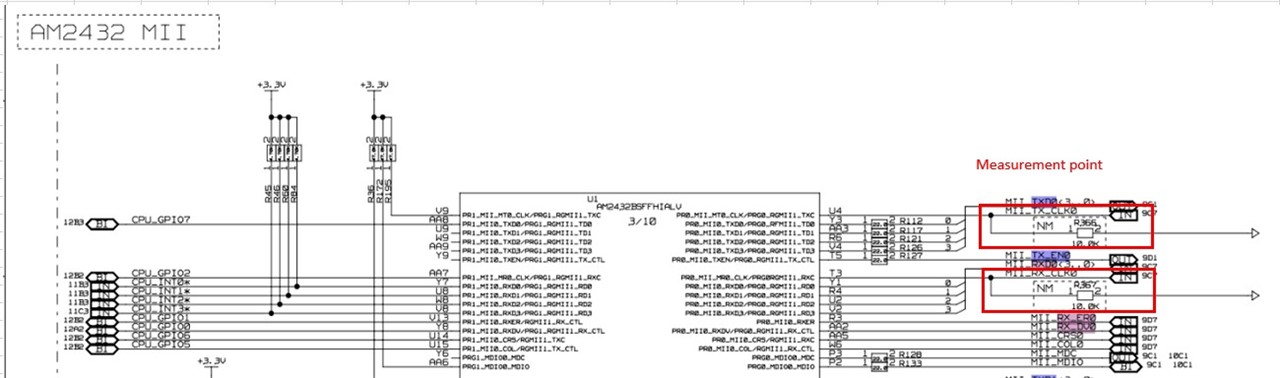
    Can they verify MII CLK from PHY in this case?

  • Matsumoto-san,

    Thank you for the ICSS Memory dump and the PHY Register Dump. I will review and get back.

    Additionally, is it possible to share the schematic of the custom board to rule out any possibility of port swapping?

    Regards,
    Aaron

  • Hi Pratheesh,

    Thank you for your comments. Here are the customer's feedback below.


    This is not correct, it can also detect packet returned by DUT in one to one to configuration and wireshark running in the same PC as CTT.

    Of course, I understand that in a 1‑to‑1 configuration, packets returned from the DUT can normally be captured by Wireshark running on the same PC as the CTT.
    In this case, however, those return packets were not detected, which is why I tried the non‑standard setup of connecting the PC to the OUT port.


    Are those packets reached with WKC incremented? If not, it suggests that there is probably IN/OUT port swap possibility. If WKC is incremented, then it is indeed process path (IN to OUT when both links active) and if not then it is OUT to IN (both links active).

    The WKC for the BWR command is incremented.
    While the packet sent from the CTT had a WKC of 0, the packet transmitted from the custom board’s OUT port shows a WKC of 1.


    Can they verify MII CLK from PHY in this case?

     This is the MII CLK waveform. 


    Thanks and regards,
    Hideaki

  • Matsumoto-san,

    While the packet sent from the CTT had a WKC of 0, the packet transmitted from the custom board’s OUT port shows a WKC of 1.
    Only 7 packets are able to be gotten. These are not filtered.

    Just comparing the latest response with the wireshark log shared earlier where WKC is not incrementing, what is the difference?

    Regards,
    Aaron

  • Matsumoto-san,

    Port.IPRU_CSSG0_0x30000000-0x30040000.bin 

    From the logs, here are my observations:

    • 0x308 (Forwarded RX Error Counter) saturated to 0xFF
    • 0x30c (ECAT Processing Unit Error Counter) saturated to 0xFF
    • 0x210 and 0x311 (Lost Link counter of Port 0 and Port 1) incremented, which may be due to the link break in the test environment.
    • 0x0982-0x0983 (Pulse Length of SyncSignals) of value 1 - Looks like Pulse Length of SyncSignals is not updated from EEPROM.
    • 0x0E0C (PRU MII RX LINK Polarity) has "Active low". This shouldn't matter if the Enhanced Link is disabled.
    • 0x0E48-0x0E4B (MDIO Alive Register for MDIO Manual Mode) indicates combined PHY Address (bit0 + bit1 set).
    • 0x0E4C-0x0E4F (MDIO Link Register for MDIO Manual Mode) indicates link up on Port1?

    Follow-up question:

    • Can the customer clarify the presence of RX Error ?

    The MDIO configuration seems to be correct. I'll also check on the PHY register and see for any unexpected behavior.

    Regards,
    Aaron

  • Hi Aaron,


    Just comparing the latest response with the wireshark log shared earlier where WKC is not incrementing, what is the difference?

    Sorry, we may not understand your question correctly, but the difference is that the Wc is 0 or 1 in Wireshark logs. You can see it in the data of each Wireshark logs.

    Thanks and regards,

    Hideaki

  • Hi Aaron,

    Thanks for your observations.

    Can the customer clarify the presence of RX Error ?

    Regarding the RX error counter (ESC 0x308), the counter value was confirmed to be “0” immediately after startup with no cable connection on the custom board, and the counter value increased to 0xFF immediately after connecting the cable to the CTT tool (PC).


    As you commented, the PHY link itself seems to be established correctly, so they cannot understand why the above error counter will increase.

    In addition, when they checked the RX error counter (ESC 0x308) even in the configuration where EtherCAT communication works correctly, the behavior of the error counter was different.


    < TwinCAT -– CustomBoard (AM2432) >

        On this configuration, no increase in the RX error counter was observed between power-up and EtherCAT communication transitioning to Op.


    < CTT(PC) –- EK1100 -- CustomBoard (AM2432) >

        On this configuration, the RX error counter is slightly counted up after power-up, and then the counter is cleared to “0” when the scan from the CTT tool is completed successfully.

        If left unattended after that, the counter counts up slightly.

        ESC REG 0x308 = 0x16
        ESC REG 0x308 = 0x16
        ESC REG 0x308 = 0x16
        ESC REG 0x308 = 0x0    <== The value was cleared when the scan was completed by CTT tool.
        ESC REG 0x308 = 0x0
        ESC REG 0x308 = 0x0
        ESC REG 0x308 = 0x0
        ESC REG 0x308 = 0x2
        ESC REG 0x308 = 0x2


    Could you tell us what the condition under which the RX error counter (ESC 0x308) counts up ?


    Thanks and regards,

    Hideaki

  • Matsumoto-san,

    Could you tell us what the condition under which the RX error counter (ESC 0x308) counts up ?

    0x308 and 0x30A will track the forwarded error counters. When the previous device detects CRC, then it will add odd nibble post FCS of the packet and ESC will instead count forwarded CRC errors here. 

    This will help in identifying which node in the network is generating CRC error. 

  • Hi Aaron, 

    Thank you for supporting this issue.

    Their board was able to communicate with CTT tool as well by modifying the following registers on DP83822.

    CR2(0xa) = 0x0102
    CR3(0xb) = 0x1008
    ANAR(0x4) = 0x01e1
    PHYCR(0x19) = 0x802*    * PHY address

    BMCR(0x0) = 0x3100


    They’re now continuing to check this, because they’re not sure why this modification can solve the issue.

    I closed this thread. I'll post another thread if we receive any update from them.

    Thanks and regards,

    Hideaki Matsumoto