This thread has been locked.

If you have a related question, please click the "Ask a related question" button in the top right corner. The newly created question will be automatically linked to this question.

AM263P4-Q1: Control Card not connecting LIN1 pins to HESC (DOCK)

Part Number: AM263P4-Q1
Other Parts Discussed in Thread: AM263P4, CODECOMPOSER, SYSCONFIG, AM2632-Q1, AM2632

I am using the AM263P4-Q1 Control Card.   We have code that is correct controlling the I2C IO expander to control other MUXes on the board.  I have been unable to get the Am263P4-Q1 pins A9/B9 mapped to the HESC dock instead of the the on board LIN interface.

I have version PROC159A of the CC.

I have consulted the schematic for the control card.  The relevent pages are 16,  23, 28 and 31.

Page 16 the connection to the AM263P4-Q1

Page23 the connection through the LIN MUX

page28 the I2C IO expander P15 is the LIN_MUX_SEL

Page 31 HESC Dock pins

  • Hi Jeffrey,

    The LIN MUX U44 is powered by the LDO2 output from the PMIC (Page 9, U7). LDO2 does not come up by default and has to be enabled via a SPI command from the AM263P4.

    Can you check to see if you are enabling this LDO as part of your application?

    Regards,

    Brennan

  • Brennan,

    No we were not,  I will include that in the support file for the eval board I am writing.

    Thank you

    Jeff

  • Brennan,

    That got me closer.

    When I try to run syscfg from the command line to generate the files it complains that the UART mode needs to be 13x instead of 16x.

    The GUI has no issue with me adjusting the clock tree to a /2 to get 96MHz.  That in turn allows me to set the baud rate to 1Mbps with a 16x operating mode.  Not warnings/issues reported from the gui tool.

    It is not until we run syscfg to generate the files from the command line that it fails.  

    We are not building inside CodeComposer.  We have a working CMAKE environment for the project.

  • Brennan,

    For completeness.  I loaded one of the example application from the SDK 11.00.19.  I added UART1.  Adjsuted the clock tree as noted above.  Set the baud rate as noted.  This is all done inside CCS.  CCS reported the same error.  It is expecting the mode to be set to 13x.

    It would appear that the rules engine is not accounting for the clock tree configuration.

    Jeff

  • Jeffrey, 

    To be clear, you added an example application from the SDK v11.00.19, added UART1, and adjusted the clock tree to 16x/baud rate 1Mbps?

    Which version of CCS are you using? I will attempt to replicate this issue on my end.

    Regards,

    Brennan

  • Brennan,

    I am using CCS Version: 20.3.1.5__1.9.1 

    SDK 11.00.00.19, 

    Syscfg included with CCS 1.25, I also use Syscfg 1.26 external to CCS

    Jeff

  • Jeff,

    Thanks, can you also try using CCS 12.8.1? 

    Regards,

    Brennan

  • Brennan,

    I will grab CCS 12.8.1 for Linux and install in the morning.

    Jeff

  • Brennan,

    I installed CCS12.8.1 for Linux.

    I  imported the uart echo example from the SDK 11.00.19,.  CCS is configured so that it will use Syscfg 1.26.

    I added a second UART UART2.  In the Clock tree view I changed UART2_CLK_GCM_CLKDIV to 2.  This results in the UART2_INT_CLK being 96MHz.  Back to configure the UART I set the baud rate to 1000000.  No other changes were made.

    I Get the follow error when attempting to compile:

    uilding file: "../example.syscfg"
    Invoking: SysConfig
    "/opt/ti/sysconfig_1.26.0/sysconfig_cli.sh" --script "/home/jhanzlik/workspace_v12/uart_echo_am263px-cc_r5fss0-0_freertos_ti-arm-clang/example.syscfg" -o "syscfg" -s "/opt/ti/mcu_plus_sdk_am263px_11_00_00_19/.metadata/product.json" --context "r5fss0-0" --part AM263P4 --package ZCZ_S --compiler ticlang
    Running script...
    Validating...
    info: CONFIG_UART_CONSOLE(/drivers/uart/uart) baudRate: Actual Baudrate Possible: 115385 (0 % error)
    info: CONFIG_MPU_REGION3(/kernel/dpl/mpu_armv7) attributes: Some memory region(s) within this range is Shared among cores. 
    subdir_rules.mk:7: recipe for target 'build-391003745' failed
    error: CONFIG_UART0(/drivers/uart/uart) operMode: Operating mode should be 13X for the configured baudrate at this clock
    1 error(s), 0 warning(s)
    gmake: *** [build-391003745] Error 1
    gmake: Target 'all' not remade because of errors.

    **** Build Finished ****

  • Hi Jeff,

    I tried this on my side and observe the same failure. Some key things to note:

    • Per the AM263P4 Technical Reference Manual (section 13.1.4.2.1.3), UART can only operate in the following modes:
      1. UART 16x with baud rate <=230.4kbps
      2. UART 16× with autobauding (>= 1200 bps and <= 115.2 kbps)
      3. UART 13x with baud rate >=460.8kbps

    Therefore, your combination of UART 16x with baud rate of 1Mbps violates the operating mode limits of the UART on this device. If you want a 1Mbps baud, then the UART mode must be 13x.

    Next, according to section 13.1.4.4.8.1.2 in the TRM, the formulas to calculate the UART clock divider values are:

    • UART 16× mode: Divisor value = Operating frequency / (16× baud rate)
    • UART 13× mode: Divisor value = Operating frequency / (13× baud rate)

    For your case of divider=2 and operating frequency=96MHz, the baud rate calculates to 3692307baud.

    If I input this value for the Baudrate in SysConfig, the project successfully builds.

    Please try adjusting your UART parameter settings according to these guidelines.

    Regards,

    Brennan

  • Brennan,

    Thank you the clarification.  The previous project used an AM2632-Q1.  The tools did not flag this configuration as an error.  

    The setting of 1Mbps for the baud rate is importatnt.  We are connecting to a BQ79731.  It supports 1Mbps +/- 1%. 

    With that said, when I try to set it to 1Mbps syscfg gui accepts the setting.  I get the this error:

    error: CONFIG_UART0(/drivers/uart/uart) baudRate: Actual baudrate error over tolerance limit (923077, 8 % error), try a

    I also tried setting to 1050000 for baud I get a similar error.  I can play wack-a-mole to guess.  I am looking for settings that will get me close to the 1Mbps rate required.

    Jeff

  • Jeff,

    With the strict requirements of your system, you will need to use the equation and device constraints to determine the correct value.

    Regards,

    Brennan

  • Brennan,

    There appears to be conflicting information for configuring the UART baud rate.  In one section of the document it claims above ~230kbps we must use 13x mode.  However in the following table 
    3.6884 Mbps 13x 1 0x00, 0x01 3.6923 Mbps +0.16

    Table 13-92. UART Baud Rate Settings (160-MHz Clock)
    Baud Rate Baud Multiple DLH, DLL (Decimal) DLH, DLL (Hex) Actual Baud Rate Error (%)
    2 Mbps 16x 5 0x00, 0x05 2 Mbps 0
    5 Mbps 16x 2 0x00, 0x02 5 Mbps 0
    10 Mbps 16x 1 0x00, 0x01 10 Mbps 0

    Using the settings for 2Mbps 160MHz clock, 16X mode, It does not work.  Can you verify this?  

    It appears that the tool is forcing 13x assuming the clock is 48MHz.  That is the default and valid.  I am still trying to understand how the AM2632 using the same exact UART module as the AM263P4 works perfectly and was easy to configure.  It appears to me that the addition of the clock tree configuration as a separate activity is not well intergrated.

    Jeff

  • Jeff,

    Looping in the SW engineer responsible for the UART module. Do you know which version of the SDK/CCS/SysConfig you were previously using when the clock/baud rate settings worked for AM2632?

    Regards,

    Brennan

  • Brennan,

    For the AM2632 we were using SDK 10.02.00.13, Syscfg 1.24.1.

    Jeff

  • Hi Jeffrey,

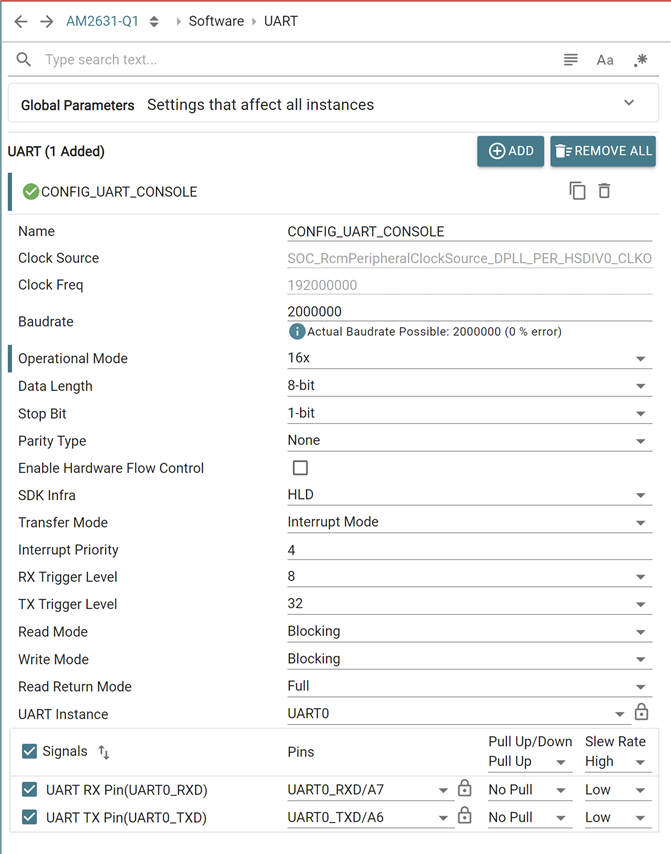
    Can we try this configuration to attain 1Mbps baudrate?

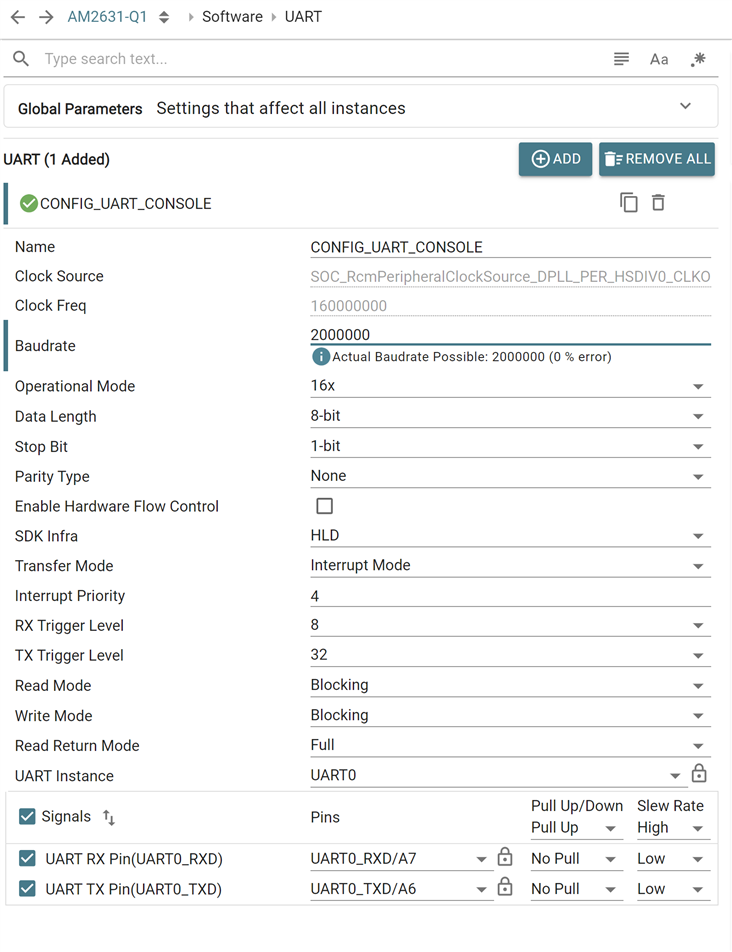
    Is this the configuration that you wanted us to check for 2Mbps?
    Regards,

    Aswin

  • Also please see the config for 160MHz clock.

  • Aswin,

    I am attaching screen shots for both cfgs.  The summary they both fail to compile.  The 96MHz fails with an error stating that the maximum baud rate is 923077.  The 160Mhz fails stating that 13x mode is required.

    Jeff

  • Hi Jeff,

    I am unable to access the file that you shared.

    Can you please check it again.

    Regards,

    Aswin

  • Aswin,

    This is the cfg for 96MHz

    UART 96MHz CFG

    Jeff

  • Aswin,

    This is the 96MHz error.

    Jeff

  • Aswin,

    What is the magic to adding a local file to the post?

    Jeff

  • Aswin,

    I think I figured it out.

    am263p4_uart1_.zip

    Jeff

  • Aswin,

    In case you cannot extract the zip here is the error for the 96MHz cfg. The 160Mhz

    Jeff

  • Hi Jeff,

    Thank you for sharing the configs. I was able to reproduce the issue. I am now checking this with the team. I will let you know of the reason behind this as soon as possible.

    Regards,

    Aswin

  • Hi Jeff,
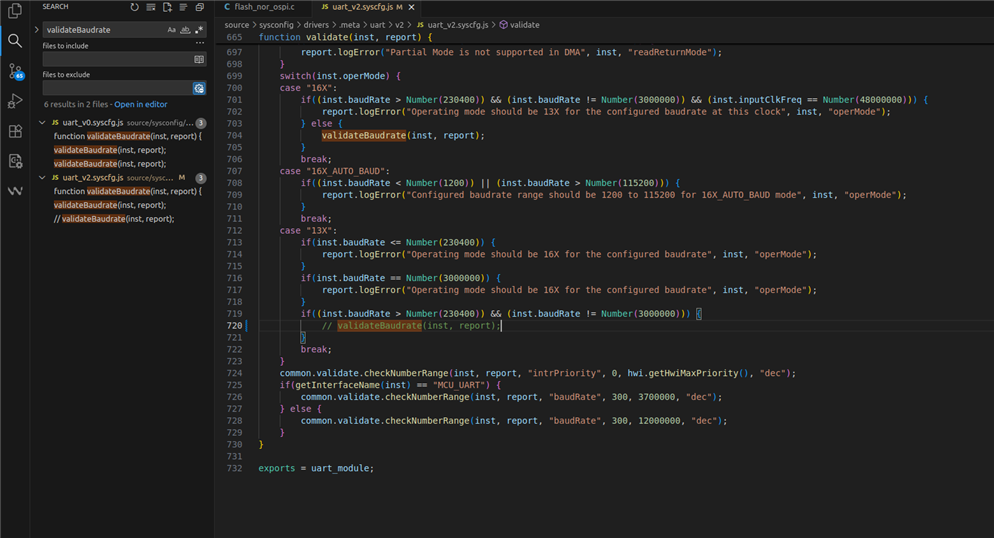
    This is a bug in the sysconfig tool. Can you please configure UART by commenting out this function so that this will unblock your process.

    Function Name: function validate(inst, report)

    File Name: source/sysconfig/drivers/.meta/uart/v2/uart_v2.syscfg.js

    Line Number:720

    For 16X line 704 should be commented.

    I have filed this bug internally, please find the tracking link: jira.itg.ti.com/.../MCUSDK-15260


    Regards,

    Aswin

  • Aswin,

    Thank you for the response.  I have revised the file in the the SDK.  I am now able to configure the UART for 1Mbps.  I have verified that the port was properly configured by measuring the TX signal using a logic analyzer.

    I will keep track for the bug report going forward.

    Jeff