This thread has been locked.

If you have a related question, please click the "Ask a related question" button in the top right corner. The newly created question will be automatically linked to this question.

TMS570LC4357: Bootloader with Serial Port Functionality

Part Number: TMS570LC4357

Dear Team

After referencing the UART_Bootloader_LC4357 project, I implemented my own bootloader. Due to specific binary file size constraints, I performed trimming.

The initialization content is as follows:

image.png

The code for the jump section after successful validation is as follows:
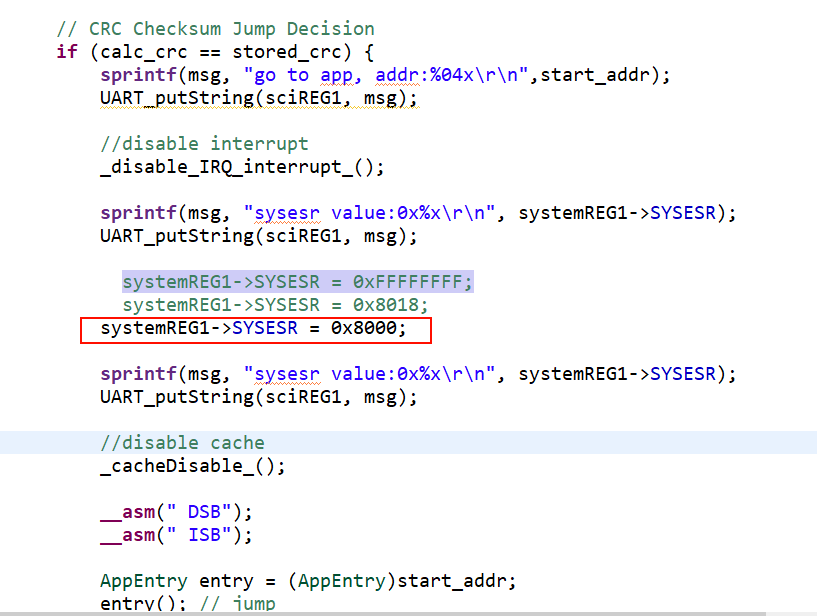
image.png

The serial port assistant displays the following information:

image.png

=======================================

This phenomenon manifests as follows: If the code segment marked by the red box in Figure 2 is omitted, the application will fail to run normally after the jump instruction executes. I hypothesize that if bit 15 of the SYSESR register remains uncleared, the program will enter an infinite loop as shown below.

image.png

I believe that if the LOADER program and the jump program are set to the same main frequency, it should not cause the phase-locked loop to fail. Please help analyze the cause of the problem. 


  • Hi Shuo liu,

    If the code segment marked by the red box in Figure 2 is omitted, the application will fail to run normally after the jump instruction executes. I hypothesize that if bit 15 of the SYSESR register remains uncleared, the program will enter an infinite loop as shown below.

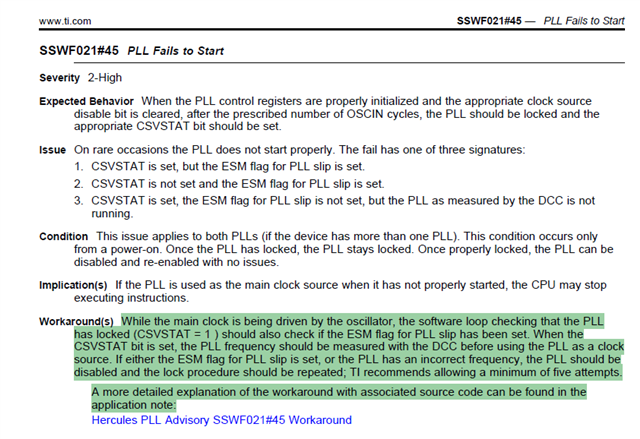
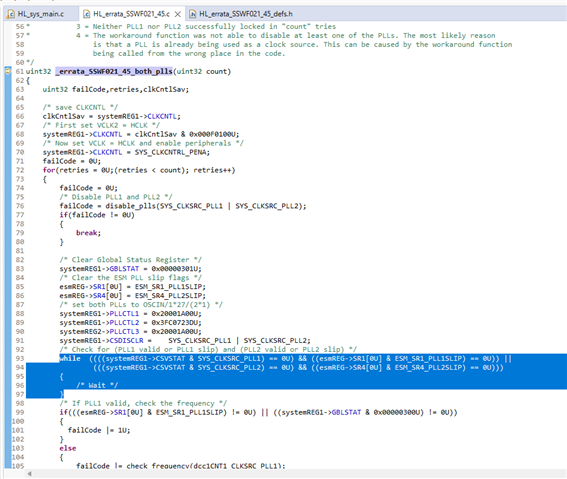
    Your highlighted code applies the PLL erratum workaround:

    I don't think it is an optional code. I think this workaround is required to be in bootloader code.

    --
    Thanks & regards,
    Jagadish.

  • I saw that the serial bootloader on the official website is fully initialized. If I execute _errata_SSWF021_45_both_plls in my bootloader and jump to the application and execute _errata_SSWF021_45_both_plls, will I still end up in an endless loop?

    In fact, I still want to keep the bootloader as compact as possible.

  • If I execute _errata_SSWF021_45_both_plls in my bootloader and jump to the application and execute _errata_SSWF021_45_both_plls, will I still end up in an endless loop?

    Yes, we should not call this API again in application. If we call, then it will end up in an endless loop this highlighted code.

    This is because as you can see this function is usually calling only after immediate power on and before any initializations.

    If we call this function after initializations PLL valid bits will get set and then it will stuck at the previously highlighted code. So, don't call this API in application again.

    --
    Thanks & regards,
    Jagadish.

  • Is there an issue with my approach? The bootloader failed to execute the _errata_SSWF021_45_both_plls function. Subsequently, by writing data to the SYSESR register, the application did not match the POWERON_RESET branch of the switch, thereby preventing the execution of the _errata_SSWF021_45_both_plls function.

  • Hi Shuo,

    There appears to be an issue with the bootloader failing to execute the _errata_SSWF021_45_both_plls function, which is critical for proper system initialization.

    Likely Issues:

    1. SYSESR Register Handling:

      • The bootloader is writing to the System Exception Status Register (SYSESR) before properly checking or handling the POWERON_RESET condition.
      • This is preventing the system from entering the correct branch in the switch statement that would call the errata function.
    2. Errata Implementation:

      • The _errata_SSWF021_45_both_plls function is specifically designed to address the SSWF021#45 silicon errata that affects PLL initialization on TMS570 devices.
      • Without this errata fix, PLL initialization may be unstable.

    Recommended solutions:

    1. Preserve SYSESR Value:

    • Capture the SYSESR register value at the very beginning of your bootloader before any writes to it.
    • Use this preserved value for determining reset type.
      • Ensure Proper Reset Sequence
      • Verify Bootloader Configuration:

      • Ensure your bootloader is properly configured for the TMS570LC4357 device.
      • Check that you're using the correct HALCoGen-generated files for this specific device.

      --
      Thanks & regards,
      Jagadish.