This thread has been locked.

If you have a related question, please click the "Ask a related question" button in the top right corner. The newly created question will be automatically linked to this question.

SYSCONFIG: SYSCONFIG and IAR Embedded Workbench issue

Part Number: SYSCONFIG
Other Parts Discussed in Thread: MSPM0G3105

Hello,

I installed sysconfig_1.26.2. I use it with IAR Embedded Workbench.
When I click on the .syscfg file in IAR, I get the error message below:
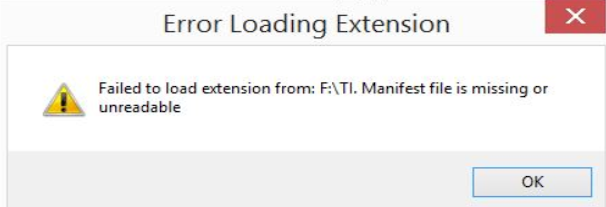
image.png

Starting from version 1.26.x, the problem is present. Before that, it was not.
Version 1.25.0 works correctly.

I checked the sysconfig_1.26.2 directory and the package.json file is missing. 

If I copy the package.json file from the sysconfig_1.25.0 directory into sysconfig_1.26.2 directory, I get the following error message:

image.png

What should I do to resolve this issue?

Laurent

  • Hello Laurent,

    Which device are you working with?

    Thanks

    ki

  • Hello Ki,

    I work with MSPM0G3105 and mspm0_sdk_2_09_00_01.

    Laurent

  • Thank you. I will bring this thread to the attention of the device/SDK experts for further investigation.

  • Hey Laurent,

    We have an MSPM0 SDK with IAR quickstart guide.  It looks like it's up to date with SDC 2.09 and sysconfig 1.26.x.   Please review and follow the steps to see if it can get Sysconfig working for you.  I don't have IAR on my local machine, but if you can't get it working after following this guide I'll try and get a coworker to test it out for me.  

    Thanks,

    JD  

  • Hello JD,

    I followed the MSPM0 SDK with IAR quickstart guide available here: 
    https://dev.ti.com/tirex/explore/node?node=A__AEZVBSxqfwq5OekqjXGMyA__MSPM0-SDK__a3PaaoK__LATEST

    here are my MSPM0_SDK.custom_argvars.

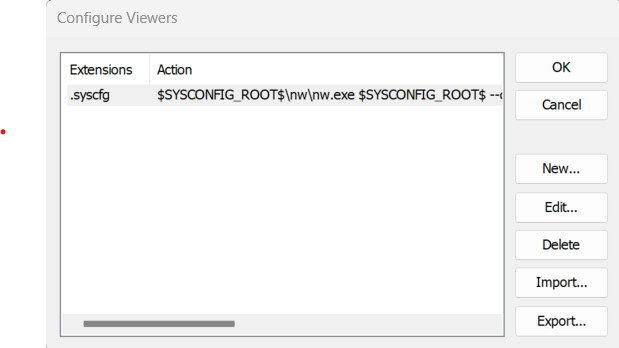
    Here is the configuration for the Viewers

    Detailed here:

    $SYSCONFIG_ROOT$\nw\nw.exe $SYSCONFIG_ROOT$ --compiler iar --product '$MSPM0_SDK_INSTALL_DIR$\.metadata\product.json' --output '$PROJ_DIR$' '$FILE_PATH$'

    And I still have the same problem.

    Best regards,

    Laurent

  • Hello Laurent,

    I just installed a fresh version of IAR, Sysconfig, and the SDK and I'm seeing the same error as you as.  I'll have to submit a ticket to our software team to review this compatibility issue.  It's unclear to me if the compatibility issue is in Sysconfig or our SDK, but I think it may be sysconfig. 

    For now, please revert back to sysconfig v1.25.0 or earlier and the teams will try and get this patched in the next release. 

    Thanks,

    JD    

  • Hello Laurent,

    The software team has confirmed this issue was actually with sysconfig_iar_setup.xml and fixed it.  It will ship in the next SDK releases.

    To fix yours, please replace the sysconfig_iar_setup.xml with the one attached here in your TI/<M0_SDK>/tools/iar.  Then re-import following the steps in Section 5 here: https://dev.ti.com/tirex/explore/node?node=A__AEZVBSxqfwq5OekqjXGMyA__MSPM0-SDK__a3PaaoK__LATEST 


    <?xml version="1.0" encoding="UTF-8"?>
    <viewers>
        <association>
            <extensions>.syscfg</extensions>
            <action>$SYSCONFIG_ROOT$\sysconfig_gui.bat --compiler iar --product '$MSPM0_SDK_INSTALL_DIR$\.metadata\product.json' --output '$PROJ_DIR$' '$FILE_PATH$'</action>
        </association>
    </viewers>

    Thanks,

    JD