


Part Number: AM2634-Q1
LWIP enabled devices can get IP address from DHCP server based on host name. To enable this feature on LWIP stack, certain configuration needs to be done.
- Let us pick the enet_cpsw_tcpserver example to enable this feature.
Path to Example: source/networking/enet/core/examples/lwip/enet_cpsw_tcpserver
- In this example the function App_setupNetif needs to updated to add the host name.
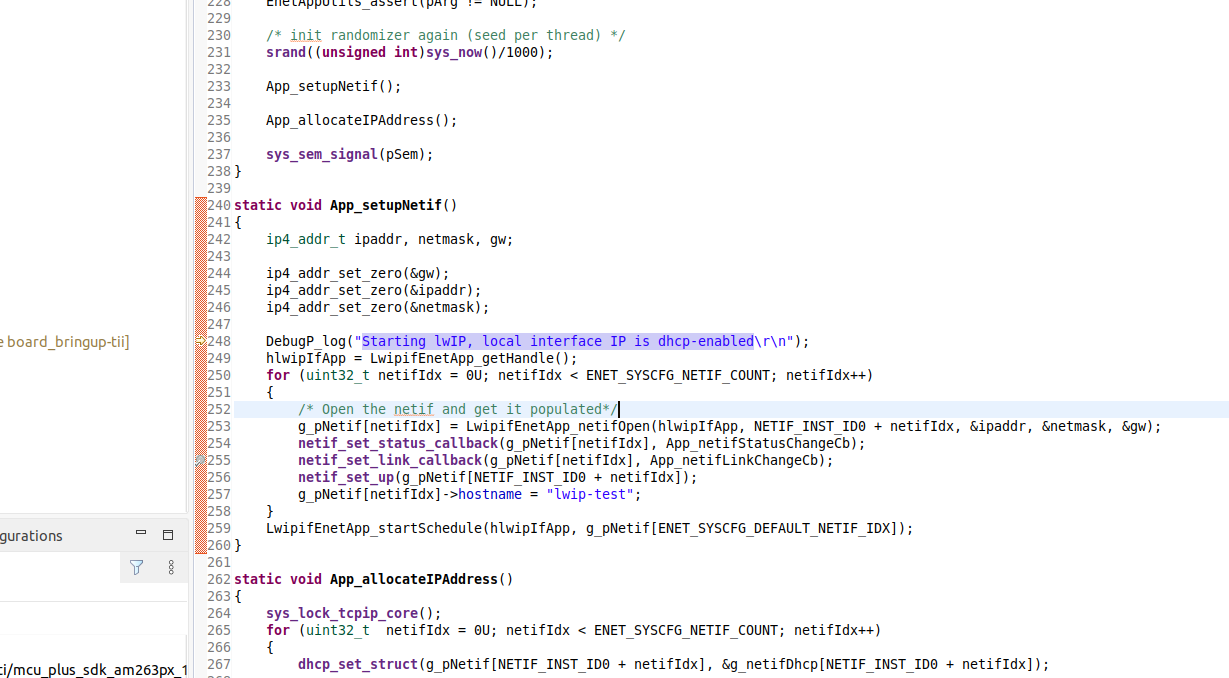
Path to File: source/networking/enet/core/examples/lwip/enet_cpsw_tcpserver/app_main.c
- In the file opt.h set the below mentioned macros/options
#define LWIP_DHCP_DISCOVER_ADD_HOSTNAME 1
#define LWIP_NETIF_HOSTNAME 1
Path to opt.h: source\networking\lwip\lwip-stack\src\include\lwip\opt.h
- After making the changes, rebuild the libs
- Clean Libs: gmake -sj32 -f .\makefile.am263x libs-clean
- Scrub Libs: gmake -sj32 -f .\makefile.am263x libs-scrub
- Build Libs: gmake -sj32 -f .\makefile.am263x libs
- Now build the example and run it. Make sure that the device is connected to a DHCP server. In my case, I am running a DHCP server on my PC.
- On running the application, we can see IP address is obtained.

- We can see the device being allocated IP address based on hostname in the DHCP lease table

- Also if the DORA packets are checked, we can see this hostname being exchanged with the DHCP server among the DHCP packets.