This thread has been locked.

If you have a related question, please click the "Ask a related question" button in the top right corner. The newly created question will be automatically linked to this question.

MSPM0G3507: BSL

Part Number: MSPM0G3507

Hi there,

I am using the MSPM0G3507 to perform a firmware update. MSPM0 Bootloader GUI as the BSL host.

From invoking the BSL to performing a mass erase and programming the data, everything works fine. However, at the end, when selecting "Start Application," it gets stuck. from ack 0x00, it also looks good.
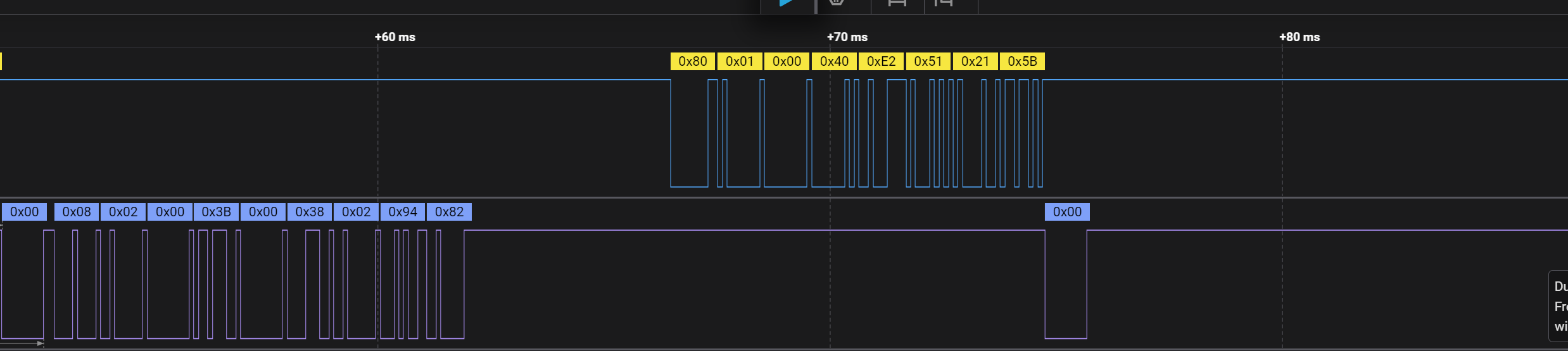
image.png

could you pls give me some advices to debug this problem?

Another question: When I enter BSL mode after invoking it from the application image, the system does not jump to the new firmware. Now I am trying to reset, but it seems I always stay in BSL mode. After powering off and on, why does it not go back to the previous application image that starts at 0x0000_0000? 


best regards
Zq

  • Hey Zq, 

    What happens if you manually reset or power cycle the device?  Does it run then?  

    What do you mean by previous image after a powercycle?  Are you using a BIM to manage multiple images?  

    I was reviewing our MSPM0 BSL User's Guide and your waveform seems to show the correct "Start Application" command and 0x00 is the correct response from the BSL.  Then it should reset the device and start the code stored in the flash.  

    By default, the BSL is going to erase the entire main flash.  It's going to wipe away your "previous version" of the firmware and new firmware must be loaded.  If the BSL fails to load new firmware, then when the device is reset/power cycled, there will not be any code loaded for it to run.   Also, the device will boot into the BSL by defaults if the Flash memory is "empty."  By empty, it really only checks the first 4 addresses of memory starting at 0x00.  

    Hope this helps.

    JD

  • What happens if you manually reset or power cycle the device?  Does it run then?  

    after power cycle the device, it still runs BSL code(located in 0x0000 1000) 

    What do you mean by previous image after a powercycle?  Are you using a BIM to manage multiple images? 

    here previous image means "application code with BSL invoke", so far i am not using a BIM

    By default, the BSL is going to erase the entire main flash.  It's going to wipe away your "previous version" of the firmware and new firmware must be loaded.  If the BSL fails to load new firmware, then when the device is reset/power cycled, there will not be any code loaded for it to run.   Also, the device will boot into the BSL by defaults if the Flash memory is "empty."  By empty, it really only checks the first 4 addresses of memory starting at 0x00.  

    it seems that the new image not correct loaded. 
    but i check the memory, there is something in the first 4 addressed of memory starting at 0x00.

  • Hey ZQ, 

    MSPM0G3507 is a single bank device.  If you are not using the BIM example, then there will only be one image on the device.  If you erase it and fail the BSL, then there is no good image left on the device.  Your best option is to return to BSL mode and trying to update again.  

    I'm guessing that your device isn't really in BSL mode.  The code was corrupted and the MCU ran into the weeds and is just stuck somewhere, and when you re-invoke the BSL it lets you try to update the MCU again.  

    Typically, I recommend programming the first 4 bytes of memory last.  That way if your update fails, the device will think that it is blank and automatically jump back into BSL mode so the BSL host can re-try.  

    Hope this helps.

    JD

  • Hi JD,

    Thank you for your explanation.

    I also need to integrate the BIM code and the secondary BSL code to perform the firmware update. My plan is to place the BIM at the very beginning, followed by the secondary BSL, and then slot 1 and slot 2.

    The idea is:

    • Use the BIM to determine which image is the latest and start the application.

    • Use the secondary BSL only to program images. After programming, the device would reset, and the BIM would decide which image to start.

    Is this approach feasible?
    Are there any particular points I should pay attention to?

    Thanks,
    Zq

  • Hi JD,

    I have another question.

    Before the secondary BSL programs a new image, how does it determine which slot to erase — slot 1 or slot 2? Do I need to implement any corresponding logic (similar to the BIM) to ensure the correct slot is erased before programming?

    Thanks,
    Zq

  • Hello Zq,

    I believe the BIM example uses XIP (execute in place) meaning the image must be build for either the lower or higher slot.  So for updating, the BSL host side would already need to know which slot it's going to erase and overwrite.  You can erase the needed sections via the BSL.  

    If you haven't already, take a look at these documents:  

    BIM user's Guide.  

    BSL User's Guide.

    Thanks,

    JD