This thread has been locked.

If you have a related question, please click the "Ask a related question" button in the top right corner. The newly created question will be automatically linked to this question.

AM6442: Flashing OSPI

Part Number: AM6442
Other Parts Discussed in Thread: UNIFLASH, SK-AM64B

I am trying to follow the steps here to flash the OSPI: https://software-dl.ti.com/mcu-plus-sdk/esd/AM64X/latest/exports/docs/api_guide_am64x/TOOLS_FLASH.html#BASIC_STEPS_TO_FLASH_FILES

I don't get any errors when running uart_uniflash.py with my custom config script (which is the same as default_sbl_ospi.cfg but with the application file pointing to an .appimage.hs_fs generated in CCS using the gpio_led_blink project for R5FSS0-0 running NORTOS). 

image.png

Upon switching to OSPI boot mode and power cycling, the only output I get is the attached, without the gpio blinking, leading me to believe something isn't working correctly. How do I properly load an image into OSPI and boot from it for this board?

Thanks!
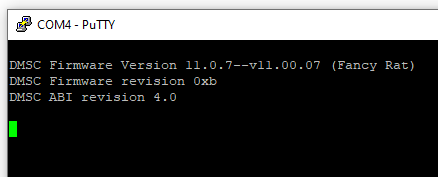
image.png

  • Hi,

    Are you using a custom board or a TI EVM?

    I assume you are using the default SBL OSPI without any changes, please confirm the same.

    As there are no failure logs, I guess it is stuck somewhere in the SBL, could you follow the steps to debug SBL mentioned here:  [FAQ] AM62X/AM64X : [FAQ] Debugging SBL boot in RTOS SDK  and let me know at which point/instruction SBL is stuck at?

    Best Regards,

    Meet.

  • Hi Meet! I am using a TI EVM, the SK-AM64B.

    And yes, I am attempting to use the default SBL OSPI without any changes.

    When running those steps, this is where I get stuck (this points to the opening curly brace for main()):


    Additionally, I do see this:

    The example that you linked is NORTOS though.

    I have also disabled the breakpoint for the call to main(), which I thought would remedy it halting there, but it does not: 

  • When running those steps, this is where I get stuck (this points to the opening curly brace for main()):

    It is expected to stop at the while loop added by you, once it is stuck there, you can change the value of halted from 1 to 0, to further debug SBL OSPI. 

    which is the same as default_sbl_ospi.cfg but with the application file pointing to an .appimage.hs_fs generated in CCS using the gpio_led_blink project for R5FSS0-0 running NORTOS

    Please share the config file with me and make sure that if you modified the flash offset in the .cfg, you also need to change it accordingly in SBL OSPI.

    As you are using default SBL, I don't expect there to be a problem with the SBL, could you share your gpio_led_blink application with me. Meanwhile, you can also use any other default example from the SDK and try to boot it using SBL OSPI to check whether that works or not.

  • When running those steps, this is where I get stuck (this points to the opening curly brace for main()):

    It is expected to stop at the while loop added by you, once it is stuck there, you can change the value of halted from 1 to 0, to further debug SBL OSPI. 

    Currently it doesn't make it to the loop. It just halts at main() before any code within it is executed. It halts here at line 56: 

    This is my config. It should be identical to default_sbl_ospi.cfg except for the two lines referencing the "application image". 

    #-----------------------------------------------------------------------------#
    #                                                                             #
    #      DEFAULT CONFIGURATION FILE TO BE USED WITH THE FLASHWRITER SCRIPT      #
    #                                                                             #
    #-----------------------------------------------------------------------------#
    #
    # By default this config file,
    # - points to pre-built flash writer, bootloader for this EVM
    # - The application image points to relative path of the ipc echo application image for this EVM
    #   - Make sure this application is built before running this script
    # - You can customized this config file to point to your own bootloader and/or application images
    # - You can use --operation=flashverify if you just want to verify the flash contents and not flash the file.
    #

    # First point to sbl_uart_uniflash binary, which function's as a server to flash one or more files
    --flash-writer=sbl_prebuilt/am64x-sk/sbl_uart_uniflash.release.hs_fs.tiimage

    # Now send one or more files to flash or flashverify as needed. The order of sending files does not matter

    # Program the OSPI PHY tuning attack vector
    --operation=flash-phy-tuning-data

    # When sending bootloader make sure to flash at offset 0x0. ROM expects bootloader at offset 0x0
    --file=../../examples/drivers/boot/sbl_ospi/am64x-sk/r5fss0-0_nortos/ti-arm-clang/sbl_ospi.release.hs_fs.tiimage --operation=flash --flash-offset=0x0

    # When sending application image, make sure to flash at offset 0x80000 (default) or to whatever offset your bootloader is configured for
    --file=../../examples/drivers/boot/sbl_ospi/am64x-sk/r5fss0-0_nortos/ti-arm-clang/gpio_led_blink_r5.appimage.hs_fs --operation=flash --flash-offset=0x80000

    # send the XIP image for this application, no need to specify flash offset since flash offset is specified within the image itself
    --file=../../examples/drivers/boot/sbl_ospi/am64x-sk/r5fss0-0_nortos/ti-arm-clang/gpio_led_blink_r5.appimage_xip --operation=flash-xip

    The gpio_led_blink application is identical to the one that was installed by default here: 

    C:\ti\mcu_plus_sdk_am64x_11_00_00_18\examples\drivers\gpio\gpio_led_blink\am64x-sk\r5fss0-0_nortos

    I imported it in CCS with Project Wizard and just changed the name to include _r5 at the end so I knew which core I was testing.

  • Hi Akane,

    The assigned expert is currently out of office, Please expect delayed responses.

    Regards,

    Tushar

  • Hi Akane,

    Can you apply this patch in the SBL OSPI and check if SBL works after this:

    diff --git a/examples/drivers/boot/sbl_ospi/am64x-sk/r5fss0-0_nortos/main.c b/examples/drivers/boot/sbl_ospi/am64x-sk/r5
    fss0-0_nortos/main.c
    index e9db819c..e5a6c88f 100644
    --- a/examples/drivers/boot/sbl_ospi/am64x-sk/r5fss0-0_nortos/main.c
    +++ b/examples/drivers/boot/sbl_ospi/am64x-sk/r5fss0-0_nortos/main.c
    @@ -131,6 +131,7 @@ int main(void)
             Bootloader_BootImageInfo bootImageInfo;
             Bootloader_Params bootParams;
             Bootloader_Handle bootHandle;
    +        Bootloader_Config *bootConfig;
     
             Bootloader_Params_init(&bootParams);
             Bootloader_BootImageInfo_init(&bootImageInfo);
    @@ -140,6 +141,9 @@ int main(void)
             {
                 /* Initialize PRU Cores if applicable */
                 Bootloader_Config *cfg = (Bootloader_Config *)bootHandle;
    +            bootConfig = (Bootloader_Config *)bootHandle;
    +            bootConfig->enableScratchMem = 0;
    +            bootConfig->scratchMemPtr = NULL;
                 if(TRUE == cfg->initICSSCores)
                 {
                     status = Bootloader_socEnableICSSCores(BOOTLOADER_ICSS_CORE_DEFAULT_FREQUENCY);

    You need to apply this patch on the default SBL OSPI, so you can remove any changes you did previously to try to debug the SBL then add this patch.

    Best Regards.

    Meet.

  • Thank you Meet, this solved my issue. Will this patch be published in coming versions for this package?

  • Hi Akane,

    Thanks for confirming this.

    I provided this patch to you just to confirm this issue. The thing is support for secure boot was added in the SDK from version 10.1, for this we use a buffer (usually in DDR) to temporarily load the image there and for decryption and authentication. Code to use this buffer was added for am64x-evm's SBL OSPI example: https://github.com/TexasInstruments/mcupsdk-core/blob/next/examples/drivers/boot/sbl_ospi/am64x-evm/r5fss0-0_nortos/main.c#L151 but this is missing from SBL OSPI for am64x-sk board which leads to this issue.

    I will raise a bug request for this, but it is unlikely that this will be fixed in the next release, for now, you can go ahead with the current patch if you don't plan to use secure boot or else you can also copy the relevant part of code from am64x-evm SBL OSPI and add the support for scratch memory for am64x-sk as well.

    Best Regards,

    Meet.

  • Thanks! Is there a similar patch for multi-partition OSPI bootloader? It is giving me the same problems I encountered with this.

  • The same fix should work for multi-partition as well, you can compare the main.c for am64x-evm and am64x-sk and copy the necessary changes from evm example to sk example.