This thread has been locked.

If you have a related question, please click the "Ask a related question" button in the top right corner. The newly created question will be automatically linked to this question.

UNIFLASH: by using ccs UNIFLASH am allotting MAC to tm4c1294ncpdt

Part Number: UNIFLASH
Other Parts Discussed in Thread: TM4C1294NCPDT,

Hi first time when i read mac address of my tiva tm4c1294ncpdt , i saw ff:ff:ff:ff:ff:ff , so i want to to give mac address to the tiva.But after program valid mac successfully,when i read mac it was showing wrong mac id. I mean what i programmed and what i read was differrent.Guide me what to do next step?

  • Hi Subbu

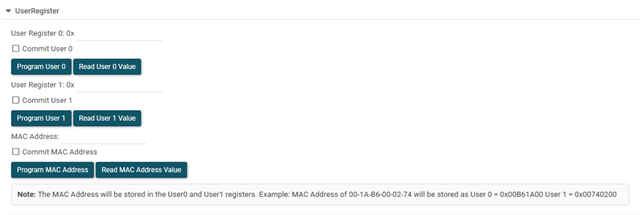
    When using UniFlash to program a MAC address into the TM4C1294NCPDT, you are specifically modifying the User Register 0 (USER_REG0) and User Register 1 (USER_REG1). This is a common requirement for custom boards where the MCU is shipped blank.
    Programming Procedure
    1, Launch UniFlash: Connect your hardware (e.g., XDS110 or XDS200) and select your device.
    2, Access User Registers: Navigate to the Settings & Utilities tab in the UniFlash GUI.
    3, Enter MAC Address: Locate the fields for User Register 0 and User Register 1.
            USER_REG0: Holds the first three bytes of the MAC address.
            USER_REG1: Holds the remaining three bytes.
    4, Commit: Use the Program and Commit MAC address option. 
    5, Verify: Perform a Read MAC address operation within UniFlash to confirm the change was successful

    ...

    Thanks

  • Please refer to UniFlash setting 

  • I tried similar way as you mentioned. But after writing mac am reading 00:00:00:00:00:00.