This thread has been locked.

If you have a related question, please click the "Ask a related question" button in the top right corner. The newly created question will be automatically linked to this question.

MSPM0C1104: issue with PA24 GPIO.

Part Number: MSPM0C1104

Dear Sir,


We are not able to pull high PA24 

We have tried same with PA0 it gets pull up .

want to connect LED at PA24  LED remains slightly on as pin is not getting pullup.


please help!

  • Is this on a launchpad? Do you have anything else on the pin?

  • Hi Seema,

    Since the LaunchPad does not have an LED on PA24, I am assuming you are developing a custom board.

    Can you share the software you've written? Can you share scope captures of the pin?

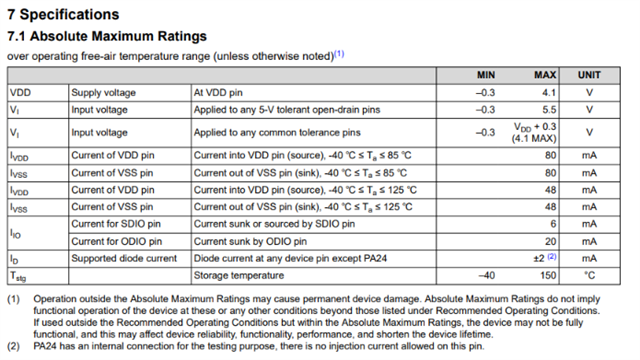
    Please keep in mind, PA24 has an internal connection for testing purposes, thus there is no injection current allowed on this pin.

    If you'd like a schematic review, please share your schematic with your local TSR or FAE.

    Best,

    Owen

  • I take Note (2) of Sec 7.1 in the datasheet (SLASF90C) -- quoted by Owen above -- to mean that PA24 can't sink any current.

    From your reference to a pull-up, I suspect your LED is wired from Vcc ("active low"), which relies on having the GPIO pin sink the current through the LED.

    You may succeed by reversing the LED circuit so that the GPIO pin sources the LED current ("active high").

  • SLASF90C

    Sry! We tried reversing LED ,but P24 is not getting more than1V in high state.LED is not getting sufficient voltage.

    to turn ON.

    Also we tried to check pin output without LED with various settings like pullup ,pull down,standard.

    We found P24   pin is not  getting to 0- 1V only.

  • I think I know what "injection current" is now (it's not sink current), and I believe it's not a concern in this case as long as the high side of your LED circuit is also the MCU Vcc.

    I also tried patching PA24 to the low side of J7 on my Launchpad (active-low LED circuit), and the LED lit properly.

    So we're back to what Owen requested: (a) Software [notably pin configuration] and (b) Schematic.

    [Edit: Minor clarification]

  • Sry! We can not attach image /code on this forum!

  • Hi Seema,

    If possible, please share any images or code with your local technical sales representative or field applications engineer.

    Best,

    Owen

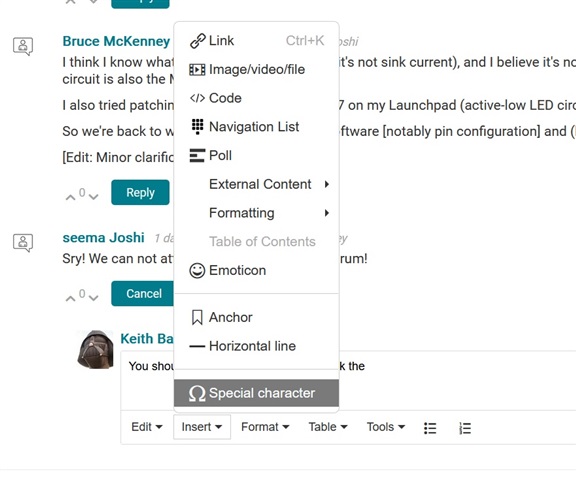
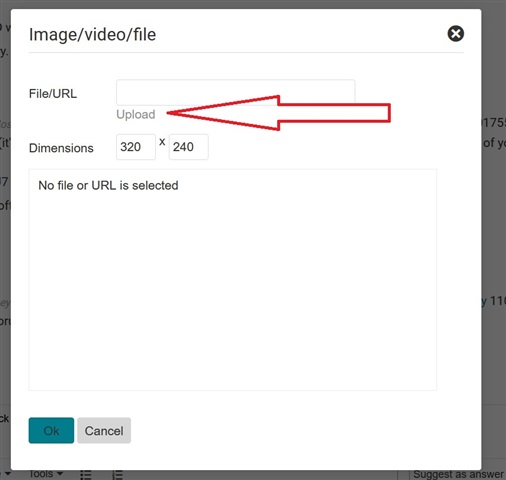
  • You should be able too. In the editor, click the "insert" then "Image/video file"


    Then hit the hard-to-see upload button:

  • Hi Seema,

    The source code appears fine from an initial inspection, as it is a very simple program.

    1. Can you monitor the voltage being supplied to the MCU?
    2. If you disconnect the LED circuitry, is the output of the pin still around 0-1V?
    3. What is the value of the resistor in the circuitry?
    4. What are the characteristics of the LED?
    5. Do you have any other devices you can test (A-B-A swap)?
    6. I would advise not using the configuration on the right of the image you shared, as this can result in unexpected behavior if current is injected on this pin.

    Best,

    Owen

    1. Can you monitor the voltage being supplied to the MCU?   3.3V
    2. If you disconnect the LED circuitry, is the output of the pin still around 0-1V?yes
    3. What is the value of the resistor in the circuitry? 1K
    4. What are the characteristics of the LED? indication LED standard indication LED.
    5. Do you have any other devices you can test (A-B-A swap)? checked other MCU board.
    6. I would advise not using the configuration on the right of the image you shared, as this can result in unexpected behavior if current is injected on this pin.Sure
  • Hi Seema,

    The fact that when you remove the circuitry from PA24 and still see 0-1V is interesting (considering your supply voltage is reading 3.3V). This makes me want to believe that the device is either damaged or there is some other factor dividing this voltage down. If the device is damaged, it could've been from injecting current into PA24.

    Is it possible for you to test a different pin with the same application code you sent above?

    Best,

    Owen

  • Dear Owen,

    We tried the code on the new chip ,its working! Any ways , we found TI MCU vary sensitive to handling & signal inetrference.If any pin blows for MCU ,it shoud always show 0V.but your MCU was showing 1V -0V.many MCU blown during development ,GPIO,I2C.

  • Hi Seema,

    Glad to hear that the issue has been resolved.

    Please keep in mind the absolute maximum ratings per the device-specific datasheet:

    A damaged device may not necessarily output 0V, so the ~1V you were observing is not exactly unexpected for a damaged device.

    Best,

    Owen