MSPM0G3519: Firmware upgrade Procedure

Part Number: MSPM0G3519
Other Parts Discussed in Thread: MSPM0C1104, UNIFLASH

Hello,

I am working on MSPM0G3519 Launchpad. I want to do OTA based firmware upgrade. I have 2 codes. 1st is bootloader code where i changed the flash region in linker.cmd file 

FLASH           (RX)  : origin = 0x00000000, length = 0x00008000.
 
in this bootloader code, I am receiving the .bin file through bluetooth and storing in location starting from 0x00008000. after completion i want to check whether application is valid or not and if valid i want to jump to application.
int is_application_valid(void)
{
    uint32_t stack = *(uint32_t*)APP_VECTOR_ADDRESS;
   // __BKPT(0);
   // if ((stack & 0xFFF00000) == 0x20200000)
    if ((stack & 0x2FFE0000) == 0x20200000){
        jump_flag = 1;
        result = 1;
    }
       
    else{

        result = 2;
    }
    return result;
}

void jump_to_application(void)
{
    uint32_t *vectorTable = (uint32_t *)APP_VECTOR_ADDRESS;

    uint32_t appStack = vectorTable[0];
    uint32_t appReset = vectorTable[1];

    __disable_irq();

    /* Disable all NVIC interrupts */
    for(int i = 0; i < 8; i++)
    {
        NVIC->ICER[i] = 0xFFFFFFFF;   // Disable
        NVIC->ICPR[i] = 0xFFFFFFFF;   // Clear pending
    }

    /* Disable SysTick */
    SysTick->CTRL = 0;

    SCB->VTOR = APP_VECTOR_ADDRESS;
    __set_MSP(appStack);

     void (*appEntry)(void) = (void (*)(void))appReset;
    appEntry();
}
 
In my application code linker.cmd file is as below.
MEMORY
{
    FLASH           (RX)  : origin = 0x00008000, length = 0x00078000
    SRAM_BANK0      (RWX) : origin = 0x20200000, length = 0x00010000
    SRAM_BANK1      (RWX) : origin = 0x20210000, length = 0x00010000
    BCR_CONFIG      (R)   : origin = 0x41C00000, length = 0x000000FF
    BSL_CONFIG      (R)   : origin = 0x41C00100, length = 0x00000080
    DATA            (R)   : origin = 0x41D00000, length = 0x00004000
}

SECTIONS
{
    .intvecs:  {}  > 0x00008000
    .text   : palign(8) {} > FLASH
    .const  : palign(8) {} > FLASH
    .cinit  : palign(8) {} > FLASH
    .pinit  : palign(8) {} > FLASH
    .rodata : palign(8) {} > FLASH
    .ARM.exidx    : palign(8) {} > FLASH
    .init_array   : palign(8) {} > FLASH
    .binit        : palign(8) {} > FLASH
    .TI.ramfunc   : load = FLASH, palign(8), run=SRAM_BANK0, table(BINIT)

    .vtable :   > SRAM_BANK0
    .args   :   > SRAM_BANK0
    .data   :   > SRAM_BANK0
    .bss    :   > SRAM_BANK0
    .sysmem :   > SRAM_BANK0
    .TrimTable :  > SRAM_BANK0
    .stack  :   > SRAM_BANK0 (HIGH)

    .BCRConfig  : {} > BCR_CONFIG
    .BSLConfig  : {} > BSL_CONFIG
    .DataBank   : {} > DATA
}
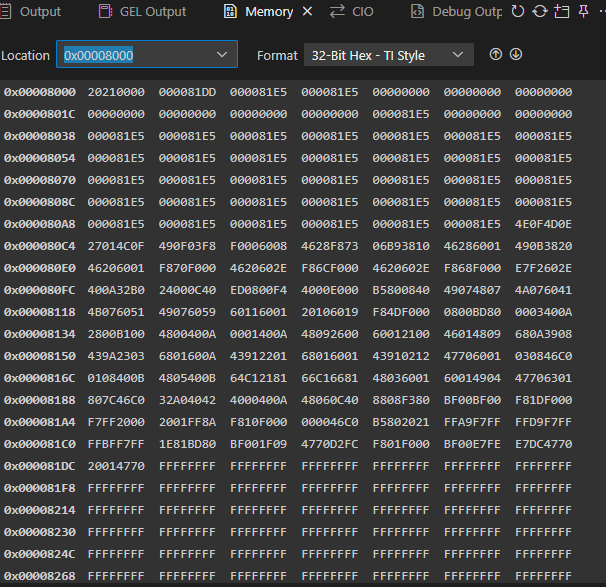
binfile_storing.pngbin_hex_convert.png
 
and in application code main() i have used 
SCB->VTOR = 0x00008000;
I build the project and generated the .bin file. I have attached the screenshots for the .bin file for after converting to hex view and another screenshot showing the memory view where this value has stored.  After storing when I am checking for is_application_valid(), in the if condition, it is entering into some default handler and I am not able to come out of the loop. what is happening I am not understanding. I am sharing the main() function too. 
int main(void)
{
    SYSCFG_DL_init();
    __enable_irq();

    DL_UART_Main_enable(UART_1_INST);
    NVIC_EnableIRQ(UART_1_INST_INT_IRQN);

    delay_ms(3000);

    /*if(is_application_valid())
    {
        __BKPT(0);
        jump_to_application();
    }*/

    // DO NOT ERASE HERE

    while(1)
    {
        delay_ms(1);
        lastReceiveTime++;

        if(lastReceiveTime > 2000)
        {
            if(rxIndex >= 8)
            {
                uint16_t fullBlocks = rxIndex / 8;

                for(int i = 0; i < fullBlocks * 8; i += 8)
                {
                    flash_write_block(&rxBuffer[i]);
                }

                rxIndex = 0;
            }
if(lastReceiveTime > 20000){
            __disable_irq();

            if(is_application_valid())
            {
                __BKPT(0);
                jump_to_application();
            }
}
        }
    }
}
 
I want to know Is this the correct way to do firmware upgrade? or Is there any other way to do this?
I need guidance on this. It's very urgent. I got stuck on it.
 
  • Hi,

    The method looks good from my side.

    •  is_application_valid(): Which code will cause you enter into default_hanlder? Please check if CPU can jump to this code line. And read the stack value to check if it is = 0x20210000
    • Please define the hard_fault and NMI handler in your bootloader code to check which specifically cause MCU enter into default_handler.
    • The main() function you shared is application project or bootloader project? 

    Regards,

    Zoey

  • Hi Zoey,

    I am coming to is_application_valid(), I am getting stack = 0x20210000. So, as per me If condition should true and it should return result =1, but I am not entering into the loop, by keeping break point i checked, after If condition, when I stepped into it is entering into some while loop in default_handler. 

    The main() function I shared is of bootloader.

  • It is so odd. Does every time you call this function, it will enter into default handler? 

  • Yes, can You suggest any other better way? Because I am not able to solve this problem. I am expecting to help me out

  • Hi,

    You can find demo code in ...\ti\mspm0_sdk_2_09_00_01\examples\nortos\LP_MSPM0C1104\bsl\flash_bsl  --- flashBSL_invocation.c

    This is what we always use:
    blInvocationState_t blInvocation_checkBlankDevice(void)
    {
        // Check if Application Reset vector exists
        if ((*((uint32_t *) (MAIN_APP_RESET_VECTOR_ADDR))) == BLANK_VALUE) {
            return BL_INVOCATION_BLANK_DEVICE;
        } else {
            return BL_INVOCATION_FALSE;
        }
    }
  • okay, thanks. I will go through this and will let you know. let the thread open.

  • Hi Zoey, 

    This is not for MSPM0G3519. Can you suggest some better way? Is it possible to store the .bin file in emulated eeprom and at poweron can it able to boot from the eeprom stored value?

  • Hi,

    You can migrate it to M0G3519. 

    .bin file is too large to store as the emulated eeprom. Can you refer to secondary BSL code in our SDK(C1104 demo code I shared will also include blank check and G3519 demo code will have blank check in boot code and only need bootloader project in flash).

    Regards,

    Zoey 

  • okay. There are many bsl codes for G3519. Which one I should check for? please suggest. I am sharing the list of codes over here. Please suggest one. 

    My setup is like, I am using MSPM0G3519 Launch pad and I have connected the JDY-25M Bluetooth Module to the UART1. I am using serial  bluetooth terminal in mobile for transfering .bin/.hex file of the gpio toggle code.

  • Hi, 

    i tried to use bsl_software_invoke_app_demo_uart code, I flashed the code, one blue led starts blinking, i pressed S2, then green led blinked and stopped, now i started flashing gpio_toggle_output code i.e. .hex file . it programmed successfully, as per me now I am expecting the gpio_toggle code to run, but its not running. even after reconnecting the borad also no code is running. Board is getting corrupted. I need to reset the board before programming again.

    please help me on this.

  • Hi,

    You mean you succeed to flash the MCU?? How your confirmed this? Is your bootloader protocol same as our ROM BSL?

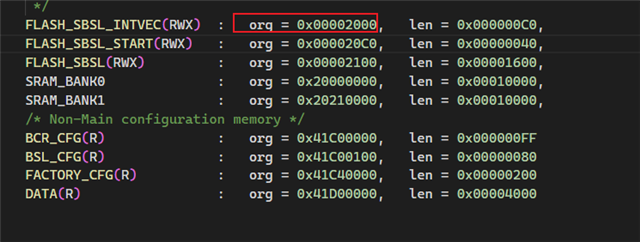
     bsl_software_invoke_app_demo_uart is using our ROM bootloader. If you have your own protocol, please refer to  . And modify the demo code like UART pin, protocol, and so on. I have also attached the BSL user guide for your reference:
    https://www.ti.com/lit/pdf/slau887

    https://www.ti.com/lit/pdf/slaae88


  • in uniflash it's showing program completed successfully. I didnot change any code in my side, simply i am using the launchpad and testing the demo code. That's it. My expectation is the demo code should work. As its TI provided uniflash so it should work correctly. I am not sending any BSL protocol.

  • OK, Please check if you application code start address at 0x0000

  • yes, it is starting at 0x0000. the application code also same demo code provided i.e. gpio_toggle_output. individually when I am running this code, it is working fine.

  • Can you generate the .bin or .txt file and upload to uniflash to have a try? There is some issue for CCS to generate the hex file

  • Thanks a lot Zoey. .bin file is working fine. So, now I want to do in the same way the firmware upgrade but not using uniflash. I have a bluetooth module connected to UART1 of the launchpad. I want to receive the .bin file over bluetooth and want to flash it. How can I achieve this, please give the steps or give me some idea.

  • i have 1 doubt, if you can clear it. 

    Rightnow i can't implement the app in android to get bsl protocol, what I can do is, by removing the bluetooth module i can connect a cable where i can open the docklight and can send the frame formats. or else 2nd method is i should receive the .bin file , store it in emulated eeprom and from there can i send it to bsl by converting it into proper bsl frame formats. just for testing i am using a small size file, so i think it won't be a problem.

    I will be waiting for your response

  • Hi,

    Sorry for the late reply. I am not familiar with your host system. But I would say if you send the .bin file based on our BSL protocol to the MCU, then MSPM0 can be updated successfully. So you can send the .bin file to your host maybe by bluetooth or EEPROM stored directly, than, host send this data array to the MCU.

    And just would like to let you know that we do have host demo code in our SDK: Not sure whether this can help you. 

  • Hi,

    Now I am able to do firmware upgrade. I am sending BSL Packets using docklight. I have 1 doubt. ROM BSL is accepting packets on UART0. Can I change the configuration to any other UART? One more thing, let say while upgrading, there is any disturbance happened, then the board is not working. I want, even if it won't upgrade to new firmware but my old firmware should run. As I am erasing before sending the new firmware, so I don't have anything in the flash , so nothing works. How to deal with this?

  • Hi, 

    Now I am trying to work with secondary bsl. But this code is not flashing on the board. what is this code? and how to test this code. Will this code able to solve the problem I am facing in firmware upgrade? I am getting following error while flashing the code.

    Flash Programmer: Invalid mass erase command
    File Loader: Memory write failed: Flash Programmer: Error, Attempting NONMAIN write without erasing!
    GEL: File: C:\Users\dibyarekha\workspace_ccstheia\secondary_bsl_uart\Debug\secondary_bsl_uart.out: Load failed.