


Part Number: MSPM0G3519
Other Parts Discussed in Thread: MSPM0C1104, UNIFLASH, MSPM0G3518
Hello,
I am working on MSPM0G3519 Launchpad. I want to do OTA based firmware upgrade. I have 2 codes. 1st is bootloader code where i changed the flash region in linker.cmd file
FLASH (RX) : origin = 0x00000000, length = 0x00008000.
in this bootloader code, I am receiving the .bin file through bluetooth and storing in location starting from 0x00008000. after completion i want to check whether application is valid or not and if valid i want to jump to application.
int is_application_valid(void)
{
uint32_t stack = *(uint32_t*)APP_VECTOR_ADDRESS;
// __BKPT(0);
// if ((stack & 0xFFF00000) == 0x20200000)
if ((stack & 0x2FFE0000) == 0x20200000){
jump_flag = 1;
result = 1;
}
else{
result = 2;
}
return result;
}
void jump_to_application(void)
{
uint32_t *vectorTable = (uint32_t *)APP_VECTOR_ADDRESS;
uint32_t appStack = vectorTable[0];
uint32_t appReset = vectorTable[1];
__disable_irq();
/* Disable all NVIC interrupts */
for(int i = 0; i < 8; i++)
{
NVIC->ICER[i] = 0xFFFFFFFF; // Disable
NVIC->ICPR[i] = 0xFFFFFFFF; // Clear pending
}
/* Disable SysTick */
SysTick->CTRL = 0;
SCB->VTOR = APP_VECTOR_ADDRESS;
__set_MSP(appStack);
void (*appEntry)(void) = (void (*)(void))appReset;
appEntry();
}
In my application code linker.cmd file is as below.
MEMORY
{
FLASH (RX) : origin = 0x00008000, length = 0x00078000
SRAM_BANK0 (RWX) : origin = 0x20200000, length = 0x00010000
SRAM_BANK1 (RWX) : origin = 0x20210000, length = 0x00010000
BCR_CONFIG (R) : origin = 0x41C00000, length = 0x000000FF
BSL_CONFIG (R) : origin = 0x41C00100, length = 0x00000080
DATA (R) : origin = 0x41D00000, length = 0x00004000
}
SECTIONS
{
.intvecs: {} > 0x00008000
.text : palign(8) {} > FLASH
.const : palign(8) {} > FLASH
.cinit : palign(8) {} > FLASH
.pinit : palign(8) {} > FLASH
.rodata : palign(8) {} > FLASH
.ARM.exidx : palign(8) {} > FLASH
.init_array : palign(8) {} > FLASH
.binit : palign(8) {} > FLASH
.TI.ramfunc : load = FLASH, palign(8), run=SRAM_BANK0, table(BINIT)
.vtable : > SRAM_BANK0
.args : > SRAM_BANK0
.data : > SRAM_BANK0
.bss : > SRAM_BANK0
.sysmem : > SRAM_BANK0
.TrimTable : > SRAM_BANK0
.stack : > SRAM_BANK0 (HIGH)
.BCRConfig : {} > BCR_CONFIG
.BSLConfig : {} > BSL_CONFIG
.DataBank : {} > DATA
}

and in application code main() i have used
SCB->VTOR = 0x00008000;
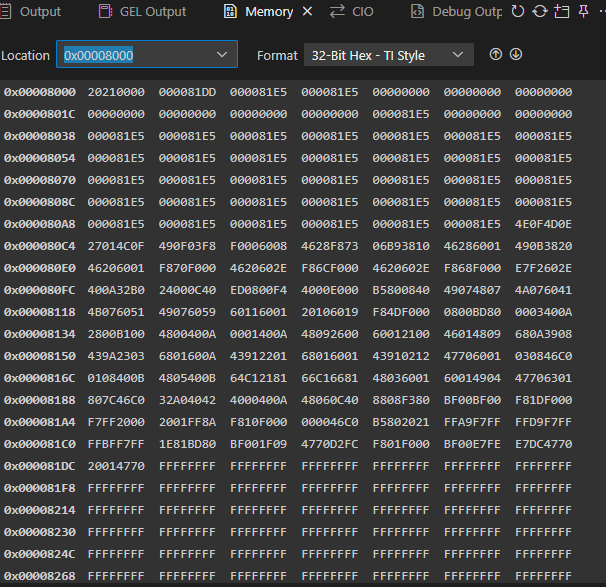
I build the project and generated the .bin file. I have attached the screenshots for the .bin file for after converting to hex view and another screenshot showing the memory view where this value has stored. After storing when I am checking for is_application_valid(), in the if condition, it is entering into some default handler and I am not able to come out of the loop. what is happening I am not understanding. I am sharing the main() function too.
int main(void)
{
SYSCFG_DL_init();
__enable_irq();
DL_UART_Main_enable(UART_1_INST);
NVIC_EnableIRQ(UART_1_INST_INT_IRQN);
delay_ms(3000);
/*if(is_application_valid())
{
__BKPT(0);
jump_to_application();
}*/
// DO NOT ERASE HERE
while(1)
{
delay_ms(1);
lastReceiveTime++;
if(lastReceiveTime > 2000)
{
if(rxIndex >= 8)
{
uint16_t fullBlocks = rxIndex / 8;
for(int i = 0; i < fullBlocks * 8; i += 8)
{
flash_write_block(&rxBuffer[i]);
}
rxIndex = 0;
}
if(lastReceiveTime > 20000){
__disable_irq();
if(is_application_valid())
{
__BKPT(0);
jump_to_application();
}
}
}
}
}
I want to know Is this the correct way to do firmware upgrade? or Is there any other way to do this?
I need guidance on this. It's very urgent. I got stuck on it.
