AM2634: I need support to bring up my custom board , facing issues in uart and ethernet testing

Part Number: AM2634
Other Parts Discussed in Thread: DP83869, SYSCONFIG, DP83869HM

AM263x MCU+ SDK 10.02 – UART Garbage Output and CPSW lwIP Not Responding to Ping (Custom Board with DP83869)

Hi TI Team,

I am working on a custom board based on AM263x using MCU+ SDK 10.02.00.

I am testing the following example:

controller : AM2634COLFHAZCZ
The board uses:
 
  • RGMII interface

  • External PHY: DP83869

  • 25 MHz crystal for PHY

  • PHY address = 0x03

    Observations:

    • UART functional clock configured as 48 MHz

    • Initially SysConfig input clock was incorrectly set to 25 MHz (fixed to 48 MHz)

    • Terminal settings:

      • 115200

      • 8N1

      • No flow control

    Even after correcting the UART clock in SysConfig to 48 MHz, the UART output still shows garbage characters.

    Questions:

    1. What is the correct UART clock source for AM263x in MCU+ SDK 10.02?

    2. Is there any additional clock configuration required outside SysConfig?

    3. Is there a known issue with UART clock configuration in this SDK version?

      Issue 2: Ethernet Link Up but No Ping Response

      Hardware Status:

      • Link LED (DL6) stable ON

      • Activity LED (DL7) blinks during ping

      • PHY auto-negotiation enabled (10/100/1000 advertised)

      • Connected directly to PC for testing

        Behavior:

        When pinging:

        ping 192.168.1.200

        Result:

        Reply from 192.168.1.10: Destination host unreachable.
it would be greatful if we got support for ping test and uart printfs and need example for ethernet perfect bringup

  • Hi,

    Please share your schematics, so we can rule out any PCB level misses. If you cannot share here, reach out to your local sales executive, so it can be shared via them.

    Also please use the latest SDK 11.1 since new bugs get fixed , also if there were any changes from the TI EVM schematics, need to be taken in software by you, hope you have already done it.

  • Hi Nilabh Anand,

    I am currently working on the AM2634COLFHAZCZR custom board with
    DP83869HM PHY bring-up, and I have installed the software packages from
    the link below. 
    https://www.ti.com/tool/download/MCU-PLUS-SDK-AM263X/08.05.00.24
    After opening the Ethernet examples, I want to know which example is the simplest and most suitable for Ethernet bring-up.
    My goal is only basic Ethernet bring-up.
    I tested one of the examples, but it is not working on my custom board.
    C:\ti\mcu_plus_sdk_am263x_08_05_00_24\examples\networking\lwip\enet_lwip_cpsw\am263x-cc\r5fss0-0_freertos
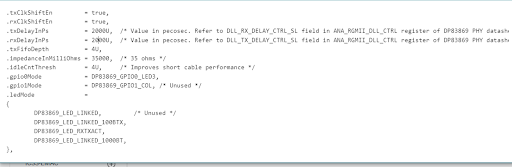
    I need guidance on how to edit the example.syscfg file — specifically how to configure Ethernet and the PHY in the SysConfig file.
    Please provide a step-by-step
    process, including any changes required in the example code and how to
    modify the project according to my custom board and PHY.
    Could you please suggest this?

  • Sure,

    Please refer to this for step by step guide to integrate a custom phy 

    software-dl.ti.com/.../custom_enetphy_guide.html

  • Dear Nilabh Anand
    Request you to please review the schematic and provide guidance for achieving stable Ethernet bring-up and reliable ping operation.

    CUSTOM_BOARD-REV02.pdf

  • Hi team 

    I would like guidance on:

    1. Correct strap resistor configuration validation

    2. RGMII timing and clock verification

    3. PHY address and auto-negotiation configuration

    4. Software configuration alignment with hardware schematic

    5. Debug steps for achieving stable Ethernet ping

    If possible, I would appreciate support through a short Microsoft Teams call where I can walk through:

    • The schematic

    • Strap resistor configuration

    • PHY connections

    • Software configuration

    This would greatly help in resolving the bring-up issues efficiently.