This thread has been locked.

If you have a related question, please click the "Ask a related question" button in the top right corner. The newly created question will be automatically linked to this question.

MSPM0G3519-Q1: Issue with connecting the board using XDS110 after CSC enable

Part Number: MSPM0G3519-Q1
Other Parts Discussed in Thread: UNIFLASH, SYSCONFIG

Hello TI,

I encountered an issue while enabling Customer Security Configuration (CSC) on my ECU. After doing the following:

- Enabling CSC via BOOTCFG5

- Then initiating an INITDONE using "DL_SYSCTL_issueINITDONE"

- A SYSRST occurred successfully and INIT done is set to one

After the next hardware reset, I am unable to establish a connection with the ECU. The debugger indicates that the ECU is in a low power mode and refuses to establish any connection.

This is the function body i use after enabling the CSC

I have attempted the following steps to regain debugging access, without success:

  1. Unplugged the LaunchPad.
  2. Pressed and held the S1 (BSL) button.
  3. Plugged in the USB cable while holding S1.
  4. Released S1 after 2 seconds.

Additionally, I have attempted a mass erase and factory reset using both UniFlash , BSL and CCS tools; however, no connection could be established.

Note that i configured the CSC vectortable at 0x000 and the its reset handler at 0x0004 as mentioned in the documents

Could you please provide guidance on how to resolve this issue and re-establish a debugging connection with the ECU?

This is the exact error when trying to connect using IAR
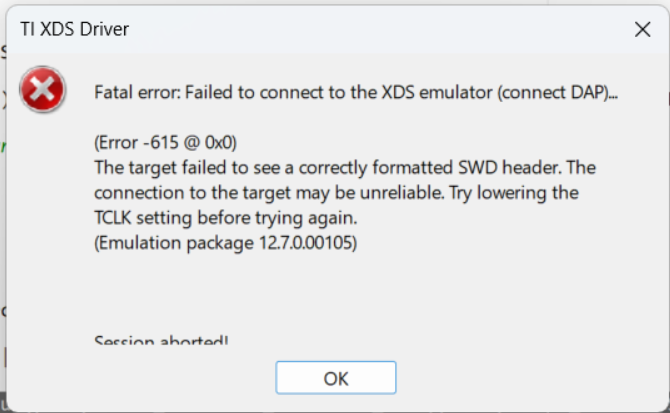
image.png

 kindly find the log files from uniflash factory reset operation here

  • Hi Ghada,
    Something may have gone wrong during CSC setup. Here's what I want to confirm with you regarding resetting your device to Factory Reset. Please follow the next steps to do so (if this fails, it means the device is bricked due to most likely a misconfiguration of NON-MAIN):

    1. Disconnect the LaunchPad from power
    2. Open a Uniflash session for the device (Check both device and debugger, or select the launchpad image)
    3. Press and hold the NRST button (S3).
    4. Connect the LaunchPad to power while continuing to hold the NRST button
    5. Click on the "Setting & Utilities" tab and click on/Issue a manual Factory Reset DSSM command
    6. Release the NRST button when the console prompts you to press the NRST button

    As for the CSC issue, the implementation is incorrect; some components may not have been configured correctly (NONMAIN in particular). I recommend following the example in the MSPM0 SDK and double-checking the implementation we provide for further clarity, since it should be working as intended. Link to the example


    Best Regards,
    Diego Abad

  • Hello Diego,

    I tried the sequence you mentioned and i got this error from CCS:

    And for the CSC Enabling in non main here is the sequence i followed:

    1. Read the non main area

    2. Updated BCR with CSCEXIST [bcr.CSCexist = BCR_CFG_CSC_EXISTS_EN]

    3. Calculated CRC on update BCR

    4. Then Write the non main by unprotecting , erasing then write the sector

    So can you help why the setup is in correct?

    And for the mentioned code snippet:

    This is only snippet of the example to check the INITDONE behavior setting and clearing and shall be updated with the rest of the sequence later so can you also clarify why this may lock the ECU?

    Thank you,

  • Hi Ghada,
    Can you try to perform a factory reset via UNIFLASH rather than CCS? I think UNIFLASH works better for factory resets. If it still gives you an issue, then yes, it is bricked. 


    As for the CSC Enabling, the example in the SDK should calculate the CRC for you in the SYSCONFIG file. We normally don't recommend calculating the CRC on the side since some errors can occur (either calculation errors or sectors that were not accounted for in the calculated CRC).) Also, I'm assuming you mean unprotecting, easing, and writing the sectors in NONMAIN in the XDS110 debug/flash options. We recommend only erasing and writing the necessary sections in NON-MAIN memory rather than the whole NON-MAIN. 


    The specific code snippet may/may not the root cause of the code being locked. However, I think it's worth going over the example in the SKD for further clarification on what needs to be done in regards of NONMAIN Configuration and file setup. Thus, my recommendation to use it as a reference and match whatever differences you may have.

    Best Regards,

    Diego Abad

  • Hello Diego,

    I tried with uniflash tools and same error persists, its okay for the ship to be bricked i just want to confirm the root cause as not to brick another one.

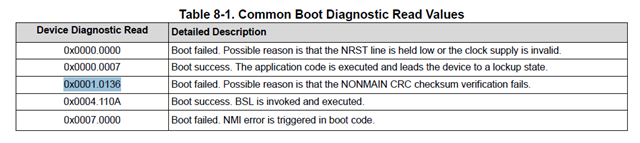
    Regrading the non main point sure I'll consider your recommendation regarding the way i shall set it with but MSPM0 NONMAIN Flash Memory Configuration Guide mentions that if the non main is configured with the wrong CRC it shall connect normally to the DAP and i shall then be able to read the boot diagnostics with error code "0x0001.0136" indicating the CRC checksum of the non main failed

    My issue is that the DAP refuses to even connect as follows:

    So i just want to make sure of the root cause of the issue that bricked the ECU as not to make the same mistake again.

    So please give you feedback regarding the root cause.

    Thank you

  • HI Diego,

    I also want to highlight a point that may have locked the ECU:

    Register BOOTCFG4 register 

    According to this register if the DEBUG hold is enabled with the CSC it shall hold the debug access until CSC execution finishes and my code snippet always remain in CSC code, so is there a possibility that something enabled this DEBUGHOLD which locked debugging for the ECU? and if so what could possibly enabled this without explicitly setting the register?

    Thank you,

  • Hi Ghada,
    As it is right now, the root cause that I can pinpoint is a misconfiguration of NONMAIN. I'm not sure where or how it is happening, though maybe after erasing the whole NONMAIN, those register values weren't set up as they should, which resulted in the device being locked. If the device can't communicate with the debugger, it could be for multiple reasons, like BOOTCFG0 not being configured properly, and SWD is disabled, or what you mentioned in BOOTCFG4. I would recommend carefully inspecting which specific values are being written to NON-MAIN to avoid any specific issues with it.


    I'm not 100% sure what could have changed the register value in your project. My recommendation is to review the NONMAIN configuration section in your project and identify any abnormal settings or discrepancies. I think comparing the example we provided should provide a good guidance on how to setup NONMAIN (Specifically, the NONMAIN Configuration in SYSCFG generated .h and .c files).


    Best Regards,
    Diego Abad