This thread has been locked.

If you have a related question, please click the "Ask a related question" button in the top right corner. The newly created question will be automatically linked to this question.

AM263X-MCAL-SDK: Debugging the MMC/SD IO

Part Number: AM263X-MCAL-SDK
Other Parts Discussed in Thread: AM2634

Hi,
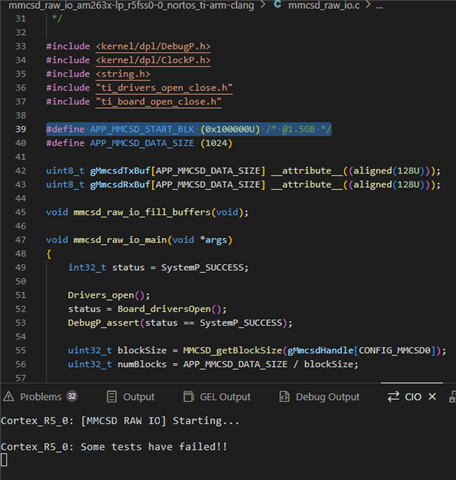
I tried to execute the program "mmcsd_raw_io_am263x-lp_r5fss0-0_nortos_ti-arm-clang", on AM2634 sitara launchpad. First I got error showing some tests have failed but after commenting out the memcmp function it showed all the tests passed and I am able to see that both read and write functions are executed. How will I verify if the data is actually written into the sd card, I trid using HXD software to check the data but I am not able to navigate to correct memory location. Please help me regarding this.

Thanks & regards
JIBIN PK

  • Hi Jibin,

    Can you please share the MCU+ SDK version being used?

    Regards,
    Shaunak

  • Hi Shaunak,

    Thank you for the reply I am using AM2634 MCU+SDK 11.01.00

    Regards,
    JIBIN

  • Hi Jibin,

    I tried to run the same example on the launchpad, i see the example passing:

    The SD Card ive used is a sandisk 16GB microSD card.

    Can you verify if anything is actually written to the card after the write function? I suspect there is some issue, since the read and write should both pass and not get stuck in the memcmp function. 

    Looking at mmcsd_raw_io.c:39-101, the program:

    1. Writes to Block: 0x300000 (3,145,728 in decimal) - this is at 1.5GB location
    2. Data Size: 1024 bytes (1 KB)
    3. Data Pattern: A repeating sequence from 0x00 to 0xFF (line 101):
    00 01 02 03 04 ... FD FE FF 00 01 02 03 ... (repeats 4 times)

    How to Verify Data Using HXD:

    1. Remove SD card from the launchpad and insert it into your PC using a card reader
    2. Open as Physical Disk in HXD:
    - File → Open Disk → Select your SD card physical drive (e.g., \\.\PhysicalDrive2)
    - Don't open the partition, open the entire physical disk
    3. Navigate to the Correct Location:
    - Press Ctrl+G (Go to)
    - Calculate byte offset: 0x300000 blocks × 512 bytes/block = 0x60000000 bytes (1.536 GB)
    - Enter: 60000000 (hex) or 1610612736 (decimal)
    - Click OK
    4. Expected Data Pattern:
    You should see exactly 1024 bytes with this pattern:
    00 01 02 03 04 05 06 07 08 09 0A 0B 0C 0D 0E 0F
    10 11 12 13 14 15 16 17 18 19 1A 1B 1C 1D 1E 1F
    ...
    F0 F1 F2 F3 F4 F5 F6 F7 F8 F9 FA FB FC FD FE FF
    00 01 02 03 04 05 ... (pattern repeats 4 times total)

    Regards,
    Shaunak

  • Hi Shaunak,

    So I found out some data were already written in those location which is not going away when formating the SD card so I tried to write into another location which is empty. I made a small change in the code instead of 0x300000, I used 0x100000 so the corresponding byte location will be 0x100000 x 512 = 20000000 bytes. After executing the program the issue is persisting but I am able to verify that write and read functions are executing and some data has been written in the sd card I am observing continuous pattern of 0xFF 0xFF 0xFF... throughout except for some random values in between the memory location. I am attaching the sceenshots of the HXD software and the CCS. The data is not exactly written in the given location it is going beyond the values, that is also an observation. And the memcmp is failing which is expected after seeing the data which is written in the sd card in HxD software.

    Regards

    JIBIN PK


  • Hi Jibin,

    1. Can you please make sure the SD card supports writing data to the specific location? Some SD cards have some addresses that are blocked.

    2. If 1 is not the issue, Can you try adding cache coherency handling?

      void mmcsd_raw_io_main(void *args)
      {
          // ... existing code ...
    
          mmcsd_raw_io_fill_buffers();
    
          // FLUSH cache before write
          CacheP_wb((void*)gMmcsdTxBuf, APP_MMCSD_DATA_SIZE, CacheP_TYPE_ALL);
    
          status = MMCSD_write(gMmcsdHandle[CONFIG_MMCSD0], gMmcsdTxBuf,
                               APP_MMCSD_START_BLK, numBlocks);
    
          // INVALIDATE cache before read
          CacheP_inv((void*)gMmcsdRxBuf, APP_MMCSD_DATA_SIZE, CacheP_TYPE_ALL);
    
          status = MMCSD_read(gMmcsdHandle[CONFIG_MMCSD0], gMmcsdRxBuf,
                              APP_MMCSD_START_BLK, numBlocks);
    
          // Compare
          status = memcmp(gMmcsdRxBuf, gMmcsdTxBuf, APP_MMCSD_DATA_SIZE);
      }

    3. Can you please get a dump of what is is read back?

    4. Incase you have another SD card, can you try that as well?

    As mentioned, i see the same example work on my end with the same SDK version and launchpad.

    Regards,
    Shaunak