AM2754-Q1: ETH Test case Information

Part Number: AM2754-Q1
Other Parts Discussed in Thread: DP83867-EVM-AM

Hello Team,

Currently we are checking ETH communication with AM275x Mcal_11_02_00_03 Version on the EVM board, need below information

  1. Integration steps for the AUTOSAR stack, related to DMA 
  2. Additional setup needed for testing the example

We have the EVM add on DP83867-EVM-AM

All the examples are waiting for the HOST transmission

Please provide the above info

Regards

Priyadarshini U

  • Hi,

    We currently support ethernet driver examples in am275x for MCAL according to my understanding. Can you please mention the exact logs that you are seeing and the example that you are using to test? I will run the tests in our test bench again to check for compatibility.

    Thanks and regards,
    Teja.

  • Hi,

    We currently support ethernet driver examples in am275x for MCAL according to my understanding. Can you please mention the exact logs that you are seeing and the example that you are using to test? I will run the tests in our test bench again to check for compatibility.

    Thanks and regards,
    Teja.

  • Hello,

    We are currently testing the eth_test_app example, and the example expects the eth packets from the host
    and when sent from packets from the host using colasoft packet builder (sending ARP and IPv4 packet to the relevant mac address), the example is still not receiving the host packets 

    please find the setting for packet building and log

    MAIN_Cortex_R5_0_0: ---
    
    MAIN_Cortex_R5_0_0: Eth Application build date/time: Mar 16 2026, 12:03:59
    
    MAIN_Cortex_R5_0_0: Eth Application Starts
    
    MAIN_Cortex_R5_0_0: TrcvIdx 0: EthTrcv mode: ACTIVE
    
    MAIN_Cortex_R5_0_0: TrcvIdx 0: EthTrcv link state: Down
    
    MAIN_Cortex_R5_0_0: TrcvIdx 0: EthTrcv link state: Down
    
    MAIN_Cortex_R5_0_0: TrcvIdx 0: EthTrcv link state: Down
    
    MAIN_Cortex_R5_0_0: TrcvIdx 0: EthTrcv link state: Down
    
    MAIN_Cortex_R5_0_0: TrcvIdx 0: EthTrcv link state: Down
    
    MAIN_Cortex_R5_0_0: TrcvIdx 0: EthTrcv link state: Down
    
    MAIN_Cortex_R5_0_0: TrcvIdx 0: EthTrcv link state: Down
    
    MAIN_Cortex_R5_0_0: TrcvIdx 0: EthTrcv link state: Down
    
    MAIN_Cortex_R5_0_0: TrcvIdx 0: EthTrcv link state: Down
    
    MAIN_Cortex_R5_0_0: TrcvIdx 0: EthTrcv link state: Down
    
    MAIN_Cortex_R5_0_0: TrcvIdx 0: EthTrcv link state: Down
    
    MAIN_Cortex_R5_0_0: TrcvIdx 0: EthTrcv link state: Down
    
    MAIN_Cortex_R5_0_0: TrcvIdx 0: EthTrcv link state: Down
    
    MAIN_Cortex_R5_0_0: TrcvIdx 0: EthTrcv link state: Down
    
    MAIN_Cortex_R5_0_0: TrcvIdx 0: EthTrcv link state: Down
    
    MAIN_Cortex_R5_0_0: TrcvIdx 0: EthTrcv link state: Down
    
    MAIN_Cortex_R5_0_0: TrcvIdx 0: EthTrcv link state: Down
    
    MAIN_Cortex_R5_0_0: TrcvIdx 0: EthTrcv link state: Down
    
    MAIN_Cortex_R5_0_0: TrcvIdx 0: EthTrcv link state: Down
    
    MAIN_Cortex_R5_0_0: TrcvIdx 0: EthTrcv link state: Down
    
    MAIN_Cortex_R5_0_0: TrcvIdx 0: EthTrcv link state: Up
    
    MAIN_Cortex_R5_0_0: TrcvIdx 0: EthTrcv baud rate: 1000Mbps
    
    MAIN_Cortex_R5_0_0: TrcvIdx 0: EthTrcv duplexity: Full
    
    MAIN_Cortex_R5_0_0: EthApp_TrcvModeIndication: Active
    
    MAIN_Cortex_R5_0_0: MAC Port 1 Address: 44:6b:1f:32:aa:3e
    
    MAIN_Cortex_R5_0_0: Waiting for Host..
    
    MAIN_Cortex_R5_0_0: No Response from Host, remaining retry = 100
    
    MAIN_Cortex_R5_0_0: No Response from Host, remaining retry = 90
    
    MAIN_Cortex_R5_0_0: No Response from Host, remaining retry = 80
    
    MAIN_Cortex_R5_0_0: No Response from Host, remaining retry = 70
    
    MAIN_Cortex_R5_0_0: No Response from Host, remaining retry = 60
    
    MAIN_Cortex_R5_0_0: No Response from Host, remaining retry = 50
    
    MAIN_Cortex_R5_0_0: No Response from Host, remaining retry = 40
    
    MAIN_Cortex_R5_0_0: No Response from Host, remaining retry = 30
    
    MAIN_Cortex_R5_0_0: No Response from Host, remaining retry = 20
    
    MAIN_Cortex_R5_0_0: No Response from Host, remaining retry = 10
    
    MAIN_Cortex_R5_0_0: ERROR: NO Host App detected after 100 retries!
    
    MAIN_Cortex_R5_0_0: 
    
    MAIN_Cortex_R5_0_0: ----------------------------
    
    MAIN_Cortex_R5_0_0: Controller 0 Counters
    
    MAIN_Cortex_R5_0_0: ----------------------------
    
    MAIN_Cortex_R5_0_0: Buffer overruns   : 0
    
    MAIN_Cortex_R5_0_0: CRC errors        : 0
    
    MAIN_Cortex_R5_0_0: Undersize packets : 0
    
    MAIN_Cortex_R5_0_0: Oversized packets : 0
    
    MAIN_Cortex_R5_0_0: Alignment errors  : 0
    
    MAIN_Cortex_R5_0_0: SQE errors        : -1
    
    MAIN_Cortex_R5_0_0: Discarded inbound : -1
    
    MAIN_Cortex_R5_0_0: Erroneous inbound : 0
    
    MAIN_Cortex_R5_0_0: Discarded outbound: -1
    
    MAIN_Cortex_R5_0_0: Erroneous outbound: 0
    
    MAIN_Cortex_R5_0_0: Single collision  : 0
    
    MAIN_Cortex_R5_0_0: Multiple collision: 0
    
    MAIN_Cortex_R5_0_0: Deferred transm   : 0
    
    MAIN_Cortex_R5_0_0: Late collisions   : 0
    
    MAIN_Cortex_R5_0_0: Excessive colls   : 0
    
    MAIN_Cortex_R5_0_0: Carrier loss      : 0
    
    MAIN_Cortex_R5_0_0: ----------------------------
    
    MAIN_Cortex_R5_0_0: Controller 0 Rx Statistics
    
    MAIN_Cortex_R5_0_0: ----------------------------
    
    MAIN_Cortex_R5_0_0: Rx Drop Events       : 314
    
    MAIN_Cortex_R5_0_0: Rx Octets            : 32885
    
    MAIN_Cortex_R5_0_0: Rx Packets           : 351
    
    MAIN_Cortex_R5_0_0: Rx Bcast Packets     : 83
    
    MAIN_Cortex_R5_0_0: Rx Mcast Packets     : 157
    
    MAIN_Cortex_R5_0_0: Rx CRC/Align Errors  : 0
    
    MAIN_Cortex_R5_0_0: Rx Undersized Packets: 0
    
    MAIN_Cortex_R5_0_0: Rx Oversized Packets : 0
    
    MAIN_Cortex_R5_0_0: Rx Fragments         : 0
    
    MAIN_Cortex_R5_0_0: Rx Jabbers           : 0
    
    MAIN_Cortex_R5_0_0: Rx Collisions        : -1
    
    MAIN_Cortex_R5_0_0: Rx 64 bytes or less Packets   : -1
    
    MAIN_Cortex_R5_0_0: Rx 65 to 127 bytes Packets    : -1
    
    MAIN_Cortex_R5_0_0: Rx 128 to 255 bytes Packets   : -1
    
    MAIN_Cortex_R5_0_0: Rx 256 to 511 bytes Packets   : -1
    
    MAIN_Cortex_R5_0_0: Rx 512 to 1023 bytes Packets  : -1
    
    MAIN_Cortex_R5_0_0: Rx 1024 to 1518 bytes Packets : -1
    
    MAIN_Cortex_R5_0_0: Rx Unicast Packets            : 111
    
    MAIN_Cortex_R5_0_0: ----------------------------
    
    MAIN_Cortex_R5_0_0: Controller 0 Tx Statistics 
    
    MAIN_Cortex_R5_0_0: ----------------------------
    
    MAIN_Cortex_R5_0_0: Tx Num octets          : 6400
    
    MAIN_Cortex_R5_0_0: Tx No Unicast Packets  : 100
    
    MAIN_Cortex_R5_0_0: Tx Unicast Packets     : 0
    
    MAIN_Cortex_R5_0_0: --------------------------------
    
    MAIN_Cortex_R5_0_0: Controller 0 Tx Error Counters 
    
    MAIN_Cortex_R5_0_0: --------------------------------
    
    MAIN_Cortex_R5_0_0: Tx Deferred transm      : 0
    
    MAIN_Cortex_R5_0_0: Tx Single collisions    : 0
    
    MAIN_Cortex_R5_0_0: Tx Multiple collisions  : 0
    
    MAIN_Cortex_R5_0_0: Tx Late collisions      : 0
    
    MAIN_Cortex_R5_0_0: Tx Excessive collisions : 0
    
    MAIN_Cortex_R5_0_0: ETH Stack Usage: 1020 bytes
    
    MAIN_Cortex_R5_0_0: Final Tests Results: FAIL
    
    MAIN_Cortex_R5_0_0: Eth Application Completed
    

    Regards

    Priyadarshini U

  • Hi Priyadarshini,

    To run the application tests, please use the host side test app provided in the corresponding example folder to run the application in the host side (Linux PC). In your case, it should be in the same folder, eth_test_app, in the path: eth_test_app/host.

    In the above location, please run the cmd in the terminal to build the host application: make

    Once the application is built, use the following cmd to start and run the host side test application: sudo ./EthHostTestApp -i <interface>

    1. Please use the interface name which is connected to the DUT (AM275x) to send the packets to correct interface. 
    2. Please start the host application before starting the application on the DUT

    For each application for ethernet examples, there exists an individual test application. Only the corresponding host example to the application being run on the DUT must be used on the host side.

    Please let us know if you need additional information.

    Thanks and regards,
    Teja.

  • Hello, 

    There is an error observed while building the host

    Please let us know how to resolve this, these files are present in the SDK and valid path is given still build error is observed

    Thanks, and Regards

    Priyadarshini U

  • Hi,

    Can you please compile this in linux environment or in wsl? The application is made with linux packages in their dependencies.

    We have tested this to be functional in linux environment, without errors.

    Regards,
    Teja.

  • Hello,

    Is there any other way we and execute this example,

    Is the host side file being built to extract the Transmit info from the signals sent from host side,

    Please provide the significance of the host side build and its dependency on the TX lines 

    Regards

    Priyadarshini U

  • Hi,

    Is there any other way we and execute this example

    wsl and linux are the go to options for this build. We do not actively test this with other build environments.

    Is the host side file being built to extract the Transmit info from the signals sent from host side

    I could not understand your intent here. Can you be more specific? What do you mean by 'Transmit Info' and the signals you are referring to?

    Please provide the significance of the host side build and its dependency on the TX lines 

    This application makes a handshake with am275x, and send specific types of ethernet streams to test the expected behavior from the application running in AM275x. I am not able to follow what you meant by Tx lines. Are you referring to the signals observed on the Ethernet cable itself?

    Thanks and regards,
    Teja.

  • Hello,

    As per the MCAL user guide if loopback is enabled that would still require the HOST side build or this is not applicable for AM275x

    Currently when loopback is enabled in AM275x only EthApp_RxIndication is getting hit but the data is not as expected, hence is it still waiting for host

    This application makes a handshake with am275x, and send specific types of ethernet streams to test the expected behavior from the application running in AM275x

    I understand this, is there a way we can send the ethernet steams from other tool instead of depending on the host side build.

    If the expected streams are defined anywhere, please help us with the info.

    Thanks, and Regards

    Priyadarshini U

  • Hi,

    Did you enable loopback mode in the testing? If the loopback mode is enabled, we don't need host application, and can run an internal test to check for data integrity. 

    Please let me check if the loopback test results with AM275x boards on your SDK version. But if you are not setting the application to loopback, then host application is needed. There is no other alternative currently available without changing the application flow. 

    Can you please try running the host app in wsl environment or using a linux host? Can you provide some details regarding the questions posted in my previous reply? These will help in understanding the issue further.

    Thanks and regards,
    Teja.

  • Hello,

    Apologies for the delayed response,

    We were unable to run the host application in the wsl instead used a python script to send the necessary signal needed from the host,

    Can you provide some details regarding the questions posted in my previous reply? These will help in understanding the issue further.

    The host side is the one that send the necessary signal to the application, as the example requires different frames with different ethetype and also the data, hence this host side controls the RX lines of the transceiver. This is clarified.

    According to the MCAL user guide only the dma, clock and pinmux are the things to be taken care by the application to enable the Eth, Ethtrcv modules
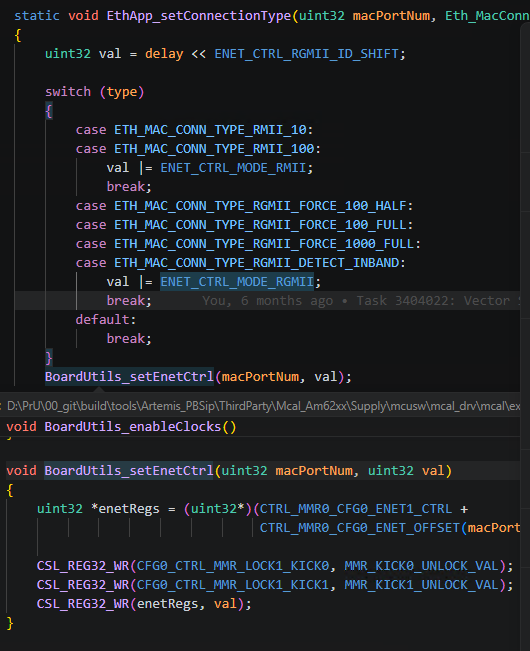
    But from the example this code is necessary for tx or rx 
    Could you please explain the significance of this code, and it has to manually added before the Initialization of Eth??


    Or this can be taken care by any configuration??

    Please provide the info on the same 

    Thanks, and Regards

    Priyadarshini U

  • Hi Priyadarshini,

    We were unable to run the host application in the wsl

    We will internally check if this is causing any issues to run the application from our end. But the test cases would expect specific patterns of traffic. In case the application is not responding correctly, we cannot support testing with custom script while the application is already available.

    According to the MCAL user guide only the dma, clock and pinmux are the things to be taken care by the application to enable the Eth, Ethtrcv modules

    Can you please point to the documentation you are reffering to? The application would need these configurations, but there would be more modules which needs to be configured from the application side like the PHY-to-MAC interface, etc. The application would be setup to handle both Tx and Rx packets. 

    The mentioned code snippet configures the MII layer between MAC and PHY to exchange information between the Eth Tranceiver and the CPSW module. 

    this can be taken care by any configuration?

    Are you asking where and how to configure this in your application? In the examples provided by TI MCAL package, these configuration settings are already handled for the TI EVMs and no additional configuration is required.

    Thanks and regards,
    Teja.

  • Hello,

    Can you please point to the documentation you are reffering to?


    Are you asking where and how to configure this in your application? In the examples provided by TI MCAL package, these configuration settings are already handled for the TI EVMs and no additional configuration is required.

    We have currently initialized this before the Eth_Init and Trcv Init 
    please let us know this is sufficient 

    Note: We are using the autosar stack for our application 


    Please let us know this information 

    Thanks

    Priyadarshini U 

  • Hi Priyadarshini,

    I will check internally with our team to check on the requirements to enable the application. Please give me a day to respond back.

    Thanks and regards,
    Teja.

  • Priyadarshini,

    Please note that Teja is still working this with the development team. I received this update from overnight.  

     John 

  • Hi Priyadarshini,

    The host and target app are tied closely, it basically works on cmd response model. So, it's better to test them together. If you want to test the target app with some python script or windows based host application, then you should exaclty mimic the functionality of host app provided in the MCAL package. 

    You can ignore the function BoardUtils_setEnetCtrl, these funcitons are basically from our RTOS based driver and used in the example apps to do the system level initialization, Since the Eth example app is not using the Mcu module for ECU level initialization.

    For your use case, you can still integarate the Eth and EthTrcv module without considering the BoardUtils_setEnetCtrl function.

    Thank You.
    With regards,
    Yogeshwaran B S.