This thread has been locked.

If you have a related question, please click the "Ask a related question" button in the top right corner. The newly created question will be automatically linked to this question.

AM2432: AM243x Ethernet/IP - ACD Feature

Part Number: AM2432

Hi everyone!


We have developed ethernetip adapter starting from example provided in AM243x SDK v11.08. At present we are under certification with ODVA laboratory and we are facing with some issues with ACD feautre.

In particular, we are not interested to certificate also this feature but laboratory has told us if stack supports that we have to be compliant to pass the certification also regarding this topic.

So my question is, if is there a way to disable ACD? At the moment we are testing device with CT21. 

Documentation of SDK shows that is compliant with this test but we have some issues.

  • Hi Stefano, 

    you can use EI_API_ADP_setACD to disable the ACD feature.
    Make sure to call this API after EI_API_ADP_new and before EI_API_ADP_init.

    Best regards,
    Pourya

  • Hi Pourya,

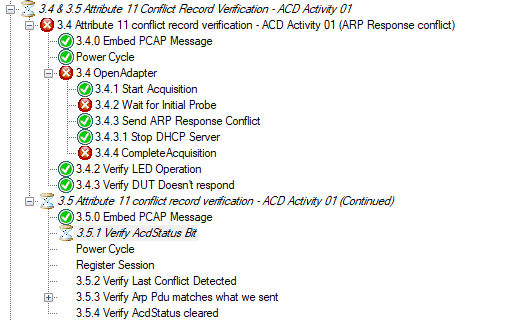
    Running CT21 Test, under Interactive Test Sequencer - ACD Behavior Test, I have this result:

    For the moment, I have set errCode = EI_API_ADP_setACD(pAdapter, false);

    Best regards

    Stefano

  • Hi Pourya,

    Running test Interactive Test Sequencer - ACD Behavior Test with CT21 Conformance Tool, test does not pass and I have different error even if I disable ACD as you have suggested. Do you have any explanation about that?

    Best regards.

    Stefano

  • Hi Stefano,

    Thank you for your patience while I was out of office. 

    In SDK 11, there is a bug in LWIP options which can interfere with ACD test.

    Please navigate to <SDK instalation path>\source\industrial_comms\ethernetip_adapter\stack\lwip\lwip-config\ then open lwipopts.h and add this definition to disable LWIP interference with ACD function:

    #define LWIP_DHCP_DOES_ACD_CHECK 0

    After making this change, you'll need to recompile the LWIP library to implement the fix. This should resolve the issue by preventing LWIP from performing its own Address Conflict Detection, which conflicts with the EtherNet/IP stack's implementation.

    If you continue to experience problems after applying this fix, please provide both the Wireshark capture log and the CT21 detailed report (which can be exported from the "Result Browser" tab) for further analysis.

    To recompile the LWIP library, navigate to your SDK installation directory, open a bash or PowerShell window, and first clean the existing libraries before rebuilding.

    gmake -s -f makefile.am243x ethernetip_adapter_lwip_contrib_r5f.ti-arm-clang_clean
    gmake -s -f makefile.am243x ethernetip_adapter_lwip_freertos_r5f.ti-arm-clang_clean

    Then build the libs:
    gmake -s -f makefile.am243x ethernetip_adapter_lwip_contrib_r5f.ti-arm-clang
    gmake -s -f makefile.am243x ethernetip_adapter_lwip_freertos_r5f.ti-arm-clang

    Best regards,
    Pourya

  • Hi Pourya,

    As attachment you can find log of Interactive Test Sequencer.

    I have run only test 1.0 and 2.0 of this section

    I have started test with Factory Param on module as:

    acd_fail_log.zip

    Best regards.

    Stefano

  • Hi Stefano,

    Is this report after updating LWIP as instructed in my previous answer?
    If yes, then along side the Wireshark log and detailed result, please save the Raw result data (.xml) file so that I can track the Wireshark log.

    Best regards,
    Pourya

  • Hi Pourya,


    Yes the result that I have attached is after updating LWIP as instructed.

    As attachment you can find raw_data.xml as you have asked.

    Best regards.ABB_ACD Behavior Test_20260326-034008.xml

  • Hi Stefano,

    I've re-run the ACD test using SDK 11.00.00.08 and couldn't reproduce the issue. The test passed successfully on my system, and I've attached the result logs for your reference.

    I recommend that you also run the ACD test on an AM243x-LP board to verify the results. If the test passes on your end as well, the issue might be specific to your particular hardware configuration.

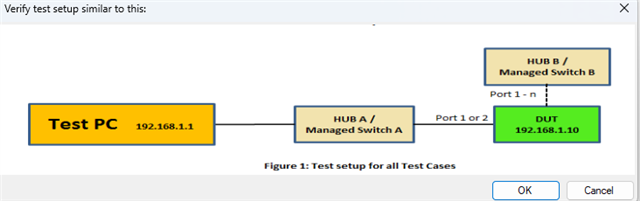
    The difference between our test outcomes could have several root causes, most likely related to setup variations. Are you using a network switch between your test PC and device? This configuration detail could be influencing your results.

    Best regards,
    Pouryahttps://e2e.ti.com/cfs-file/__key/communityserver-discussions-components-files/908/SDK11_5F00_PassingResults.7z

  • Hi Pourya,

    I will retry with this setup. Do I need to configure switch in some way? or do you have some suggestion to test it without running all test?

    Best regards.

    Stefano

  • Hi Stefano,

    If your device's PHY is configured by default to use Auto-Negotiation mode, then the switch must also be set to Auto-Negotiation mode. Alternatively, if you're using fixed speed mode, the speed and duplex settings must match on both the switch and your device. These matching settings should also apply to any additional device you connect to another port during some step of the testing.

    Best regards,
    Pourya

  • Hi Pourya,

    Setting both switches with AutoNeg ON step 2 is passed(before failed), but now I have an issue regarding this topic:

    Do you know where could be the problem?

    Best regards.


    Stefano

  • Hi Stefano,

    To narrow down the problem, I suggest first testing with the AM243x-LP board (as mentioned in my previous answer, the test should pass if your setup is correct).

    Once you've successfully run the test on the AM243x-LP board and resolved any setup issues, we can assume that the testing configuration is working properly. At that point, you can proceed to testing your custom hardware. This methodical approach will help us better isolate the source of the problem.

    Best regards,
    Pourya
  • Hi Puorya,

    Also with AM243x-LP board I still have the problem in this step of test. Do you have some suggestion regarding some errors on setup that I have?

    Best regards.

    Stefano

  • Hi Stefano, 

    the test setup should be relatively simple, you would just need a switch between your Test PC and your Device, you should let the other port of the device be free and do not connect it to any other network.
    There is specific test step during the test which asks you to connect the second port to another device, but before that make sure it is disconnected.
    Other than that (and the PHY settings (Auto-negotiation, Speed/Duplex settings), I can't think of any other setup failures.

    Best regards,
    Pourya

  • Hi Pourya,

    On LP-AM243x, I have always errors on this step with this type of message?

    What do you think?

    Regards.

    Stefano

  • Hi Stefano,

    Since we cannot reproduce this issue on our end (as shown in the test results I shared with you), I cannot pinpoint the exact root cause on your side. However, it appears to be related to your setup configuration.

    Here are some troubleshooting steps you can try:

    Network Configuration:

    • Test with different PHY settings (e.g., fixed speed, 100M, full-duplex) to see if your smart switch is causing the issue
    • Try using a different smart switch if available (I'm currently using a TP-Link TL-SG108E without issues)

    Test Environment:

    • Use a dedicated Test PC instead of a laptop, as corporate laptops often have restrictive security policies that could interfere with the testing process


    Best regards,
    Pourya