This thread has been locked.

If you have a related question, please click the "Ask a related question" button in the top right corner. The newly created question will be automatically linked to this question.

LP-MSPM0G3519: [MSPM0G3519] DAP Connection Error.

Part Number: LP-MSPM0G3519
Other Parts Discussed in Thread: UNIFLASH

I cannot flash my LaunchPad anymore.
I already tried to factory reset the board in auto and in manual mode (see this link).

Do you have any tips or hints what I can try to fix my LaunchPad?

  • Hi Timo,

    Can you share the specific error you're getting when attempting to connect to the device?

    Did you make any Non-Main configuration changes to SW-DP access or have the debugger pins (PA19 and PA20) reassigned to other functions?

    There are additional reset procedures that may allow the device to reconnect.

    1. SWD Factory Reset with Specific Reset Sequence:
      1. Disconnect power
      2. Assert NRST pin and Hold in Low state (i.e. Keep the Reset Button pressed)
      3. Connect power
      4. Similar to the link you shared. Connect CS_DAP0 port in CCS, Click on 'Scripts' in Menu bar and choose MSPM0_FactoryReset_Manual
      5. De-assert NRST pin (Release the Reset Button)


    1. BSL Invocation (step 7 in included link)
      1. Invoke Bootoader using the BSL_Invoke pin/ Switch
      2. While keeping the BSL_Invoke Pin asserted, Toggle the NRST to trigger BootReset
      3. De-assert the BSL_Invoke pin
      4. Try to connect the debugger now. It should get connected.
      5. Now load a different working application into the device using CCS Debugger or Bootloader


    Best Regards,
    Brian

  • Hi Brian,

    thanks for your reply.

    As far as I know, I didn't make changes to the Non-Main configuration and have kept the debugger pins from being changed.

    I tried both of your suggested methods and this is the response, I get from UniFlash:

    [3/31/2026, 2:31:14 PM] [INFO] CS_DAP_0: GEL Output: Initiating Device Factory Reset
    [3/31/2026, 2:31:14 PM] [INFO] CS_DAP_0: GEL Output: Attempting CS_DAP connection
    [3/31/2026, 2:31:14 PM] [ERROR] CS_DAP_0: Error connecting to the target: DAP Connection Error. This could be caused by the device having gone to low power mode. Try forcing an external reset.If the error persists, try forcing BSL, a Mass erase or a Factory Reset. Check device FAQs for more information.
    [3/31/2026, 2:31:17 PM] [INFO] CS_DAP_0: GEL Output: Initiating BOOTRST Board Reset
    [3/31/2026, 2:31:17 PM] [INFO] CS_DAP_0: GEL Output: Reset line asserted
    [3/31/2026, 2:31:18 PM] [INFO] CS_DAP_0: GEL Output: Reset line de-asserted
    [3/31/2026, 2:31:18 PM] [INFO] CS_DAP_0: GEL Output: Board Reset Complete
    [3/31/2026, 2:31:18 PM] [INFO] CS_DAP_0: GEL Output: Reset done
    [3/31/2026, 2:31:19 PM] [ERROR] CS_DAP_0: Error connecting to the target: DAP Connection Error. This could be caused by the device having gone to low power mode. Try forcing an external reset.If the error persists, try forcing BSL, a Mass erase or a Factory Reset. Check device FAQs for more information.
    [3/31/2026, 2:31:20 PM] [ERROR] CS_DAP_0: GEL: Error while executing GEL_DAPInit_remoteFactoryReset(1): Connect failed at GEL_Connect() [mspm0_cs_dap_init.gel:390] at GEL_DAPInit_remoteSECAPCommand(0x020AU, autoReset) [mspm0_cs_dap_init.gel:334] at GEL_DAPInit_remoteFactoryReset(1)

    In the pop-up I hit "Force Reset" but the same error message showed up again - as you can see in the short log.

  • Hi Timo,

    Would you be able to scope VCORE and send the waveform with just the device connected to power and running the application code that was last loaded?

    Additionally, can you try the following through CCS and share the results from the GEL output console?

    1. How to open a projectless debug session: right-click on the .ccxml file in workspace->project->targetconfigs
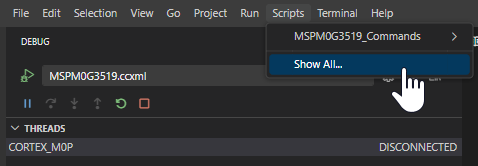
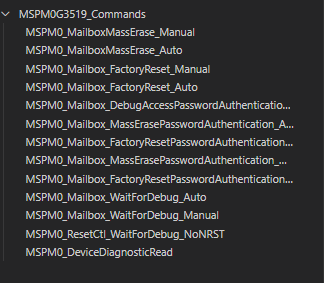
    2. How to view all available device scripts: click on the scripts tab at the top of the IDE

    3. How to add GEL console View: Go to View->Console->GEL Output
    4. Running Diagnostic read script:
      1. Hold nRST low
      2. Disconnect power from LP
      3. Reconnect Power to LP
      4. Start Projectless debug session
      5. Run MSPM0_DeviceDiagnosticRead script
      6. Release nRST after running script

    Best Regards,
    Brian

  • Hi Brian,

    The VCORE waveform looks like this:

    Thanks for the detailed step-by-step guide.
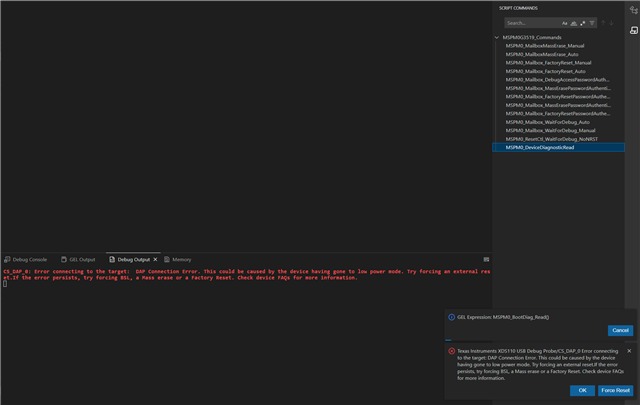
    If I follow the steps I directly see an error message when starting the diagnostic script:

    Best regards,
    Timo

  • Hi Timo,

    I've reached out to the team expert on this if they have any further ideas on how to recover the device. I will update you when I hear back from them.

    Best Regards,
    Brian

  • Hi Timo,

    From the tests you have performed and the errors you are seeing, The team expert an I believe Non-Main is likely to have been erased. This makes the device unrecoverable by any means unfortunately. 

    Best Regards,
    Brian

  • Hi Brian,

    thanks for the info and the effort to help me solve my issue!

    Best regards,
    Timo