This thread has been locked.

If you have a related question, please click the "Ask a related question" button in the top right corner. The newly created question will be automatically linked to this question.

AM6422: CPU 1 not starting if watchdog is enabled in UBOOT and CPU reboot gets stuck

Part Number: AM6422
Other Parts Discussed in Thread: AM6421

Hello Team,

We have developed a product based on AM6421/22 based processor. We have two custom designed boards/revisions. One baord has a single core AM6421 and other revision has dual core AM6422. We have deployed a custom Yocto based image on the board. Also, we have optimized the bootup time in order to meet the requirements of the prodcut (boot time into application < 40 sec).

Our primary issue is related to reboot (without power cycle), when we perform this continuously, AM6421 based board gets stuck during reboot after around 2500 reboot cycles.

Initially, the reboot stuck frequency was around 200-300 reboot cycles. Searching online and checking, initially we found that USB (as CDC_NCM device) and eMMC were initialized almost at the same time creating some race conditions and linux kernel was stuck there even before jumping to user space ans starting systemd. As a fix, we have disabled the USB and CDC_MCM support in the linux kernel. After this the reboot was successful for around 2500 cycles and after that it was getting stuck in user space waiting for /dev/ttyS2 in systemd.

To rule out any h/w and s/w related issues, we cheked the same thing on ti image on AM6421-EVM. we observed that similar case we could reproduce on the EVM as well where it gets stuck for /dev/ttyS2 in systemd forever, almost after 3500 reboot cycles.


The same issue we are observing on AM6422 board, but on this board we are able to reproduce the issue often, just after 10-20 reboots and this time we get kernel dump..

------------------------------------

To temporarily resolve this, we tried to enable the watchdog in uboot and in kernel. This worked and we were able to recover the board if it gets stuck it timeouts and reboots automatically.


However, on AM6422 based board, if we enable the watchdog in uboot, the CPU 1 fails to start
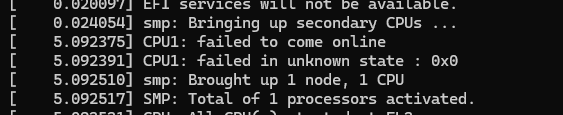
image.png'

It only starts if watchdog is disabled in the U-boot.


But we want it to be running from Uboot 


Searching online we found something related to power-domain

image.png


so removed it and tried.. but still it is not working if we enable watchdog in uboot.

---------------------


Please guide us to identify and fix both the issues

  • Hi Akshay,

    Let me address the watchdog issue first on AM6422.

    Why CPU1 fails to start when watchdog is enabled in U-Boot

    The RTI watchdog is a windowed watchdog that fires an NMI once started — it cannot be stopped. When U-Boot starts it and jumps to Linux, there is a gap where nobody is petting it. CPU1 SMP bring-up happens very early in kernel init, well before the rti_wdt driver probes. If the NMI fires during CPU1's PSCI CPU_ON sequence, the handshake fails — hence CPU1: failed in unknown state: 0x0. AM6421 doesn't show this because there is no CPU1 to bring up.

    The power-domain change you tried does not fix this — the NMI timing is unrelated to power domain ownership. Please refer to the guide on bringing up Watchdog on AM64x -  https://software-dl.ti.com/processor-sdk-linux/esd/AM64X/11_02_08_02/exports/docs/linux/Foundational_Components/Kernel/Kernel_Drivers/Watchdog.html

    For the reboot issue, I will loop on another expert who can better assist you.

    Regards,
    Harshith

  • Hello Harshith,

    Thanks for the update and suggestion.

    I will check the suggested link.

    -------

    However, I had tried one more step, I added an argument "maxcpus=1" in kernel bootargs, this stopped init of CPU1 during kernel boot. Once I reach userspace, I started the CPU1, manually when all drivers are loaded and watchdog is triggered continuously. This also fails with the same error code.

    Regards,

    Akshay

  • Hi Akshay,

    Sounds like separate issues on AM6421 vs AM6422.

    Can you do a stress test using the maxcpus=1 on AM6422 and share results?

    Also, please share the coredump from AM6422 after normal mode failure.

    Regards,
    Vinu

  • Hello Team,

    I have implemented changes in rti_wdt as per given in the link. Still CPU1 is not booting up.

    --------------------------

    Attaching logs from AM6421 core dumps

    CORE DUMP 1
    
    
    MEM DUMP
    
    U-Boot SPL 2025.01-g3280a643b283 (Mar 25 2025 - 16:14:37 +0000)
    Resetting on cold boot to workaround ErrataID:i2331
    Please resend tiboot3.bin in case of UART/DFU boot
    resetting ...
    
    U-Boot SPL 2025.01-g3280a643b283 (Mar 25 2025 - 16:14:37 +0000)
    SYSFW ABI: 4.0 (firmware rev 0x000b '11.0.7--v11.00.07 (Fancy Rat)')
    EEPROM not available at 0x50, trying to read at 0x51
    Reading on-board EEPROM at 0x51 failed -121
    SPL initial stack usage: 13392 bytes
    Trying to boot from MMC1
    Authentication passed
    Authentication passed
    init_env from device 9 not supported!
    Authentication passed
    Authentication passed
    Starting ATF on ARM64 core...
    
    NOTICE:  BL31: v2.12.0(release):11.00.09-dirty
    NOTICE:  BL31: Built : 12:35:58, Mar 24 2025
    I/TC:
    I/TC: OP-TEE version: 4.5.0-73-gef1ebdc23-dev (gcc version 13.3.0 (GCC)) #1 Tue Feb  4 11:33:18 UTC 2025 aarch64
    I/TC: WARNING: This OP-TEE configuration might be insecure!
    I/TC: WARNING: Please check https://optee.readthedocs.io/en/latest/architecture/porting_guidelines.html
    I/TC: Primary CPU initializing
    I/TC: GIC redistributor base address not provided
    I/TC: Assuming default GIC group status and modifier
    I/TC: SYSFW ABI: 4.0 (firmware rev 0x000b '11.0.7--v11.00.07 (Fancy Rat)')
    I/TC: Activated SA2UL device
    I/TC: Enabled firewalls for SA2UL TRNG device
    I/TC: SA2UL TRNG initialized
    I/TC: SA2UL Drivers initialized
    I/TC: HUK Initialized
    I/TC: Primary CPU switching to normal world boot
    
    U-Boot SPL 2025.01-g3ad0ddad5376 (Mar 25 2025 - 16:14:37 +0000)
    SYSFW ABI: 4.0 (firmware rev 0x000b '11.0.7--v11.00.07 (Fancy Rat)')
    EEPROM not available at 0x50, trying to read at 0x51
    Reading on-board EEPROM at 0x51 failed -121
    Trying to boot from MMC1
    Authentication passed
    Authentication passed
    
    
    U-Boot 2025.01-g3ad0ddad5376 (Mar 25 2025 - 16:14:37 +0000)
    
    SoC:   AM64X SR2.0 HS-FS
    Model: Texas Instruments AM642 EVM
    EEPROM not available at 0x50, trying to read at 0x51
    Reading on-board EEPROM at 0x51 failed -121
    DRAM:  2 GiB
    Core:  107 devices, 34 uclasses, devicetree: separate
    WDT:   Started watchdog@e000000 with servicing every 1000ms (100s timeout)
    ti_sci system-controller@44043000: Message not acknowledged
    ti-sci-pm-domains power-controller: ti_sci_power_domain_on: get_device(126) failed (-19)
    MMC:   mmc@fa10000: 0, mmc@fa00000: 1
    Loading Environment from MMC... Reading from MMC(0)... *** Warning - bad CRC, using default environment
    
    In:    serial@2800000
    Out:   serial@2800000
    Err:   serial@2800000
    am65_cpsw_nuss ethernet@8000000: K3 CPSW: nuss_ver: 0x6BA00903 cpsw_ver: 0x6BA80903 ale_ver: 0x00294104 Ports:2
    EEPROM not available at 0x50, trying to read at 0x51
    Reading on-board EEPROM at 0x51 failed -121
    Net:   eth0: ethernet@8000000port@1
    Warning: icssg1-eth-port@0 (eth2) using random MAC address - f6:43:ff:61:95:52
    , eth2: icssg1-eth-port@0
    Hit any key to stop autoboot:  0
    MMC: no card present
    switch to partitions #0, OK
    mmc0(part 0) is current device
    [FLASH] INFO: Found eMMC
    MMC: no card present
    [FLASH] INFO: Boot from eMMC
    Set to BOOT_BUS_WIDTH = 0x2, RESET = 0x0, BOOT_MODE = 0x0
    switch to partitions #1, OK
    mmc0(part 1) is current device
    switch to partitions #2, OK
    mmc0(part 2) is current device
    MMC read: dev # 0, block # 0, count 1 ... 1 blocks read: OK
    INFO: Magic = SLA1: Booting Slot A
    INFO: Using bootslot a
    Saving Environment to MMC... Writing to MMC(0)... OK
    Saving Environment to MMC... Writing to MMC(0)... OK
    ## Error: "main_cpsw0_qsgmii_phyinit" not defined
    7886844 bytes read in 46 ms (163.5 MiB/s)
    ## Loading kernel from FIT Image at 90000000 ...
       Using 'conf-ti_k3-am642-evm.dtb' configuration
       Verifying Hash Integrity ... OK
       Trying 'kernel-1' kernel subimage
         Description:  Linux kernel
         Created:      2025-03-25  12:45:29 UTC
         Type:         Kernel Image
         Compression:  gzip compressed
         Data Start:   0x900000e4
         Data Size:    7404457 Bytes = 7.1 MiB
         Architecture: AArch64
         OS:           Linux
         Load Address: 0x81000000
         Entry Point:  0x81000000
         Hash algo:    sha512
         Hash value:   1b959ca86b41a23aaefaa8ce6ff371fa97a3b76ae6dbf2a2eaed6fecc360687adba50185a898fbc47782f12b10ae6ac4ca2f3
       Verifying Hash Integrity ... sha512+ OK
    ## Loading fdt from FIT Image at 90000000 ...
       Using 'conf-ti_k3-am642-evm.dtb' configuration
       Verifying Hash Integrity ... OK
       Trying 'fdt-ti_k3-am642-evm.dtb' fdt subimage
         Description:  Flattened Device Tree blob
         Created:      2025-03-25  12:45:29 UTC
         Type:         Flat Device Tree
         Compression:  uncompressed
         Data Start:   0x9071f210
         Data Size:    70375 Bytes = 68.7 KiB
         Architecture: AArch64
         Load Address: 0x83000000
         Hash algo:    sha512
         Hash value:   dd413e03e0d26201f1c7858d371d8eead0228f681cc0c1448e3554190fc7165d60b2973d572e5298e63fefd88a4868cd9054c
       Verifying Hash Integrity ... sha512+ OK
       Loading fdt from 0x9071f210 to 0x83000000
       Booting using the fdt blob at 0x83000000
    Working FDT set to 83000000
       Uncompressing Kernel Image to 81000000
       Loading Device Tree to 000000008ffeb000, end 000000008ffff2e6 ... OK
    Working FDT set to 8ffeb000
    
    Starting kernel ...
    
    ERROR:   Failed to get response (-19)
    ERROR:   Transfer send failed (-19)
    ERROR:   Request to start core failed: -19
    I/TC: Reserved shared memory is enabled
    I/TC: Dynamic shared memory is enabled
    I/TC: Normal World virtualization support is disabled
    I/TC: Asynchronous notifications are disabled
    [    0.039144] psci: failed to boot CPU1 (-22)
    [    0.039161] CPU1: failed to boot: -22
    [    1.000534] remoteproc remoteproc0: request_firmware failed: -2
    [    1.003926] k3_r5_rproc bus@f4000:r5fss@78000000: split-mode not permitted, force configuring for single-cpu mode
    [    1.004936] remoteproc remoteproc1: request_firmware failed: -2
    [    1.008544] k3_r5_rproc bus@f4000:r5fss@78400000: split-mode not permitted, force configuring for single-cpu mode
    [    1.009589] remoteproc remoteproc2: request_firmware failed: -2
    [    1.270115] am65-cpsw-nuss 8000000.ethernet: Use random MAC address
    [    1.348387] Unable to handle kernel NULL pointer dereference at virtual address 0000000000000000
    [    1.357486] Mem abort info:
    [    1.360531]   ESR = 0x0000000096000004
    [    1.364410]   EC = 0x25: DABT (current EL), IL = 32 bits
    [    1.369747]   SET = 0, FnV = 0
    [    1.372819]   EA = 0, S1PTW = 0
    [    1.376006]   FSC = 0x04: level 0 translation fault
    [    1.380902] Data abort info:
    [    1.383850]   ISV = 0, ISS = 0x00000004, ISS2 = 0x00000000
    [    1.389404]   CM = 0, WnR = 0, TnD = 0, TagAccess = 0
    [    1.394555]   GCS = 0, Overlay = 0, DirtyBit = 0, Xs = 0
    [    1.399938] [0000000000000000] user address but active_mm is swapper
    [    1.406361] Internal error: Oops: 0000000096000004 [#1] PREEMPT SMP
    [    1.412618] Modules linked in:
    [    1.415674] CPU: 0 UID: 0 PID: 11 Comm: kworker/u8:0 Not tainted 6.12.17-ti-gfe5775b7abde #1
    [    1.424099] Hardware name: AM642 UNIFIED REV B (DT)
    [    1.428966] Workqueue: events_unbound 0xffff8000806f51a0
    [    1.434273] pstate: 40000005 (nZcv daif -PAN -UAO -TCO -DIT -SSBS BTYPE=--)
    [    1.441223] pc : 0xffff800080b17854
    [    1.444701] lr : 0xffff80008060468c
    [    1.448178] sp : ffff8000812cb360
    [    1.451482] x29: ffff8000812cb360 x28: 0000000000000038 x27: ffff0000039cd3a0
    [    1.458614] x26: ffff0000025f5000 x25: ffff00007fc00680 x24: 0000000002afd420
    [    1.465745] x23: ffff0000025f20a0 x22: 0000000000000000 x21: 0000000000000001
    [    1.472876] x20: ffff0000025f5018 x19: ffff0000025eecb8 x18: ffffffffffffffff
    [    1.480006] x17: 0000000000000000 x16: 1fffe000001eec01 x15: ffffffffffffffff
    [    1.487137] x14: ffffffffffffffff x13: 0000000000000000 x12: 0000000000000020
    [    1.494267] x11: 0101010101010101 x10: ffff0000039cd3a0 x9 : 0000000000000030
    [    1.501398] x8 : 0101010101010101 x7 : 000000000000656c x6 : 0000000000000000
    [    1.508527] x5 : cf3a000000000000 x4 : 0080000000000000 x3 : 2e30303030333832
    [    1.515657] x2 : 0000000000000000 x1 : ffff0000039cd3a0 x0 : 0000000000000000
    [    1.522788] Call trace:
    [    1.525226]  0xffff800080b17854
    [    1.528357]  0xffff800080604a5c
    [    1.531488]  0xffff800080604b18
    [    1.534619]  0xffff80008071a568
    [    1.537749]  0xffff8000806f5d9c
    [    1.540880]  0xffff8000806f605c
    [    1.544011]  0xffff8000806f6294
    [    1.547142]  0xffff8000806f63d0
    [    1.550273]  0xffff8000806f3c84
    [    1.553404]  0xffff8000806f673c
    [    1.556534]  0xffff8000806f69d4
    [    1.559665]  0xffff8000806f4cdc
    [    1.562796]  0xffff8000806f1910
    [    1.565927]  0xffff8000806ada9c
    [    1.569058]  0xffff8000806acf40
    [    1.572189]  0xffff8000806add8c
    [    1.575320]  0xffff8000806ade0c
    [    1.578450]  0xffff8000806af958
    [    1.581581]  0xffff8000806b7904
    [    1.584712]  0xffff8000806f8ab4
    [    1.587843]  0xffff8000806f5e04
    [    1.590974]  0xffff8000806f605c
    [    1.594105]  0xffff8000806f6294
    [    1.597236]  0xffff8000806f63d0
    [    1.600367]  0xffff8000806f3c84
    [    1.603498]  0xffff8000806f673c
    [    1.606629]  0xffff8000806f69d4
    [    1.609760]  0xffff8000806f4cdc
    [    1.612891]  0xffff8000806f5228
    [    1.616022]  0xffff80008006b5f4
    [    1.619153]  0xffff80008006ba00
    [    1.622284]  0xffff800080075220
    [    1.625415]  0xffff8000800153fc
    [    1.628551] Code: 54000401 b50002c6 d503201f f86a6803 (f8408402)
    [    1.634630] ---[ end trace 0000000000000000 ]---
    [    1.709140] mmc0: Command Queue Engine enabled
    [    1.713658] mmc0: new HS200 MMC card at address 0001
    [    2.835992] sdhci-am654 fa00000.mmc: Power on failed
    [    2.871610] mmc1: SDHCI controller on fa00000.mmc [fa00000.mmc] using ADMA 64-bit

    CORE DUMP 2
    
    U-Boot SPL 2025.01-g3280a643b283 (Mar 25 2025 - 16:14:37 +0000)
    SYSFW ABI: 4.0 (firmware rev 0x000b '11.0.7--v11.00.07 (Fancy Rat)')
    EEPROM not available at 0x50, trying to read at 0x51
    Reading on-board EEPROM at 0x51 failed -121
    SPL initial stack usage: 13392 bytes
    Trying to boot from MMC1
    Authentication passed
    Authentication passed
    init_env from device 9 not supported!
    Authentication passed
    Authentication passed
    Starting ATF on ARM64 core...
    
    NOTICE:  BL31: v2.12.0(release):11.00.09-dirty
    NOTICE:  BL31: Built : 12:35:58, Mar 24 2025
    I/TC:
    I/TC: OP-TEE version: 4.5.0-73-gef1ebdc23-dev (gcc version 13.3.0 (GCC)) #1 Tue Feb  4 11:33:18 UTC 2025 aarch64
    I/TC: WARNING: This OP-TEE configuration might be insecure!
    I/TC: WARNING: Please check https://optee.readthedocs.io/en/latest/architecture/porting_guidelines.html
    I/TC: Primary CPU initializing
    I/TC: GIC redistributor base address not provided
    I/TC: Assuming default GIC group status and modifier
    I/TC: SYSFW ABI: 4.0 (firmware rev 0x000b '11.0.7--v11.00.07 (Fancy Rat)')
    I/TC: Activated SA2UL device
    I/TC: Enabled firewalls for SA2UL TRNG device
    I/TC: SA2UL TRNG initialized
    I/TC: SA2UL Drivers initialized
    I/TC: HUK Initialized
    I/TC: Primary CPU switching to normal world boot
    
    U-Boot SPL 2025.01-g3ad0ddad5376 (Mar 25 2025 - 16:14:37 +0000)
    SYSFW ABI: 4.0 (firmware rev 0x000b '11.0.7--v11.00.07 (Fancy Rat)')
    EEPROM not available at 0x50, trying to read at 0x51
    Reading on-board EEPROM at 0x51 failed -121
    Trying to boot from MMC1
    Authentication passed
    Authentication passed
    
    
    U-Boot 2025.01-g3ad0ddad5376 (Mar 25 2025 - 16:14:37 +0000)
    
    SoC:   AM64X SR2.0 HS-FS
    Model: Texas Instruments AM642 EVM
    EEPROM not available at 0x50, trying to read at 0x51
    Reading on-board EEPROM at 0x51 failed -121
    DRAM:  2 GiB
    Core:  107 devices, 34 uclasses, devicetree: separate
    WDT:   Started watchdog@e000000 with servicing every 1000ms (100s timeout)
    ti_sci system-controller@44043000: Message not acknowledged
    ti-sci-pm-domains power-controller: ti_sci_power_domain_on: get_device(126) failed (-19)
    MMC:   mmc@fa10000: 0, mmc@fa00000: 1
    Loading Environment from MMC... Reading from MMC(0)... OK
    In:    serial@2800000
    Out:   serial@2800000
    Err:   serial@2800000
    am65_cpsw_nuss ethernet@8000000: K3 CPSW: nuss_ver: 0x6BA00903 cpsw_ver: 0x6BA80903 ale_ver: 0x00294104 Ports:2
    EEPROM not available at 0x50, trying to read at 0x51
    Reading on-board EEPROM at 0x51 failed -121
    Net:   eth0: ethernet@8000000port@1, eth2: icssg1-eth-port@0
    Hit any key to stop autoboot:  0
    switch to partitions #0, OK
    mmc0(part 0) is current device
    SD/MMC found on device 0
    Can't set block device
    switch to partitions #0, OK
    mmc0(part 0) is current device
    [FLASH] INFO: Found eMMC
    MMC: no card present
    [FLASH] INFO: Boot from eMMC
    Set to BOOT_BUS_WIDTH = 0x2, RESET = 0x0, BOOT_MODE = 0x0
    switch to partitions #1, OK
    mmc0(part 1) is current device
    switch to partitions #2, OK
    mmc0(part 2) is current device
    MMC read: dev # 0, block # 0, count 1 ... 1 blocks read: OK
    INFO: Magic = SLA1: Booting Slot A
    INFO: Using bootslot a
    Saving Environment to MMC... Writing to MMC(0)... OK
    Saving Environment to MMC... Writing to MMC(0)... OK
    ## Error: "main_cpsw0_qsgmii_phyinit" not defined
    7886844 bytes read in 46 ms (163.5 MiB/s)
    ## Loading kernel from FIT Image at 90000000 ...
       Using 'conf-ti_k3-am642-evm.dtb' configuration
       Verifying Hash Integrity ... OK
       Trying 'kernel-1' kernel subimage
         Description:  Linux kernel
         Created:      2025-03-25  12:45:29 UTC
         Type:         Kernel Image
         Compression:  gzip compressed
         Data Start:   0x900000e4
         Data Size:    7404457 Bytes = 7.1 MiB
         Architecture: AArch64
         OS:           Linux
         Load Address: 0x81000000
         Entry Point:  0x81000000
         Hash algo:    sha512
         Hash value:   1b959ca86b41a23aaefaa8ce6ff371fa97a3b76ae6dbf2a2eaed6fecc360687adba50185a898fbc47782f12b10ae6ac4ca2f3
       Verifying Hash Integrity ... sha512+ OK
    ## Loading fdt from FIT Image at 90000000 ...
       Using 'conf-ti_k3-am642-evm.dtb' configuration
       Verifying Hash Integrity ... OK
       Trying 'fdt-ti_k3-am642-evm.dtb' fdt subimage
         Description:  Flattened Device Tree blob
         Created:      2025-03-25  12:45:29 UTC
         Type:         Flat Device Tree
         Compression:  uncompressed
         Data Start:   0x9071f210
         Data Size:    70375 Bytes = 68.7 KiB
         Architecture: AArch64
         Load Address: 0x83000000
         Hash algo:    sha512
         Hash value:   dd413e03e0d26201f1c7858d371d8eead0228f681cc0c1448e3554190fc7165d60b2973d572e5298e63fefd88a4868cd9054c
       Verifying Hash Integrity ... sha512+ OK
       Loading fdt from 0x9071f210 to 0x83000000
       Booting using the fdt blob at 0x83000000
    Working FDT set to 83000000
       Uncompressing Kernel Image to 81000000
       Loading Device Tree to 000000008ffeb000, end 000000008ffff2e6 ... OK
    Working FDT set to 8ffeb000
    
    Starting kernel ...
    
    ERROR:   Failed to get response (-19)
    ERROR:   Transfer send failed (-19)
    ERROR:   Request to start core failed: -19
    I/TC: Reserved shared memory is enabled
    I/TC: Dynamic shared memory is enabled
    I/TC: Normal World virtualization support is disabled
    I/TC: Asynchronous notifications are disabled
    [    0.035106] psci: failed to boot CPU1 (-22)
    [    0.035124] CPU1: failed to boot: -22
    [    1.000612] remoteproc remoteproc0: request_firmware failed: -2
    [    1.004015] k3_r5_rproc bus@f4000:r5fss@78000000: split-mode not permitted, force configuring for single-cpu mode
    [    1.005028] remoteproc remoteproc1: request_firmware failed: -2
    [    1.008638] k3_r5_rproc bus@f4000:r5fss@78400000: split-mode not permitted, force configuring for single-cpu mode
    [    1.009677] remoteproc remoteproc2: request_firmware failed: -2
    [    1.270140] am65-cpsw-nuss 8000000.ethernet: Use random MAC address
    [    1.353191] spi-nor spi0.0: unrecognized JEDEC id bytes: ff ff ff ff ff ff
    [    1.436926] Unable to handle kernel NULL pointer dereference at virtual address 0000000000000000
    [    1.445817] Mem abort info:
    [    1.448613]   ESR = 0x0000000096000004
    [    1.452361]   EC = 0x25: DABT (current EL), IL = 32 bits
    [    1.457682]   SET = 0, FnV = 0
    [    1.460737]   EA = 0, S1PTW = 0
    [    1.463878]   FSC = 0x04: level 0 translation fault
    [    1.468764] Data abort info:
    [    1.471645]   ISV = 0, ISS = 0x00000004, ISS2 = 0x00000000
    [    1.477136]   CM = 0, WnR = 0, TnD = 0, TagAccess = 0
    [    1.482185]   GCS = 0, Overlay = 0, DirtyBit = 0, Xs = 0
    [    1.487505] [0000000000000000] user address but active_mm is swapper
    [    1.493866] Internal error: Oops: 0000000096000004 [#1] PREEMPT SMP
    [    1.500124] Modules linked in:
    [    1.503179] CPU: 0 UID: 0 PID: 47 Comm: kworker/0:2 Not tainted 6.12.17-ti-gfe5775b7abde #1
    [    1.511519] Hardware name: AM642 UNIFIED REV B (DT)
    [    1.516386] Workqueue: events_freezable 0xffff8000808ca7f4
    [    1.521865] pstate: 40000005 (nZcv daif -PAN -UAO -TCO -DIT -SSBS BTYPE=--)
    [    1.528815] pc : 0xffff800080b17854
    [    1.532293] lr : 0xffff80008060468c
    [    1.535771] sp : ffff8000816d39d0
    [    1.539076] x29: ffff8000816d39d0 x28: 0000000000000038 x27: ffff0000039ee010
    [    1.546207] x26: ffff0000039ef000 x25: ffff000000ecd1c0 x24: 0000000002afd420
    [    1.553338] x23: ffff0000025f20a0 x22: 0000000000000000 x21: 0000000000000001
    [    1.560468] x20: ffff0000039ef018 x19: ffff0000025eecb8 x18: ffffffffffffffff
    [    1.567599] x17: 0000000000000000 x16: 0000000000000068 x15: ffffffffffffffff
    [    1.574729] x14: ffff0000024aaa1c x13: ffff0000024aa2b4 x12: 6d3d5341494c4144
    [    1.581860] x11: 00000006a6280e15 x10: ffff0000039ee010 x9 : 0000000000000001
    [    1.588991] x8 : 0101010101010101 x7 : 000000000000656c x6 : 0000000000000000
    [    1.596121] x5 : 1e00000a0050555f x4 : 0000000000000000 x3 : 3030303a30636d6d
    [    1.603251] x2 : 0000000000000064 x1 : ffff0000039ee010 x0 : 0000000000000000
    [    1.610382] Call trace:
    [    1.612821]  0xffff800080b17854
    [    1.615952]  0xffff800080604a5c
    [    1.619083]  0xffff800080604b18
    [    1.622214]  0xffff80008071a568
    [    1.625345]  0xffff8000806f5d9c
    [    1.628476]  0xffff8000806f605c
    [    1.631607]  0xffff8000806f6294
    [    1.634738]  0xffff8000806f63d0
    [    1.637869]  0xffff8000806f3c84
    [    1.641000]  0xffff8000806f673c
    [    1.644131]  0xffff8000806f69d4
    [    1.647261]  0xffff8000806f4cdc
    [    1.650392]  0xffff8000806f1910
    [    1.653523]  0xffff8000808cb35c
    [    1.656654]  0xffff8000808cfab8
    [    1.659785]  0xffff8000808ca9cc
    [    1.662917]  0xffff80008006b5f4
    [    1.666048]  0xffff80008006ba00
    [    1.669178]  0xffff800080075220
    [    1.672310]  0xffff8000800153fc
    [    1.675446] Code: 54000401 b50002c6 d503201f f86a6803 (f8408402)
    [    1.681526] ---[ end trace 0000000000000000 ]---
    [    2.839512] sdhci-am654 fa00000.mmc: Power on failed
    [    2.875131] mmc1: SDHCI controller on fa00000.mmc [fa00000.mmc] using ADMA 64-bit

    CORE DUMP 3


    U-Boot SPL 2025.01-g3280a643b283 (Mar 25 2025 - 16:14:37 +0000)
    SYSFW ABI: 4.0 (firmware rev 0x000b '11.0.7--v11.00.07 (Fancy Rat)')
    EEPROM not available at 0x50, trying to read at 0x51
    Reading on-board EEPROM at 0x51 failed -121
    SPL initial stack usage: 13392 bytes
    Trying to boot from MMC1
    Authentication passed
    Authentication passed
    init_env from device 9 not supported!
    Authentication passed
    Authentication passed
    Starting ATF on ARM64 core...
    
    NOTICE:  BL31: v2.12.0(release):11.00.09-dirty
    NOTICE:  BL31: Built : 12:35:58, Mar 24 2025
    I/TC:
    I/TC: OP-TEE version: 4.5.0-73-gef1ebdc23-dev (gcc version 13.3.0 (GCC)) #1 Tue Feb  4 11:33:18 UTC 2025 aarch64
    I/TC: WARNING: This OP-TEE configuration might be insecure!
    I/TC: WARNING: Please check https://optee.readthedocs.io/en/latest/architecture/porting_guidelines.html
    I/TC: Primary CPU initializing
    I/TC: GIC redistributor base address not provided
    I/TC: Assuming default GIC group status and modifier
    I/TC: SYSFW ABI: 4.0 (firmware rev 0x000b '11.0.7--v11.00.07 (Fancy Rat)')
    I/TC: Activated SA2UL device
    I/TC: Enabled firewalls for SA2UL TRNG device
    I/TC: SA2UL TRNG initialized
    I/TC: SA2UL Drivers initialized
    I/TC: HUK Initialized
    I/TC: Primary CPU switching to normal world boot
    
    U-Boot SPL 2025.01-g3ad0ddad5376 (Mar 25 2025 - 16:14:37 +0000)
    SYSFW ABI: 4.0 (firmware rev 0x000b '11.0.7--v11.00.07 (Fancy Rat)')
    EEPROM not available at 0x50, trying to read at 0x51
    Reading on-board EEPROM at 0x51 failed -121
    Trying to boot from MMC1
    Authentication passed
    Authentication passed
    
    
    U-Boot 2025.01-g3ad0ddad5376 (Mar 25 2025 - 16:14:37 +0000)
    
    SoC:   AM64X SR2.0 HS-FS
    Model: Texas Instruments AM642 EVM
    EEPROM not available at 0x50, trying to read at 0x51
    Reading on-board EEPROM at 0x51 failed -121
    DRAM:  2 GiB
    Core:  107 devices, 34 uclasses, devicetree: separate
    WDT:   Started watchdog@e000000 with servicing every 1000ms (100s timeout)
    ti_sci system-controller@44043000: Message not acknowledged
    ti-sci-pm-domains power-controller: ti_sci_power_domain_on: get_device(126) failed (-19)
    MMC:   mmc@fa10000: 0, mmc@fa00000: 1
    Loading Environment from MMC... Reading from MMC(0)... OK
    In:    serial@2800000
    Out:   serial@2800000
    Err:   serial@2800000
    am65_cpsw_nuss ethernet@8000000: K3 CPSW: nuss_ver: 0x6BA00903 cpsw_ver: 0x6BA80903 ale_ver: 0x00294104 Ports:2
    EEPROM not available at 0x50, trying to read at 0x51
    Reading on-board EEPROM at 0x51 failed -121
    Net:   eth0: ethernet@8000000port@1, eth2: icssg1-eth-port@0
    Hit any key to stop autoboot:  0
    switch to partitions #0, OK
    mmc0(part 0) is current device
    SD/MMC found on device 0
    Can't set block device
    switch to partitions #0, OK
    mmc0(part 0) is current device
    [FLASH] INFO: Found eMMC
    MMC: no card present
    [FLASH] INFO: Boot from eMMC
    Set to BOOT_BUS_WIDTH = 0x2, RESET = 0x0, BOOT_MODE = 0x0
    switch to partitions #1, OK
    mmc0(part 1) is current device
    switch to partitions #2, OK
    mmc0(part 2) is current device
    MMC read: dev # 0, block # 0, count 1 ... 1 blocks read: OK
    INFO: Magic = SLB1: Booting Slot B
    INFO: Using bootslot b
    Saving Environment to MMC... Writing to MMC(0)... OK
    Saving Environment to MMC... Writing to MMC(0)... OK
    ## Error: "main_cpsw0_qsgmii_phyinit" not defined
    7886844 bytes read in 45 ms (167.1 MiB/s)
    ## Loading kernel from FIT Image at 90000000 ...
       Using 'conf-ti_k3-am642-evm.dtb' configuration
       Verifying Hash Integrity ... OK
       Trying 'kernel-1' kernel subimage
         Description:  Linux kernel
         Created:      2025-03-25  12:45:29 UTC
         Type:         Kernel Image
         Compression:  gzip compressed
         Data Start:   0x900000e4
         Data Size:    7404457 Bytes = 7.1 MiB
         Architecture: AArch64
         OS:           Linux
         Load Address: 0x81000000
         Entry Point:  0x81000000
         Hash algo:    sha512
         Hash value:   1b959ca86b41a23aaefaa8ce6ff371fa97a3b76ae6dbf2a2eaed6fecc360687adba50185a898fbc47782f12b10ae6ac4ca2f3
       Verifying Hash Integrity ... sha512+ OK
    ## Loading fdt from FIT Image at 90000000 ...
       Using 'conf-ti_k3-am642-evm.dtb' configuration
       Verifying Hash Integrity ... OK
       Trying 'fdt-ti_k3-am642-evm.dtb' fdt subimage
         Description:  Flattened Device Tree blob
         Created:      2025-03-25  12:45:29 UTC
         Type:         Flat Device Tree
         Compression:  uncompressed
         Data Start:   0x9071f210
         Data Size:    70375 Bytes = 68.7 KiB
         Architecture: AArch64
         Load Address: 0x83000000
         Hash algo:    sha512
         Hash value:   dd413e03e0d26201f1c7858d371d8eead0228f681cc0c1448e3554190fc7165d60b2973d572e5298e63fefd88a4868cd9054c
       Verifying Hash Integrity ... sha512+ OK
       Loading fdt from 0x9071f210 to 0x83000000
       Booting using the fdt blob at 0x83000000
    Working FDT set to 83000000
       Uncompressing Kernel Image to 81000000
       Loading Device Tree to 000000008ffeb000, end 000000008ffff2e6 ... OK
    Working FDT set to 8ffeb000
    
    Starting kernel ...
    
    ERROR:   Failed to get response (-19)
    ERROR:   Transfer send failed (-19)
    ERROR:   Request to start core failed: -19
    I/TC: Reserved shared memory is enabled
    I/TC: Dynamic shared memory is enabled
    I/TC: Normal World virtualization support is disabled
    I/TC: Asynchronous notifications are disabled
    [    0.039151] psci: failed to boot CPU1 (-22)
    [    0.039168] CPU1: failed to boot: -22
    [    1.004816] remoteproc remoteproc0: request_firmware failed: -2
    [    1.008200] k3_r5_rproc bus@f4000:r5fss@78000000: split-mode not permitted, force configuring for single-cpu mode
    [    1.009215] remoteproc remoteproc1: request_firmware failed: -2
    [    1.012865] k3_r5_rproc bus@f4000:r5fss@78400000: split-mode not permitted, force configuring for single-cpu mode
    [    1.013908] remoteproc remoteproc2: request_firmware failed: -2
    [    1.274255] am65-cpsw-nuss 8000000.ethernet: Use random MAC address
    [    1.352181] Unable to handle kernel NULL pointer dereference at virtual address 0000000000000000
    [    1.361788] Mem abort info:
    [    1.364788]   ESR = 0x0000000096000004
    [    1.368708]   EC = 0x25: DABT (current EL), IL = 32 bits
    [    1.374050]   SET = 0, FnV = 0
    [    1.377128]   EA = 0, S1PTW = 0
    [    1.380315]   FSC = 0x04: level 0 translation fault
    [    1.385213] Data abort info:
    [    1.388162]   ISV = 0, ISS = 0x00000004, ISS2 = 0x00000000
    [    1.393716]   CM = 0, WnR = 0, TnD = 0, TagAccess = 0
    [    1.398867]   GCS = 0, Overlay = 0, DirtyBit = 0, Xs = 0
    [    1.404250] [0000000000000000] user address but active_mm is swapper
    [    1.410673] Internal error: Oops: 0000000096000004 [#1] PREEMPT SMP
    [    1.416931] Modules linked in:
    [    1.419986] CPU: 0 UID: 0 PID: 11 Comm: kworker/u8:0 Not tainted 6.12.17-ti-gfe5775b7abde #1
    [    1.428411] Hardware name: AM642 UNIFIED REV B (DT)
    [    1.433278] Workqueue: events_unbound 0xffff8000806f51a0
    [    1.438584] pstate: 40000005 (nZcv daif -PAN -UAO -TCO -DIT -SSBS BTYPE=--)
    [    1.445534] pc : 0xffff800080b17854
    [    1.449014] lr : 0xffff80008060468c
    [    1.452492] sp : ffff8000812cb360
    [    1.455797] x29: ffff8000812cb360 x28: 0000000000000038 x27: ffff0000025f2d40
    [    1.462929] x26: ffff0000025f5000 x25: ffff00007fc00680 x24: 0000000002afd420
    [    1.470060] x23: ffff0000025f20a0 x22: 0000000000000000 x21: 0000000000000001
    [    1.477191] x20: ffff0000025f5018 x19: ffff0000025eecb8 x18: ffffffffffffffff
    [    1.484322] x17: ffff7ffffed46000 x16: ffff800080000000 x15: ffffffffffffffff
    [    1.491452] x14: ffffffffffffffff x13: 0000000000000000 x12: 0000000000000020
    [    1.498583] x11: 0101010101010101 x10: ffff0000025f2d40 x9 : 0000000000000030
    [    1.505713] x8 : 0101010101010101 x7 : 000000000000656c x6 : 0000000000000000
    [    1.512844] x5 : cf3a000000000000 x4 : 0080000000000000 x3 : 2e30303030333832
    [    1.519974] x2 : 0000000000000000 x1 : ffff0000025f2d40 x0 : 0000000000000000
    [    1.527106] Call trace:
    [    1.529543]  0xffff800080b17854
    [    1.532675]  0xffff800080604a5c
    [    1.535806]  0xffff800080604b18
    [    1.538937]  0xffff80008071a568
    [    1.542067]  0xffff8000806f5d9c
    [    1.545198]  0xffff8000806f605c
    [    1.548329]  0xffff8000806f6294
    [    1.551460]  0xffff8000806f63d0
    [    1.554591]  0xffff8000806f3c84
    [    1.557722]  0xffff8000806f673c
    [    1.560852]  0xffff8000806f69d4
    [    1.563983]  0xffff8000806f4cdc
    [    1.567114]  0xffff8000806f1910
    [    1.570245]  0xffff8000806ada9c
    [    1.573376]  0xffff8000806acf40
    [    1.576508]  0xffff8000806add8c
    [    1.579639]  0xffff8000806ade0c
    [    1.582769]  0xffff8000806af958
    [    1.585900]  0xffff8000806b7904
    [    1.589031]  0xffff8000806f8ab4
    [    1.592162]  0xffff8000806f5e04
    [    1.595293]  0xffff8000806f605c
    [    1.598424]  0xffff8000806f6294
    [    1.601555]  0xffff8000806f63d0
    [    1.604686]  0xffff8000806f3c84
    [    1.607817]  0xffff8000806f673c
    [    1.610948]  0xffff8000806f69d4
    [    1.614078]  0xffff8000806f4cdc
    [    1.617209]  0xffff8000806f5228
    [    1.620340]  0xffff80008006b5f4
    [    1.623471]  0xffff80008006ba00
    [    1.626602]  0xffff800080075220
    [    1.629733]  0xffff8000800153fc
    [    1.632868] Code: 54000401 b50002c6 d503201f f86a6803 (f8408402)
    [    1.638949] ---[ end trace 0000000000000000 ]---
    [    1.713210] mmc0: Command Queue Engine enabled
    [    1.717729] mmc0: new HS200 MMC card at address 0001
    [    2.842210] sdhci-am654 fa00000.mmc: Power on failed
    [    2.877828] mmc1: SDHCI controller on fa00000.mmc [fa00000.mmc] using ADMA 64-bit

    Sometimes, it does not print any errors just gets stuck waiting for ttyS2

    Please check

    Regards,

    Akshay

  • Hello Harshith,

    The attached link did not help. However, I got it working by disabling the WDT1 in uboot 

    Only WDT0 is enabled

    diff --git a/dts/upstream/src/arm64/ti/k3-am64-main.dtsi b/dts/upstream/src/arm64/ti/k3-am64-main.dtsi
    index abc123def456..789012345678 100644
    --- a/dts/upstream/src/arm64/ti/k3-am64-main.dtsi
    +++ b/dts/upstream/src/arm64/ti/k3-am64-main.dtsi
    @@ -1223,7 +1223,8 @@
     	main_rti1: watchdog@e010000 {
     		compatible = "ti,j7-rti-wdt";
     		reg = <0x00 0xe010000 0x00 0x100>;
     		clocks = <&k3_clks 126 0>;
    -		power-domains = <&k3_pds 126 TI_SCI_PD_EXCLUSIVE>;
    +		power-domains = <&k3_pds 126 0>;
    +		status = "disabled";
     		assigned-clocks = <&k3_clks 126 0>;
     		assigned-clock-parents = <&k3_clks 126 2>;
    	};

  • Hi Akshay,

    Is the reboot issue still occuring, or is it resolved?

    Regards,
    Vinu

  • Hello Vinu,

    Reboot issue is still there.

    --------------------------------------

    We are currently on 11.00.09.04. We are in the process to upgrade it to 11.02.08.02

    Once that it upgraded, we will need to perform stress test again.

    Regards,

    Akshay

  • Hi Akshay,

    Thanks for the information.

    Let us know if the issue remain after SDK upgrade.

    Regards,
    Vinu