


Part Number: TMDSCNCD263P-SIP
Other Parts Discussed in Thread: UNIFLASH
Hello TI Team,
I recently purchased the TMDSCNCD263P-SIP evaluation board and am currently testing it. I am using the mcu_plus_sdk_am263px_11_01_00_19 SDK.
My goal is to flash the gpio_led_blink example into the flash memory so that the program runs automatically upon a power cycle (standalone boot).
I have already verified that the program loads and runs perfectly in RAM mode via Code Composer Studio (CCS). However, I am encountering issues when trying to flash the application. I have two specific questions regarding this:

1. Uniflash Issue (Successful download, but no boot): I tried flashing the binary using the Uniflash tool. The console output indicated that the download was successful. However, after power-cycling the board, the LED blink program does not run. I also made sure to change the boot mode switch to the appropriate boot mode after downloading, but there was no change in behavior.
-
Is there a known issue with using Uniflash for this specific board/SDK, or is there an additional step required (like generating a specific appimage format)?
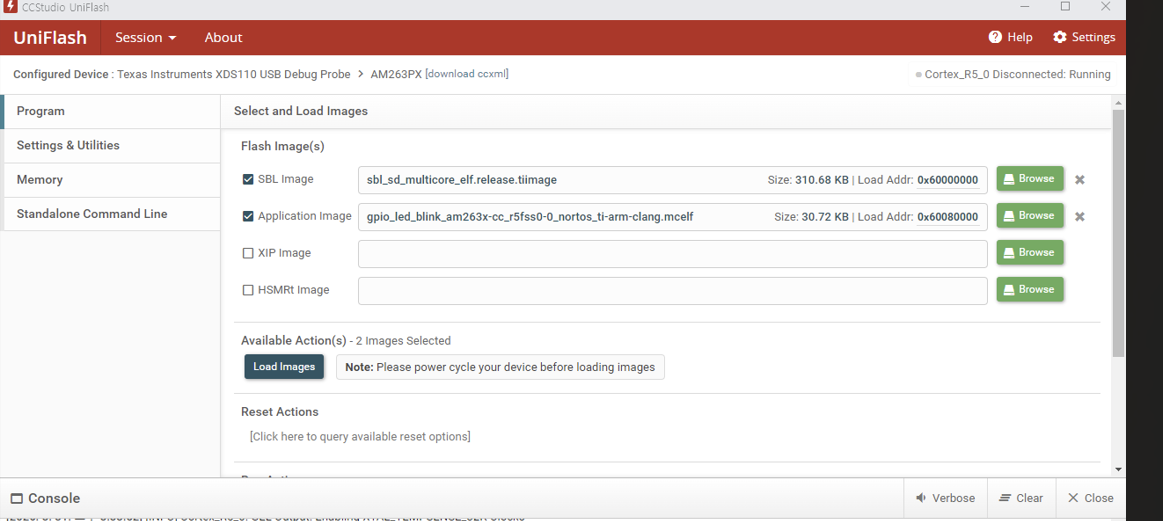
- To clarify, does Uniflash actually program the flash memory on this board, or is it only capable of loading the program into RAM?
2. Python CLI Script Hangs: I also attempted to flash the board using the Python script via the command prompt (cmd). However, the flashing process consistently hangs at the "2 of 3" stage and does not proceed further.
I have downloaded and tested both the mcu_plus_sdk_am263px_11_01_00_19 and mcu_plus_sdk_am263x_11_01_00_19 SDKs, but the exact same issues occur in both cases.

My Questions:
-
Are there any specific hardware settings (like specific Boot Mode DIP switch configurations during flashing vs. booting) I might be missing for the TMDSCNCD263P-SIP?
-
Could there be an issue with the prebuilt SBL images in these specific SDK versions?
Any guidance on how to successfully flash and boot this example would be greatly appreciated.
I also attempted to flash the board using the Python script via the command prompt (cmd). I used the following configuration parameters for the flash tool:
python uart_uniflash.py -p COM3 --cfg=C:\ti\my_flash.cfg
--flash-writer=C:/ti/mcu_plus_sdk_am263x_11_01_00_19/tools/boot/sbl_prebuilt/am263x-cc/sbl_uart_uniflash.release.tiimage
--file=C:/ti/mcu_plus_sdk_am263x_11_01_00_19/tools/boot/sbl_prebuilt/am263x-cc/sbl_qspi_multicore_elf.release.tiimage --operation=flash --flash-offset=0x0
--file=C:/Users/wlsl0/workspace_v12/gpio_led_blink_am263px-cc_r5fss0-0_nortos_ti-arm-clang/Release/gpio_led_blink_am263px-cc_r5fss0-0_nortos_ti-arm-clang.mcelf --operation=flash --flash-offset=0x80000
Thank you.

