This thread has been locked.

If you have a related question, please click the "Ask a related question" button in the top right corner. The newly created question will be automatically linked to this question.

[FAQ] AM13E23019: How to enable the CSC mode in AM13E230x device? How to use UART bootloader to flash image to the device?

Part Number: AM13E23019
Other Parts Discussed in Thread: SYSCONFIG

Hi experts, 

I am using the AM13E230x device along with the mcu_sdk v26.0

  1. Is it possible to enable a custom bootloader in TI AM13E230x?
  2. If so, how to enable and flash the custom bootloader and the application?
  3. How to use the BSL (Boot-Start Loader) UART mode and flash application over UART to the AM13E230x device?
  • Hi,

    • The TI AM13E230x BootROM code is split into two parts, the BCR (Boot Configuration Routine) and the BSL (Boot-Strap Loader). Both the modules are flexible in terms of configuration and are responsible for booting up the device, initializing memory, peripherals, receiving application image and storing it in RAM/Flash, authentication of images and booting the application. The flash non-main region holds these configurations and needs to be programmed with the desired configurations.
    • The default bootflow after a power-on executes the BCR first and then the BSL (If not disabled). After this, if the CSC (customer secure code) or customer bootloader is enabled, it executes, which later boots the application.
      The AM13Ex academy bootflow chapterAM13E230x TRM section 7.3 and the Bootloader user guide discuss the responsibilities and configuration of BCR/BSL in depth.

    How to enable CSC?

    • As of MCU_SDK version 26.00.00.06, to override the boot settings (BCR and BSL), create a binary with the right BCR/BSL configs for the flash non-main region and overwrite the default configuration.
    • Attached in this E2E is a sample configuration which enables the CSC (customer secure code), which is basically a custom boot-loader that can be enabled to run after the TI ROM code.
    • The below .txt file can be be flashed to the non-main flash region of the device.
      @60100800
      00 00 00 05 BB AA BB AA BB AA BB AA 22 55 BB AA 
      FF FF BB AA BB AA BB AA FF FF FF FF FF FF FF FF 
      FF FF FF FF FF FF FF FF FF FF FF FF FF FF FF FF 
      FF FF FF FF FF FF FF FF FF FF FF FF FF FF FF FF 
      FF FF FF FF FF FF FF FF FF FF FF FF FF FF FF FF 
      FF FF FF FF FF FF FF FF FF FF FF FF FF FF FF FF 
      FF FF FF FF FF FF FF FF FF FF FF FF FF FF FF FF 
      FF FF FF FF FF FF FF FF FF FF FF FF FF FF FF FF 
      FF FF FF FF FF FF FF FF FF FF FF FF FF FF FF FF 
      FF FF FF FF FF FF FF FF 00 00 00 00 00 00 00 00 
      00 00 00 00 00 00 00 00 00 00 00 00 00 00 00 00 
      00 00 00 00 00 00 00 00 FF FF 00 00 FF FF FF FF 
      FF FF FF FF FF FF FF FF FF FF FF FF FF FF FF FF 
      FF FF FF FF FF FF FF FF FF FF FF FF FF FF FF FF 
      FF FF FF FF BB AA 00 00 FF FF FF FF FF FF FF FF 
      00 00 00 00 00 00 00 00 00 00 00 00 00 00 00 00 
      00 00 00 00 FF FF FF FF FF FF FF FF 00 00 00 00 
      00 00 00 00 00 00 00 00 00 00 00 00 00 00 00 00 
      FF FF FF FF FF FF FF FF FF FF FF FF 00 00 00 00 
      FF 0F 00 FF C8 08 00 00 00 00 00 00 00 00 00 00 
      00 00 00 00 00 00 00 00 00 00 00 00 7E 34 22 5C 
      @60100C00
      00 00 00 05 01 07 00 07 16 04 17 04 0B 0A 0C 0A 
      86 06 BB AA FF FF FF FF FF FF FF FF FF FF FF FF 
      FF FF FF FF FF FF FF FF FF FF FF FF FF FF FF FF 
      FF FF FF FF FF FF FF FF FF FF 02 00 48 00 00 00 
      00 00 00 00 00 00 00 00 00 00 00 00 86 A4 9E 5A 
      q

    Steps to flash the updated Non-main configuration:

    1.Connect the device through CCS (Code Composer Studio)

    • Launch CCS
    • Connect to the AM13E2x device/LaunchPad

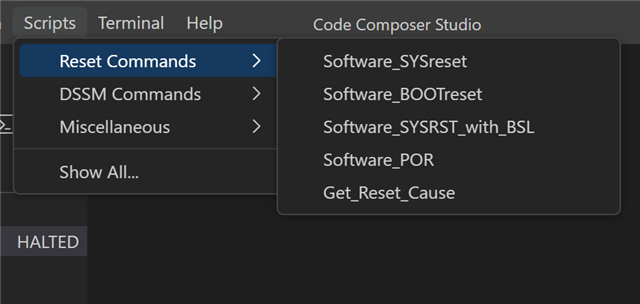
    2.Navigate to Scripts Menu

    • Click on "Scripts“ in the top menu bar
    • Look for reset commands section

    3.Trigger BSL Reset

    • Go to "reset commands“ and click on "SOFTWARE_SYSRST_WITH_BSL“
    • This will invoke the device into BSL mode

    4.Disconnect from Debug Session

    • Disconnect the device from the CCS debug session
    • Device is now in BSL mode and listening on the configured COM port

    5.Ready for BSL Command

    • Open terminal and run the BSL command immediately

    6. Run the python script (bsl_cli_am13e2.py)

    • python bsl_cli_am13e2.py --no-invoke flash csc_exist_NM.txt
      
      
      import argparse
      import os
      import struct
      import subprocess
      import serial
      import time
      import sys
      from typing import Optional, List, Tuple
      from elftools.elf.elffile import ELFFile
      
      # ---------------------------------------------------------------------------
      # Configuration defaults
      # ---------------------------------------------------------------------------
      DEFAULT_BAUD_RATE = 9600
      SERIAL_TIMEOUT = 5
      
      # Serial port – set this to your BSL UART COM port (USB-to-UART adapter)
      DEFAULT_PORT = "COM24"
      
      # ---------------------------------------------------------------------------
      # BSL Protocol Constants (AM13E2x)
      # ---------------------------------------------------------------------------
      PACKET_HEADER_TX = 0x80        # Host -> Device
      PACKET_HEADER_RX = 0x08        # Device -> Host
      
      # Command opcodes (from secure-rom BSL_CI.h)
      CMD_CONNECTION          = 0x12
      CMD_GET_IDENTITY        = 0x19
      CMD_UNLOCK_BSL          = 0x21
      CMD_GET_SOC_ID          = 0x22
      CMD_MASS_ERASE          = 0x15
      CMD_FLASH_RANGE_ERASE   = 0x23
      CMD_PROGRAM_DATA        = 0x20
      CMD_PROGRAM_DATA_FAST   = 0x24
      CMD_MEMORY_READ_BACK    = 0x29
      CMD_FACTORY_RESET       = 0x30
      CMD_STANDALONE_VERIFY   = 0x26
      CMD_START_APPLICATION   = 0x40
      
      # Response command bytes (from secure-rom BSL_CI.h)
      RSP_MEMORY_READ_BACK    = 0x30
      RSP_GET_IDENTITY        = 0x31
      RSP_STANDALONE_VERIFY   = 0x32
      RSP_GET_SOC_ID          = 0x33
      RSP_MESSAGE_REPLY       = 0x3B
      RSP_DETAILED_ERROR      = 0x3A
      
      # BSL error codes (from secure-rom BSL_CI.h)
      BSL_ERRORS = {
          0x00: "Success",
          0x01: "BSL locked",
          0x02: "Password error",
          0x03: "Multiple password errors (security alert triggered)",
          0x04: "Unknown command",
          0x05: "Invalid memory range",
          0x06: "Invalid command",
          0x07: "Factory reset disabled",
          0x08: "Factory reset password error",
          0x09: "Readout disabled",
          0x0A: "Invalid address/length alignment (must be 16-byte aligned)",
          0x0B: "Standalone verification invalid length",
          0x0C: "SHA check error",
          0xF0: "Flash command failed",
      }
      
      # UART-level ACK/error codes (single-byte, from secure-rom BSL_PI.c)
      BSL_ACK = 0x00
      UART_ERRORS = {
          0x00: "ACK (no error)",
          0x51: "Header incorrect",
          0x52: "Checksum incorrect",
          0x53: "Packet size zero",
          0x54: "Packet size exceeds buffer",
          0x55: "Unknown error",
          0x56: "Unknown baud rate",
          0x57: "Packet size error",
      }
      
      # Protocol limits
      # NOTE: AM13 supports up to 32KB buffers (BSL_MAX_BUF_SIZE = 0x7FFF),
      # but actual size depends on device SRAM. We use a safe default of 256
      # bytes per chunk until GET_IDENTITY tells us the real buffer size.
      # Address and length for PROGRAM_DATA must be 16-byte aligned.
      DEFAULT_CHUNK_SIZE = 256
      PROGRAM_ALIGNMENT = 16
      PASSWORD_SIZE = 32
      HDR_LEN_CMD_BYTES = 4   # header(1) + length(2) + cmd(1)
      CRC_BYTES = 4
      ADDR_BYTES = 4
      BSL_PI_WRAPPER_SIZE = 7  # header(1) + length(2) + CRC(4)
      
      
      # ---------------------------------------------------------------------------
      # Memory region definitions (AM13E2x)
      # ---------------------------------------------------------------------------
      # Main flash memory range: 0x00000000 - 0x0007FFFF (512KB)
      MAIN_FLASH_START = 0x00000000
      MAIN_FLASH_END = 0x0007FFFF
      
      # Non-main memory range: 0x60100000 - 0x60101FFF (configuration/info memory)
      NON_MAIN_MEMORY_START = 0x60100000
      NON_MAIN_MEMORY_END = 0x60101FFF
      
      
      # ---------------------------------------------------------------------------
      # CRC32 (same as MSPM0L/G BSL)
      # ---------------------------------------------------------------------------
      CRC32_POLY = 0xEDB88320
      
      def crc32(data: bytes) -> int:
          crc = 0xFFFFFFFF
          for b in data:
              crc ^= b
              for _ in range(8):
                  mask = -(crc & 1)
                  crc = (crc >> 1) ^ (CRC32_POLY & mask)
          return crc
      
      
      # ---------------------------------------------------------------------------
      # Packet construction / parsing
      # ---------------------------------------------------------------------------
      def build_packet(cmd: int, data: bytes = b"") -> bytes:
          payload = bytes([cmd]) + data
          payload_len = len(payload)
          header = struct.pack("<BH", PACKET_HEADER_TX, payload_len)
          checksum = struct.pack("<I", crc32(payload))
          return header + payload + checksum
      
      
      def parse_response(raw: bytes) -> Tuple[Optional[int], Optional[bytes]]:
          """Parse a BSL response packet.
      
          Returns (response_cmd, data) or (None, None) on parse failure.
          """
          if len(raw) < HDR_LEN_CMD_BYTES + CRC_BYTES:
              return None, None
      
          header = raw[0]
          if header != PACKET_HEADER_RX and header != PACKET_HEADER_TX:
              # Some devices echo the TX header in responses
              pass  # still try to parse
      
          payload_len = struct.unpack_from("<H", raw, 1)[0]
          resp_cmd = raw[3]
          data = raw[4 : 4 + payload_len - 1]
      
          # Validate CRC
          expected_crc_offset = 3 + payload_len
          if len(raw) >= expected_crc_offset + 4:
              received_crc = struct.unpack_from("<I", raw, expected_crc_offset)[0]
              computed_crc = crc32(raw[3 : 3 + payload_len])
              if received_crc != computed_crc:
                  print(f"  WARNING: CRC mismatch (received 0x{received_crc:08X}, computed 0x{computed_crc:08X})")
      
          return resp_cmd, data
      
      
      # ---------------------------------------------------------------------------
      # Firmware file loaders
      # ---------------------------------------------------------------------------
      def load_ti_txt(filepath: str) -> List[Tuple[int, bytes]]:
          """Load a TI-TXT format file. Returns list of (address, data) segments."""
          segments = []
          current_addr = 0
          current_data = bytearray()
      
          with open(filepath, "r") as f:
              for line in f:
                  line = line.strip()
                  if not line:
                      continue
                  if line.startswith("@"):
                      if current_data:
                          segments.append((current_addr, bytes(current_data)))
                          current_data = bytearray()
                      current_addr = int(line[1:], 16)
                  elif line.lower() == "q":
                      if current_data:
                          segments.append((current_addr, bytes(current_data)))
                          current_data = bytearray()
                      break
                  else:
                      current_data.extend(bytes.fromhex(line))
      
          if current_data:
              segments.append((current_addr, bytes(current_data)))
      
          return segments
      
      
      def load_intel_hex(filepath: str) -> List[Tuple[int, bytes]]:
          """Load an Intel HEX format file. Returns list of (address, data) segments."""
          segments = []
          base_addr = 0
          current_addr = None
          current_data = bytearray()
      
          with open(filepath, "r") as f:
              for line in f:
                  line = line.strip()
                  if not line.startswith(":"):
                      continue
                  raw = bytes.fromhex(line[1:])
                  byte_count = raw[0]
                  addr = struct.unpack(">H", raw[1:3])[0]
                  record_type = raw[3]
                  data = raw[4 : 4 + byte_count]
      
                  if record_type == 0x00:  # Data record
                      full_addr = base_addr + addr
                      if current_addr is not None and full_addr == current_addr + len(current_data):
                          current_data.extend(data)
                      else:
                          if current_data:
                              segments.append((current_addr, bytes(current_data)))
                          current_addr = full_addr
                          current_data = bytearray(data)
                  elif record_type == 0x02:  # Extended segment address
                      base_addr = struct.unpack(">H", data)[0] << 4
                  elif record_type == 0x04:  # Extended linear address
                      base_addr = struct.unpack(">H", data)[0] << 16
                  elif record_type == 0x01:  # EOF
                      break
      
          if current_data and current_addr is not None:
              segments.append((current_addr, bytes(current_data)))
      
          return segments
      
      
      def load_binary(filepath: str, start_addr: int) -> List[Tuple[int, bytes]]:
          """Load a raw binary file at a given start address."""
          with open(filepath, "rb") as f:
              data = f.read()
          return [(start_addr, data)]
      
      
      def load_elf(filepath: str) -> List[Tuple[int, bytes]]:
          """Load an ELF (.out) file. Returns list of (address, data) segments from loadable sections.
      
          Merges all segments into one contiguous block with 16-byte alignment to satisfy BSL requirements.
          """
          flash_segments = []
      
          with open(filepath, "rb") as f:
              elf = ELFFile(f)
      
              # Collect all LOAD segments that go to flash (not RAM)
              for segment in elf.iter_segments():
                  if segment['p_type'] == 'PT_LOAD':
                      paddr = segment['p_paddr']
                      data = segment.data()
      
                      # Only include segments with non-zero size in flash memory
                      # Skip RAM segments (typically addresses >= 0x20000000)
                      if len(data) > 0 and paddr < 0x20000000:
                          flash_segments.append((paddr, data))
      
          if not flash_segments:
              raise ValueError(f"No loadable flash segments found in ELF file: {filepath}")
      
          # Sort segments by address
          flash_segments.sort(key=lambda x: x[0])
      
          # Find the address range
          min_addr = flash_segments[0][0]
          max_addr = max(addr + len(data) for addr, data in flash_segments)
      
          # Align start address down to 16-byte boundary
          aligned_start = (min_addr // 16) * 16
      
          # Calculate total size and align up to 16-byte boundary
          total_size = max_addr - aligned_start
          aligned_size = ((total_size + 15) // 16) * 16
      
          # Create buffer filled with 0xFF (erased flash state)
          buffer = bytearray([0xFF] * aligned_size)
      
          # Copy all segment data into the buffer at their respective offsets
          for addr, data in flash_segments:
              offset = addr - aligned_start
              buffer[offset:offset + len(data)] = data
      
          return [(aligned_start, bytes(buffer))]
      
      
      def load_firmware(filepath: str, start_addr: int = 0) -> List[Tuple[int, bytes]]:
          """Auto-detect format and load firmware file."""
          ext = os.path.splitext(filepath)[1].lower()
          if ext in (".hex",):
              print(f"Loading Intel HEX file: {filepath}")
              return load_intel_hex(filepath)
          elif ext in (".bin",):
              print(f"Loading binary file: {filepath} at address 0x{start_addr:08X}")
              return load_binary(filepath, start_addr)
          elif ext in (".out",):
              print(f"Loading ELF file: {filepath}")
              return load_elf(filepath)
          else:
              # Default to TI-TXT
              print(f"Loading TI-TXT file: {filepath}")
              return load_ti_txt(filepath)


      # ---------------------------------------------------------------------------
      # Helper function to check memory regions
      # ---------------------------------------------------------------------------
      def has_non_main_memory_addresses(segments: List[Tuple[int, bytes]]) -> bool:
          """Check if any programming address falls within non-main memory region.
      
          Args:
              segments: List of (address, data) tuples representing firmware segments
      
          Returns:
              True if any address is in non-main memory (0x60100000-0x60101FFF), False otherwise
          """
          for addr, data in segments:
              # Check if segment start address is in non-main memory
              if NON_MAIN_MEMORY_START <= addr <= NON_MAIN_MEMORY_END:
                  return True
              # Check if segment end address is in non-main memory
              end_addr = addr + len(data) - 1
              if NON_MAIN_MEMORY_START <= end_addr <= NON_MAIN_MEMORY_END:
                  return True
              # Check if segment spans across non-main memory
              if addr < NON_MAIN_MEMORY_START and end_addr > NON_MAIN_MEMORY_END:
                  return True
          return False
      
      
      # ---------------------------------------------------------------------------
      # BSLConnection class
      # ---------------------------------------------------------------------------
      class BSLConnection:
          """Manages BSL connection to an AM13E2x device over UART."""
      
          def __init__(self, port: str, baud_rate: int = DEFAULT_BAUD_RATE,
                       no_invoke: bool = False, verbose: bool = False):
              self.port_name = port
              self.baud_rate = baud_rate
              self.no_invoke = no_invoke
              self.verbose = verbose
              self.ser: Optional[serial.Serial] = None
              # Max data bytes per PROGRAM_DATA chunk. Updated by GET_IDENTITY
              # to match device buffer size. Must subtract wrapper overhead
              # (cmd byte + 4 addr bytes = 5 bytes) from the device buffer.
              self.max_chunk_size = DEFAULT_CHUNK_SIZE
      
          def open(self, wait: bool = False) -> bool:
              if wait:
                  print(f"  Waiting for {self.port_name}... (unplug/replug USB now)")
                  while True:
                      try:
                          self.ser = serial.Serial(
                              port=self.port_name,
                              baudrate=self.baud_rate,
                              bytesize=serial.EIGHTBITS,
                              parity=serial.PARITY_NONE,
                              stopbits=serial.STOPBITS_ONE,
                              timeout=SERIAL_TIMEOUT,
                              xonxoff=False,
                              rtscts=False,
                              dsrdtr=False,
                          )
                          print(f"  Opened {self.port_name} at {self.baud_rate} baud")
                          return True
                      except serial.SerialException:
                          time.sleep(0.2)
              else:
                  try:
                      self.ser = serial.Serial(
                          port=self.port_name,
                          baudrate=self.baud_rate,
                          bytesize=serial.EIGHTBITS,
                          parity=serial.PARITY_NONE,
                          stopbits=serial.STOPBITS_ONE,
                          timeout=SERIAL_TIMEOUT,
                          xonxoff=False,
                          rtscts=False,
                          dsrdtr=False,
                      )
                      print(f"  Opened {self.port_name} at {self.baud_rate} baud")
                      return True
                  except Exception as e:
                      print(f"  Failed to open {self.port_name}: {e}")
                      return False
      
          def close(self):
              if self.ser and self.ser.is_open:
                  try:
                      self.ser.close()
                      if self.verbose:
                          print(f"  Closed {self.port_name}")
                  except Exception as e:
                      print(f"  Error closing {self.port_name}: {e}")
      
          # -- BSL invocation via XDS110 ------------------------------------------
      
          def invoke_bsl_mode(self):
              """Handle BSL invocation mode."""
              if self.no_invoke:
                  # User already has device in BSL mode (via main.c)
                  return
      
              # Device not in BSL mode - instruct user to flash main.c
              print("\n  ERROR: Device not in BSL mode")
              print(f"  Please flash main.c using CCS, then run with --no-invoke flag")
              print(f"  Example: python {os.path.basename(__file__)} --no-invoke flash firmware.out\n")
              return False
      
          # -- Low-level send/receive ---------------------------------------------
      
          def send_packet(self, packet: bytes) -> bool:
              if not self.ser or not self.ser.is_open:
                  print("  Serial port not open")
                  return False
              try:
                  self.ser.write(packet)
                  if self.verbose:
                      print(f"  TX [{len(packet)}]: {packet.hex()}")
                  return True
              except Exception as e:
                  print(f"  Error sending: {e}")
                  return False
      
          def read_response_raw(self, expected_len: int = 0, timeout_s: float = 5.0) -> Optional[bytes]:
              if not self.ser or not self.ser.is_open:
                  return None
      
              old_timeout = self.ser.timeout
              self.ser.timeout = timeout_s
      
              try:
                  # Read header first (3 bytes: header + length)
                  hdr = self.ser.read(3)
                  if len(hdr) < 3:
                      if self.verbose:
                          print(f"  RX timeout waiting for header (got {len(hdr)} bytes)")
                      return hdr if hdr else None
      
                  payload_len = struct.unpack_from("<H", hdr, 1)[0]
                  # Read payload + CRC
                  remaining = payload_len + CRC_BYTES
                  rest = self.ser.read(remaining)
                  raw = hdr + rest
      
                  if self.verbose:
                      print(f"  RX [{len(raw)}]: {raw.hex()}")
                  return raw
              except Exception as e:
                  print(f"  Error reading: {e}")
                  return None
              finally:
                  self.ser.timeout = old_timeout
      
          def read_ack(self, timeout_s: float = 5.0) -> Optional[int]:
              """Read a single ACK byte (for Connection command)."""
              if not self.ser or not self.ser.is_open:
                  return None
              old_timeout = self.ser.timeout
              self.ser.timeout = timeout_s
              try:
                  data = self.ser.read(1)
                  if data:
                      if self.verbose:
                          print(f"  RX ACK: 0x{data[0]:02X}")
                      return data[0]
                  return None
              except Exception as e:
                  print(f"  Error reading ACK: {e}")
                  return None
              finally:
                  self.ser.timeout = old_timeout
      
          # -- BSL Commands -------------------------------------------------------
      
          def cmd_connection(self, retries: int = 3) -> bool:
              """Send Connection command (0x12) with retries.
      
              During auto-detection the ROM BSL sends a single-byte ACK (0x00)
              and locks onto UART as the active interface. The connection command
              should only be sent once (during auto-detection phase). Sending it
              again during the command loop will return BSL_INVALID_COMMAND.
              """
              for attempt in range(retries):
                  if attempt > 0:
                      print(f"  Retry {attempt}/{retries-1}...")
                      time.sleep(0.5)
      
                  # Clear any pending data
                  if self.ser and self.ser.is_open:
                      self.ser.reset_input_buffer()
                      self.ser.reset_output_buffer()
      
                  packet = build_packet(CMD_CONNECTION)
                  if not self.send_packet(packet):
                      continue
      
                  time.sleep(0.1)
                  ack = self.read_ack(timeout_s=5.0)
      
                  if ack is None:
                      if attempt == retries - 1:
                          print("  ERROR: No response from BSL")
                          print("  Make sure device is in BSL mode (flash main.c first)")
                      continue
      
                  if ack == BSL_ACK:
                      print("  BSL connection established (interface locked to UART)")
                      # Drain any extra response bytes BSL sends after connection ACK
                      time.sleep(0.2)
                      self.ser.reset_input_buffer()
                      return True
                  else:
                      err_msg = UART_ERRORS.get(ack, f"Unknown (0x{ack:02X})")
                      print(f"  Connection failed: {err_msg}")
                      continue
      
              return False
      
          def cmd_get_identity(self) -> Optional[bytes]:
              """Send Get Identity command (0x19). Returns device info payload.
      
              Also reads the device's BSL buffer size from the response and
              updates max_chunk_size accordingly.
              """
              packet = build_packet(CMD_GET_IDENTITY)
              if not self.send_packet(packet):
                  return None
      
              # GET_IDENTITY gets a single-byte ACK first, then a full response packet
              ack = self.read_ack(timeout_s=5.0)
              if ack is not None and ack != BSL_ACK:
                  err_msg = UART_ERRORS.get(ack, f"Unknown (0x{ack:02X})")
                  print(f"  Get Identity ACK error: {err_msg}")
                  return None
      
              raw = self.read_response_raw(timeout_s=5.0)
              if not raw:
                  print("  No response to Get Identity")
                  return None
      
              resp_cmd, data = parse_response(raw)
              if resp_cmd == RSP_GET_IDENTITY:
                  # Try to extract buffer size from identity response
                  # MSPM0/AM13 identity response typically has buffer size at offset 1-2
                  if data and len(data) >= 4:
                      buf_size = struct.unpack_from("<H", data, 1)[0]
                      if buf_size > BSL_PI_WRAPPER_SIZE:
                          # Usable data per chunk = buffer size - wrapper(7) - cmd(1) - addr(4)
                          usable = buf_size - BSL_PI_WRAPPER_SIZE - 1 - ADDR_BYTES
                          # Round down to 16-byte alignment
                          usable = (usable // PROGRAM_ALIGNMENT) * PROGRAM_ALIGNMENT
                          if usable > 0:
                              self.max_chunk_size = usable
                              if self.verbose:
                                  print(f"  Device buffer: {buf_size} bytes, max chunk: {self.max_chunk_size} bytes")
                  return data
              elif resp_cmd == RSP_MESSAGE_REPLY:
                  err = data[0] if data else 0xFF
                  print(f"  Get Identity error: {BSL_ERRORS.get(err, f'0x{err:02X}')}")
                  return None
              else:
                  print(f"  Unexpected response cmd: 0x{resp_cmd:02X}" if resp_cmd else "  Failed to parse response")
                  return raw
      
          def _read_ack_then_response(self, cmd_name: str, timeout_s: float = 5.0) -> Tuple[Optional[int], Optional[bytes]]:
              """Common flow: read single-byte ACK, then full response packet.
      
              The ROM BSL PI layer sends a 0x00 ACK after validating the packet,
              then the CI layer processes the command and sends a full response.
              Returns (resp_cmd, data) or (None, None) on failure.
              """
              ack = self.read_ack(timeout_s=timeout_s)
              if ack is not None and ack != BSL_ACK:
                  err_msg = UART_ERRORS.get(ack, f"Unknown (0x{ack:02X})")
                  print(f"  {cmd_name} packet error: {err_msg}")
                  return None, None
      
              raw = self.read_response_raw(timeout_s=timeout_s)
              if not raw:
                  print(f"  No response to {cmd_name}")
                  return None, None
      
              return parse_response(raw)
      
          def cmd_unlock(self, password: bytes = None) -> bool:
              """Send Unlock BSL command (0x21) with 32-byte password."""
              if password is None:
                  password = b"\xFF" * PASSWORD_SIZE
              if len(password) != PASSWORD_SIZE:
                  print(f"  Password must be {PASSWORD_SIZE} bytes (got {len(password)})")
                  return False
      
              packet = build_packet(CMD_UNLOCK_BSL, password)
              if not self.send_packet(packet):
                  return False
      
              resp_cmd, data = self._read_ack_then_response("Unlock BSL")
              if resp_cmd == RSP_MESSAGE_REPLY:
                  err = data[0] if data else 0xFF
                  if err == 0x00:
                      print("  BSL unlocked successfully")
                      return True
                  else:
                      print(f"  Unlock failed: {BSL_ERRORS.get(err, f'0x{err:02X}')}")
                      return False
              elif resp_cmd is None:
                  return False
              else:
                  print(f"  Unexpected response to unlock (cmd=0x{resp_cmd:02X})")
                  return False
      
          def cmd_mass_erase(self) -> bool:
              """Send Mass Erase command (0x15)."""
              packet = build_packet(CMD_MASS_ERASE)
              if not self.send_packet(packet):
                  return False
      
              resp_cmd, data = self._read_ack_then_response("Mass Erase", timeout_s=10.0)
              if resp_cmd == RSP_MESSAGE_REPLY:
                  err = data[0] if data else 0xFF
                  if err == 0x00:
                      print("  Mass erase complete")
                      return True
                  else:
                      print(f"  Mass erase failed: {BSL_ERRORS.get(err, f'0x{err:02X}')}")
                      return False
              elif resp_cmd is None:
                  return False
              else:
                  print(f"  Unexpected response to mass erase (cmd=0x{resp_cmd:02X})")
                  return False
      
          def cmd_program_data(self, addr: int, data: bytes) -> bool:
              """Send Program Data command (0x20) for a single chunk.
      
              Address and data length must be 16-byte aligned per ROM requirements.
              """
              if len(data) > self.max_chunk_size:
                  print(f"  Chunk too large: {len(data)} bytes (max {self.max_chunk_size})")
                  return False
      
              addr_bytes = struct.pack("<I", addr)
              packet = build_packet(CMD_PROGRAM_DATA, addr_bytes + data)
              if not self.send_packet(packet):
                  return False
      
              resp_cmd, resp_data = self._read_ack_then_response(f"Program @0x{addr:08X}")
              if resp_cmd == RSP_MESSAGE_REPLY:
                  err = resp_data[0] if resp_data else 0xFF
                  if err == 0x00:
                      return True
                  else:
                      print(f"\n  Program failed at 0x{addr:08X}: {BSL_ERRORS.get(err, f'0x{err:02X}')}")
                      return False
              elif resp_cmd is None:
                  return False
              else:
                  print(f"\n  Unexpected response at 0x{addr:08X} (cmd=0x{resp_cmd:02X})")
                  return False
      
          def cmd_program_segments(self, segments: List[Tuple[int, bytes]]) -> bool:
              """Program all firmware segments in chunks.
      
              Pads each chunk to 16-byte alignment as required by the AM13 ROM BSL.
              """
              total_bytes = sum(len(d) for _, d in segments)
              programmed = 0
      
              for seg_addr, seg_data in segments:
                  # Pad segment data to 16-byte alignment
                  pad_len = (PROGRAM_ALIGNMENT - (len(seg_data) % PROGRAM_ALIGNMENT)) % PROGRAM_ALIGNMENT
                  if pad_len:
                      seg_data = seg_data + b"\xFF" * pad_len
      
                  # Ensure segment start address is 16-byte aligned
                  if seg_addr % PROGRAM_ALIGNMENT != 0:
                      print(f"\n  WARNING: Segment address 0x{seg_addr:08X} is not 16-byte aligned")
      
                  offset = 0
                  while offset < len(seg_data):
                      chunk_size = min(self.max_chunk_size, len(seg_data) - offset)
                      # Round chunk size down to 16-byte alignment
                      chunk_size = (chunk_size // PROGRAM_ALIGNMENT) * PROGRAM_ALIGNMENT
                      if chunk_size == 0:
                          chunk_size = PROGRAM_ALIGNMENT
      
                      chunk = seg_data[offset : offset + chunk_size]
                      addr = seg_addr + offset
      
                      if not self.cmd_program_data(addr, chunk):
                          return False
      
                      offset += chunk_size
                      programmed += min(chunk_size, total_bytes - (programmed))
                      pct = min((programmed / total_bytes) * 100, 100.0)
                      print(f"\r  Programming: {programmed}/{total_bytes} bytes ({pct:.1f}%)", end="", flush=True)
      
              print()  # newline after progress
              return True
      
          def cmd_standalone_verify(self, addr: int, length: int) -> Optional[int]:
              """Send Standalone Verification command (0x26). Returns CRC or None."""
              payload = struct.pack("<II", addr, length)
              packet = build_packet(CMD_STANDALONE_VERIFY, payload)
              if not self.send_packet(packet):
                  return None
      
              resp_cmd, data = self._read_ack_then_response("Standalone Verify", timeout_s=10.0)
              if resp_cmd == RSP_STANDALONE_VERIFY:
                  if data and len(data) >= 4:
                      return struct.unpack_from("<I", data, 0)[0]
                  return None
              elif resp_cmd == RSP_MESSAGE_REPLY:
                  err = data[0] if data else 0xFF
                  print(f"  Verification error: {BSL_ERRORS.get(err, f'0x{err:02X}')}")
                  return None
              elif resp_cmd is None:
                  return None
              else:
                  print(f"  Unexpected response to verify (cmd=0x{resp_cmd:02X})")
                  return None
      
          def cmd_memory_readback(self, addr: int, length: int) -> Optional[bytes]:
              """Send Memory Read Back command (0x29)."""
              payload = struct.pack("<II", addr, length)
              packet = build_packet(CMD_MEMORY_READ_BACK, payload)
              if not self.send_packet(packet):
                  return None
      
              resp_cmd, data = self._read_ack_then_response("Memory Read Back")
              if resp_cmd == RSP_MEMORY_READ_BACK:
                  return data
              elif resp_cmd == RSP_MESSAGE_REPLY:
                  err = data[0] if data else 0xFF
                  print(f"  Read back error: {BSL_ERRORS.get(err, f'0x{err:02X}')}")
                  return None
              elif resp_cmd is None:
                  return None
              else:
                  print(f"  Unexpected response to readback (cmd=0x{resp_cmd:02X})")
                  return None
      
          def cmd_factory_reset(self) -> bool:
              """Send Factory Reset command (0x30)."""
              packet = build_packet(CMD_FACTORY_RESET)
              if not self.send_packet(packet):
                  return False
      
              resp_cmd, data = self._read_ack_then_response("Factory Reset")
              if resp_cmd == RSP_MESSAGE_REPLY:
                  err = data[0] if data else 0xFF
                  if err == 0x00:
                      print("  Factory reset complete")
                      return True
                  else:
                      print(f"  Factory reset failed: {BSL_ERRORS.get(err, f'0x{err:02X}')}")
                      return False
              elif resp_cmd is None:
                  return False
              else:
                  print(f"  Unexpected response to factory reset (cmd=0x{resp_cmd:02X})")
                  return False
      
          def cmd_start_application(self) -> bool:
              """Send Start Application command (0x40).
      
              The ROM BSL clears RAM, posts the flash semaphore, and resets the
              device with DL_SYSCTL_RESET_BOOTLOADER_EXIT. No response is sent
              because the device resets immediately after processing.
              """
              packet = build_packet(CMD_START_APPLICATION)
              if not self.send_packet(packet):
                  return False
      
              # Wait briefly for the ACK (device may reset before sending response)
              ack = self.read_ack(timeout_s=2.0)
              if ack is not None and ack == BSL_ACK:
                  if self.verbose:
                      print("  ACK received before device reset")
      
              print("  Start Application command sent (device resetting)")
              return True
      
          # -- High-level sequences -----------------------------------------------
      
          def connect_to_bsl(self) -> bool:
              """Full connection sequence: invoke BSL mode, then send connection command."""
              self.invoke_bsl_mode()
              time.sleep(0.2)
              self.ser.reset_input_buffer()
              print("  Sending connection command...")
              return self.cmd_connection()
      
      
      # ---------------------------------------------------------------------------
      # Helper to create BSLConnection from parsed args
      # ---------------------------------------------------------------------------
      def make_bsl(args) -> BSLConnection:
          port = args.port or DEFAULT_PORT
      
          if args.verbose:
              print(f"  Port: {port}")
      
          return BSLConnection(
              port=port,
              baud_rate=args.baud,
              no_invoke=args.no_invoke,
              verbose=args.verbose,
          )
      
      
      # ---------------------------------------------------------------------------
      # CLI command handlers
      # ---------------------------------------------------------------------------
      def cmd_connect(args):
          """Test BSL connection."""
          print("\n=== BSL Connection Test ===")
          bsl = make_bsl(args)
          try:
              wait = getattr(args, 'wait', False)
              if not bsl.open(wait=wait):
                  return 1
              if not bsl.connect_to_bsl():
                  return 1
              print("\n  Connection test successful!")
              return 0
          finally:
              bsl.close()
      
      
      def cmd_get_id(args):
          """Get device identity information."""
          print("\n=== Get Device Identity ===")
          bsl = make_bsl(args)
          try:
              if not bsl.open(wait=getattr(args, 'wait', False)):
                  return 1
              if not bsl.connect_to_bsl():
                  return 1
      
              data = bsl.cmd_get_identity()
              if data:
                  print(f"  Device info: {data.hex()}")
                  return 0
              else:
                  print("  Failed to get device identity")
                  return 1
          finally:
              bsl.close()
      
      
      def cmd_unlock(args):
          """Unlock BSL with password."""
          print("\n=== Unlock BSL ===")
          bsl = make_bsl(args)
          try:
              if not bsl.open(wait=getattr(args, 'wait', False)):
                  return 1
              if not bsl.connect_to_bsl():
                  return 1
      
              password = None
              if args.password:
                  password = bytes.fromhex(args.password)
              if bsl.cmd_unlock(password):
                  return 0
              return 1
          finally:
              bsl.close()
      
      
      def cmd_erase(args):
          """Mass erase flash."""
          print("\n=== Mass Erase ===")
          bsl = make_bsl(args)
          try:
              if not bsl.open(wait=getattr(args, 'wait', False)):
                  return 1
              if not bsl.connect_to_bsl():
                  return 1
              if not bsl.cmd_unlock():
                  return 1
              print("\n  Erasing flash...")
              if bsl.cmd_mass_erase():
                  return 0
              return 1
          finally:
              bsl.close()
      
      
      def cmd_flash(args):
          """Full flash sequence: connect -> unlock -> erase -> program -> start app."""
          print("\n=== Flash Firmware ===")
      
          segments = load_firmware(args.file, start_addr=args.address)
          if not segments:
              print("  ERROR: No data found in firmware file")
              return 1
      
          total_bytes = sum(len(d) for _, d in segments)
          print(f"  Loaded {len(segments)} segment(s), {total_bytes} bytes total")
          for addr, data in segments:
              print(f"    0x{addr:08X} - 0x{addr + len(data) - 1:08X} ({len(data)} bytes)")
      
          bsl = make_bsl(args)
          try:
              if not bsl.open(wait=getattr(args, 'wait', False)):
                  return 1
      
              # Step 1: Connect
              print("\n--- Step 1: Connect ---")
              if not bsl.connect_to_bsl():
                  return 1
      
              # Step 1b: Get device identity (discovers buffer size for optimal chunking)
              print("\n--- Step 1b: Get Device Identity ---")
              id_data = bsl.cmd_get_identity()
              if id_data:
                  print(f"  Device info: {id_data.hex()}")
                  print(f"  Using chunk size: {bsl.max_chunk_size} bytes")
              else:
                  print(f"  Could not get device identity, using default chunk size: {bsl.max_chunk_size} bytes")
      
              # Step 2: Unlock
              print("\n--- Step 2: Unlock BSL ---")
              password = None
              if args.password:
                  password = bytes.fromhex(args.password)
              if not bsl.cmd_unlock(password):
                  return 1
      
              # Step 3: Erase (choose appropriate erase command based on memory addresses)
              if not args.no_erase:
                  # Check if any programming address is in non-main memory
                  if has_non_main_memory_addresses(segments):
                      print("\n--- Step 3: Factory Reset (non-main memory detected) ---")
                      if not bsl.cmd_factory_reset():
                          return 1
                  else:
                      print("\n--- Step 3: Mass Erase (main memory only) ---")
                      if not bsl.cmd_mass_erase():
                          return 1
              else:
                  print("\n--- Step 3: Erase skipped (--no-erase) ---")
      
              # Step 4: Program
              print("\n--- Step 4: Program ---")
              if not bsl.cmd_program_segments(segments):
                  return 1
              print("  Programming complete!")
      
              # Step 5: Start application
              if not args.no_start:
                  print("\n--- Step 5: Start Application ---")
                  bsl.cmd_start_application()
              else:
                  print("\n--- Step 5: Start skipped (--no-start) ---")
      
              print("\n  Flash sequence complete!")
              return 0
      
          finally:
              bsl.close()
      
      
      def cmd_read(args):
          """Read back memory."""
          print("\n=== Memory Read Back ===")
          addr = int(args.address, 16) if isinstance(args.address, str) else args.address
          length = int(args.length, 0)
      
          bsl = make_bsl(args)
          try:
              if not bsl.open(wait=getattr(args, 'wait', False)):
                  return 1
              if not bsl.connect_to_bsl():
                  return 1
              if not bsl.cmd_unlock():
                  return 1
      
              print(f"\n  Reading {length} bytes from 0x{addr:08X}...")
              data = bsl.cmd_memory_readback(addr, length)
              if data:
                  print(f"  Data: {data.hex()}")
                  # Pretty hex dump
                  for i in range(0, len(data), 16):
                      hex_part = " ".join(f"{b:02X}" for b in data[i:i+16])
                      ascii_part = "".join(chr(b) if 32 <= b < 127 else "." for b in data[i:i+16])
                      print(f"  {addr + i:08X}  {hex_part:<48s}  {ascii_part}")
                  return 0
              else:
                  print("  Failed to read memory")
                  return 1
          finally:
              bsl.close()
      
      
      def cmd_verify(args):
          """Verify programmed firmware via standalone CRC check."""
          print("\n=== Standalone Verification ===")
      
          segments = load_firmware(args.file, start_addr=args.address)
          if not segments:
              print("  ERROR: No data found in firmware file")
              return 1
      
          bsl = make_bsl(args)
          try:
              if not bsl.open(wait=getattr(args, 'wait', False)):
                  return 1
              if not bsl.connect_to_bsl():
                  return 1
              if not bsl.cmd_unlock():
                  return 1
      
              all_ok = True
              for seg_addr, seg_data in segments:
                  print(f"\n  Verifying 0x{seg_addr:08X} ({len(seg_data)} bytes)...")
                  device_crc = bsl.cmd_standalone_verify(seg_addr, len(seg_data))
                  if device_crc is not None:
                      local_crc = crc32(seg_data)
                      if device_crc == local_crc:
                          print(f"  CRC match: 0x{device_crc:08X}")
                      else:
                          print(f"  CRC MISMATCH: device=0x{device_crc:08X} local=0x{local_crc:08X}")
                          all_ok = False
                  else:
                      print("  Verification failed")
                      all_ok = False
      
              return 0 if all_ok else 1
          finally:
              bsl.close()
      
      
      def cmd_start_app(args):
          """Start the application."""
          print("\n=== Start Application ===")
          bsl = make_bsl(args)
          try:
              if not bsl.open(wait=getattr(args, 'wait', False)):
                  return 1
              if not bsl.connect_to_bsl():
                  return 1
              bsl.cmd_start_application()
              return 0
          finally:
              bsl.close()
      
      
      def cmd_factory_reset(args):
          """Factory reset the device."""
          print("\n=== Factory Reset ===")
          bsl = make_bsl(args)
          try:
              if not bsl.open(wait=getattr(args, 'wait', False)):
                  return 1
              if not bsl.connect_to_bsl():
                  return 1
              if not bsl.cmd_unlock():
                  return 1
              if bsl.cmd_factory_reset():
                  return 0
              return 1
          finally:
              bsl.close()
      
      
      # ---------------------------------------------------------------------------
      # Main / argparse
      # ---------------------------------------------------------------------------
      def main():
          parser = argparse.ArgumentParser(
              description="AM13E2x BSL CLI - Bootstrap Loader tool for UART programming",
              formatter_class=argparse.RawDescriptionHelpFormatter,
              epilog="""\
      Examples:
        %(prog)s connect                          # Test BSL connection
        %(prog)s get-id                           # Get device identity
        %(prog)s flash firmware.out               # Flash ELF (.out) firmware (full sequence)
        %(prog)s flash firmware.hex               # Flash Intel HEX firmware
        %(prog)s flash firmware.txt               # Flash TI-TXT firmware
        %(prog)s flash firmware.bin --address 0x0 # Flash raw binary at address
        %(prog)s erase                            # Mass erase flash
        %(prog)s read 0x00000000 256              # Read 256 bytes from address 0
        %(prog)s start-app                        # Start the application
        %(prog)s --port COM5 connect              # Use specific COM port
      
      BSL Invocation:
        1. Flash main.c using CCS (one-time, device enters BSL mode)
        2. Run: %(prog)s --no-invoke flash firmware.out
        3. To flash again: Re-flash main.c, then repeat step 2
              """,
          )
      
          # Global arguments
          parser.add_argument("--port", "-p", default=None,
                              help="Serial port (e.g., COM5). Auto-detects XDS110 if not specified.")
          parser.add_argument("--baud", "-b", type=int, default=DEFAULT_BAUD_RATE,
                              help=f"Baud rate (default: {DEFAULT_BAUD_RATE})")
          parser.add_argument("--no-invoke", action="store_true",
                              help="Skip BSL invocation (device already in BSL mode via main.c)")
          parser.add_argument("--wait", action="store_true",
                              help="Wait for COM port to appear (use with unplug/replug workflow)")
          parser.add_argument("--verbose", "-v", action="store_true",
                              help="Enable verbose output (show raw TX/RX bytes)")
      
          subparsers = parser.add_subparsers(dest="command", help="Available commands")
      
          # connect
          p_connect = subparsers.add_parser("connect", help="Test BSL connection")
          p_connect.set_defaults(func=cmd_connect)
      
          # get-id
          p_getid = subparsers.add_parser("get-id", help="Get device identity")
          p_getid.set_defaults(func=cmd_get_id)
      
          # unlock
          p_unlock = subparsers.add_parser("unlock", help="Unlock BSL")
          p_unlock.add_argument("--password", default=None,
                                help="32-byte password as hex string (default: all 0xFF)")
          p_unlock.set_defaults(func=cmd_unlock)
      
          # erase
          p_erase = subparsers.add_parser("erase", help="Mass erase flash")
          p_erase.set_defaults(func=cmd_erase)
      
          # flash
          p_flash = subparsers.add_parser("flash", help="Flash firmware (connect -> unlock -> erase -> program -> start)")
          p_flash.add_argument("file", help="Firmware file (.out=ELF, .hex=Intel HEX, .txt=TI-TXT, .bin=raw binary)")
          p_flash.add_argument("--address", type=lambda x: int(x, 0), default=0,
                               help="Start address for .bin files (default: 0x0)")
          p_flash.add_argument("--password", default=None,
                               help="32-byte password as hex string (default: all 0xFF)")
          p_flash.add_argument("--no-erase", action="store_true",
                               help="Skip mass erase before programming")
          p_flash.add_argument("--no-start", action="store_true",
                               help="Don't start application after programming")
          p_flash.set_defaults(func=cmd_flash)
      
          # read
          p_read = subparsers.add_parser("read", help="Read back memory")
          p_read.add_argument("address", help="Start address (hex, e.g., 0x00000000)")
          p_read.add_argument("length", help="Number of bytes to read")
          p_read.set_defaults(func=cmd_read)
      
          # verify
          p_verify = subparsers.add_parser("verify", help="Verify programmed firmware via CRC")
          p_verify.add_argument("file", help="Firmware file to verify against")
          p_verify.add_argument("--address", type=lambda x: int(x, 0), default=0,
                                help="Start address for .bin files (default: 0x0)")
          p_verify.set_defaults(func=cmd_verify)
      
          # start-app
          p_start = subparsers.add_parser("start-app", help="Start the application")
          p_start.set_defaults(func=cmd_start_app)
      
          # factory-reset
          p_reset = subparsers.add_parser("factory-reset", help="Factory reset the device")
          p_reset.set_defaults(func=cmd_factory_reset)
      
          args = parser.parse_args()
      
          if not args.command:
              parser.print_help()
              return 0
      
          return args.func(args)
      
      
      if __name__ == "__main__":
          sys.exit(main())
      
      # AM13E2x BSL CLI Tool - Usage Guide
      
      ## Overview
      
      The BSL (Bootstrap Loader) CLI tool (`bsl_cli_am13e2.py`) is a Python script for programming firmware to AM13E2x devices over UART using the ROM bootloader.
      
      ## Before You Begin - Quick Checklist
      
      **Check your COM port** in Device Manager (e.g., COM21)
      **Edit `bsl_cli_am13e2.py` line 21** - Set `DEFAULT_PORT = "COM21"` (or your port)
      **Install Python packages**: `pip install pyserial pyelftools`
      **Have CCS installed** - Needed to flash main.c helper (one-time)
      **Read the "Quick Start Guide"** below for step-by-step instructions
      
      ## Hardware Setup
      
      ### Required Hardware
      - AM13E2 LaunchPad
      - USB cable
      
      ### UART Connections
      - **Using XDS110 (LaunchPad):** Application UART backchannel (COM21 by default)
      
      ## Script Configuration (Before First Use)
      
      ### Step 1: Find Your COM Port
      
      Check which COM port your device is using:
      
      **Windows:**
      1. Open **Device Manager** (Win+X → Device Manager)
      2. Expand **Ports (COM & LPT)**
      3. Look for **"XDS110 Class Application/User UART (COMxx)"**
      4. Note the COM port number (e.g., COM21)
      
      ### Step 2: Configure DEFAULT_PORT in Script
      
      Open `bsl_cli_am13e2.py` in a text editor and find this section near the top (lines 17-21):
      
      ```python
      # ---------------------------------------------------------------------------
      # Configuration defaults
      # ---------------------------------------------------------------------------
      DEFAULT_BAUD_RATE = 9600
      SERIAL_TIMEOUT = 5
      
      # Serial port – set this to your BSL UART COM port (XDS110 Application UART)
      DEFAULT_PORT = "COM21"
      ```
      
      **Change line 21 `DEFAULT_PORT` to match your COM port:**
      
      ```python
      DEFAULT_PORT = "COM21"
      ```
      
      **Note:** You can override this at runtime using `--port`:
      ```bash
      python bsl_cli_am13e2.py --port COM23 --no-invoke flash firmware.out
      ```
      
      ### Step 3: Verify Python Dependencies
      
      Ensure required Python packages are installed:
      
      ```bash
      pip install pyserial pyelftools
      ```
      
      **Required packages:**
      - `pyserial` - For UART communication
      - `pyelftools` - For reading ELF (.out) files
      
      ### Configuration Summary
      
      | Setting | Location | Default | Description |
      |---------|----------|---------|-------------|
      | **COM Port** | Line 21 | `"COM21"` | UART serial port (XDS110 or USB-UART) |
      | **Baud Rate** | Line 17 | `9600` | UART communication speed |
      | **Timeout** | Line 18 | `5` | Serial timeout (seconds) |
      
      **Visual Guide - What to Edit:**
      
      ```python
      # File: bsl_cli_am13e2.py
      # Lines 17-21
      
      DEFAULT_BAUD_RATE = 9600        # ← Line 17: Change if needed (usually keep 9600)
      SERIAL_TIMEOUT = 5              # ← Line 18: Change if needed (usually keep 5)
      
      # Serial port – set this to your BSL UART COM port
      DEFAULT_PORT = "COM21"          # ← Line 21: CHANGE THIS to your COM port!
      ```
      
      **After configuration, you're ready to use the tool!**
      
      ## Supported File Formats
      
      The tool supports multiple firmware file formats:
      
      | Format | Extension | Description | Notes |
      |--------|-----------|-------------|-------|
      | **ELF** | `.out` | TI CCS output format | **Recommended** - Direct from build |
      | **Intel HEX** | `.hex` | Intel HEX format | Standard hex format |
      | **TI-TXT** | `.txt` | TI text format | Legacy format |
      | **Binary** | `.bin` | Raw binary | Requires `--address` parameter |
      
      ## Quick Start Guide
      
      ### Step 1: One-Time Setup - Flash main.c
      
      Before you can use the BSL tool, you must flash the `main.c` helper program **once**:
      
      1. **Open CCS (Code Composer Studio)**
      2. **Import the project:**
         - File → Import → CCS Projects
         - Select: `hello_world_am13e230x_lp_m33_nortos_ti_arm_clang`
      3. **Build the project:**
         - Right-click project → Build Project
      4. **Flash main.c:**
         - Click the **Debug** button (bug icon)
         - Wait for it to halt at `main()`
         - Click **Resume** (or F8)
         - Device will **immediately enter BSL mode** (debugger will disconnect)
      5. **Terminate debug session:**
         - Click **Terminate** button (red square)
      
      **What main.c does:**
      ```c
      // Writes SYSCTL registers to invoke BSL mode
      SYSCTL_RESETLEVEL = 0x00000002;  // BOOTLOADERENTRY
      SYSCTL_RESETCMD = 0xE4000001;    // KEY + GO
      // Device resets into BSL mode with UART configured
      ```
      
      ### Step 2: Flash Your Firmware
      
      After main.c is running and device is in BSL mode:
      
      ```bash
      python bsl_cli_am13e2.py --no-invoke flash your_firmware.out
      ```
      
      **Full sequence:**
      ```bash
      # Flash ELF file (most common)
      python bsl_cli_am13e2.py --no-invoke flash gpio_output_toggle.out
      
      # Flash with verbose output
      python bsl_cli_am13e2.py --verbose --no-invoke flash firmware.out
      ```
      
      ### Step 3: For Subsequent Updates
      
      **IMPORTANT:** After the first BSL flash, your application overwrites main.c. To flash again:
      
      **Option A: Re-flash main.c (Repeat Step 1)**
      1. Flash main.c again using CCS
      2. Run BSL script with `--no-invoke`
      
      **Option B: Add BSL Entry to Your Application**
      Add this code to your firmware to enter BSL on command:
      ```c
      void enter_bsl_mode(void) {
          SYSCTL_RESETLEVEL = 0x00000002;  // BOOTLOADERENTRY
          SYSCTL_RESETCMD = 0xE4000001;    // KEY + GO
          // Device will reset into BSL mode
      }
      ```
      Trigger this function via GPIO, UART command, or button press.
      
      ## Complete Workflow Diagram
      
      ```
      ┌─────────────────────────────────────────────────────────┐
      │ FIRST TIME SETUP                                        │
      ├─────────────────────────────────────────────────────────┤
      │ 1. Build project in CCS                                 │
      │ 2. Flash main.c using CCS Debug                         │
      │ 3. Device enters BSL mode (debugger disconnects)       │
      │ 4. Terminate debug session in CCS                      │
      └─────────────────────────────────────────────────────────┘
                                ↓
      ┌─────────────────────────────────────────────────────────┐
      │ FLASH FIRMWARE VIA BSL                                  │
      ├─────────────────────────────────────────────────────────┤
      │ python bsl_cli_am13e2.py --no-invoke flash app.out     │
      │                                                         │
      │ This will:                                              │
      │ - Connect to BSL                                        │
      │ - Unlock BSL                                            │
      │ - Mass erase flash                                      │
      │ - Program your firmware                                 │
      │ - Start application                                     │
      └─────────────────────────────────────────────────────────┘
                                ↓
      ┌─────────────────────────────────────────────────────────┐
      │ APPLICATION RUNNING                                     │
      │ (main.c is now gone, replaced by your app)             │
      └─────────────────────────────────────────────────────────┘
                                ↓
      ┌─────────────────────────────────────────────────────────┐
      │ TO FLASH AGAIN: Choose one method                      │
      ├─────────────────────────────────────────────────────────┤
      │ Method 1: Re-flash main.c in CCS (go back to top)      │
      │ Method 2: Trigger BSL entry from your application      │
      └─────────────────────────────────────────────────────────┘
      ```
      
      ## Command Reference
      
      ### Global Options
      
      ```bash
      python bsl_cli_am13e2.py [OPTIONS] COMMAND [ARGS]
      ```
      
      | Option | Short | Description | Default |
      |--------|-------|-------------|---------|
      | `--port PORT` | `-p` | Serial port (e.g., COM21, COM23) | COM21 |
      | `--baud BAUD` | `-b` | Baud rate | 9600 |
      | `--no-invoke` | - | Skip BSL invocation (use after main.c) | False |
      | `--manual-invoke` | - | Prompt for manual BSL invocation | False |
      | `--wait` | - | Wait for COM port (unplug/replug) | False |
      | `--verbose` | `-v` | Show detailed TX/RX output | False |
      
      ### Commands
      
      #### 1. `flash` - Flash Firmware (Full Sequence)
      
      Flash firmware with complete sequence: connect → unlock → erase → program → start
      
      ```bash
      python bsl_cli_am13e2.py --no-invoke flash <file> [OPTIONS]
      ```
      
      **Arguments:**
      - `file` - Firmware file (.out, .hex, .txt, or .bin)
      - `--address ADDR` - Start address for .bin files (hex format, e.g., 0x0)
      - `--password PASS` - 32-byte password as hex string (default: all 0xFF)
      
      **Examples:**
      ```bash
      # Flash ELF file
      python bsl_cli_am13e2.py --no-invoke flash firmware.out
      
      # Flash HEX file with verbose output
      python bsl_cli_am13e2.py -v --no-invoke flash firmware.hex
      
      # Flash binary at specific address
      python bsl_cli_am13e2.py --no-invoke flash firmware.bin --address 0x1000
      
      # Use different COM port
      python bsl_cli_am13e2.py --port COM23 --no-invoke flash firmware.out
      ```
      
      #### 2. `connect` - Test BSL Connection
      
      Test connection to BSL without programming:
      
      ```bash
      python bsl_cli_am13e2.py --no-invoke connect
      ```
      
      **Output:**
      - Connection status
      - BSL interface locked to UART
      
      #### 3. `get-id` - Get Device Identity
      
      Retrieve device information:
      
      ```bash
      python bsl_cli_am13e2.py --no-invoke get-id
      ```
      
      **Output:**
      - Device identity data (24+ bytes)
      - BSL buffer size
      - Firmware version info
      
      #### 4. `unlock` - Unlock BSL
      
      Unlock BSL with password (required before erase/program):
      
      ```bash
      python bsl_cli_am13e2.py --no-invoke unlock [--password PASS]
      ```
      
      **Arguments:**
      - `--password` - 32-byte (64 hex chars) password (default: all 0xFF)
      
      #### 5. `erase` - Mass Erase Flash
      
      Erase entire main flash memory:
      
      ```bash
      python bsl_cli_am13e2.py --no-invoke erase [--password PASS]
      ```
      
      **Note:** Requires unlock first (or use default password)
      
      #### 6. `read` - Read Memory
      
      Read memory from device:
      
      ```bash
      python bsl_cli_am13e2.py --no-invoke read <address> <length>
      ```
      
      **Arguments:**
      - `address` - Start address (hex, e.g., 0x00000000)
      - `length` - Number of bytes to read
      
      **Example:**
      ```bash
      # Read 256 bytes from flash start
      python bsl_cli_am13e2.py --no-invoke read 0x00000000 256
      ```
      
      #### 7. `verify` - Verify Programmed Firmware
      
      Verify firmware using CRC:
      
      ```bash
      python bsl_cli_am13e2.py --no-invoke verify <file> [--address ADDR]
      ```
      
      **Arguments:**
      - `file` - Firmware file to verify against
      - `--address` - Start address for .bin files
      
      #### 8. `start-app` - Start Application
      
      Exit BSL mode and start the application:
      
      ```bash
      python bsl_cli_am13e2.py --no-invoke start-app
      ```
      
      #### 9. `factory-reset` - Factory Reset
      
      Perform factory reset (if enabled):
      
      ```bash
      python bsl_cli_am13e2.py --no-invoke factory-reset [--password PASS]
      ```
      
      ## Common Usage Scenarios
      
      ### Scenario 1: Development - Frequent Flashing
      
      **Setup once:**
      1. Flash main.c using CCS
      
      **Every firmware update:**
      ```bash
      # Build in CCS
      # Device still in BSL mode from last flash
      python bsl_cli_am13e2.py --no-invoke flash Debug/myapp.out
      
      # For next update, re-flash main.c first
      ```
      
      ### Scenario 2: Field Updates
      Add BSL entry function to your application which is trigger when update is requested:
      
      ```c
      // In your application code
      
      void check_for_firmware_update(void) {
          // Check GPIO, UART command, etc.
          if (update_requested) {
              // Enter BSL mode for update
              SYSCTL_RESETLEVEL = 0x00000002;
              SYSCTL_RESETCMD = 0xE4000001;
              // Device will reset into BSL
          }
      }
      ```
      
      Then flash updates remotely:
      ```bash
      python bsl_cli_am13e2.py --no-invoke flash new_firmware.out
      ```
      
      ## Troubleshooting
      
      ### Problem: "No ACK received for connection command"
      
      **Causes:**
      - Device not in BSL mode
      - Wrong COM port
      - Debugger still connected
      - Wrong baud rate
      
      **Solutions:**
      1. **Re-flash main.c** using CCS (see Step 1)
      2. **Terminate debug session** in CCS completely
      3. **Press RESET button** on LaunchPad
      4. **Verify COM port**: Check Device Manager
      5. **Try different baud rate**: `--baud 115200`
      6. **Use verbose mode**: `--verbose` to see TX/RX
      
      ### Problem: "Invalid address/length alignment"
      
      **Cause:** BSL requires 16-byte aligned addresses and lengths
      
      **Solution:** The tool automatically handles alignment for .out files. If using .bin files, ensure your start address is 16-byte aligned.
      
      ### Problem: "Device info received but programming fails"
      
      **Causes:**
      - BSL locked
      - Incorrect password
      - Flash protection enabled
      
      **Solutions:**
      1. Use default unlock: Tool does this automatically
      2. Specify password: `--password <64 hex chars>`
      3. Check for flash protection in device config
      
      ### Problem: "COM port not found"
      
      **Solutions:**
      1. **Check Device Manager** for XDS110 COM port number
      2. **Specify port manually**: `--port COM23`
      3. **Re-connect USB cable**
      4. **Update XDS110 drivers**
      
      ### Problem: "CCS won't connect to device"
      
      **Solutions:**
      1. **Power cycle**: Unplug USB, wait 5 sec, plug back in
      2. **Press RESET button** on LaunchPad
      3. **Check Target Configuration**: View → Target Configurations
      4. **Close other tools** that might be using the debugger
      
      ### Problem: "Error -6305 PRSC module failed to write to a router register"
      
      **Error Message:**
      ```
      Error connecting to the target:
      (Error -6305) PRSC module failed to write to a router register.
      (Emulation package 20.4.0.3756)
      ```
      
      **This error occurs when the debug interface is in a bad state. Follow these steps to recover:**
      
      **Quick Recovery Procedure:**
      
      1. **Open CCS Scripts Menu**
         - Click on **"Scripts"** in the top menu bar
      
      2. **Navigate to DSSM Commands**
         - Click on **"DSSM commands"**
      
      3. **Perform Factory Reset**
         - Click on **"DSSM_factoryReset"**
         - This will reset the device to factory version.
      
      4.   **Perform NRST Reset**                                                                                                         
         - In CCS menu: Run → Reset → System Reset.                                                                                        
         - Or use the NRST button on hardware.
      
      5. **Try Connecting Again**
         - Attempt to connect to the device in CCS
         - The error should be resolved
      
      ## BSL Protocol Details
      
      ### Communication Settings
      - **Baud Rate:** 9600 (default), configurable
      - **Data Bits:** 8
      - **Parity:** None
      - **Stop Bits:** 1
      - **Flow Control:** None
      
      ### Memory Alignment Requirements
      - **Address alignment:** 16 bytes
      - **Length alignment:** 16 bytes
      - **Reason:** BSL flash programming operates on 16-byte blocks
      
      ### Packet Structure
      ```
      [Header] [Length] [Command] [Data...] [CRC16]
         1B       1B       1B       0-N B      2B
      ```
      
      ### BSL Entry Methods
      
      | Method | Pros | Cons | Use Case |
      |--------|------|------|----------|
      | **main.c helper** | Configures UART properly | Must re-flash each time | Development |
      | **Application trigger** | Remote updates possible | Must add code to app | Production/field updates |
      
      ## Advanced Options
      
      ### Custom Passwords
      
      If BSL is password-protected:
      
      ```bash
      # 32-byte (64 hex characters) password
      python bsl_cli_am13e2.py --no-invoke unlock \
        --password 0123456789ABCDEF0123456789ABCDEF0123456789ABCDEF0123456789ABCDEF
      ```
      
      ### Wait for Device Connection
      
      Useful for automated testing:
      
      ```bash
      # Script will wait for COM port to appear
      python bsl_cli_am13e2.py --wait --no-invoke flash firmware.out
      ```
      
      ### Manual BSL Invocation with Prompt
      
      For guided operation:
      
      ```bash
      python bsl_cli_am13e2.py --manual-invoke flash firmware.out
      ```
      
      The tool will prompt you to manually activate BSL mode.
      
      ## Error Codes
      
      ### BSL Error Codes
      
      | Code | Meaning | Solution |
      |------|---------|----------|
      | 0x00 | Success | - |
      | 0x01 | BSL locked | Unlock BSL first |
      | 0x02 | Password error | Check password |
      | 0x04 | Unknown command | Update BSL tool |
      | 0x05 | Invalid memory range | Check address |
      | 0x0A | Invalid alignment | Tool handles automatically |
      | 0xF0 | Flash command failed | Check flash protection |
      
      ### UART Error Codes
      
      | Code | Meaning | Solution |
      |------|---------|----------|
      | 0x00 | ACK (no error) | - |
      | 0x51 | Header incorrect | Check connection |
      | 0x52 | Checksum incorrect | Retry or check cable |
      | 0x53 | Packet size zero | Tool issue, report bug |
      | 0x54 | Packet size too large | Reduce chunk size |
      
      ## Tips and Best Practices
      
      ### Development Workflow
      
      1. **Keep main.c project open** in CCS for quick re-flashing
      2. **Use .out files directly** - no conversion needed
      3. **Use verbose mode** during debugging: `--verbose`
      4. **Create a script** for repetitive flashing:
      
      ```bash
      @echo off
      echo Flashing firmware...
      python bsl_cli_am13e2.py --no-invoke flash Debug\myapp.out
      if %errorlevel% neq 0 (
          echo Flash failed! Re-flash main.c and try again.
      ) else (
          echo Flash successful!
      )
      ```
      
      
      ## FAQ
      
      **Q: Do I need to flash main.c every time?**
      A: Yes, unless you add BSL entry code to your application.
      
      **Q: Can I use this over network/remote connection?**
      A: Not directly, but you can forward the COM port over network using tools like `com0com` or `hub4com`.
      
      **Q: What if my device has custom BSL?**
      A: This tool is for ROM BSL only. Custom BSL may have different protocol.
      
      **Q: Can I flash multiple devices simultaneously?**
      A: Yes, run multiple instances with different `--port` parameters.
      
      **Q: How do I know which COM port to use?**
      A: Check Windows Device Manager → Ports (COM & LPT) → "XDS110 Class Application/User UART"
      
      **Q: Why does it fail after flashing once?**
      A: Your new firmware overwrote main.c. Re-flash main.c to enter BSL mode again.
      

    Now, power cycle the device and the new updated Boot configurations will take effect. Similarly, following the above linked collaterals, any boot-configuration can be created and flashed to update the non-main flash region

    How to flash the csc image and application image?

    CSC image can be flashed to the device similar to any other application image. One way is to enter the BSL mode (follow the steps shown above), and then use the python script to flash the csc application binary.

    Other way is to use the CCS flasher and flash the images. Now, when the device boots, a custom bootloader first runs after TI bootloader and then the application image is booted.

    Future scope:

    In future versions of the SDK, the option to modify BCR/BSL will be added in sysconfig, making it more feasible to modify boot configurations from the application. There will also be sample CSC and BSL applications added.

    Regards,
    Shaunak