This thread has been locked.

If you have a related question, please click the "Ask a related question" button in the top right corner. The newly created question will be automatically linked to this question.

AM62P: Need help in Offset calculation for OSPI Flash on SK-AM62P5 EVK for custom display sharin example.

Part Number: AM62P
Other Parts Discussed in Thread: SYSCONFIG, UNIFLASH,

Hello TI experts,
I'm using TI's SK-AM62P5 EVK. On this I trying to use custom display sharing application(On DM-R5F) and IPC application(On MCU-R5F) cores. And for flashing this example below is my default_sbl_ospi_linux_hs_fs.cfg 

#-----------------------------------------------------------------------------#
#                                                                             #
#      DEFAULT CONFIGURATION FILE TO BE USED WITH THE FLASHWRITER SCRIPT      #
#                                                                             #
#-----------------------------------------------------------------------------#
#
# By default this config file,
# - points to pre-built flash writer, bootloader for this EVM
# - The application image points to relative path of the ipc rpmsg linux application image for this EVM
#   - Make sure this application is built before running this script
# - You can customized this config file to point to your own bootloader and/or application images
# - You can use --operation=flashverify if you just want to verify the flash contents and not flash the file.
#

# First point to sbl_uart_uniflash_stage1 binary, which initialises DDR and receives sbl_uart_uniflash_stage2 binary
--flash-writer=sbl_prebuilt/am62px-sk/sbl_uart_uniflash_stage1.release.hs_fs.tiimage

# Points to sbl_uart_uniflash_stage2 binary, which function's as a server to flash one or more files
# Please note this binary is copied to DDR by sbl_uart_uniflash_stage1 and not written to any boot media like flash or eMMC
--file=../../examples/drivers/boot/sbl_uart_uniflash_multistage/sbl_uart_uniflash_stage2/am62px-sk/wkup-r5fss0-0_nortos/ti-arm-clang/sbl_uart_uniflash_stage2.release.appimage.hs_fs --operation=flash --flash-offset=0x0

# Program the OSPI PHY tuning attack vector
--operation=flash-phy-tuning-data

# Now send one or more files to flash or flashverify as needed. The order of sending files does not matter

# When sending bootloader make sure to flash at offset 0x0. ROM expects bootloader at offset 0x0
--file=sbl_prebuilt/am62px-sk/sbl_ospi_linux_stage1.release.hs_fs.tiimage --operation=flash --flash-offset=0x0

# 2nd stage bootloader with DM is flashed at 0x80000 or to whatever offset your bootloader is configured for
--file=../../examples/drivers/dss/dss_display_share/am62px-sk/wkup-r5fss0-0_freertos/ti-arm-clang/dss_display_share.release.appimage.hs_fs --operation=flash --flash-offset=0x80000

# When sending application image, make sure to flash at offset 0x100000 (default) or to whatever offset your bootloader is configured for
--file=../../examples/drivers/ipc/ipc_rpmsg_echo_linux/am62px-sk/mcu-r5fss0-0_freertos/ti-arm-clang/ipc_rpmsg_echo_linux.release.appimage.hs_fs --operation=flash --flash-offset=0x800000

# HSM image is flashed at 0x800000 or to whatever offset your bootloader is configured for
--file=HSMAppimageGen/board/am62px-sk/hsm.appimage.hs_fs --operation=flash --flash-offset=0x240000

# Linux image is flashed at 0xC00000 or to whatever offset your bootloader is configured for
--file=linuxAppimageGen/board/am62px-sk/linux.appimage.hs_fs --operation=flash --flash-offset=0x1200000

# u-boot.img is flashed at 0x280000
--file=linuxAppimageGen/board/am62px-sk/u-boot.img --operation=flash --flash-offset=0x280000

But When used this file I got to see that size of display sharing example on DM-R5F core is 2415862 bytes and it is overlapping with the offset addresses of hsm.appimage.hs_fs and u-boot.img files which are flashed after this.

Now the flashing is completed but board is not booting and giving below error.

WARNING: Bootloader_verifyMulticoreImage:375: Failed to authenticate and copy on the go, reading the image to DDR.
SBL stage 1 failed!!

So, What steps shouls I do to work this example?

Please help me on which offset should I keep my wkup core binaries so that it wont affect/overlap with the offsets of other binaries.

Regards,
Aditya T

  • Hi Aditya,

    If you would see the stage 1 and stage 2 bootloaders, in your case stage 2 bootloader is the display application, under the BOOTLOADER section in SysConfig, you will see the offsets defined for all the files which are listed in the file: default_sbl_ospi_linux_hs_fs.cfg

    All you would need to do is change the offsets at both these places in such a way that no binary overlap.

    There is no strict rule on keeping offsets far away from each other, just that other entities should know about the changed offset.

    I would have you determine what is the maximum size a binary can get to, suppose a binary X can be maximum of 1 MB, so you reserve 1 MB of offset for this.

    You will be not worried now, as the binary can be 1 MB or less, but not more than 1 MB.

    I hope this helps.

    NOTE: The stage 1 and stage 2 bootloaders should be at 0x00 and 0x80000 offsets itself, you can adjust the other offsets accordingly.

    Regards,

    Vaibhav

  • Hello Vaibhav,
    I'll let you know the steps I've performed to get this work


    Things updated due to which there is a need for memory map to be changed.
    Modifications in dss_display_share example by changing images from original example to customized images.
    Configured new endpoints for IPC between DM-R5F to MCU-R5F and DM-R5F to A53(Linux).

    Due to the above changes, the size of dss_display_share.release.appimage.hs_fs increased from 1.1MB to 2.5MB. And because of this increased size of binary, the size of binary was overlapping with the offsets of HSM and U-boot.img binaries in OSPI Flash.
    So there is a need to modify the memory mapping of OSPI Flash.

    PFA images which will let you understand changes in Original layout and modified layout 1 and 2.

    NOTE:
    When used modified layout as per Layout-1. Took care of modifying Offset in example.syscfg of sbl_ospi_linux_stage1 example. 
    When used modified layout as per Layout-2. Took care of modifying Offset in example.syscfg of dss_display_share example.

    Modified layout-1: Issue is SBL-1 is not loading SBL-2 + DM App.
    Modified layout-2: Issue is SBL-2 + DM App is loaded but unable to perform next steps.

    Can you please guide me on what am I missing to get the modified layout working.


    Kind Regards,
    Aditya T

  • Hi Aditya,

    For the modified layout-2, Have you also modified the offset in example.syscfg of sbl_ospi_linux_stage2 example? The offsets for the HSM, MCU, and the Linux images have to be modified in the stage2 example to the offsets as mentioned in your modified layout scheme.

    Regards,

    Aryamaan Chaurasia

  • Hello Aryamaan,

    For the modified layout-2, Have you also modified the offset in example.syscfg of sbl_ospi_linux_stage2 example?

    No, I have modified it only in dss_display_share example.

    The offsets for the HSM, MCU, and the Linux images have to be modified in the stage2 example to the offsets as mentioned in your modified layout scheme.

    Okay I'll try this and update right now. Also needed to ask where to update the offset for u-boot.img which is loading at bottom of .cfg?

    Regards,
    Aditya T

  • Okay I'll try this and update right now.

    Thanks looking forward to it.

  • Also needed to ask where to update the offset for u-boot.img which is loading at bottom of .cfg?

  • Hi Aditya,

    For the modified layout-1, the SBL stage2 has to be present at the offset= 0x80000 and not in 0x850000. This could be a reason why the SBL stage1 was not loading the SBL stage2.

    For the modified layout-2, please update the stage2 sysconfig and let us know.

    the u-boot.img file can be present at any offset, provided its not overlapping with any other offsets.

    Regards,

    Aryamaan Chaurasia

  • But, in which example.syscfg I'll need to pass the offset for u-boot.img

  • Yes,

    So you can add a offset in example.syscfg for the u-boot.img that does not overlap with any other offsets.

  • Sorry but you didn't get what I was asking.
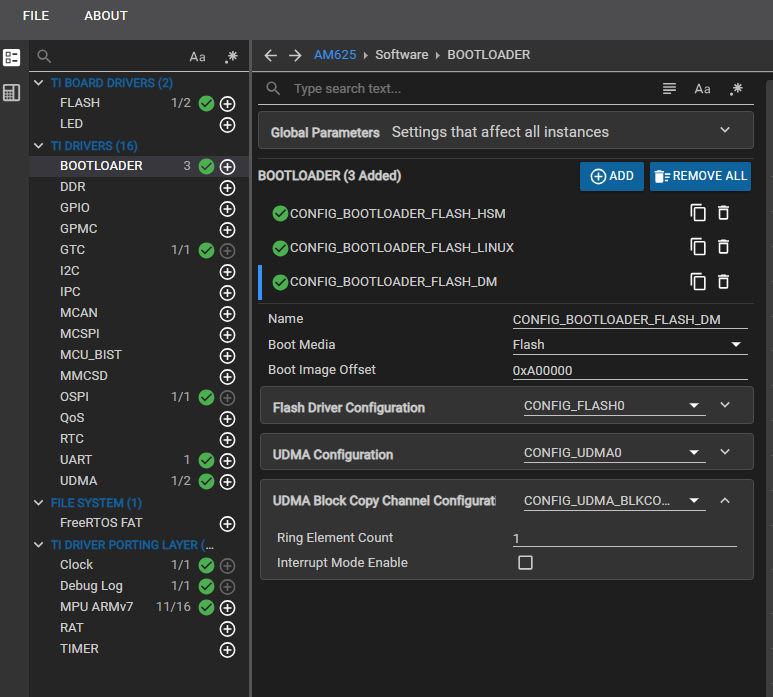
    What actually I'm asking is, In which example's example.syscfg I need to modify the updated offset for u-boot.img

    Like in below attached image for dss_display_share example, there are offsets passed for HSM, MCU and Linux. but not for u-boot.img


    Like above image, in which example's example.syscfg I should be modifying the new offset which I've set for u-boot.img?

    Regards,
    Aditya T

  • You dont need to add the u-boot.img in example.sysconfig.

    Since, its not used in the mcu+ sdk, theres no need for flashing the u-boot.img

  • PFA .cfg file and let me know that u-boot.img is flashed at 0x280000. But if this is not being used then why do we need to flash this?

    Correct me if I'm wrong, But if this file is used for booting process, then its offset should be passed to some example.syscfg which will load it right?

    default_sbl_ospi_linux_hs_fs.cfg

  • Hi Aditya,

    Small correction: u-boot.img is to be used if the A53 core is being used, and this offset=0x280000 cannot be changed. This cannot be modified in the example.syscfg of any example.

    If A53 core is not being used, then the Linux instance in the bootloader can be removed in example.sysconfig of the SBL.

    Regards,

    Aryamaan Chaurasia

  • But then how to boot Linux if my binary size of SBL-2 + DM App is overlapping with the u-boot.img.
    Like the size of my application image(SBL-2 + DM App) is more than 2560KB and when I calculated the next offset from 0x0008 0000(i.e. start of SBL-2 + DM App) goes to 0x0030 0000(i.e. end of SBL-2 + DM App). And due to this reason only I needed to modify start offsets of HSM and u-boot.img binaries.

    So what would be the solution on this if offset for u-boot.img cant be changed from 0x0028 0000 to any other offset. And binary size of my SBL-2 + DM App should be start from 0x0008 0000 and it is ending over start offset of u-boot.img.

    Regards,
    Aditya T

  • I just confirmed with the SBL expert, the offset for SBL stage2 can be changed. Can you try changing the offset of the SBL stage2 to any other offset? and modify the bootloader instance in the example.sysconfig of SBL stage1 to the new offset?

    Please keep the offset for the u-boot.img as it is.

  • But that will be just the same as modified layout-1, which I've tried earlier.

    Modified layout-1: Issue is SBL-1 is not loading SBL-2 + DM App.

    And the above way is not working as expected.

    Regards,
    Aditya T

  • Can you share the example.syscfg files for SBL stage1 and SBL stage2? I can verify the offsets

  • Yes
    Below is sbl_stage-1 example.syscfg

    /**
     * These arguments were used when this file was generated. They will be automatically applied on subsequent loads
     * via the GUI or CLI. Run CLI with '--help' for additional information on how to override these arguments.
     * @cliArgs --device "AM62Px" --package "AMH" --part "Default" --context "wkup-r5fss0-0" --product "MCU-PLUS-SDK-AM62P@11.02.00"
     * @versions {"tool":"1.19.0+3426"}
     */
    
    /**
     * Import the modules used in this configuration.
     */
    const mcu_bist    = scripting.addModule("/drivers/mcu_bist/mcu_bist", {}, false);
    const mcu_bist1   = mcu_bist.addInstance();
    const flash       = scripting.addModule("/board/flash/flash", {}, false);
    const flash1      = flash.addInstance();
    const bootloader  = scripting.addModule("/drivers/bootloader/bootloader", {}, false);
    const bootloader1 = bootloader.addInstance();
    const ddr         = scripting.addModule("/drivers/ddr/ddr", {}, false);
    const ddr1        = ddr.addInstance();
    const gtc         = scripting.addModule("/drivers/gtc/gtc");
    const qos         = scripting.addModule("/drivers/qos/qos", {}, false);
    const qos1        = qos.addInstance();
    const clock       = scripting.addModule("/kernel/dpl/clock");
    const debug_log   = scripting.addModule("/kernel/dpl/debug_log");
    const mpu_armv7   = scripting.addModule("/kernel/dpl/mpu_armv7", {}, false);
    const mpu_armv71  = mpu_armv7.addInstance();
    const mpu_armv72  = mpu_armv7.addInstance();
    const mpu_armv73  = mpu_armv7.addInstance();
    const mpu_armv74  = mpu_armv7.addInstance();
    const mpu_armv75  = mpu_armv7.addInstance();
    const mpu_armv76  = mpu_armv7.addInstance();
    const mpu_armv77  = mpu_armv7.addInstance();
    const mpu_armv78  = mpu_armv7.addInstance();
    const mpu_armv79  = mpu_armv7.addInstance();
    
    /**
     * Write custom configuration values to the imported modules.
     */
    bootloader1.appImageOffset = "0x850000";
    bootloader1.$name          = "CONFIG_BOOTLOADER_FLASH_SBL";
    bootloader1.bootloaderDma  = true;
    
    bootloader1.flashDriver                                  = flash1;
    flash1.$name                                             = "CONFIG_FLASH_SBL";
    flash1.serialFlashDriver.$name                           = "board_flash_serialFlash_serialflash0";
    flash1.serialFlashDriver.peripheralDriver.dmaEnable      = true;
    flash1.serialFlashDriver.peripheralDriver.phyEnable      = true;
    flash1.serialFlashDriver.peripheralDriver.$name          = "CONFIG_OSPI_SBL";
    flash1.serialFlashDriver.peripheralDriver.fastBootTuning = "true";
    
    ddr1.$name = "CONFIG_DDR0";
    
    mcu_bist1.$name = "CONFIG_MCU_BIST0";
    
    const udma                                           = scripting.addModule("/drivers/udma/udma", {}, false);
    const udma1                                          = udma.addInstance({}, false);
    udma1.$name                                          = "CONFIG_UDMA0";
    bootloader1.udmaDriver                               = udma1;
    flash1.serialFlashDriver.peripheralDriver.udmaDriver = udma1;
    
    const udma_blkcopy_channel                                   = scripting.addModule("/drivers/udma/udma_blkcopy_channel", {}, false);
    const udma_blkcopy_channel1                                  = udma_blkcopy_channel.addInstance({}, false);
    udma_blkcopy_channel1.$name                                  = "CONFIG_UDMA_BLKCOPY_CH0";
    bootloader1.udmaBlkCopyChannel                               = udma_blkcopy_channel1;
    flash1.serialFlashDriver.peripheralDriver.udmaBlkCopyChannel = udma_blkcopy_channel1;
    
    qos1.$name = "CONFIG_QOS0";
    
    debug_log.enableCssLog                            = false;
    debug_log.enableUartLog                           = true;
    debug_log.sysfwUartTrace                          = true;
    debug_log.uartLog.addedByBootloader               = true;
    debug_log.uartLog.useWakeupDomainPeripherals      = false;
    debug_log.uartLog.intrEnable                      = "DISABLE";
    debug_log.uartLog.$name                           = "CONFIG_UART_SBL";
    debug_log.sysfwUartLog.$name                      = "CONFIG_UART_TRACE0";
    debug_log.sysfwUartLog.useWakeupDomainPeripherals = false;
    debug_log.sysfwUartLog.UART.$assign               = "USART1";
    debug_log.sysfwUartLog.UART.RXD.$assign           = "MCASP0_AFSR";
    debug_log.sysfwUartLog.UART.TXD.$assign           = "MCASP0_ACLKR";
    debug_log.sysfwUartLog.UART.RTSn.$assign          = "MCASP0_AXR2";
    debug_log.sysfwUartLog.UART.CTSn.$assign          = "MCASP0_AXR3";
    
    mpu_armv71.attributes        = "NonCached";
    mpu_armv71.allowExecute      = false;
    mpu_armv71.$name             = "REGISTER_REGION";
    mpu_armv71.accessPermissions = "Supervisor RD+WR, User RD";
    
    mpu_armv72.size              = 7;
    mpu_armv72.$name             = "TCMA_VEC";
    mpu_armv72.accessPermissions = "Supervisor RD+WR, User RD";
    
    mpu_armv73.baseAddr = 0x80000000;
    mpu_armv73.size     = 31;
    mpu_armv73.$name    = "DDR";
    
    mpu_armv74.baseAddr   = 0x41010000;
    mpu_armv74.size       = 15;
    mpu_armv74.attributes = "NonCached";
    mpu_armv74.$name      = "TCMB";
    
    mpu_armv75.size       = 15;
    mpu_armv75.attributes = "NonCached";
    mpu_armv75.$name      = "TCMA";
    
    mpu_armv76.baseAddr = 0x43C00000;
    mpu_armv76.size     = 18;
    mpu_armv76.$name    = "HSM_RAM";
    
    mpu_armv77.baseAddr     = 0xFC40000;
    mpu_armv77.size         = 8;
    mpu_armv77.attributes   = "Device";
    mpu_armv77.allowExecute = false;
    mpu_armv77.$name        = "FSS0_OSPI0_CTRL_REG";
    
    mpu_armv78.baseAddr     = 0x2800000;
    mpu_armv78.size         = 9;
    mpu_armv78.attributes   = "Device";
    mpu_armv78.allowExecute = false;
    mpu_armv78.$name        = "UART0_REG";
    
    mpu_armv79.$name        = "FSS0_DAT_REG1";
    mpu_armv79.baseAddr     = 0x60000000;
    mpu_armv79.size         = 27;
    mpu_armv79.attributes   = "Device";
    mpu_armv79.allowExecute = false;
    
    /**
     * Pinmux solution for unlocked pins/peripherals. This ensures that minor changes to the automatic solver in a future
     * version of the tool will not impact the pinmux you originally saw.  These lines can be completely deleted in order to
     * re-solve from scratch.
     */
    flash1.serialFlashDriver.peripheralDriver.OSPI.$suggestSolution      = "OSPI0";
    flash1.serialFlashDriver.peripheralDriver.OSPI.CLK.$suggestSolution  = "OSPI0_CLK";
    flash1.serialFlashDriver.peripheralDriver.OSPI.CSn0.$suggestSolution = "OSPI0_CSn0";
    flash1.serialFlashDriver.peripheralDriver.OSPI.DQS.$suggestSolution  = "OSPI0_DQS";
    flash1.serialFlashDriver.peripheralDriver.OSPI.D7.$suggestSolution   = "OSPI0_D7";
    flash1.serialFlashDriver.peripheralDriver.OSPI.D6.$suggestSolution   = "OSPI0_D6";
    flash1.serialFlashDriver.peripheralDriver.OSPI.D5.$suggestSolution   = "OSPI0_D5";
    flash1.serialFlashDriver.peripheralDriver.OSPI.D4.$suggestSolution   = "OSPI0_D4";
    flash1.serialFlashDriver.peripheralDriver.OSPI.D3.$suggestSolution   = "OSPI0_D3";
    flash1.serialFlashDriver.peripheralDriver.OSPI.D2.$suggestSolution   = "OSPI0_D2";
    flash1.serialFlashDriver.peripheralDriver.OSPI.D1.$suggestSolution   = "OSPI0_D1";
    flash1.serialFlashDriver.peripheralDriver.OSPI.D0.$suggestSolution   = "OSPI0_D0";
    debug_log.uartLog.UART.$suggestSolution                              = "USART0";
    debug_log.uartLog.UART.RXD.$suggestSolution                          = "UART0_RXD";
    debug_log.uartLog.UART.TXD.$suggestSolution                          = "UART0_TXD";

    And below one is sbl_stage-2 example.syscfg

    /**
     * These arguments were used when this file was generated. They will be automatically applied on subsequent loads
     * via the GUI or CLI. Run CLI with '--help' for additional information on how to override these arguments.
     * @cliArgs --device "AM62Px" --part "Default" --package "AMH" --context "wkup-r5fss0-0" --product "MCU-PLUS-SDK-AM62P@11.02.00"
     * @v2CliArgs --device "AM62P" --package "FCBGA (AMH)" --variant "AM62P54-M" --context "wkup-r5fss0-0" --product "MCU-PLUS-SDK-AM62P@11.02.00"
     * @versions {"tool":"1.22.0+3893"}
     */
    
    /**
     * Import the modules used in this configuration.
     */
    const flash       = scripting.addModule("/board/flash/flash", {}, false);
    const flash1      = flash.addInstance();
    const bootloader  = scripting.addModule("/drivers/bootloader/bootloader", {}, false);
    const bootloader1 = bootloader.addInstance();
    const bootloader2 = bootloader.addInstance();
    const bootloader3 = bootloader.addInstance();
    const gtc         = scripting.addModule("/drivers/gtc/gtc");
    const uart        = scripting.addModule("/drivers/uart/uart", {}, false);
    const uart1       = uart.addInstance();
    const clock       = scripting.addModule("/kernel/dpl/clock");
    const debug_log   = scripting.addModule("/kernel/dpl/debug_log");
    const mpu_armv7   = scripting.addModule("/kernel/dpl/mpu_armv7", {}, false);
    const mpu_armv71  = mpu_armv7.addInstance();
    const mpu_armv72  = mpu_armv7.addInstance();
    const mpu_armv73  = mpu_armv7.addInstance();
    const mpu_armv74  = mpu_armv7.addInstance();
    const mpu_armv75  = mpu_armv7.addInstance();
    const mpu_armv76  = mpu_armv7.addInstance();
    const mpu_armv77  = mpu_armv7.addInstance();
    const mpu_armv78  = mpu_armv7.addInstance();
    const mpu_armv79  = mpu_armv7.addInstance();
    
    /**
     * Write custom configuration values to the imported modules.
     */
    bootloader1.$name          = "CONFIG_BOOTLOADER_FLASH_HSM";
    bootloader1.appImageOffset = "0x240000";
    
    bootloader2.$name          = "CONFIG_BOOTLOADER_FLASH_MCU";
    bootloader2.appImageOffset = "0x800000";
    
    bootloader3.$name          = "CONFIG_BOOTLOADER_FLASH_LINUX";
    bootloader3.appImageOffset = "0x1200000";
    
    bootloader1.flashDriver                                 = flash1;
    bootloader2.flashDriver                                 = flash1;
    bootloader3.flashDriver                                 = flash1;
    flash1.$name                                            = "CONFIG_FLASH_SBL";
    flash1.serialFlashDriver.$name                          = "board_flash_serialFlash_serialflash0";
    flash1.serialFlashDriver.peripheralDriver.$name         = "CONFIG_OSPI_SBL";
    flash1.serialFlashDriver.peripheralDriver.dmaEnable     = true;
    flash1.serialFlashDriver.peripheralDriver.phyEnable     = true;
    flash1.serialFlashDriver.peripheralDriver.phySkipTuning = true;
    
    uart1.$name                      = "CONFIG_UART_SBL";
    uart1.useWakeupDomainPeripherals = false;
    uart1.addedByBootloader          = true;
    uart1.intrEnable                 = "DISABLE";
    
    const udma                                           = scripting.addModule("/drivers/udma/udma", {}, false);
    const udma1                                          = udma.addInstance({}, false);
    udma1.$name                                          = "CONFIG_UDMA0";
    flash1.serialFlashDriver.peripheralDriver.udmaDriver = udma1;
    bootloader1.udmaDriver                               = udma1;
    bootloader2.udmaDriver                               = udma1;
    bootloader3.udmaDriver                               = udma1;
    
    const udma_blkcopy_channel                                   = scripting.addModule("/drivers/udma/udma_blkcopy_channel", {}, false);
    const udma_blkcopy_channel1                                  = udma_blkcopy_channel.addInstance({}, false);
    udma_blkcopy_channel1.$name                                  = "CONFIG_UDMA_BLKCOPY_CH0";
    flash1.serialFlashDriver.peripheralDriver.udmaBlkCopyChannel = udma_blkcopy_channel1;
    bootloader1.udmaBlkCopyChannel                               = udma_blkcopy_channel1;
    bootloader2.udmaBlkCopyChannel                               = udma_blkcopy_channel1;
    bootloader3.udmaBlkCopyChannel                               = udma_blkcopy_channel1;
    
    debug_log.enableCssLog       = false;
    debug_log.enableUartLog      = true;
    debug_log.uartTrace          = true;
    debug_log.uartLog.intrEnable = "DISABLE";
    debug_log.uartLog.$name      = "CONFIG_UART_APP";
    
    mpu_armv71.$name             = "REGISTER_REGION";
    mpu_armv71.size              = 31;
    mpu_armv71.attributes        = "Device";
    mpu_armv71.allowExecute      = false;
    mpu_armv71.accessPermissions = "Supervisor RD+WR, User RD";
    
    mpu_armv72.$name             = "TCMA_VEC";
    mpu_armv72.size              = 7;
    mpu_armv72.accessPermissions = "Supervisor RD+WR, User RD";
    
    mpu_armv73.$name    = "DDR";
    mpu_armv73.baseAddr = 0x80000000;
    mpu_armv73.size     = 31;
    
    mpu_armv74.$name      = "TCMB";
    mpu_armv74.baseAddr   = 0x41010000;
    mpu_armv74.size       = 15;
    mpu_armv74.attributes = "NonCached";
    
    mpu_armv75.$name      = "TCMA";
    mpu_armv75.size       = 15;
    mpu_armv75.attributes = "NonCached";
    
    mpu_armv76.$name    = "HSM_RAM";
    mpu_armv76.baseAddr = 0x43C00000;
    mpu_armv76.size     = 18;
    
    mpu_armv77.$name        = "FSS0_OSPI0_CTRL_REG";
    mpu_armv77.baseAddr     = 0xFC40000;
    mpu_armv77.size         = 8;
    mpu_armv77.attributes   = "Device";
    mpu_armv77.allowExecute = false;
    
    mpu_armv78.$name        = "UART0_REG";
    mpu_armv78.baseAddr     = 0x2800000;
    mpu_armv78.size         = 9;
    mpu_armv78.attributes   = "Device";
    mpu_armv78.allowExecute = false;
    
    mpu_armv79.$name        = "FSS0_DAT_REG1";
    mpu_armv79.baseAddr     = 0x60000000;
    mpu_armv79.size         = 27;
    mpu_armv79.attributes   = "Device";
    mpu_armv79.allowExecute = false;
    
    /**
     * Pinmux solution for unlocked pins/peripherals. This ensures that minor changes to the automatic solver in a future
     * version of the tool will not impact the pinmux you originally saw.  These lines can be completely deleted in order to
     * re-solve from scratch.
     */
    flash1.serialFlashDriver.peripheralDriver.OSPI.$suggestSolution      = "OSPI0";
    flash1.serialFlashDriver.peripheralDriver.OSPI.CLK.$suggestSolution  = "OSPI0_CLK";
    flash1.serialFlashDriver.peripheralDriver.OSPI.CSn0.$suggestSolution = "OSPI0_CSn0";
    flash1.serialFlashDriver.peripheralDriver.OSPI.DQS.$suggestSolution  = "OSPI0_DQS";
    flash1.serialFlashDriver.peripheralDriver.OSPI.D7.$suggestSolution   = "OSPI0_D7";
    flash1.serialFlashDriver.peripheralDriver.OSPI.D6.$suggestSolution   = "OSPI0_D6";
    flash1.serialFlashDriver.peripheralDriver.OSPI.D5.$suggestSolution   = "OSPI0_D5";
    flash1.serialFlashDriver.peripheralDriver.OSPI.D4.$suggestSolution   = "OSPI0_D4";
    flash1.serialFlashDriver.peripheralDriver.OSPI.D3.$suggestSolution   = "OSPI0_D3";
    flash1.serialFlashDriver.peripheralDriver.OSPI.D2.$suggestSolution   = "OSPI0_D2";
    flash1.serialFlashDriver.peripheralDriver.OSPI.D1.$suggestSolution   = "OSPI0_D1";
    flash1.serialFlashDriver.peripheralDriver.OSPI.D0.$suggestSolution   = "OSPI0_D0";
    uart1.UART.$suggestSolution                                          = "USART0";
    uart1.UART.RXD.$suggestSolution                                      = "UART0_RXD";
    uart1.UART.TXD.$suggestSolution                                      = "UART0_TXD";
    debug_log.uartLog.WKUP_UART.$suggestSolution                         = "WKUP_USART0";
    debug_log.uartLog.WKUP_UART.RXD.$suggestSolution                     = "WKUP_UART0_RXD";
    debug_log.uartLog.WKUP_UART.TXD.$suggestSolution                     = "WKUP_UART0_TXD";

    Regards,
    Aditya T

  • Hi Aditya,

    Thanks for sharing these, allow us sometime to get back to you.

    Thanks,

    Vaibhav

  • Is there any update on this topic?

    Regards,
    Aditya T

  • Hi Aditya,

    Your current structure looks like follows inside default_sbl_ospi_linux_hs_fs.cfg.

    SBL OSPI Linux Stage 1 --> 0x0 offset

    DSS Display Share --> 0x80000

    IPC RPMSG Echo Linux --> 0x100000

    HSM image ---> 0x240000

    Linux image ---> 0x1200000

    u-boot image ---> 0x280000

    Please share with me the sizes of each of these binaries.

    Regards,

    Vaibhav

  • Hello,

    Your current structure looks like follows inside default_sbl_ospi_linux_hs_fs.cfg.

    This was the default one, I've modified it as below

    //////////////////////////////////////////////////////////////////////////////////////////////////////////////

    #-----------------------------------------------------------------------------#
    #                                                                             #
    #      DEFAULT CONFIGURATION FILE TO BE USED WITH THE FLASHWRITER SCRIPT      #
    #                                                                             #
    #-----------------------------------------------------------------------------#
    #
    # By default this config file,
    # - points to pre-built flash writer, bootloader for this EVM
    # - The application image points to relative path of the ipc rpmsg linux application image for this EVM
    #   - Make sure this application is built before running this script
    # - You can customized this config file to point to your own bootloader and/or application images
    # - You can use --operation=flashverify if you just want to verify the flash contents and not flash the file.
    #

    # First point to sbl_uart_uniflash_stage1 binary, which initialises DDR and receives sbl_uart_uniflash_stage2 binary
    --flash-writer=sbl_prebuilt/am62px-sk/sbl_uart_uniflash_stage1.release.hs_fs.tiimage

    # Points to sbl_uart_uniflash_stage2 binary, which function's as a server to flash one or more files
    # Please note this binary is copied to DDR by sbl_uart_uniflash_stage1 and not written to any boot media like flash or eMMC
    --file=../../examples/drivers/boot/sbl_uart_uniflash_multistage/sbl_uart_uniflash_stage2/am62px-sk/wkup-r5fss0-0_nortos/ti-arm-clang/sbl_uart_uniflash_stage2.release.appimage.hs_fs --operation=flash --flash-offset=0x0

    # Program the OSPI PHY tuning attack vector
    --operation=flash-phy-tuning-data

    # Now send one or more files to flash or flashverify as needed. The order of sending files does not matter

    # When sending bootloader make sure to flash at offset 0x0. ROM expects bootloader at offset 0x0
    --file=sbl_prebuilt/am62px-sk/sbl_ospi_linux_stage1.release.hs_fs.tiimage --operation=flash --flash-offset=0x0

    # 2nd stage bootloader with DM is flashed at 0x80000 or to whatever offset your bootloader is configured for
    --file=../../examples/drivers/dss/dss_display_share/am62px-sk/wkup-r5fss0-0_freertos/ti-arm-clang/dss_display_share.release.appimage.hs_fs --operation=flash --flash-offset=0x850000

    # When sending application image, make sure to flash at offset 0x100000 (default) or to whatever offset your bootloader is configured for
    --file=../../examples/drivers/ipc/ipc_rpmsg_echo_linux/am62px-sk/mcu-r5fss0-0_freertos/ti-arm-clang/ipc_rpmsg_echo_linux.release.appimage.hs_fs --operation=flash --flash-offset=0x800000

    # HSM image is flashed at 0x800000 or to whatever offset your bootloader is configured for
    --file=HSMAppimageGen/board/am62px-sk/hsm.appimage.hs_fs --operation=flash --flash-offset=0x240000

    # Linux image is flashed at 0xC00000 or to whatever offset your bootloader is configured for
    --file=linuxAppimageGen/board/am62px-sk/linux.appimage.hs_fs --operation=flash --flash-offset=0x1200000

    # u-boot.img is flashed at 0x280000
    --file=linuxAppimageGen/board/am62px-sk/u-boot.img --operation=flash --flash-offset=0x280000

    //////////////////////////////////////////////////////////////////////////////////////////////////////////////


    The reason to modiify it was increase in size of dss_display_share.release.appimage.hs_fs binary from 1.1 MB to 2.5MB

    Actual sizes of each binary is given below

    1. SBL-1                      =>      299623     bytes        => 0x0000 0000 Offset
    2. SBL-2 + DM App     =>      2415862   bytes        => 0x0085 0000 Offset
    3. MCU App                 =>      58222      bytes        => 0x0080 0000 Offset
    4. HSM                        =>      9677         bytes        => 0x0024 0000 Offset
    5. Linux image             =>      855742     bytes        => 0x0120 0000 Offset
    6. U-boot.img              =>      1472487   bytes        => 0x0028 0000 Offset

    Using the above sizes and their offsets, you might understand the current memory mapping of OSPI Flash

    Regards,
    Aditya T

  • Hi Aditya,

    Let me check this. Allow us sometime to follow up.

    Regards,

    Vaibhav

  • Hi Aditya,

    Apologies for the delay.

    Can you please perform a small experiment?

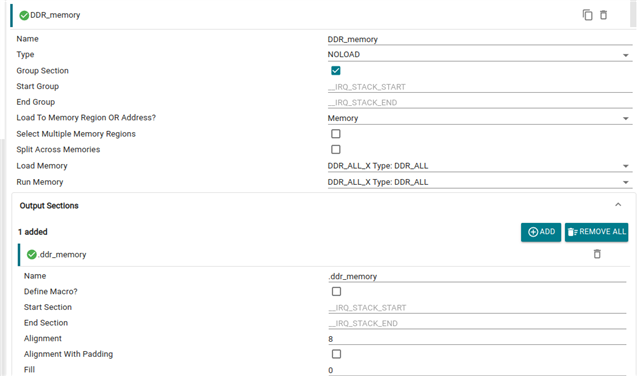
    Please flash SBL NULL and the OSPI Flash IO example. In the OSPI Flash IO example, change the offset to 0x850000 and the data size to be used to 1 MB. You would also have to use place this in the DDR memory so please make the following changes:

    In ospi_flash_io.c,

    In example.syscfg of the OSPI Flash IO example -> MPU ARMv7 settings, verify the configurations given below:

    In example.syscfg -> Memory Region, add a DDR region as mentioned below:

    In example.syscfg -> Sections, add a new DDR_memory section and configure it as mentioned below:

    The objective is to verify if all the flash operations are working as expected at the offset= 0x850000 with a data size comparable to the SBL2+DM image size.

    Regards,

    Aryamaan Chaurasia

  • Hello,

    Apologies for delayed response.

    In example.syscfg -> Memory Region, add a DDR region as mentioned below:

    In example.syscfg -> Sections, add a new DDR_memory section and configure it as mentioned below:

    But I couldn't find in which example.syscfg I have to make these 2 changes. The 1st change I've modified in code as well as example.syscfg

    Regards,
    Aditya T

  • Hi Aditya,

    The changes have to be made in the OSPI Flash IO example. SBL NULL can be flashed as it is.

    We would like to verify if all the Flash operations are working as expected with the offset=0x850000.

    Regards,

    Aryamaan Chaurasia

  • Hello,

    Here as per above snapshot where do I actually need to add DDR region?

    Regards,
    Aditya T

  • Hi,

    The snapshot indicates that a DDR region has already been added.

    Can you please confirm if you are using a default AM62P board which has the default flash part (S28HS512T)?
    If yes, then I can verify whether flash operations are valid on the 0x850000 offset in my setup using the same Flash part.

    Can you also tell me the SDK version which you are using?

    Thanks

  • Since I'm using EVK provided by TI, and we have not changed any part on it. The flash we are using is the same i.e. S28HS512T. Which comes on EVK right?
    Also, SDK I'm using is of version V11.02.00.03 link.

    Regards,
    Aditya T

  • Thank you for the reply, please give me 1 days time to replicate the same example usecase on my setup and identify the issue.

    Regards,

    Aryamaan Chaurasia

  • Hello,
    Is their any updates on this?

    Regards,
    Aditya T

  • Hi Aditya,

    Apologies for the delay. We are currently running experiments and investigating the issue.

    Regards,

    Aryamaan Chaurasia

  • Hi Aditya,

    I have figured out the issue.

    In the S28HS512T Serial NOR OSPI Flash, we use a uniform configuration, which means that the block size is equal to the sector size.

    For successful flash erase, the offset that is used should be aligned with the block size which has a default value of 262144 Bytes or 256 KB.

    And if the correct number of blocks are not erased, flash writes wont work as expected.

    Now, the offset 0x850000 corresponds to an address of 8716288 and, 8716288/262144 gives 33.25 Blocks, which is not block aligned.

    However, if the offset 0x840000 is used, then 8650752/262144 gives 33 Blocks, which is block aligned.

    Hence, any offset such as 0x840000 or 0x880000 will work, since these are block aligned as their addresses are perfectly divisible by the block size.

    Therefore, its a best practice to use offsets which are block aligned.

    Can you please retry your example with 0x840000 or 0x880000 which are block aligned? The other offsets in the example.syscfg file for the dss_display_share example, HSM, Linux and u-boot should be block aligned and need not be changed, but please verify that all offsets being used are block aligned.

    Regards,

    Aryamaan Chaurasia

  • Hello,

    I tried changing to offset to 0x00880000 and the boot logs are as below

    [BOOTLOADER_PROFILE] Boot Media       : FLASH 
    [BOOTLOADER_PROFILE] Boot Media Clock : 166.667 MHz 
    [BOOTLOADER_PROFILE] Boot Image Size  : 2266 KB 
    [BOOTLOADER_PROFILE] Cores present    : 
    wkup-r5f0-0
    [BOOTLOADER PROFILE] System_init                      :      27758us 
    [BOOTLOADER PROFILE] App_waitForMcuPbist              :          2us 
    [BOOTLOADER PROFILE] Board_init                       :          0us 
    [BOOTLOADER PROFILE] Drivers_open                     :          1us 
    [BOOTLOADER PROFILE] SBL Drivers_open                 :        157us 
    [BOOTLOADER PROFILE] Board_driversOpen                :          1us 
    [BOOTLOADER PROFILE] SBL Board_driversOpen            :       7525us 
    [BOOTLOADER PROFILE] App_loadSelfcoreImage            :      18860us 
    [BOOTLOADER_PROFILE] SBL Total Time Taken             :      54308us 
    
    Image loading done, switching to application ...
    Starting 2nd stage bootloader
    : v11.02.05
    Starting Sciserver..... PASSED
    [BOOTLOADER_PROFILE] Boot Media       : FLASH 
    [BOOTLOADER_PROFILE] Boot Media Clock : 166.667 MHz 
    [BOOTLOADER_PROFILE] Boot Image Size  : 841 KB 
    [BOOTLOADER_PROFILE] Cores present    : 
    hsm-m4f0-0
    mcu-r5f0-0
    a530-0
    [BOOTLOADER PROFILE] System_init                      :       2646us 
    [BOOTLOADER PROFILE] Board_init                       :          3us 
    [BOOTLOADER PROFILE] FreeRtosTask Create              :        260us 
    [BOOTLOADER PROFILE] SBL Drivers_open                 :        539us 
    [BOOTLOADER PROFILE] SBL Board_driversOpen            :        523us 
    [BOOTLOADER PROFILE] HSM Image Load                   :       5449us 
    [BOOTLOADER PROFILE] MCU R5 Image Load                :       5951us 
    [BOOTLOADER PROFILE] A53 Image Load                   :      12337us 
    [BOOTLOADER_PROFILE] SBL Total Time Taken             :      27712us 
    
    Image loading done, switching to application ...
    Starting linux and RTOS/Baremetal applications
    NOTICE:  BL31: v2.14.0(release):sandbox/v2.14-888-gde387341e
    NOTICE:  BL31: Built : 10:33:53, Apr 23 2026
    I/TC: 
    I/TC: OP-TEE version: 4.10.0-5-g496fea3c8 (gcc version 13.3.1 20240614 (Arm GNU Toolchain 13.3.Rel1 (Build arm-13.24))) #1 Thu Apr 23 05:04:50 UTC 2026 aarch64
    I/TC: WARNING: This OP-TEE configuration might be insecure!
    I/TC: WARNING: Please check https://optee.readthedocs.io/en/latest/architecture/porting_guidelines.html
    I/TC: Primary CPU initializing
    I/TC: GIC redistributor base address not provided
    I/TC: Assuming default GIC group status and modifier
    I/TC: SYSFW ABI: 4.0 (firmware rev 0x000b '11.2.5--v11.02.05 (Fancy Rat)')
    I/TC: Activated SA2UL device
    I/TC: Enabled firewalls for SA2UL TRNG device
    I/TC: EIP76D TRNG initialized
    I/TC: SA2UL Drivers initialized
    I/TC: HUK Initialized
    I/TC: Disabling output console

    But still my display application is not starting, below are logs from WKUP-R5F core and MCU-R5F core respectively.

    ///////////////////////////////////////////////////////////////////////////////
    WKUP-R5F Core logs
    ///////////////////////////////////////////////////////////////////////////////
    
    Sciserver Testapp Built On: May  7 2026 11:36:56
    Sciserver Version: v2025.12.0.0-REL.MCUSDK.K3.11.02.00.23+
    RM_PM_HAL VersionConfigure DSS framebuffer region firewall... DONE !!!
    DispApp_init() - DONE !!!
    DSS display share application started...
    Display create complete!!
    Starting display ... !!!
    Display in progress ... DO NOT HALT !!!
    [IPC RPMSG ECHO] Version: REL.MCUSDK.K3.11.02.00.23+ (May  7 2026 11:37:28):
    
    ///////////////////////////////////////////////////////////////////////////////
    MCU-R5F Core logs
    ///////////////////////////////////////////////////////////////////////////////
    
    [IPC RPMSG ECHO] Version: REL.MCUSDK.K3.11.02.00.23+ (May  7 2026 11:37:27):  

    Is there anything more that I'm missing?

    Regards,
    Aditya T

  • Hi Aditya,

    I have just ran the default dss display share example on my setup at offset=0x880000, and I am able to see the display logs:

    ÀSciserver Testapp Built On: May  6 2026 09:37:36
    Sciserver Version: v2025.12.0.0-REL.MCUSDK.K3.11.02.00.23+
    RM_PM_HAL Version: v11.02.05
    Starting ScConfigure DSS region firewall... DONE !!!
    Configure DSS framebuffer region firewall... DONE !!!
    DispApp_init() - DONE !!!
    DSS display share application started...
    Display create complete!!
    Starting display ... !!!
    Display in progress ... DO NOT HALT !!!
    DSS display share Passed!!
    [IPC RPMSG ECHO] Version: REL.MCUSDK.K3.11.02.00.23+ (May  6 2026 09:40:09):  
    Number of elapsed frames = 300, elapsed msec = 4998, fps = 60.02
    Number of elapsed frames = 300, elapsed msec = 5010, fps = 59.88
    Number of elapsed frames = 300, elapsed msec = 5011, fps = 59.87
    Number of elapsed frames = 300, elapsed msec = 5010, fps = 59.88
    Number of elapsed frames = 300, elapsed msec = 5010, fps = 59.88
    Number of elapsed frames = 300, elapsed msec = 5010, fps = 59.88
    Number of elapsed frames = 300, elapsed msec = 5011, fps = 59.87
    Number of elapsed frames = 300, elapsed msec = 5010, fps = 59.88
    Number of elapsed frames = 300, elapsed msec = 5010, fps = 59.88
    Number of elapsed frames = 300, elapsed msec = 5010, fps = 59.88
    Number of elapsed frames = 300, elapsed msec = 5011, fps = 59.87
    Number of elapsed frames = 300, elapsed msec = 5010, fps = 59.88
    Number of elapsed frames = 300, elapsed msec = 5010, fps = 59.88
    Number of elapsed frames = 300, elapsed msec = 5011, fps = 59.87
    Number of elapsed frames = 300, elapsed msec = 5010, fps = 59.88
    Number of elapsed frames = 300, elapsed msec = 5010, fps = 59.88
    Number of elapsed frames = 300, elapsed msec = 5010, fps = 59.88
    Number of elapsed frames = 300, elapsed msec = 5011, fps = 59.87
    Number of elapsed frames = 300, elapsed msec = 5010, fps = 59.88
    Number of elapsed frames = 300, elapsed msec = 5010, fps = 59.88
    Number of elapsed frames = 300, elapsed msec = 5010, fps = 59.88
    Number of elapsed frames = 300, elapsed msec = 5011, fps = 59.87

    CCCC[BOOTLOADER_PROFILE] Boot Media       : FLASH 
    [BOOTLOADER_PROFILE] Boot Media Clock : 166.667 MHz 
    [BOOTLOADER_PROFILE] Boot Image Size  : 1060 KB 
    [BOOTLOADER_PROFILE] Cores present    : 
    wkup-r5f0-0
    [BOOTLOADER PROFILE] System_init                      :      27568us 
    [BOOTLOADER PROFILE] App_waitForMcuPbist              :          2us 
    [BOOTLOADER PROFILE] Board_init                       :          0us 
    [BOOTLOADER PROFILE] Drivers_open                     :          0us 
    [BOOTLOADER PROFILE] SBL Drivers_open                 :        152us 
    [BOOTLOADER PROFILE] Board_driversOpen                :          0us 
    [BOOTLOADER PROFILE] SBL Board_driversOpen            :       6885us 
    [BOOTLOADER PROFILE] App_loadSelfcoreImage            :      10686us 
    [BOOTLOADER_PROFILE] SBL Total Time Taken             :      45297us 
    
    Image loading done, switching to application ...
    Starting 2nd stage bootloader
    iserver..... PASSED
    [BOOTLOADER_PROFILE] Boot Media       : FLASH 
    [BOOTLOADER_PROFILE] Boot Media Clock : 166.667 MHz 
    [BOOTLOADER_PROFILE] Boot Image Size  : 1061 KB 
    [BOOTLOADER_PROFILE] Cores present    : 
    hsm-m4f0-0
    mcu-r5f0-0
    a530-0
    [BOOTLOADER PROFILE] System_init                      :       2766us 
    [BOOTLOADER PROFILE] Board_init                       :          4us 
    [BOOTLOADER PROFILE] FreeRtosTask Create              :        261us 
    [BOOTLOADER PROFILE] SBL Drivers_open                 :       1418us 
    [BOOTLOADER PROFILE] SBL Board_driversOpen            :        523us 
    [BOOTLOADER PROFILE] HSM Image Load                   :       5441us 
    [BOOTLOADER PROFILE] MCU R5 Image Load                :       5953us 
    [BOOTLOADER PROFILE] A53 Image Load                   :      14520us 
    [BOOTLOADER_PROFILE] SBL Total Time Taken             :      30889us 
    
    Image loading done, switching to application ...
    Starting linux and RTOS/Baremetal applications
    NOTICE:  BL31: v2.13.0(release):v2.13.0-259-ge0c4d3903b-dirty
    NOTICE:  BL31: Built : 07:01:36, Jul  1 2025
    
    U-Boot SPL 2025.01-00766-g7493977a537f (Dec 03 2025 - 15:20:36 +0000)
    SYSFW ABI: 4.0 (firmware rev 0x000b '11.2.5--v11.02.05 (Fancy Rat)')
    DM ABI: 3.0 (firmware ver 0x000b 'MSDK.11.02.00.23--v11.02.05' patch_ver: 5)
    SPL initial stack usage: 1984 bytes
    Trying to boot from SPI
    Authentication passed
    Authentication passed
    
    
    U-Boot 2025.01-00766-g7493977a537f (Dec 03 2025 - 15:20:36 +0000)
    
    SoC:   AM62PX SR1.0 HS-FS
    Model: Texas Instruments AM62P5 SK
    DRAM:  2 GiB (total 8 GiB)
    Core:  101 devices, 32 uclasses, devicetree: separate
    MMC:   mmc@fa10000: 0, mmc@fa00000: 1
    Loading Environment from nowhere... OK
    In:    serial
    Out:   serial
    Err:   serial
    Net:   eth0: ethernet@8000000port@1
    Warning: ethernet@8000000port@2 (eth1) using random MAC address - 56:6b:13:c4:13:c6
    , eth1: ethernet@8000000port@2
    Hit any key to stop autoboot:  0 

    This is the cfg file: default_sbl_ospi_linux_hs_fs_splash_screen.cfg

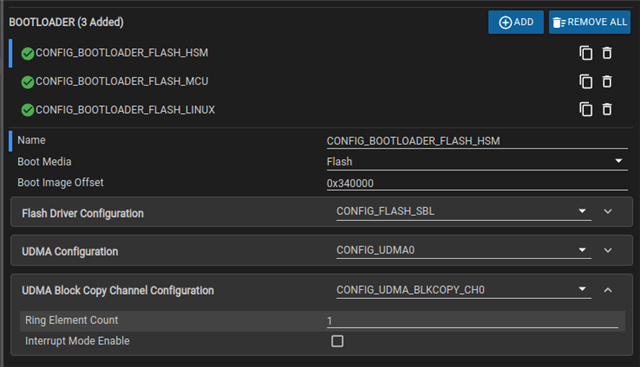
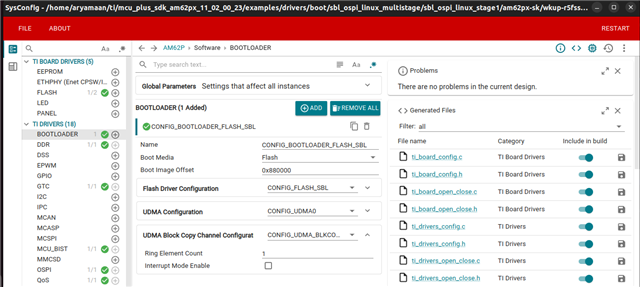
    And these are the offsets for the Stage1 SysConfig file and the DSS display share example:

    Can you verify the offsets in your Stage1 and DSS display share example?

    If the offsets are correct, then there could be an issue with your display application and not a OSPI or Flash issue.

    Regards,

    Aryamaan Chaurasia