AM2434: AM2434: MCU-PLUS-SDK-AM243X: Can AM243X use GPMC PSRAM as memory extention for CODE

Part Number: AM2434
Other Parts Discussed in Thread: SYSCONFIG, UNIFLASH

Hello 

we would like to know if we can use GPMC PSRAM for code like ospi xip.  we know that the gpmc will probably not be fast and plan to put not always executed coe in that as extention to internal MSRAM.

Please advice


regards

  • Hello Winson Lim,


    We have tested GPMC PSRAM for data storage only (MEMCOPY operations), not for code execution. The measured performance results are:

    - Read Speed: 44.41 Mbps = 5.55 MB/s
    - Write Speed: 40.97 Mbps = 5.12 MB/s

    These results represent data transfer performance, not code execution performance. The current 5.55 MB/s read speed can be significantly improved by enabling DMA :
    We recommend exploring DMA enablement for GPMC PSRAM data transfers to achieve better performance.

    Based on our testing and analysis, we recommend using GPMC PSRAM exclusively for data storage:
    We have not validated GPMC PSRAM for XIP code execution. Using it for code execution introduces:
    - Unpredictable instruction fetch latency
    - Potential real-time requirement violations
    - Unknown cache interaction effects

    https://software-dl.ti.com/mcu-plus-sdk/esd/AM64X/12_00_00_26/exports/docs/api_guide_am64x/EXAMPLES_DRIVERS_GPMC_PSRAM_IO.html

    Regards,

    Anil.

  • Hello Sajid/Winson,

    Please find below our latest status update regarding the GPMC application development and SBL integration.
    GPMC Application & Driver Integration :
    We have successfully completed the GPMC driver development, integrated it into the MCU+SDK, and thoroughly verified its functionality.
    • Implementation Details: We completed the necessary SysConfig changes for pin multiplexing (PinMux) to support the auto-generated code and finalized the GPMC driver implementation.
    • Validation: The driver has been tested many times almost 20K+. Read and write operations are stable and working exactly as expected.
    • Action Required: Kindly integrate the latest patches into your setup and confirm if the GPMC driver operates correctly in your environment.
    SBL Testing :
    We have successfully validated the boot flow using the following sequence:
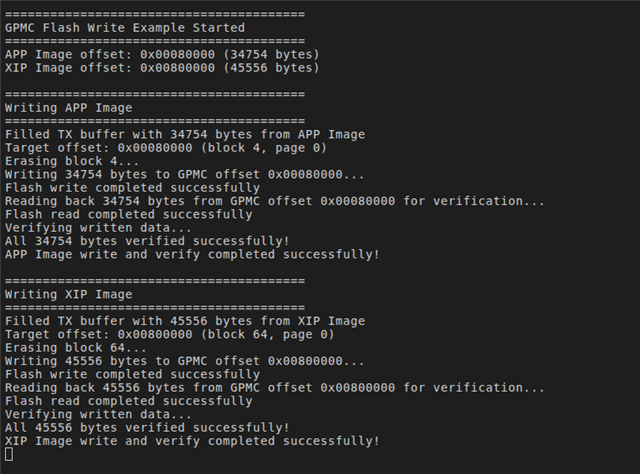
    1. Flash Programming: The GPMC application image (Hello world) was programmed using the GPMC read/write Application.
    2. SBL Flashing: We utilized the UART Uniflash tool to send the GPMC SBL and flashed it onto the OSPI memory.
    3. Boot Execution: Upon a Power-On Reset  with the board configured in OSPI boot mode, the ROM bootloader successfully fetched the SBL GPMC from OSPI.
    4. Application Launch: The GPMC SBL successfully read the application image from the designated memory location and executed it from the On-Chip Memory (OCM).

    Next Steps & Ongoing Optimizations

    • DMA Enablement: I am currently implementing DMA support for read operations. Please note that DMA will not be enabled for write operations; because each word requires a 25us wait delay, utilizing DMA for writes provides no performance advantage.
    • Timing Parameters: The current timing parameters are stable. Mark is currently exploring further adjustments to optimize these parameters and maximize data throughput.
    If you encounter any issues while integrating these patches, please let us know.
    We are ready to assist you with any integration or debugging challenges.
    Patches : 
    NOTE :  While configuring the Pin settings from the syscfg always check for the IOSET2 rather than IOSET1 .
    Regards,
    Anil.
  • SBL GPMC boot logs:

    DMSC Firmware Version 12.0.2--v12.00.02 (Clever Cat)
    DMSC Firmware revision 0xc
    DMSC ABI revision 4.0
    
    KPI_DATA: [BOOTLOADER_PROFILE] CPU Clock        : 800.000 MHz 
    KPI_DATA: [BOOTLOADER_PROFILE] Boot Media       : GPMC NOR FLASH 
    KPI_DATA: [BOOTLOADER_PROFILE] Boot Media Clock : 133.333 MHz 
    KPI_DATA: [BOOTLOADER_PROFILE] Boot Image Size  : 49 KB 
    KPI_DATA: [BOOTLOADER_PROFILE] Cores present    : 
    r5f0-0
    KPI_DATA: [BOOTLOADER PROFILE] SYSFW init                       :      10929us 
    KPI_DATA: [BOOTLOADER PROFILE] System_init                      :      14042us 
    KPI_DATA: [BOOTLOADER PROFILE] Drivers_open                     :       1436us 
    KPI_DATA: [BOOTLOADER PROFILE] Board_driversOpen                :          0us 
    KPI_DATA: [BOOTLOADER PROFILE] Sciclient Get Version            :       9935us 
    KPI_DATA: [BOOTLOADER PROFILE] CPU Load                         :      26813us 
    KPI_DATA: [BOOTLOADER PROFILE] SBL End                          :          1us 
    KPI_DATA: [BOOTLOADER_PROFILE] SBL Total Time Taken             :      63159us 
    
    Image loading done, switching to application ...
    Hello World!
    

  • I am attaching the new zip file, that has both the SBL tiimage I am using as well as the example that I use to write hello_world to gpmc.

    1057.sbl_gpmc.zip

    Please note that you need to have your hello_world written to 0x80000 offset if you are using this tiimage.

    I am also sharing the steps on how you can debug the SBL to get the exact point of failure:

    (+) [FAQ] AM62X/AM64X : [FAQ] Debugging SBL boot in RTOS SDK - Processors forum - Processors - TI E2E support forums

  • Hello,
    Please share the test results after applying the above patches.
    Regards,
    Anil

  • seems the zip file gpmc_write_hello_world.zip, sbl_gpmc.zip, are invalid, the other 1057.sbl_gpmc.zip is ok

  • seems the zip file gpmc_write_hello_world.zip, sbl_gpmc.zip, are invalid, the other 1057.sbl_gpmc.zip is ok

    Yes, the previous zips were invalid, please use the latest sbl_gpmc.zip:

    I am attaching the new zip file, that has both the SBL tiimage I am using as well as the example that I use to write hello_world to gpmc.

    1057.sbl_gpmc.zip

  • Please find below the examples for OSPI PSRAM:

    0). Patch to be applied: https://e2e.ti.com/cfs-file/__key/communityserver-discussions-components-files/908/0001_2D00_am64x_2D00_ospi_2D00_add_2D00_psram_2D00_functionality.patch

    1). sbl_uart_uniflash example: sbl_uart_uniflash.zip

    2). sbl_ospi example: 1663.sbl_ospi.zip

    3). hello world example where the .rodata and .text executes from OSPI PSRAM: 7838.hello_world.zip

    4). psram_ospi example: psram_ospi.zip

    5). default_sbl_ospi.cfg file: 1586.default_sbl_ospi.cfg

    Using a new AM64x 12.00 SDK, apply the path provided and rebuild all the libraries.

    After this is done, simply drag and drop the above examples and rebuild them.

    NOTE: The examples can be run and loaded as is, no changes are to be made to any of the examples.

    For the cfg file above, examples - 1,2,3 are to be used.

    For the example-4, which calculates the read and write throughput of OSPI PSRAM, the default SBL NULL can be used to load and run the example.

    Regards,

    Aryamaan

  • Hi,

    Please find below the SBL OSPI which has the updated main.c file, this is not related to the PHY enabling issue but this has the correct implementation of setting the OSPI clock frequencies: 7607.sbl_ospi.zip

    Regards,

    Aryamaan

  • Hi,

    Please find attached the cfg file for the default_sbl_ospi.cfg:8688.default_sbl_ospi.cfg

    Regards,

    Aryamaan

  • Yanjia,

    Can you try using this to access the cfg file? flashing.zip

    Regards,

    Aryamaan