AM2611: Example support and migration error for ENET CPSW Project

Part Number: AM2611
Other Parts Discussed in Thread: SYSCONFIG

Hi Team,


I have imported the enet_cpsw_tcpserver_am261x-lp_r5fss0-0_freertos_ti-arm-clang from the example path.


Now my controller selection is changed to XAM2612AOFFHIZEJ  from default ZFG package.


When switch the option from the sysconfig file showing the following error

Generating Code (example.syscfg)...
TypeError: Cannot read properties of undefined (reading 'clockIds')
    at Object.getClockEnableIds (C:\ti\mcu_plus_sdk_am261x_11_01_00_19\source\networking\enet\core\sysconfig\networking\.meta\enet_cpsw\am261x\enet_cpsw_am261x.syscfg.js:225:23)
    at subTemplateFunction (C:\ti\mcu_plus_sdk_am261x_11_01_00_19\source\sysconfig\drivers\.meta\system\power_clock_module_enable.c.xdt:12:25)
    at C:\ti\sysconfig_1.26.0\dist\webpack:\sysconfig\src\pinmux\services\metaEnvironment\runtimeContext.ts:1178:11
    at templateFunc (C:\ti\mcu_plus_sdk_am261x_11_01_00_19\source\sysconfig\drivers\.meta\system\power_clock_config.c.xdt:21:49)
    at func (C:\ti\sysconfig_1.26.0\dist\webpack:\sysconfig\src\pinmux\services\codeGeneration\templateRunner.ts:29:39)
    at allowPathVisibility (C:\ti\sysconfig_1.26.0\dist\webpack:\sysconfig\src\pinmux\services\pathsVisibility.ts:11:10)
    at runTemplate (C:\ti\sysconfig_1.26.0\dist\webpack:\sysconfig\src\pinmux\services\codeGeneration\templateRunner.ts:29:13)
    at t.CodeGenerator.generate (C:\ti\sysconfig_1.26.0\dist\webpack:\sysconfig\src\pinmux\services\codeGeneration\codeGenerator.ts:142:10)
    at iteratee (C:\ti\sysconfig_1.26.0\dist\webpack:\sysconfig\src\pinmux\services\codeGeneration\codeGenerator.ts:147:26)
    at Nt (C:\ti\sysconfig_1.26.0\dist\webpack:\sysconfig\node_modules\lodash\lodash.js:653:23)
[1]gmake: Target 'all' not remade because of errors.

  • Hi,

    Let me check and get back.

    Regards,
    Shaunak

  • HI,

    The pinmux data for this ZEJ package is not yet added to the SDK. Let me confirm and check how to enable this support.

    Regards,
    Shaunak

  • Hi Shaunak,

    Can i get the update on this topics.

  • Hi,

    Please use the below patches to resolve the build issues:

    Patch-1: Apply in mcu_plus_sdk folder

    diff --git a/.project/device/project_am261x.js b/.project/device/project_am261x.js
    index 2e316afa882..ed1e0724a11 100644
    --- a/.project/device/project_am261x.js
    +++ b/.project/device/project_am261x.js
    @@ -505,11 +505,11 @@ function getExampleList() {
     function getSysCfgDevice(board) {
         switch (board) {
             case "am261x-lp":
    -            return "AM261x_ZFG";
    +            return "AM261x_ZEJ";
             case "am261x-lp-dp83tg720/am261x-lp":
    -            return "AM261x_ZFG";
    +            return "AM261x_ZEJ";
             case "am261x-lp-dp83826/am261x-lp":
    -            return "AM261x_ZFG";
    +            return "AM261x_ZEJ";
             case "am261x-som":
                 return "AM261x_ZCZ";
             case "am261x-som-dp83869/am261x-som":
    @@ -546,11 +546,11 @@ function getSysCfgPkg(board) {
     
         switch (board) {
             case "am261x-lp":
    -            return "ZFG";
    +            return "ZEJ";
             case "am261x-lp-dp83tg720/am261x-lp":
    -            return "ZFG";
    +            return "ZEJ";
             case "am261x-lp-dp83826/am261x-lp":
    -            return "ZFG";
    +            return "ZEJ";
             case "am261x-som":
                 return "ZCZ";
             case "am261x-som-dp83869/am261x-som":
    

    Patch-2: Apply in mcu_plus_sdk/source/syscfg folder

    diff --git a/.meta/common.syscfg.js b/.meta/common.syscfg.js
    index bbe77200..401fd8ab 100755
    --- a/.meta/common.syscfg.js
    +++ b/.meta/common.syscfg.js
    @@ -59,7 +59,7 @@ function getDefaultR5Freq()
     {
         let defaultVal = "400MHz";
         if(getSocName() == "am261x" && getSocPackage() == "ZFG")
    -    {   
    +    {
             defaultVal = "500MHz";
         }
         return defaultVal;
    @@ -74,7 +74,7 @@ function getR5Freq()
         {
             let instance = module.$static;
             let config = module.getInstanceConfig(instance);
    -        
    +
             r5Freq = config.r5ClockFreq;
         }
     
    @@ -119,6 +119,8 @@ function getDeviceName() {
             return "am263px-cc";
         if(system.deviceData.device == "AM261x_ZCZ")
             return "am261x-som";
    +    if(system.deviceData.device == "AM261x_ZEJ")
    +        return "am261x-lp";
         if(system.deviceData.device == "AM261x_ZFG")
             return "am261x-lp";
         if(system.deviceData.device == "AM261x_ZFG_400")
    @@ -150,6 +152,8 @@ function getBoardName() {
         }
         if(system.deviceData.device == "AM261x_ZCZ")
             return "am261x-som";
    +    if(system.deviceData.device == "AM261x_ZEJ")
    +        return "am261x-lp";
         if(system.deviceData.device == "AM261x_ZFG")
             return "am261x-lp";
         if(system.deviceData.device == "AM261x_ZFG_400")
    

    Ignore any errors/warnings.

    Post-this, re-open the application's sysconfg, migrate the package to ZEJ, supress the pinmux errors and build the binary. I was able to follow the above and generate a binary (Attaching that too for reference)

    https://e2e.ti.com/cfs-file/__key/communityserver-discussions-components-files/908/enet_5F00_cpsw_5F00_tcpserver.release.outhttps://e2e.ti.com/cfs-file/__key/communityserver-discussions-components-files/908/enet_5F00_cpsw_5F00_tcpserver.release.mcelf

    Regards,
    Shaunak

    Regards,
    Shaunak

  • Also, for package migration for other modules, i recommend following the documentation here: https://software-dl.ti.com/mcu-plus-sdk/esd/AM261X/latest/exports/docs/api_guide_am261x/SOC_MIGRATION.html

  • Hi,

    Thanks for the updates.

    For Patch 1 i was not able to see the path , please suggest the path.

    For Patch 2 able apply the patch.

  • Hi,

    Patch-1 can be directly applied in the mcu_plus_sdk_am261x folder. Since some build config files are not exposed in public SDK, you might see a warning/error for path not found, which can be ignored.

  • Hi Shaunak,

    Please guide me how to do this. Sorry i was not able follow what you are explaining here

  • Hi 

    With Patch 2 update able to compile the CPSW example 

    While in debug mode it stops at clock init and console ouput is as follows

    soc/am261x/soc_rcm.c:SOC_rcmGetModuleClkDivVal:1650: actOutFreq == outFreq failed !!!

    And Clock ID is directing to CPTS 

    Please do advise.

  • Hi Shaunak,

    To give more details our end PHY device used is DP83826 and RMII mode is enabled.

    Also, i was not able to comment the IO Expander functions which is not required for our custom board.  

  • Hi Shaunak,

    i hope this following will help 

    Few more updates, I have overwritten the Clock configuration to match the 50 Mhz for PHY (RMII Follower)

    Also commented the IO Exander configuration.

    After these changes.

    Both PHY is Alive

    But PING is not happening 

    Logs :

    Cortex_R5_0: ==========================

    Cortex_R5_0: CPSW LWIP TCP ECHO SERVER

    Cortex_R5_0: ==========================

    Cortex_R5_0: EnetAppUtils_reduceCoreMacAllocation: Reduced Mac Address Allocation for CoreId:0 From 4 To 2

    Cortex_R5_0: Link Status Changed. PHY: 0x1, state: up

    Cortex_R5_0: Open MAC port 1

    Cortex_R5_0: EnetPhy_bindDriver:1942

    Cortex_R5_0: Open MAC port 2

    Cortex_R5_0: EnetPhy_bindDriver:1942

    Cortex_R5_0: PHY 1 is alive

    Cortex_R5_0: PHY 4 is alive

    Cortex_R5_0: Starting lwIP, local interface IP is dhcp-enabled

    Cortex_R5_0: [LWIPIF_LWIP] NETIF INIT SUCCESS

    Cortex_R5_0: Host MAC address-0 : 70:ff:76:1d:ec:f2

    Cortex_R5_0: [0]Enet IF UP Event. Local interface IP:0.0.0.0

    Cortex_R5_0: [LWIPIF_LWIP] Enet has been started successfully

    Cortex_R5_0: [0]Enet IF UP Event. Local interface IP:192.168.1.200

    Cortex_R5_0: [0]Waiting for network UP ...

    Cortex_R5_0: Cpsw_handleLinkUp:1586

    Cortex_R5_0: Cpsw_periodicTick:707

    Cortex_R5_0: Cpsw_handleLinkUp:1586

    Cortex_R5_0: Cpsw_periodicTick:707

    Cortex_R5_0: [0]Waiting for network UP ...

    Cortex_R5_0: [0]Waiting for network UP ...

    Cortex_R5_0: [0]Waiting for network UP ...

    Cortex_R5_0: [0]Waiting for network UP ...

    Cortex_R5_0: [0]Waiting for network UP ...

    Cortex_R5_0: [0]Waiting for network UP ...

    Cortex_R5_0: [0]Waiting for network UP ...

    Cortex_R5_0: [0]Waiting for network UP ...

    Cortex_R5_0: Cpsw_handleLinkDown:1642

    Cortex_R5_0: MAC Port 1: link down

    Cortex_R5_0: [0]Waiting for network UP ...

  • Hi Mallikaarjun,

    Can you tell me what clock configuration did you override? Is your R5F running at the 500MHz?

    Can you check if the packets are going out?

    Regards,
    Surbhi

  • Please update this patch for the example that you are using. It is to migrate the R5F clock source from 400MHz to 500MHz. Please do not skip CPPI clock settings. You can skip CPTS clock source if you are not using in your example  AM261_ZEJ_Package_example.diff

  • Hi Surbhi,

    Clock override is done here 200000000 instead 250000000

    SOC_ModuleClockFrequency gSocModulesClockFrequency[] = {
        { SOC_RcmPeripheralId_I2C, SOC_RcmPeripheralClockSource_DPLL_PER_HSDIV0_CLKOUT0, 48000000},

        { SOC_RcmPeripheralId_CPTS, SOC_RcmPeripheralClockSource_SYS_CLK, 200000000},
        { SOC_RcmPeripheralId_CPSW_5_50_250, SOC_RcmPeripheralClockSource_DPLL_CORE_HSDIV0_CLKOUT1, 500000000},

        { SOC_RcmPeripheralId_LIN0_UART0, SOC_RcmPeripheralClockSource_DPLL_PER_HSDIV0_CLKOUT0, 192000000},

        { SOC_MODULES_END, SOC_MODULES_END, SOC_MODULES_END },
    };
    This ZEJ package is R5 running at 400Mhz.
    Can you check if the packets are going out?
    Reply: Where to check
  • Hi Surbhi,

    Thanks, I will check and update

  • HI Surbhi, 

    I have updated the in the example syscfg file, as we are using the am261x_lp 

    Still showing same clock issue

    .soc/am261x/soc_rcm.c:SOC_rcmGetModuleClkDivVal:1650: actOutFreq == outFreq failed !!!

  • Hi,

    The team is working to get the 500MHz clock up. Meanwhile, Can you remove the CPTS clock from the config, if you are not using. For checking if the packets are coming out, you can either use wireshark or you can use stats by using gel files.

    Use debug mode and disable one of the macport from syscfg.

  • Hi,

    I have did uncheck for CPTS:  CPTS TS Output in sys config

    Now able to ping 

    But only if i connect both Ethernet port, if anyone is removed both will stop pinging.

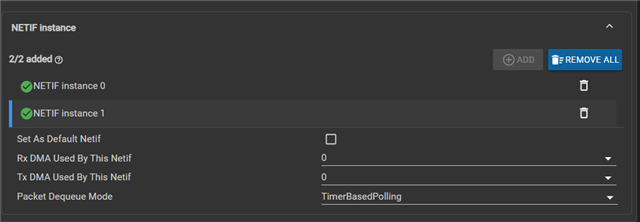
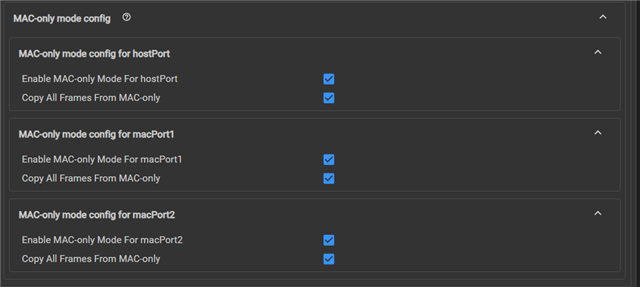
    I have enabled netif and mac mode attached reference

  • Hi Team,

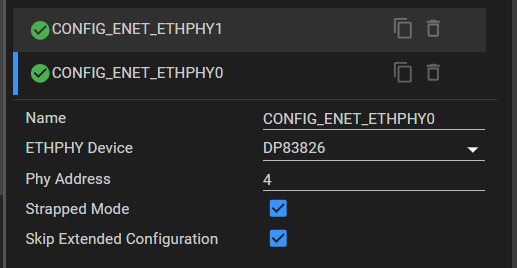
    After reversing the PHY address mapping in the sysconfig

    we are able ping individual and also both together.

    Can please update on, how to fix the R5F running clock to   500MHz 

  • SDK team is working on the permanent fix. Menawhile, you can follow this WA to get the clock to 500MHz

    Can you open your syscfg:

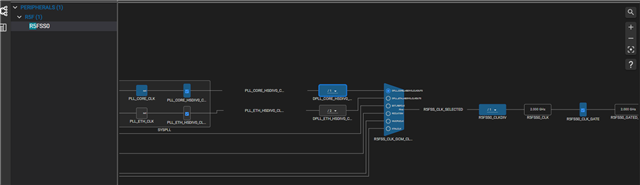
    1. Open the clock tree which on top-left side of the screen (the second one) 

    2. Search for R5F, and open R5FSS0

    3. Check both the PLL_CORE and PLL_ETH divider values

    4. Check the final R5FSS0_CLKDIV value

  • Hi,

    From the syscfg Clock tree values is 2.00gHz

    Even after changing the Divider to and R5FSS0_CLK to 500MHz in the clock tree

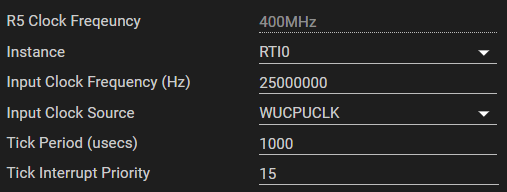
    same is not showing in the R5 Clock frequency as 500MHz 

    Also the error is same as before :.soc/am261x/soc_rcm.c:SOC_rcmGetModuleClkDivVal:1650: actOutFreq == outFreq failed !!!