This thread has been locked.

If you have a related question, please click the "Ask a related question" button in the top right corner. The newly created question will be automatically linked to this question.

AM6421: Programming custom board with am6421bsefhaalvr, using only R5F core

Part Number: AM6421
Other Parts Discussed in Thread: UNIFLASH, SYSCONFIG

Request you for setting up a quick call. Please find the problem statement below.

Need your kind support on the first time programming issue.

We are using am6421 series processor. We have bootmode configurations as OSPI and also UART fall back boot mode. DDR is not populated using only R5F.

SW2 (0→7) : 1 1 0 0 1 1 1 0

SW3 (8→15): 0 1 1 1 0 0 0 0


We tried to use uart_uniflash.py. but we are getting stuck in second stage .  cfg file used is default_sbl_null.cfg. 


for your reference 

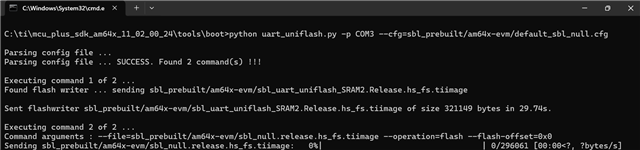
C:\ti\mcu_plus_sdk_am64x_11_02_00_24\tools\boot>python uart_uniflash.py -p COM3 --cfg=sbl_prebuilt/am64x-evm/default_sbl_null.cfg

Parsing config file ...
Parsing config file ... SUCCESS. Found 2 command(s) !!!

Executing command 1 of 2 ...
Found flash writer ... sending sbl_prebuilt/am64x-evm/sbl_ospi.release.hs_fs.tiimage

Sent flashwriter sbl_prebuilt/am64x-evm/sbl_ospi.release.hs_fs.tiimage of size 325021 bytes in 29.77s.

Executing command 2 of 2 ...
Command arguments : --file=sbl_prebuilt/am64x-evm/sbl_null.release.hs_fs.tiimage --operation=flash --flash-offset=0x0
Sending sbl_prebuilt/am64x-evm/sbl_null.release.hs_fs.tiimage:   0%|                                  | 0/296061 [00:00<?, ?

Kindly guide us on this. Thank you for your support

  • Hello,

    It looks like you have modified the "default_sbl_null.cfg" file as the default one sends SBL_UART_UNIFLASH and SBL_NULL images. Please try the flashing with the unmodified cfg file.

    https://github.com/TexasInstruments/mcupsdk-core/blob/next/tools/boot/sbl_prebuilt/am64x-evm/default_sbl_null.cfg

  • Hi Prashant,

    Thank you for your quick repsonse.

    we tried the default sbl as well, there also it stucks at same stage. 

    For our application we plan to use OSPI and we dont have DDR populated so we were trying to modify the sbl ospi. kindly guide on next steps.

    Thank you.

  • Hi,

    For our application we plan to use OSPI and we dont have DDR populated so we were trying to modify the sbl ospi. kindly guide on next steps.

    I assume you are using a custom board please confirm if that is not the case, if you are using a custom OSPI on your board then you would need to follow this guide to add support for the custom flash part in UART UNIFLASH: https://software-dl.ti.com/mcu-plus-sdk/esd/AM64X/12_00_00_27/exports/docs/api_guide_am64x/CUSTOM_FLASH_SUPPORT_GUIDE.html 

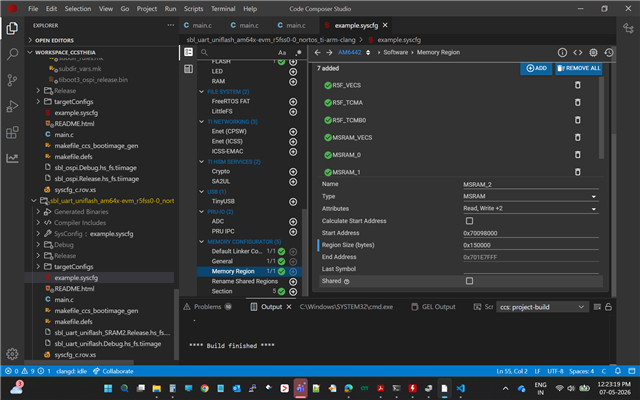
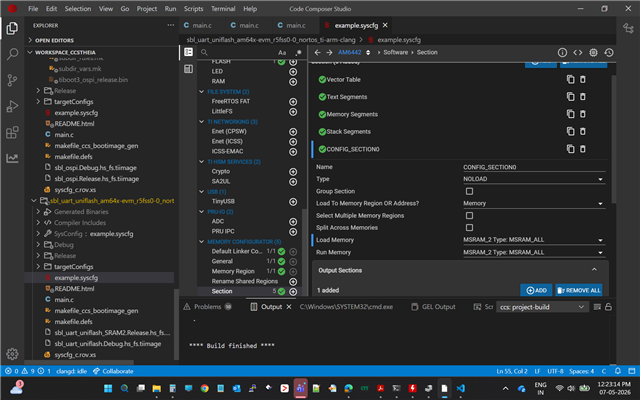
    The default UNIFLASH uses a buffer placed in DDR to receive the image and then copy it to the flash later, as you don't have a DDR you need to make some changes in SBL UART UNIFLASH example and move this from DDR to MSRAM, you can follow the steps mentioned here:  RE: AM2431: AM2431 – UART Uniflash to OSPI Flashing Failure with HS-FS SBL on Custom Board  

    Best Regards,
    Meet.

  • Thanks Meet. One quick query, we are using same OSPI part number as that of Eval board. Still do we need to perform the first step changes? 

    Thank you for your support.

  • Hi ,

    we are using same OSPI part number as that of Eval board. Still do we need to perform the first step changes? 

    If you are using the exact same OSPI flash part number as the EVM and the flash is connected in the same way, then you do not need to add custom flash support or modify the UART Uniflash flash driver.

    In that case, you can skip the steps from the Custom Flash Support Guide and focus only on the SBL UART Uniflash buffer changes required for a no-DDR system.

     RE: AM2431: AM2431 – UART Uniflash to OSPI Flashing Failure with HS-FS SBL on Custom Board 

    Thanks,

    JOMY

  • Thank you Jomy for response. we followed the steps suggested by you and below are snaps of config for your reference.   

    But we are getting same result. stuck at second step.

    Also, we have tried with null sbl. we are getting error for A53 core 1, shall we disbale this from sysconfig? kindly guide. Thank you. 

  • We are trying to flash the OSPI NOR flash on our custom AM6421 board.

    Processor:
    AM6421BSEFHAALVR

    OSPI Flash:
    S28HS512TGABHM010

    Issue Description:
    We are using uart_uniflash.py with default_sbl_null.cfg. The flashing process gets stuck on the second command at 0%.

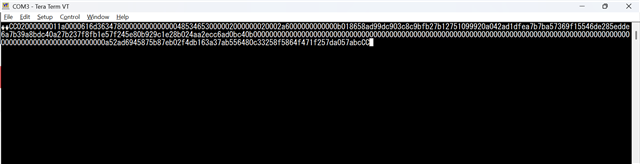
    As a workaround, we tried manually sending the image sbl_null.Release.hs_fs.tiimage from Tera Term using the XMODEM protocol after receiving continuous CCCC characters on the UART terminal.

    At one point, we were successfully able to send sbl_null.Release.hs_fs.tiimage once, but we were not able to send it a second time as mentioned in the flash diagnostics setup procedure from the forum thread.

    Additionally, we modified the boot flow by commenting out booting of other cores because the boot process was failing during A53 boot. The following sections were commented out:

    //status = Bootloader_bootCpu(bootHandle, &bootImageInfo.cpuInfo[CSL_CORE_ID_M4FSS0_0]);

    //status = Bootloader_bootCpu(bootHandle, &bootImageInfo.cpuInfo[CSL_CORE_ID_A53SS0_0]);

    //status = Bootloader_bootCpu(bootHandle, &bootImageInfo.cpuInfo[CSL_CORE_ID_A53SS0_1]);

    After this modification, we were able to enter debug mode through CCS using the flash diagnostic project:

    ospi_flash_diag_am64x-evm_r5fss0-0_nortos_ti-arm-clang

    However, after running the diagnostic application, the OSPI flash manufacturer ID and device ID are not being detected/read correctly.

    The diagnostic test fails immediately on the very first command with the following UART output:

    MAIN_Cortex_R5_0_0: [OSPI Flash Diagnostic Test] Starting ...

    MAIN_Cortex_R5_0_0: Some tests have failed!!

    We would like guidance on the following points:

    1. Is the S28HS512TGABHM010 officially supported in the AM64x SDK OSPI driver?
    2. Are there any required changes in the flash configuration or PHY settings for this flash device?
    3. Could this failure indicate an issue with:
      • OSPI clock configuration
      • Pinmux
      • PHY tuning
      • Reset sequence
      • Flash protocol mode (Octal SDR/DDR)
    4. Is there a recommended way to validate low-level communication with this flash before running the full diagnostic test?
    5. Why would uart_uniflash.py get stuck at the second command at 0%?

    Any suggestions for debugging this issue would be very helpful.

  • Hi Sarita,

    1. Yes, the S28HS512TGABHM010 Serial NOR OSPI Flash part is officially supported in the AM64x MCU+ SDK, information about the Flash part supported is also present in the Userguide.

    2. No, the default configurations of the Flash present in SysConfig should work. The only change in the Flash configurations would be the read and command dummy cycles if a different frequency is used. Please refer the flash datasheet for the latency/dummy cycles.

    3 and 4. Yes the recommended way is to run the OSPI Flash Diagnostic by using the following command:

    python uart_bootloader.py -p COMX -b sbl_prebuilt\am64x-evm\sbl_uart.release.hs_fs.tiimage -f "path to ospi flash diagnostic image"

    5. Could be a Flash configuration issue, can you try running the OSPI Flash Diagnostic with the above command and share the logs?

    Regards,

    Aryamaan Chaurasia

  • Hi, this is Sourav Singh.

    We executed the UART boot command from CMD using the compiled application image local path.

    Command used:
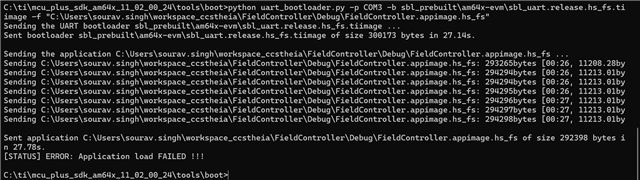
    python uart_bootloader.py -p COM3 -b sbl_prebuilt\am64x-evm\sbl_uart.release.hs_fs.tiimage -f "<appimage_path>"

    Observed output:

    • UART bootloader (sbl_uart.release.hs_fs.tiimage) was sent successfully.

    • Application image (ospi_flash_diag...appimage.hs_fs) was also transferred successfully.

    • Transfer completed without any communication interruption.

    However, after application transfer completion, the final status observed was:

    [STATUS] ERROR: Application load FAILED !!!

    This indicates that the image transmission over UART completed successfully, but the application failed during the load/boot stage on the target.

    Additionally, when the same project:
    ospi_flash_diag_am64x-evm_r5fss0-0_nortos_ti-arm-clang

    is executed directly in CCS debug mode(after loading sbl_null.Release.hs_fs.tiimage via xmodem through Teraterm), the following output is observed:

    MAIN_Cortex_R5_0_0: [OSPI Flash Diagnostic Test] Starting ...

    MAIN_Cortex_R5_0_0: Some tests have failed!!

    Further debugging indicates that the failure occurs during the manufacturer/device ID read itself, where the returned status is -1 for the following API:

    status = OSPI_norFlashReadId(ospiHandle, &manfId, &deviceId);

    As of now, no additional changes or debugging steps have been performed from our side beyond executing the above command and verifying the generated image path.

    Please let us know if there is any additional step/configuration that we might have missed during the boot, OSPI configuration, or image generation process.


  • Hi Sourav,

    Can you please check the hardware connections with the Flash and make sure that the OSPI lines are connected properly since you are using a custom board.

    OSPI Flash Diagnostic should work without any issues since it operates at the most basic protocol which is 1S-1S-1S, and should correctly fetch the Device ID and Manufacturer ID. Could you please check with your Hardware team for a schematic review of the custom board and make sure it aligns with this FAQ.

    Regards,

    Aryamaan Chaurasia

  • Hi,

    We are trying to flash sbl_null.release.hs_fs.tiimage using the python UART uniflash utility with the below command:

    python uart_uniflash.py -p COM3 --cfg=sbl_prebuilt/am64x-evm/default_sbl_null.cfg

    However, we are still observing the same behaviour where the first command in the .cfg executes successfully, but the second command gets stuck at 0% and no further flash operation happens.

    Before this, we successfully debugged the diagnostic application:

    ospi_flash_diag_am64x-evm_r5fss0-0_nortos_ti-arm-clang

    Also, we were able to manually send sbl_null.release.hs_fs.tiimage through XMODEM protocol using TeraTerm utility, after which the diagnostic application runs correctly.

    The debug output from the diagnostic test is attached below. It is able to correctly detect the Flash Manufacturer ID and Device ID:

    Flash Manufacturer ID : 0x34
    Flash Device ID       : 0x5B1A

    Initially it showed:

    Executing Flash Erase on first block...
    Erase Failed !!!

    But later the complete diagnostics including read/write/erase operations are passing successfully.

    We also tested another example project:

    ospi_flash_io_am64x-evm_r5fss0-0_nortos_ti-arm-clang

    In debug mode, flash read/write/erase operations are working correctly there as well.

    So currently the issue seems specific to flashing through the UART uniflash python command only:

    python uart_uniflash.py -p COM3 --cfg=sbl_prebuilt/am64x-evm/default_sbl_null.cfg

    where the second command in the .cfg gets stuck at 0%.

    Below is the diagnostic log output:


    MAIN_Cortex_R5_0_0: [OSPI Flash Diagnostic Test] Starting ...

    MAIN_Cortex_R5_0_0: [OSPI Flash Diagnostic Test] Flash Manufacturer ID : 0x34

    MAIN_Cortex_R5_0_0: [OSPI Flash Diagnostic Test] Flash Device ID : 0x5B1A

    MAIN_Cortex_R5_0_0: [OSPI Flash Diagnostic Test] Executing Flash Erase on first block...

    MAIN_Cortex_R5_0_0: [OSPI Flash Diagnostic Test] Erase Failed !!!

    MAIN_Cortex_R5_0_0: [OSPI Flash Diagnostic Test] Performing Write-Read Test...

    MAIN_Cortex_R5_0_0: [OSPI Flash Diagnostic Test] Write-Read Test Passed!

    MAIN_Cortex_R5_0_0: [QSPI Flash Diagnostic Test] SFDP Information :

    MAIN_Cortex_R5_0_0: ================================================

    MAIN_Cortex_R5_0_0: SFDP

    MAIN_Cortex_R5_0_0: ================================================

    MAIN_Cortex_R5_0_0: SFDP Major Revision : 0x1

    MAIN_Cortex_R5_0_0: SFDP Minor Revision : 0x8

    MAIN_Cortex_R5_0_0: Number of Parameter Headers in this Table : 6

    MAIN_Cortex_R5_0_0:

    MAIN_Cortex_R5_0_0: Types of Additional Parameter Tables in this flash

    MAIN_Cortex_R5_0_0: ---------------------------------------------------

    MAIN_Cortex_R5_0_0: 4 BYTE ADDRESSING MODE INSTRUCTIONS TABLE

    MAIN_Cortex_R5_0_0: NOR SPI PROFILE TABLE

    MAIN_Cortex_R5_0_0: STATUS CONTROL AND CONFIGURATION REGISTER MAP TABLE

    MAIN_Cortex_R5_0_0: OCTAL DDR MODE COMMAND SEQUENCE TABLE

    MAIN_Cortex_R5_0_0: SECTOR MAP TABLE

    MAIN_Cortex_R5_0_0:

    MAIN_Cortex_R5_0_0: Parsing of OCTAL DDR MODE COMMAND SEQUENCE TABLE table not yet supported.

    MAIN_Cortex_R5_0_0: JSON Data for the flash :

    MAIN_Cortex_R5_0_0:

    MAIN_Cortex_R5_0_0: {

    MAIN_Cortex_R5_0_0:

    MAIN_Cortex_R5_0_0: "flashSize": 67108864,

    MAIN_Cortex_R5_0_0: "flashPageSize": 256,

    MAIN_Cortex_R5_0_0: "flashManfId": "0x34",

    MAIN_Cortex_R5_0_0: "flashDeviceId": "0x5B1A",

    MAIN_Cortex_R5_0_0: "flashBlockSize": 262144,

    MAIN_Cortex_R5_0_0: "flashSectorSize": 4096,

    MAIN_Cortex_R5_0_0: "cmdBlockErase3B": "0xDC",

    MAIN_Cortex_R5_0_0: "cmdBlockErase4B": "0xDC",

    MAIN_Cortex_R5_0_0: "cmdSectorErase3B": "0x21",

    MAIN_Cortex_R5_0_0: "cmdSectorErase4B": "0x21",

    MAIN_Cortex_R5_0_0: "protos": {

    MAIN_Cortex_R5_0_0: "p111": {

    MAIN_Cortex_R5_0_0: "isDtr": false,

    MAIN_Cortex_R5_0_0: "cmdRd": "0x03",

    MAIN_Cortex_R5_0_0: "cmdWr": "0x02",

    MAIN_Cortex_R5_0_0: "modeClksCmd": 0,

    MAIN_Cortex_R5_0_0: "modeClksRd": 0,

    MAIN_Cortex_R5_0_0: "dummyClksCmd": 0,

    MAIN_Cortex_R5_0_0: "dummyClksRd": 0,

    MAIN_Cortex_R5_0_0: "enableType": "0",

    MAIN_Cortex_R5_0_0: "enableSeq": "0x00",

    MAIN_Cortex_R5_0_0: "dummyCfg": null,

    MAIN_Cortex_R5_0_0: "protoCfg": null,

    MAIN_Cortex_R5_0_0: "strDtrCfg": null

    MAIN_Cortex_R5_0_0: },

    MAIN_Cortex_R5_0_0: "p112": null,

    MAIN_Cortex_R5_0_0: "p114": null,

    MAIN_Cortex_R5_0_0: "p118": null,

    MAIN_Cortex_R5_0_0: "p444s": null,

    MAIN_Cortex_R5_0_0: "p444d": null,

    MAIN_Cortex_R5_0_0: "p888s": null,

    MAIN_Cortex_R5_0_0: "p888d": {

    MAIN_Cortex_R5_0_0: "isDtr": true,

    MAIN_Cortex_R5_0_0: "cmdRd": "0xEE",

    MAIN_Cortex_R5_0_0: "cmdWr": "0x12",

    MAIN_Cortex_R5_0_0: "modeClksCmd": 0,

    MAIN_Cortex_R5_0_0: "modeClksRd": 0,

    MAIN_Cortex_R5_0_0: "dummyClksCmd": 4,

    MAIN_Cortex_R5_0_0: "dummyClksRd": 24,

    MAIN_Cortex_R5_0_0: "enableType": "0",

    MAIN_Cortex_R5_0_0: "enableSeq": "0x00",

    MAIN_Cortex_R5_0_0: "dummyCfg": {

    MAIN_Cortex_R5_0_0: "isAddrReg": true,

    MAIN_Cortex_R5_0_0: "cmdRegRd":"0x65",

    MAIN_Cortex_R5_0_0: "cmdRegWr":"0x71",

    MAIN_Cortex_R5_0_0: "cfgReg":"0x00800003",

    MAIN_Cortex_R5_0_0: "shift":0,

    MAIN_Cortex_R5_0_0: "mask":"0x03",

    MAIN_Cortex_R5_0_0: "bitP":11

    MAIN_Cortex_R5_0_0: },

    MAIN_Cortex_R5_0_0: "protoCfg": {

    MAIN_Cortex_R5_0_0: "isAddrReg": true,

    MAIN_Cortex_R5_0_0: "cmdRegRd": "0x65",

    MAIN_Cortex_R5_0_0: "cmdRegWr": "0x71",

    MAIN_Cortex_R5_0_0: "cfgReg": "0x00800006",

    MAIN_Cortex_R5_0_0: "shift": 0,

    MAIN_Cortex_R5_0_0: "mask": "0x00",

    MAIN_Cortex_R5_0_0: "bitP": 0

    MAIN_Cortex_R5_0_0: },

    MAIN_Cortex_R5_0_0: "strDtrCfg": {

    MAIN_Cortex_R5_0_0: "isAddrReg": true,

    MAIN_Cortex_R5_0_0: "cmdRegRd": "0x65",

    MAIN_Cortex_R5_0_0: "cmdRegWr": "0x71",

    MAIN_Cortex_R5_0_0: "cfgReg": "0x00800006",

    MAIN_Cortex_R5_0_0: "shift": 1,

    MAIN_Cortex_R5_0_0: "mask": "0x00",

    MAIN_Cortex_R5_0_0: "bitP": 1

    MAIN_Cortex_R5_0_0: }

    MAIN_Cortex_R5_0_0: },

    MAIN_Cortex_R5_0_0: "pCustom": {

    MAIN_Cortex_R5_0_0: "fxn": null

    MAIN_Cortex_R5_0_0: }

    MAIN_Cortex_R5_0_0: },

    MAIN_Cortex_R5_0_0: "addrByteSupport": "1",

    MAIN_Cortex_R5_0_0: "fourByteAddrEnSeq": "0xA1",

    MAIN_Cortex_R5_0_0: "cmdExtType": "REPEAT",

    MAIN_Cortex_R5_0_0: "resetType": "0x10",

    MAIN_Cortex_R5_0_0: "deviceBusyType": "1",

    MAIN_Cortex_R5_0_0: "cmdWren": "0x06",

    MAIN_Cortex_R5_0_0: "cmdRdsr": "0x05",

    MAIN_Cortex_R5_0_0: "srWip": 0,

    MAIN_Cortex_R5_0_0: "srWel": 1,

    MAIN_Cortex_R5_0_0: "cmdChipErase": "0xC7",

    MAIN_Cortex_R5_0_0: "rdIdSettings": {

    MAIN_Cortex_R5_0_0: "cmd": "0x9F",

    MAIN_Cortex_R5_0_0: "numBytes": 5,

    MAIN_Cortex_R5_0_0: "dummy4": 0,

    MAIN_Cortex_R5_0_0: "dummy8": 0

    MAIN_Cortex_R5_0_0: },

    MAIN_Cortex_R5_0_0: "xspiWipRdCmd": "0x65",

    MAIN_Cortex_R5_0_0: "xspiWipReg": "0x00800000",

    MAIN_Cortex_R5_0_0: "xspiWipBit": 0,

    MAIN_Cortex_R5_0_0: "flashDeviceBusyTimeout": 256000000,

    MAIN_Cortex_R5_0_0: "flashPageProgTimeout": 512

    MAIN_Cortex_R5_0_0: }

    MAIN_Cortex_R5_0_0:

    MAIN_Cortex_R5_0_0: All tests have passed!!

    Could you please suggest what could cause the UART uniflash flow to get stuck only during the second command, even though manual XMODEM loading and debug-mode flash operations are working correctly?


  • Hi,

    In that case, you can skip the steps from the Custom Flash Support Guide and focus only on the SBL UART Uniflash buffer changes required for a no-DDR system.

     RE: AM2431: AM2431 – UART Uniflash to OSPI Flashing Failure with HS-FS SBL on Custom Board 

    After making changes to the UART Uniflash example by following the above reply, have you rebuilt the example properly?

    Also can you share the example.syscfg file for the UART Uniflash example? I'd like to check the Flash and OSPI configurations of that example.

    Regards,

    Aryamaan Chaurasia

  • Hi Aryamaan,

    Yes, we rebuilt the UART Uniflash example properly after making the suggested changes and generated updated binaries before testing.


    We are also sharing the
    example.syscfg file for review of the Flash and OSPI configurations.

    7411.example.zip

  • Hi,

    Does your custom board have an eMMC?

    Best Regards,

    Meet.

  • No, we are only using R50 Core and OSPI boot mode supporting Uart fallback. DDR and eMMC are not populated/not used.

    Boot mode:-

    SW3 (0→7) : 1 1 0 0 1 1 1 0

    SW2 (8→15): 0 1 1 1 0 0 0 0

  • Then you need to remove MMCSD instance from your SBL UART UNIFLASH application's example.syscfg, please refer to the 4th point in this FAQ:  [FAQ] AM6XX:How to Port SBL UART UNIFLASH for a custom board  

  • Hi !
    The UART uniflash command flow is working now after removing the MMCSD/eMMC instance from
    example.syscfg.

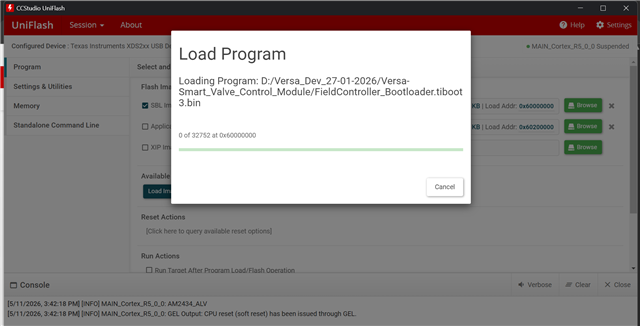
    However, when trying to connect using Uniflash GUI with XDS200 configured, we are getting the below error:

    Run failed...
    File Loader: Memory write failed: Timed out waiting for target to halt while executing am243x_alv_flasher.out

    Also, when we connect to the UART terminal and press reset, we are continuously receiving "CCCC" instead of booting sbl_null.

    Could you please suggest what could cause this issue in Uniflash GUI mode?


  • Hi,

    It’s good to know that you successfully flashed the SBL NULL. Could you please switch to OSPI boot mode to run the SBL NULL

    Could you please suggest what could cause this issue in Uniflash GUI mode?

    Also, could you please check the tiboot3.bin you built for AM6421

    Thanks,

    JOMY

  • Thank you JOMY. we are using following boot mode config, that is 

    Boot mode:-

    SW3 (0→7) : 1 1 0 0 1 1 1 0

    SW2 (8→15): 0 1 1 1 0 0 0 0.

    So, OSPI boot mode and UART fallback mode are supported.

    Even if we use tiboot3.bon for uart uniflash the output is same. 

  • Could you please suggest what could cause this issue in Uniflash GUI mode?

    Could you let me know why you are trying to flash the binary again with Uniflash GUI if flashing with UART UNIFLASH was already successful?

    Also, when we connect to the UART terminal and press reset, we are continuously receiving "CCCC" instead of booting sbl_null.

    This suggests that ROM was not able to boot the SBL binary from OSPI so it switched to the backup boot mode. Could you check if you are able to boot SBL NULL over UART or not? You can send sbl_null as the bootloader binary instead of sbl_uart: https://software-dl.ti.com/mcu-plus-sdk/esd/AM64X/12_00_00_27/exports/docs/api_guide_am64x/TOOLS_BOOT.html#UART_BOOTLOADER_PYTHON_SCRIPT 

  • Hi Meet,

    We are able to manually load sbl_null.release.hs_fs.tiimage over XMODEM using TeraTerm, and it boots correctly in RAM. However, flashing through uart_uniflash.py with default_sbl_null.cfg still fails.

    We also tested uart_bootloader.py with sbl_uart.release.hs_fs.tiimage, where both bootloader and application transfer complete successfully, but it ends with:

    [STATUS] ERROR: Application load FAILED !!!


  • Hi,

    Since there is a ROM Boot failure, can you refer the Boot Failure section of the xSPI Debug Guide?

    Meanwhile, please give us some more time in investigating the issue.

    Regards,

    Aryamaan