This thread has been locked.

If you have a related question, please click the "Ask a related question" button in the top right corner. The newly created question will be automatically linked to this question.

AM2754-Q1: Uniflash Programming Questions for Audio Demo Project

Part Number: AM2754-Q1
Other Parts Discussed in Thread: UNIFLASH

Hi experts,

     Cusotmer has question to use UniFlash + JTAG to program multi core image in factory.

Screenshot 2026-05-15 185854.png

In the screen shot, you can see we only can specify one image to program. I guess the programming start address should be 0x0. However, for each core, the image start addresses is different.
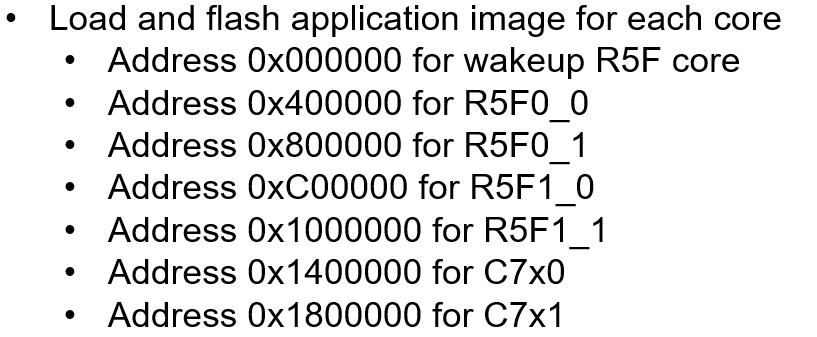
 image.pngf

For example, we can see differnet images for R5F and 2 C75x DSP in demo awe_sdk_am275x_12_00_22_12/audio_app/am275.

They are not combined into one. May I know:

  1. If UniFlash support multi images programming?
  2. Or can we provide an example,use dmeo project to show customer how to combine all images belong different cores into one?

Regards

Andre


  • Hi Andre,

    The uniflash via UART does support multiple image programming. Please refer to the following URL for details:

    AM275 FreeRTOS SDK: Flash an example application

    Best regards,

    Ming

  • Ming,

        We are looking for UniFlash +JTAG support for multiples image. The solution you provide is go through UART with python script. 

    Can you please help to check if UniFlash support  this feature on AM275x as other Sitata MCU.

    Regards

    Andre

  • Hi Andre,

    The TI standard UNIFLASH: UniFlash flash programming tool does not support AM275x currently. There are two different ways to flash the application program into the flash:

    1. Using sbl_uart_uniflash, which you can program multiple images into the different locates in flash with python script. You only need to run the python script once. It is the preferred way to program application images into the flash. It only uses UART and does not use JTAG. The customer board will have UART0 wired out.

    2. Using sbl_jtag_uniflash, which you can program multiple images into the different locates in flash, but you will have to run the same program multiple times, because each run can only write to one image at one flash location by default. Of course, you can change the sbl_jtag_uniflash to fit your needs.

    To combine all the application images (for all cores involved) and form one image for sbl_jtag_uniflash is not recommended, because all the gaps between the address spaces used by various cores are huge. It will take long times to program that image into the flash.

    Can you explain why sbl_uart_uniflash plus python script does not work for your customer?

    Best regards,

    Ming

  • Ming, 

        Due to some mistake, UART0 may not be available on customer HW. So JTAG is a workaround.

    Uniflash 9.5 still list AM275x in its support list.

    Regards

    Andre 

  • Hi ,

    Due to some mistake, UART0 may not be available on customer HW. So JTAG is a workaround.

    You can upload multiple images in UniFlash. After uploading the first image, you will see an option to add additional images. Please refer to the following section in the UniFlash documentation for programming the device

    UNIFLASH_GUIDE

    Alternatively, you can use the sbl_jtag_uniflash method:

    SBL_JTAG_UNIFLASH

    Thanks,

    JOMY