Part Number: SK-AM62A-LP-PINMUX-CONFIGURATION
Hello Support,
we need the DCC Tuninig Tool for development support within our TI-AM62A environment and integration of a camera system.
Where can we find this tool?
Thank you!
Christoph
This thread has been locked.
If you have a related question, please click the "Ask a related question" button in the top right corner. The newly created question will be automatically linked to this question.
Part Number: SK-AM62A-LP-PINMUX-CONFIGURATION
Hello Support,
we need the DCC Tuninig Tool for development support within our TI-AM62A environment and integration of a camera system.
Where can we find this tool?
Thank you!
Christoph
Hi Christoph,
The topic owner will be able to respond earliest on Tuesday (May-26-2026) next week.
Thanks for your patience !
Best Regards,
Anastas Yordanov
Hello Christoph,
You can download the software through this link:
https://www.ti.com/tool/PROCESSOR-SDK-AM62A
Keep in mind you need to download the correct one depending if you use Windows or Linux.
Here is a link to the latest ISP Tuning guide:
https://www.ti.com/lit/an/sprad86a/sprad86a.pdf?ts=1752243196188
In it, you can find more information for performing tuning in section 7 Perform Basic Tuning.
Best Regards,
Borislav Lazarkov
Hello Christoph,
It needs to be in the installation folder and after that \bin\DCC.exe.
For more information, you could also find in the ISP Tuning guide, section 7 Perform Basic Tuning, point 7.1 Launch the Tuning Tool and Create a Project.
Best Regards,
Borislav Lazarkov
Dear Borislav
please explain exactly what tool you are refering too under that given link. Because we certainly cannot find a Windows version of anything anywhere.

Kind regards
Bernhard
Hello Bernhard,
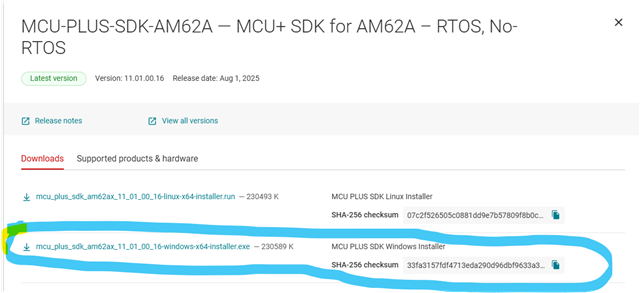
You need the second one in the screenshot "MCU-PLUS-SDK-AM62A - MCU+ SDK for AM62A- RTOS, No-RTOS".
When you click Download options, a new window will open.
You need to download the .exe file in which name it is stated windows. Please refer to the screenshot bellow:

Best Regards,
Borislav Lazarkov
Hello Borislav,
we already tried installing that and it doesn't seem to contain any DCC.exe, nor a "bin" path. At least not in
C:\ti\mcu_plus_sdk_am62ax_11_01_00_16 (the same for v9)
And the documentation you referenced clearly states:

Kind regards
Bernhard
Hi Bernhard,
Did you follow the FAQ page below to get access to the tuning tool?
[FAQ] DCC Tuning Tool V3.2 for VPAC on TDA4x and AM6xA Devices
If not, you would need to request access here first: http://www.ti.com/drr/opn/ADAS-SW-IMAGING
we need the DCC Tuninig Tool for development support within our TI-AM62A environment and integration of a camera system.
Please also refer to these FAQ pages for simplicity.
[FAQ] Default DCC profile generation tool for TDA4/AM6xA ISP (VPAC)
[FAQ] TDA4VM: How to use Auto-Tune in the python tool under “imaging/tools/” of TDA4x/AM6xA SDK?
Hello Gang,
please approve mine as well. I have already requested access here: http://www.ti.com/drr/opn/ADAS-SW-IMAGING
Thank you