


Part Number: LP-AM263P
Currently, I am using the AM263Px launchpad for bare-metal firmware development for our work project and my goal is to to get familiar with the functionality of this development board.
I am trying to test out an example program - i2c_led_blink_polling_lld_am263px-lp_r5fss0-0_nortos from the mcu_plus_sdk_am263px_26_00_00_01 using the AM263Px launchpad.
I am able to build the project successfully using CCS 12.7.1 However, when I try to debug or flash the code to the board, I am getting the error code 1170 - "Cortex_M4_0: Error connecting to the target: (Error -1170 @ 0x0) Unable to access the DAP. Reset the device, and retry the operation. If error persists, confirm configuration, power-cycle the board, and/or try more reliable JTAG settings (e.g. lower TCLK). (Emulation package 20.0.0.3178) ."
The error persists after implementing the below troubleshooting steps:
- Tried all troubleshooting steps suggested in https://software-dl.ti.com/ccs/esd/documents/ccs_debugging_jtag_connectivity_issues.html.
- Unchecked Cortex M4 under the Debug Configurations -> Main .
- Under target configurations - Edited the source script to halt under a reset, set reset type to hardware and lower the TCLK.
- Under target configuration, tested the connection between the port and the board using the Test Connection tab and the reslults were successful.
- Made sure the XDS110 firmware version is the recommended version for use - 3.0.0.32
I am not sure if I am missing any other steps but I am unable to resolve this issue. Any help or insight will be much appreciated. Pasted some screenshots below for reference.
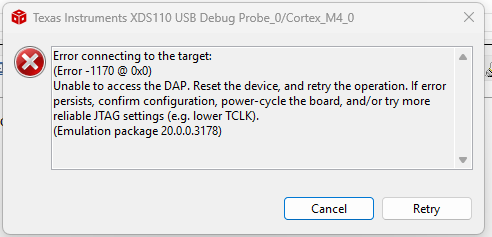

I also noticed another issue where I am not able to load some "no-rtos launchpad" examples (under drivers) from the SDK into CCS. I am using CCS 12.7.1 Not sure if this is related to the CCS version or some other issue. Even if I am able to load the required folder, the build icon is disabled. Please help.
