This thread has been locked.

If you have a related question, please click the "Ask a related question" button in the top right corner. The newly created question will be automatically linked to this question.

AM263P4-Q1: Query Regarding LIN BaudRate Configuration on MCAL 26.00.00.08

Part Number: AM263P4-Q1

Hello Team,

Currently we are working on MCAL AM26xx 26.00.00.08. In LIN the baudrate is configured as 19200.

In the earlier meeting, it was mentioned that 9600 baudrate support/configuration would be available in the current MCAL 26.00.00.08 release. But we are still not able to configure it to 9600.

Could you please help us with the required configuration changes or steps to set the LIN baudrate to 9600?

Regards,

Mohasin


  • Hi Mohasin,

    I can check on this for you. Can you provide information on what earlier meeting you are referring to and your previous TI point of contact? I would like to have full context so I can reach out to the right team members internally.

    Best Regards,

    Allison

  • Hello Allison,

    In the previous meeting, we discussed this with s-bhat2@ti.com and n-dasan@ti.com.In previous MCAL the LIN baud rate was configured to 19200. They informed us that support to configure the LIN baud rate to 9600 would be provided in the upcoming MCAL release (26.00.00.08).

    We have now integrated the latest MCAL version (26.00.00.08), but the baud rate is still configured to 19200.

    Could you please help us with the required configuration changes or steps to set the LIN baud rate to 9600?

    Regards,

    Mohasin

  • Hi Mohasin,

    I'm able to configure the lin baud rate as 9600 at my end with the latest plugins. May I know what is the issue that you are facing?

  • Hello Nikhil,

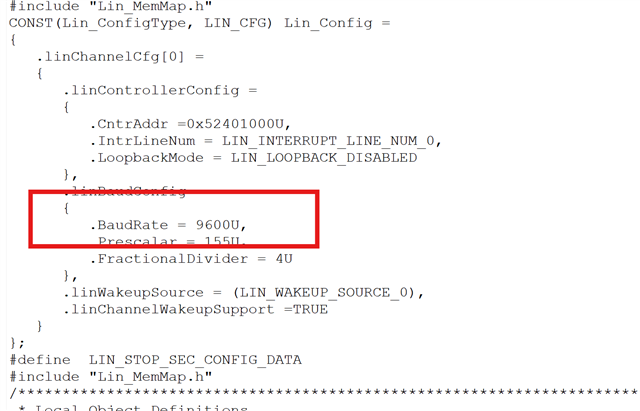
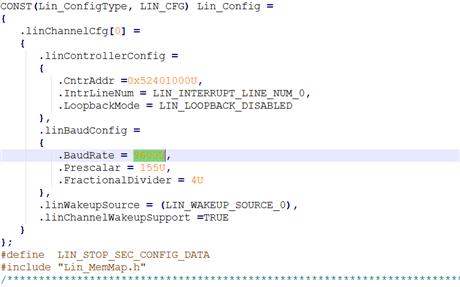
    I have configured the LIN Baudrate as 9600 and tested on PLIN, but I'm not able to see any frames. I've Observed that even if I configured 9600 as baudrate but PLIN is detecting the value as 19200.

    Please check the reference video which is shared below

    Can you please check and provide your feedback

    Regards,

    Mohasin

  • Hi Mohasin, 

    You need to run auto-calculate button in the Tresos GUI to update the Prescalar and Divider values. Since these values are used to set the baud rate, running auto-calc is essential. 

    Regards, 
    Pranav Siddappa