Part Number: MSPM0C1104
Hi expert,
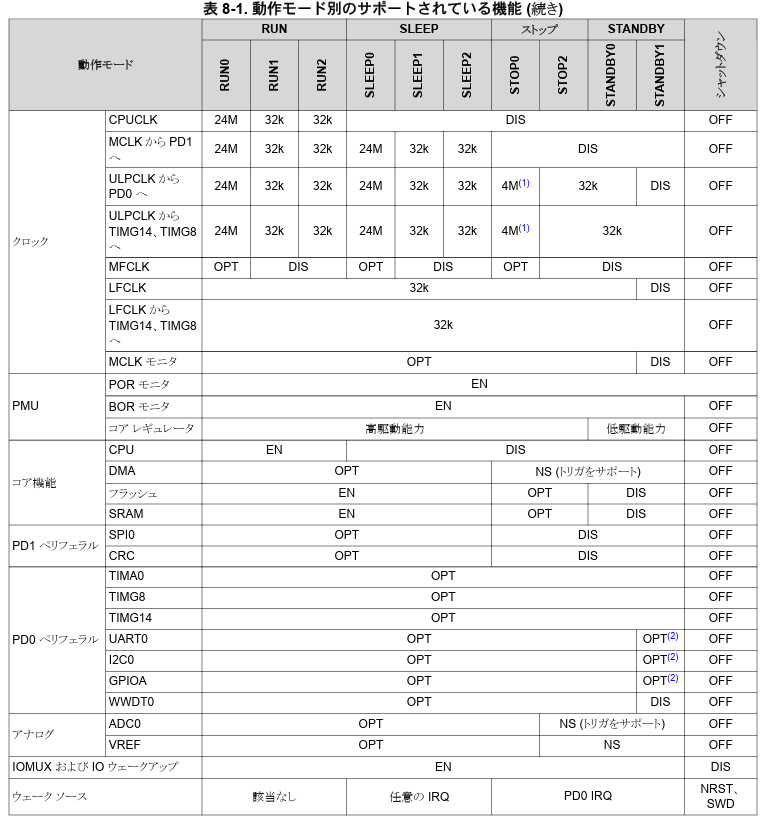
I have a question regarding clock behavior when entering Sleep mode on MSPM0C110x4 devices.
I would like to achieve low-power operation while using Sleep mode.
Is the following approach possible?
- Run the device with a high-frequency system clock (e.g., 32 MHz)
- Just before entering Sleep mode, switch the clock to a low-frequency source (e.g., via ULPCLK)
- Then enter Sleep mode
My understanding is that the clock configuration is maintained during Sleep mode, so I am considering switching to a low-frequency clock just before entering Sleep.
However, based on the clock tree, ULPCLK appears to be derived from MCLK, and it is not clear whether it is possible to reduce only ULPCLK frequency while keeping MCLK high before Sleep.
Could you please clarify:
- Is it possible to switch to a low-frequency clock (e.g., 32 kHz) just before entering Sleep mode while running at high frequency?
- If possible, what is the recommended method or API to perform this clock switching?
- If not, what is the recommended approach to achieve low-power operation in Sleep mode?
Thank you for your support.
Best regards,
Ibuki Endo