TIDA-010979: Bring up software development environment problems

Part Number: TIDA-010979

Hi Experts,

We have TIDA-010979 preliminary software released on 6 April including motor control and EtherCAT running on both cores.

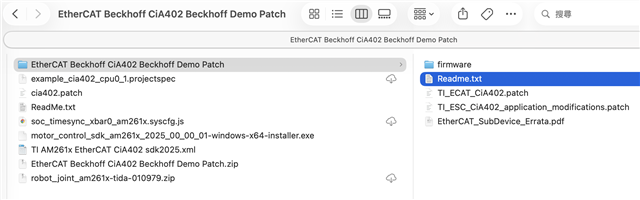
The files and subfolders are shown as below where there is a ReadMe.txt describing overall bring up procedures. Some problems listed as below need your help. Thanks in advance for your great support.


Q1: In the ReadMe.txt as below snapshot, the motor control SDK is Windows version(*.exe) provided in the release. Could we install it in Windows and copy all files in SDK in Ubuntu OS? It's preferred for us to use Ubuntu environment. And could we use TI CCS 20.5 version instead of 12.8 mentioned in .ccsproject of robot_joint_am261x-tida-010979_system project?

image.png


Q2: In step 3, does 'Apply patch in EtherCAT Beckhoff CiA402 Beckhoff Demo Patch' mean we have to follow another Readme.txt under this sub-folder to apply TI_ECAT_CiA402.patch and TI_ESC_CiA402_application_modications.patch and rebuild EtherCAT firmware HAL libraries? If yes, after applying TI_ECAT_CiA402.patch (ecat_frame_handler_bin.h and ecat_host_interface_bin.h are both patched here), the step 3-1 mentions to overwrite them. Is it correct to do it?

image.png

Q3: Continuing Q2, after applying patch of TI_ESC_CiA402_application_modifications.patch, example.projectspec file is modified. Afterwards when we import this Beckhoff demo example project, it shows up two *.projectspec as below snapshot. It's supposed to select example_cia402_cpu0_1_projectspec. But actually example.projectspec does some patches. Any reason for this? Or we misunderstand something?
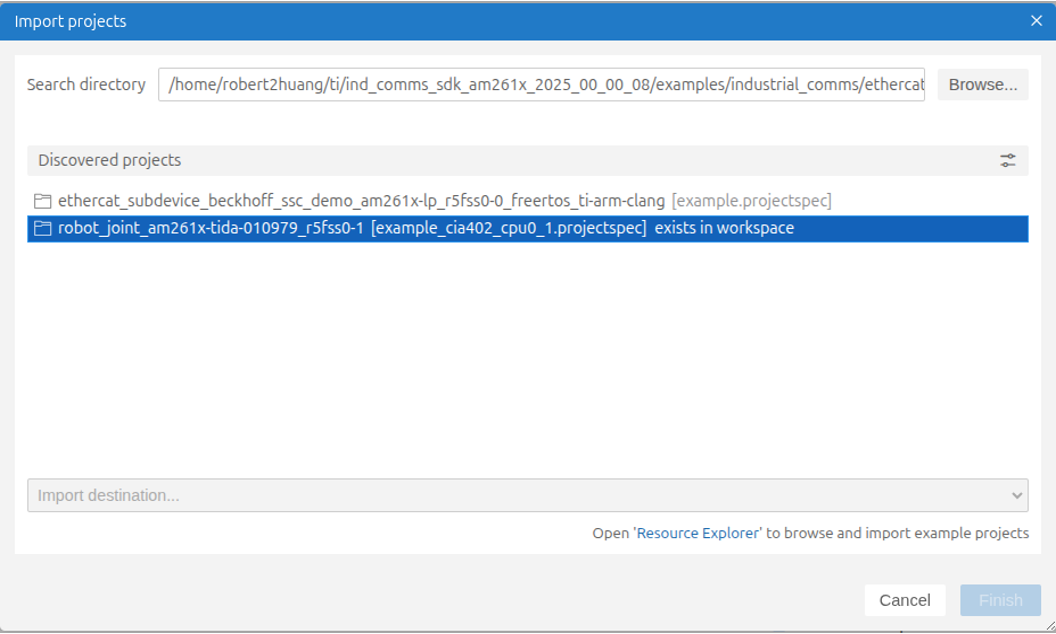
image.png


Q4: For step 6, we faced problem when patching cia402.patch as below snapshot. Could you please provide some suggestions on these errors?

image.png


Q5: After importing 3 projects and we build the system project, the other two projects (r5ss0-*) do not build automatically. Any solution for this problem in CCS 20.5?

Q6: The build configurations for r5ss0-0 are LAUNCHPAD and TIDA_010979; the ones for r5ss0-1 are Debug and Release. In system project, one problme we faced during build is that it cannot find debug/r5fss0-0.out. Is there fast way to set up different build configuration for 2 sub projects in CCS 20.5 instead of modifying makefile_system_ccs_bootimage_gen file?


Best Regards,

Robert Huang

  • Hello, 

    - Should generally be possible. The MC SDK package content is mostly source code, headers, and windows .exe installer mainly extracts the SDK into the default TI folder. However, copying the installed folder to Ubuntu is a manual workaround rather than a fully validated installer flow. Also, you may try the code in CCS theia, but the code is validated in CCS eclipse.

    - Yes

    -  The screen shot does not include the debug console and it's not possible to suggest solution.

    - Did you changed the "Build Configuration" to "release"?

    - All the "Build Configuration" should be on "release" once you followed the steps.

    Can you confirm if you have the video from us on how to patch the files?

    Best Regards,

    Masoud

  • Hi Masoud,

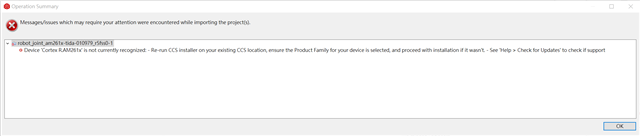
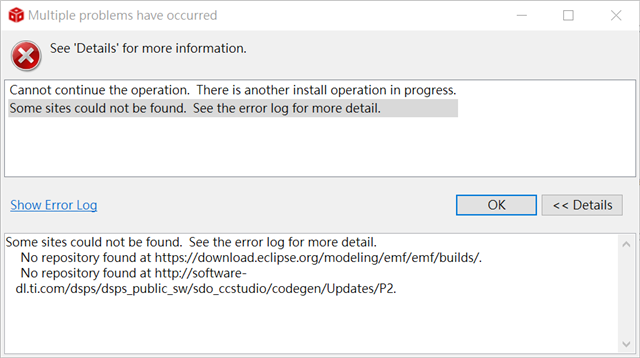
    To simply the things, we have duplicated actions on Windows PC and use CCS 12.8 (full installation) as recommended. When importing EtherCAT SSC demo project, it shows up following error message. We tried  'check for update' but error 'Some sites could not be found' prompted (snapshot as below). Could you please help check for us? Thanks in advance.

    'See details below...
    robot_joint_am261x-tida-010979_r5fss0-1
    Device 'Cortex R.AM261x' is not currently recognized:
    - Re-run CCS installer on your existing CCS location, ensure the Product Family for your device is selected, and proceed with installation if it wasn't.
    - See 'Help > Check for Updates' to check if support for this device is available through a CCS update.
    - Migrate the project to closest matching supported device by adjusting project properties.
    - Or contact TI for support if using experimental silicon.'

    BR, Robert Huang

  • Add one more question regarding step 6 in ReadMe.txt as below extraction for reference, the patch process stops due to error as below response. Please also help check this for us. Appreciate your help.
    6. Apply patch "cia402.patch" inside the new robot_joint_am261x-tida-010979_r5fss0-1 project folder
    1. copy the patch file into the robot_joint_am261x-tida-010979_r5fss0-1 project folder
    2. Open command line from this folder
    3. Execute "git apply cia402.patch -v"


    C:\Users\pega_user\workspace_ccstheia\robot_joint_am261x-tida-010979_r5fss0-1>git apply cia402.patch -v
    Checking patch cia402appl.c...
    error: while searching for:
    #include "tiescutils.h"
    #endif

    #ifdef CiA402_MOTOR_CONTROL
    #include <motor_control/control/math_blocks/IQmathLib.h>


    error: patch failed: cia402appl.c:66
    error: cia402appl.c: patch does not apply
    Checking patch cia402appl.h...
    error: while searching for:

    CiA402Objects Objects; /**< \brief CiA402 Axis object variable*/
    TOBJECT OBJMEM * ObjDic; /**< \brief Pointer to Axis specific object dictionary*/
    UINT16 axisIndex; /**< \brief CiA402 Axis index variable */
    }
    TCiA402Axis, *pTCiA402Axis;
    /** @}*/

    error: patch failed: cia402appl.h:634
    error: cia402appl.h: patch does not apply
    Checking patch ecat_def.h...
    error: while searching for:
    /**
    EOE_SUPPORTED: If the EoE services should be supported, then this switch shall be set. */
    #ifndef EOE_SUPPORTED
    #define EOE_SUPPORTED 1
    #endif

    /**

    error: patch failed: ecat_def.h:352
    error: ecat_def.h: patch does not apply
    Checking patch example.syscfg...
    Checking patch main.c...
    error: while searching for:
    StaticTask_t gMainTaskObj;
    TaskHandle_t gMainTask;

    void ethercat_subdevice_beckhoff_ssc_demo_main(void *args);

    void freertos_main(void *args)
    {
    ethercat_subdevice_beckhoff_ssc_demo_main(NULL);

    vTaskDelete(NULL);
    }

    error: patch failed: main.c:46
    error: main.c: patch does not apply
    Checking patch tiesceoefoe.c...
    Checking patch tiescsoc.c...
    Checking patch tiescutils.c...
    error: while searching for:
    /* Function Definitions */
    /* ========================================================================== */

    uint8_t task1_init()
    {
    uint8_t u8Err = 0;

    error: patch failed: tiescutils.c:105
    error: tiescutils.c: patch does not apply

    C:\Users\pega_user\workspace_ccstheia\robot_joint_am261x-tida-010979_r5fss0-1>

  • Hi Robert,

    We have a instruction video on how to run the whole reference design. Can you confirm if you have the video from us on how to patch the files? I'm guessing it'll solve most of the issues here.

    Best Regards,

    Masoud

  • Hi Masoud,

    Great to hear it. We don't have the video from your team and could you share it?

    BR, Robert Huang

  • Sure, Please share your email with me.

    Best Regards,

    Masoud

  • By the way, I've make a screen recording of the process following the readme.txt guild. If you need it, please share your email with me.

    BR, Robert Huang

  • I shared the video. Please follow and let me know if you face with issue.

    Best Regards,

    Masoud

  • Hi Masoud,

    A big difference is that Han doesn't proceed Readme.txt under 'EtherCAT Beckhoff CiA402 Beckhoff Demo Patch' folder where the steps Han has not done are TI_ESC_CiA402_application_modifications.patch (step 3) and Rebuild EtherCAT Firmware HAL Libraries(step 4). Please help double check they are not necessary to do. I'll also try it again without these two steps next week.

    BR, Robert Huang