TMDSCNCD263P: Unable to see CCCs from Hello World example

Part Number: TMDSCNCD263P
Other Parts Discussed in Thread: UNIFLASH

spradf9.pdf 

I was following the quick-start guide in the attached pdf. I got to the part where I am supposed to read some "CCC" from the serial terminal but I was unable to read anything from the Sitara card. 
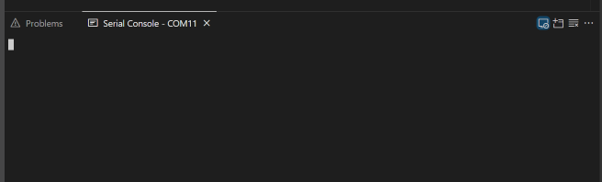
Picture1.png


Additionally, I want to clarify with respect to table 2-4 of the user's guide: spruj86d.pdf - exactly what are the advantages and disadvantages of the various bootloader options? 

  • HI

    I was following the quick-start guide in the attached pdf. I got to the part where I am supposed to read some "CCC" from the serial terminal but I was unable to read anything from the Sitara card. 

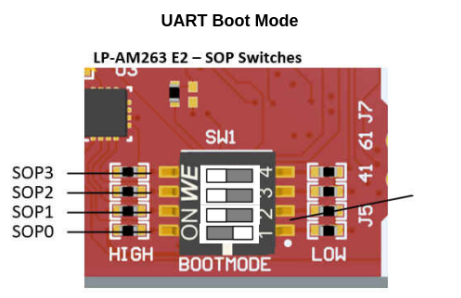
    Can you please share what boot-mode you are using? IF it is the control-card, UART Bootmode is:

    IF it is the launchpad, UART Bootmode is: 

    Additionally, I want to clarify with respect to table 2-4 of the user's guide: spruj86d.pdf - exactly what are the advantages and disadvantages of the various bootloader options? 

    This highly depends on the interface you want to use in your design and boot your application from, your plan to use a QSPI or OSPI flash, what xSPI mode/protocol you want to run in.

    For example,

    - QSPI/OSPI boot is for booting from flash interfaces connected over QSPI/OSPI.

    - Dev bootmode is what you would use during your application development without an SBL and rely on the CCS gel scripts for initialization

    - UART Bootmode is for receiving application image over UART.

    I can tabulate some differences below:

    Boot Mode Advantages Disadvantages
    OSPI (8S) Octal Read Highest throughput (8-bit wide reads); fastest autonomous boot for production; supports SFDP auto-discovery  Requires OSPI flash hardware; more complex PCB routing (8 data lines); requires SBL initialization steps 
    QSPI (4S) Quad Read Good balance of speed and simplicity; autonomous boot from flash; simpler routing than OSPI  Lower throughput than OSPI; still requires external flash
    QSPI (1S) Single Read Simplest flash interface (fewest data lines); autonomous boot  Slowest flash-based boot mode; limited bandwidth
    OSPI/QSPI + UART Fallback Fault-tolerant — attempts flash boot first, falls back to UART if primary/secondary SBL images fail; robust for field-deployed systems  Added complexity; requires UART connection available as backup; longer boot time if fallback triggers
    UART Maximum flexibility; downloads SBL via XMODEM from external host; ideal for prototyping and initial flash programming  Slowest boot (serial transfer); requires host connection; not viable for standalone production boot; requires boot mode switching between programming and operation 
    DevBoot No SBL required; GEL scripts handle initialization; fastest path to debugging during development 

    Development only — not suitable for production; requires JTAG debugger; no standalone operation

    • Production systems: Use OSPI Octal Read or QSPI Quad Read for fastest autonomous boot 
    • Field-robust systems: Use a fallback mode (flash + UART) if your application needs recovery from corrupted images 
    • Development/prototyping: Use DevBoot (with JTAG) or UART boot for flexibility 

    Regards,

    Shaunak

  • I am using the control card. Not the launchpad.

    Let me clarify the following:

    1) Exactly what is meant by "SBL" in this context?

    2) So the quick start guide spradf9 is only if I want to use GEL scripts written with Python? Devboot mode is only used with GEL scripts?

    3) So for typical flashing of the volatile or non-volatile memory of the card, I can just leave it on UART mode by default? 

    4) I am using CCS20.5.1. How do I swap between flashing the volatile and non-volatile memory of the card while on UART mode?

  • Hi,

    1) Exactly what is meant by "SBL" in this context?

    1, SBL is basically the Secondary Boot-loader, which is responsible for basic initiazation of the device memory, clocks and some peripherals and is also responsible for getting the application image loaded over some interface (for example if image is in Flash, then get it from Flash to RAM and boot it, or if there is no image in Flash, then get it over UART from the host PC and boot it). The AM26x bootflow can be studied here:

    ROM Bootflow: dev.ti.com/.../node

    SBL Bootflow:  https://dev.ti.com/tirex/explore/node?isTheia=false&node=A__AcihA9ANR54nmG9pF-hOHg__AM26X-ACADEMY__t0CaxbG__LATEST

    The SDK offers multiple bootloader examples at mcu_plus_sdk/examples/drivers/boot/

    2) So the quick start guide spradf9 is only if I want to use GEL scripts written with Python? Devboot mode is only used with GEL scripts?

    2. It is a quick start guide to help you load and run sample examples from the SDK. Yes DEVBOOT mode is used mostly with GEL Scripts. Gel scripts are not written in python. Code Composer Studio (CCS) GEL (General Extension Language) scripts are written in an interpreted, proprietary language that uses a C-based syntax

    I'll list down some other options below:

    2.1 Use DEVBOOT mode with gel scripts, launch your .ccxml file and load your .out binary for application

    2.2 Flash SBL NULL using TI UniFlash tool and use your .ccxml file to launch target config and debug session, connect to the CPU and load your .out binary (Refer SDK documentation: https://software-dl.ti.com/mcu-plus-sdk/esd/AM263PX/26_00_00_06/exports/docs/api_guide_am263px/EXAMPLES_DRIVERS_SBL_NULL.html)

    2.3 If you want to Flash the application to the external flash memory and boot from Flash, use the SBL OSPI Multicore ELF Bootloader and flash the bootloader and TI .mcelf binary using TI UniFlash tool (watch video for reference: https://www.ti.com/video/6362394255112).

    3) So for typical flashing of the volatile or non-volatile memory of the card, I can just leave it on UART mode by default? 

    If you want to flash to the Non-Volatile external Flash memory, you can use UART or OSPI bootmode, please refer the video linked above. You can use the TI UniFlash tool to program the application .mcelf image to flash.

    4) I am using CCS20.5.1. How do I swap between flashing the volatile and non-volatile memory of the card while on UART mode?

    You just need to change the SBL script, If you want to use UART Bootmode, you can set the control card in UART Boot-mode, connect it to your PC, and use the UniFlash tool or the python script to send the images.

    Alternatively, you also have python scripts in the SDK at: mcu_plus_sdk/tools/boot/ incase you do not want to use the TI UniFlash tool.

    https://software-dl.ti.com/mcu-plus-sdk/esd/AM263PX/26_00_00_06/exports/docs/api_guide_am263px/EXAMPLES_DRIVERS_SBL_UART.html

    https://software-dl.ti.com/mcu-plus-sdk/esd/AM263PX/26_00_00_06/exports/docs/api_guide_am263px/EXAMPLES_DRIVERS_SBL_UART_UNIFLASH.html

    Regards,
    Shaunak