This thread has been locked.

If you have a related question, please click the "Ask a related question" button in the top right corner. The newly created question will be automatically linked to this question.

TMDSCNCD263P: Ethernet Communication Failure between AM263Px board to PC

Part Number: TMDSCNCD263P
Other Parts Discussed in Thread: UNIFLASH

We are working on AM263Px Control Card(TMDSCNCD263P) and We have imported the icss_emac_lwip sample project from the MCU+ SDK (mcu_plus_sdk_am263px_26_00_00_06) using code composer studio(CCS) to test Ethernet communication between the control card and the PC.

On the PC side, we implemented a sample UDP application where packets are continuously transmitted in a loop, along with a receiver thread running in parallel. On the board side, the requirement is to receive packets from the PC and echo the same data back to the PC.

However, we are facing an issue:

  • Ethernet communication is not working in OSPI boot mode.
  • The same project works correctly when run in debug mode (via CCS).
  • The SDK version currently in use is mcu_plus_sdk_am263px_26_00_00_06.

Additionally:

  • We flashed the same icss_emac_lwip project from another PC that uses old SDK version mcu_plus_sdk_am263px_26_00_00_01, and in that case, Ethernet communication is working as expected even in OSPI boot mode.

Problem Statement: Why is Ethernet communication failing in OSPI boot mode with SDK version 26_00_00_06, while it works in debug mode and also works correctly with an older SDK version (26_00_00_01)?

Kindly provide guidance or a solution to resolve this issue.

  • Hi We will look into it and get back by Monday.

  • Hi ,

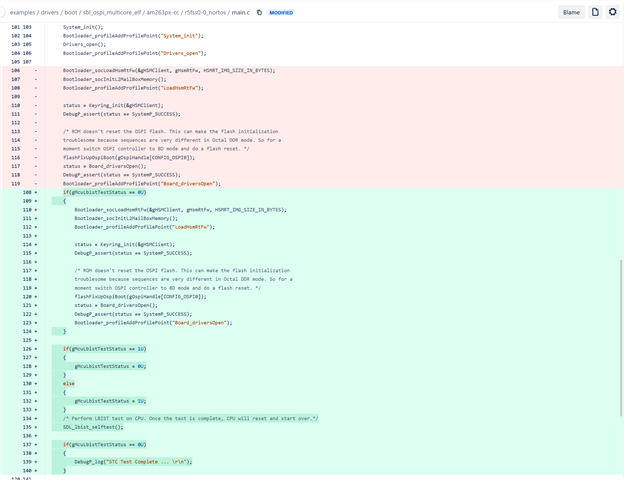
    Thanks for letting us know about this issue, I checked the diff between SBLs in both .01 and .06 release and see what might be breaking the bootloader. While we fix this internally, can you please continue using the 26_00_00_01 SBLs (so that you are not blocked). The change pasted below seems to be breaking the flow. Let me take this up internally with the team and investigate further.

    Regards,
    Shaunak

  • Hi Teja,

    We are still trying to reproduce this issue locally, Can you please help me with the below details:

    1. What is the revision of your ControlCard? There would be a label on the control card which says something like "PCB#: PROCXXXE2" or "PROCXXXXA", this tells the revision of the hardware.

    2. Is this SBL being used out of box from the mcu_plus_sdk/tools/boot/sbl_prebuilt/am261x-lp/ folder? OR is this SBL re-built without any changes and then used OR is this SBL modified and then re-built and being used?

    3. Do you observe the same behaviour in other applications as well (other than icss_emac_lwip)?

    4. Can you please share the non-working sbl_ospi_multicore_elf.tiimage and icss_emac mcelf image binary with me (for the non-working case) that i could flash to my ControlCard and debug?

    Regards,
    Shaunak

  • Hi Shaunak,

    Please find the below details of the AM263Px Control Card:


    1. PCB#: PROC159B
        OPN#: TMDSCNCD263P
        SL#: 43251590164


    2. Yes, we are using the SBL out of the box from the SDK folder C:\ti\mcu_plus_sdk_am263px_26_00_00_06\tools\boot\sbl_prebuilt\am263px-cc.
         Actually, we are using the mcelf_sbl_ospi.cfg file for flashing using the uart_uniflash.py script located inside C:\ti\mcu_plus_sdk_am263px_26_00_00_06\tools\boot folder. Please refer the uploaded mcelf_sbl_ospi.cfg file for more details.

    3. We haven't faced this issue in any other applications we have imported from the SDK. This issue comes when we tried to import the icss_emac_lwip sample project from the SDK (26_00_00_06). When we flashed the code and tried to run in OSPI boot mode we are getting logs from the SBL and also from our application, but the problem we are facing is the Ethernet is not up. So, we are not able to communicate from board to PC.

    We also tried the same in another PC which has the SDK version - 26_00_00_01, which is working fine and the Ethernet is up and able to communicate.

    4. Please refer the uploaded documents.

    mcelf_sbl_ospi.cfg


    Note: We are not able to upload the sbl_ospi_multicore_elf_release.tiimage and icss_emac_lwip.mcelf binaries due to file type is not accepting to upload. Please refer the uploaded mcelf_sbl_ospi.cfg file for getting the file paths we are using for SBL and mcelf binaries from the SDK and project workspace.

    Regards,
    Teja

  • Hi Teja,

    Thanks for the information shared, we will continue the debug on our end.

    Regards,
    Shaunak