MSPM0G1507: Regarding the method for writing to the NONMAIN memory using the MSPM0G Bootloader

Part Number: MSPM0G1507
Other Parts Discussed in Thread: SYSCONFIG

Hi experts,

I am using MSPM0_BSL_GUI.exe, which was downloaded from the source below.
:[FAQ] MSPM0L1306: BSL_GUI_EXE update - Arm-based microcontrollers forum - Arm-based microcontrollers - TI E2E support forums 

Q1:Even when using a .txt file that includes the CRC at address 0x41C00000 as shown in the attachment, the GUI displays "Mass Erase" instead of "Factory Reset". Is this expected behavior, or is there an issue?
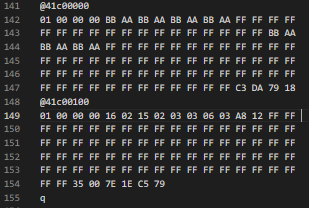
image.png  

Default hardware is XDS110 on Launchpad.
Find MSP COM port:COM13
Configure UART: 9600 baudrate, 8 data bits (LSB first), no parity, and 1 stop bit.
MSPM0 is in BSL mode.
Get device ID...
Send the password...
[Firmware update on going...] Send password package successfully!
Operation success!
Mass erase...
Send the firmware...
[Firmware update on going...] Send firmware package 1 successfully!
Operation success!
[Firmware update on going...] Send firmware package 2 successfully!
Operation success!
[Firmware update on going...] Send firmware package 3 successfully!
Operation success!
[Firmware update on going...] Send firmware package 4 successfully!
Operation success!
[Firmware update on going...] Send firmware package 5 successfully!
Operation success!
[Firmware update on going...] Send firmware package 6 successfully!
Operation success!
[Firmware update on going...] Send firmware package 7 successfully!
Operation success!
[Firmware update on going...] Send firmware package 8 successfully!
Operation success!
[Firmware update on going...] Send firmware package 9 successfully!
Operation success!
[Firmware update on going...] Send firmware package 10 successfully!
Operation success!
[Firmware update on going...] Send firmware package 11 successfully!
Operation success!
[Firmware update on going...] Send firmware package 12 successfully!
Operation success!
[Firmware update on going...] Send firmware package 13 successfully!
Operation success!
[Firmware update on going...] Send firmware package 14 successfully!
Operation success!
[Firmware update on going...] Send firmware package 15 successfully!
Operation success!
[Firmware update on going...] Send firmware package 16 successfully!
Operation success!
[Firmware update on going...] Send firmware package 17 successfully!
Operation success!
[Firmware update on going...] Send firmware package 18 successfully!
Operation success!
[Firmware update on going...] Send firmware package 19 successfully!
Operation success!
[Firmware update on going...] Send firmware package 20 successfully!
Operation success!
[Firmware update on going...] Send firmware package 21 successfully!
Operation success!
Send firmware successfully!
Boot reset the device to start application ...
-----------Download finished!----------

Q2:
The MSG contents described in 4.4.1 Bootloader Core Message of slau887a.pdf do not match the implementation of check_reponse() in MSPM0_BSL_GUI.py.
How should this discrepancy be interpreted?
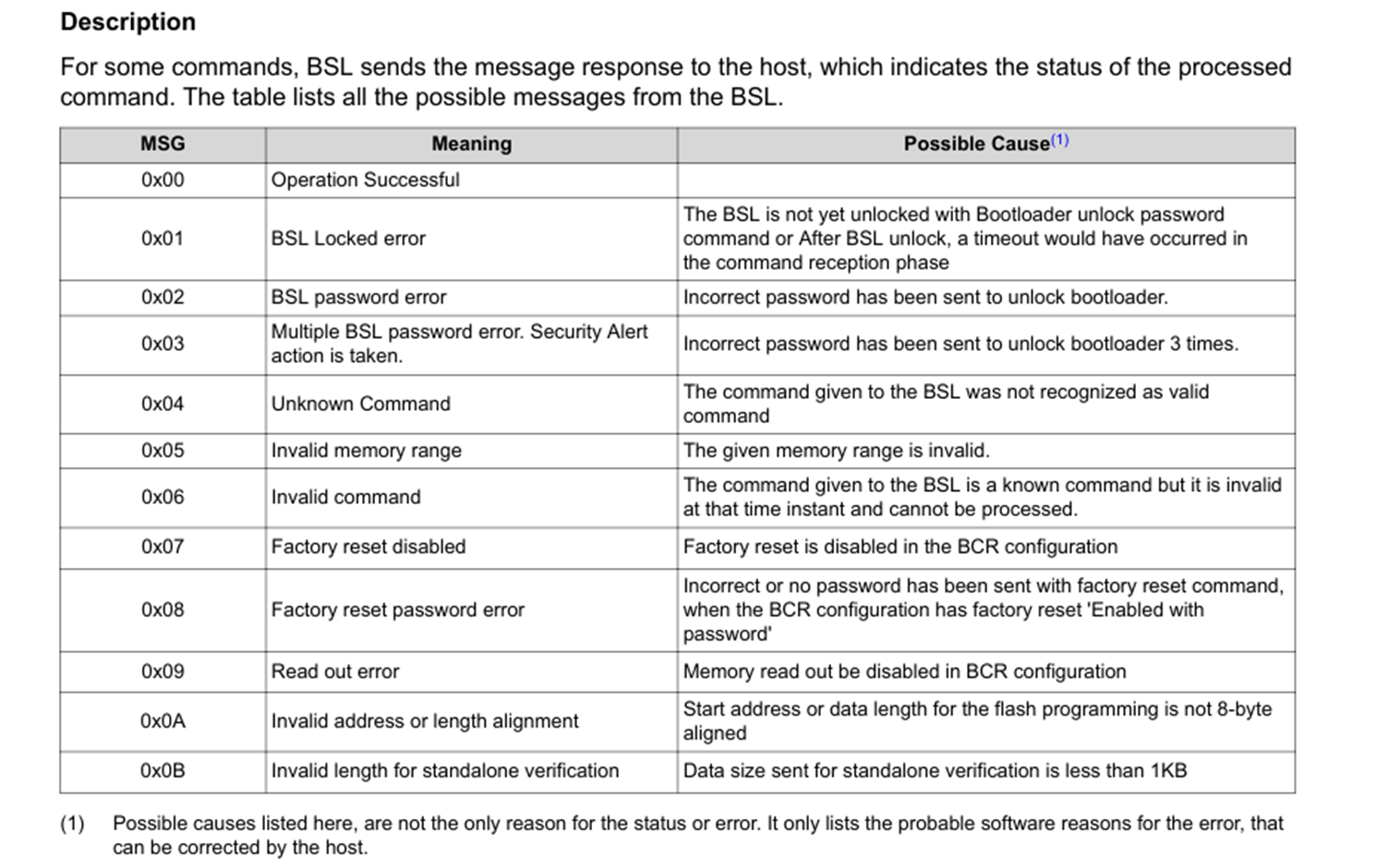
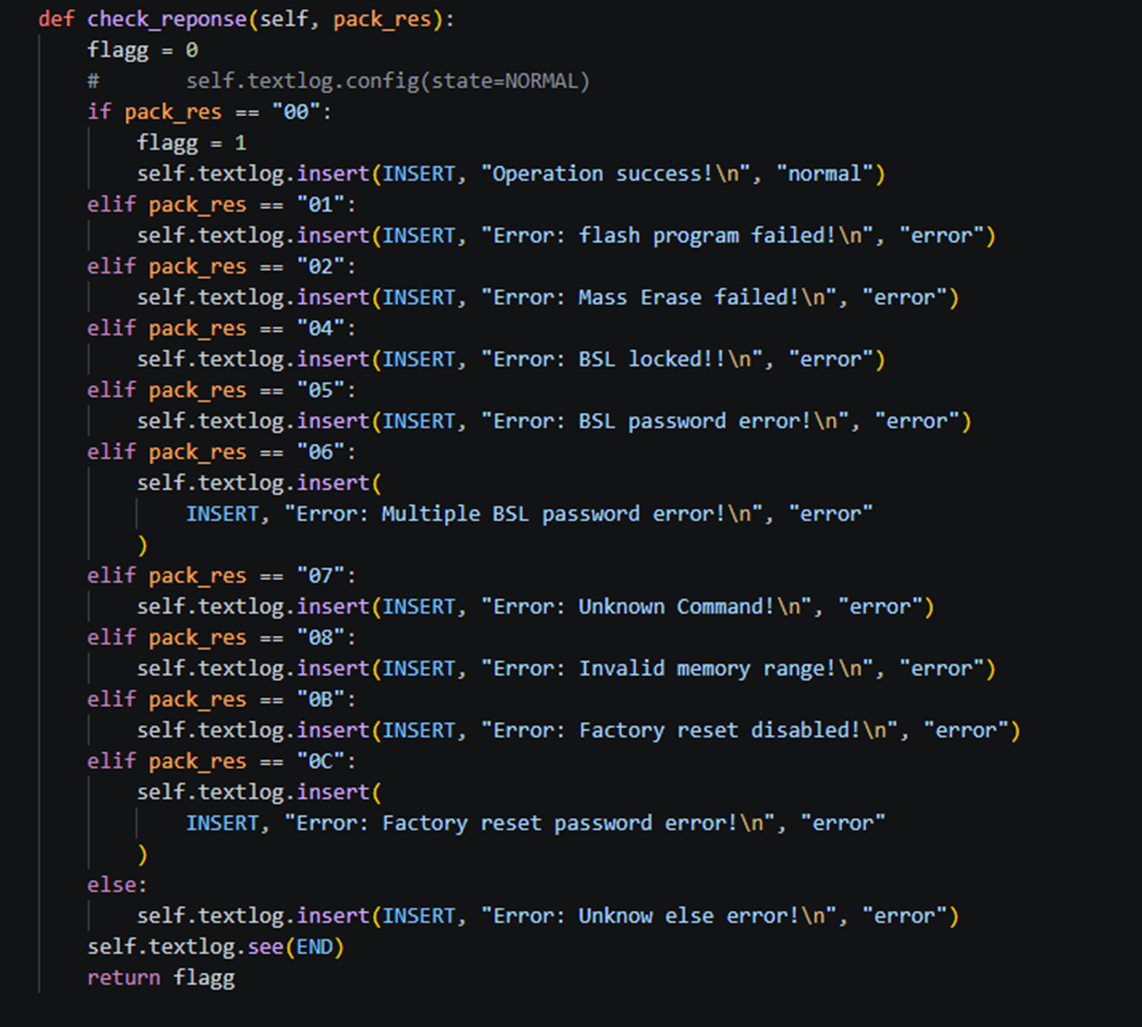
image.png
image.png

Q3:
Even after executing GUI_EXE_Update.bat included in the SDK, MSPM0_BSL_GUI.exe is not generated.
Am I missing any required steps or prerequisites?

Best regards,
O.H

  • Hello O.H,

    I need to do some confirm and tests on my side. After I get feedback, I will reply to you as soon as possible,

    BR,

    Janz Bai

  • Hello Janz Bai,

    Thank you for your reply, and sorry for rush you, is there any update?

    Best regards,
    O.H

  • Hello Janz Bai,

    Sorry for rush you, is there any update? Any information you can provide about the situation would be greatly appreciated.

    Best regards,
    O.H

  • Hello O.H,

    1. This GUI won't operate NONMAIN, it just download code into MAIN Flash. "Mass erase" is normal, after mass erase, it will program code into Flash. And it won't operate factory reset.

    2. Thanks for your feedback, we will fix it in next version.

    3. Please just use the GUI shared in the E2E, don't need to generate by yourself. [FAQ] MSPM0L1306: BSL_GUI_EXE update - Arm-based microcontrollers forum - Arm-based microcontrollers - TI E2E support forums

    BR,

    Janz Bai

  • Hello Janz Bai,

    Thank you for your reply.

    Sorry for not providing the background information earlier.
    The customer is evaluating the I2C BSL on a prototype board. Since the GUI only supports UART, they are developing a custom tool based on the GUI source code. In order to change the BSL I2C slave address, writing to the NONMAIN memory is required.

    Now we understand that the GUI does not support Factory Reset. We are executing the process with the following flow based on the source code, however, for some reason the process fails after the Factory Reset. The CRC and BCR become invalid, and it is no longer possible to perform a DSSM Factory Reset via CCS.

    Q4: Are there any mistakes or concerns in this procedure?

    1. Software Invoke: Reused invokeBSLAsm() from bsl_software_invoke_app_demo_i2c
    2. CMD Connection
    3. Status Check
    4. CMD Get Device Info
    5. CMD Unlock Bootloader
    6. CMD Factory Reset: Used when modifying NONMAIN. Since MAIN is also erased, it is necessary to back up calibration data in advance
    7. CMD Program Data
    8. CMD Start Application

    Best regards,
    O.H

  • Also

    2. Thanks for your feedback, we will fix it in next version.

    Q2-2: Which is correct, "slau887a.pdf" or the GUI? Which one do you plan to fix?

    Best regards,
    O.H

  • Hello Janz Bai,

    Sorry for rush you. Is there any comment about Q4, Q2-2?

    Best regards,
    O.H

  • Hello O.H,

    About the Q4: 

    • If they need to do BSL through I2C interface, why they need to modify the BSL I2C target address through BSL? BSL I2C target address can be configured in NONMAIN through Sysconfig directly. They can configure the NONMAIN firstly and then download it into the device. 


    • I have checked the BSL process you mentioned, I think it is ok. It is the normal process of BSL. But please notice below. Customer need to program the whole NONAIN region after the factory reset command.

    About Q2-2:

    The user guide is right, we will fix the GUI.

    BR,

    Janz Bai

  • Hello Janz Bai,

    Sorry, the reply was not completed...

    Thank you for your supports. I understood.

    If they need to do BSL through I2C interface, why they need to modify the BSL I2C target address through BSL? BSL I2C target address can be configured in NONMAIN through Sysconfig directly. They can configure the NONMAIN firstly and then download it into the device. 

    Correction: The reason the customer needs to write to NONMAIN is to enable the BSL pin configuration.

    Due to the board design constraints, SWD (JTAG) cannot be implemented, so BSL over I2C is the only available programming interface.
    For this reason, modifying NONMAIN could be done at the initial programming stage before mounting; however, we are currently evaluating it to confirm that firmware updates are possible and that it can also be disabled later.

    We will decode the message(CPU response) and verify the cause of the failure.

    Best regards,

    O.H
