This thread has been locked.

If you have a related question, please click the "Ask a related question" button in the top right corner. The newly created question will be automatically linked to this question.

TM4C1299NCZAD: Not able to access some I/O pins in TM4C1299NCZAD

Part Number: TM4C1299NCZAD
Other Parts Discussed in Thread: EK-TM4C1294XL, TM4C1294NCPDT,

Dear TI Technical support,

A few months ago I purchased EK-TM4C1294XL evaluation kit. This kit came with the TM4C1294NCPDT chip.

I am using CCS 11.2.0.00007 and compiler V20.2.5.LTS.

I have been working on a Serial to ethernet project (SPMA072) without any issues. My project compiles and runs fine. However, the actual control board that I am supposed to use has a TM4C1299NCZAD chip instead. At first, I even didn't realize that it was a different chip. My TM4C1294NCPDT project downloaded into the TM4C1299NCZAD chip and ran fine. This project utilizes some I/O pins and so far they all seem to work. However, pin R3  (PH4) doesn't. I cannot read it correctly. I noticed that PH4 doesn't exist in the TM4C1294NCPDT chip. However, pin W12 (PQ5), which is not in TM4C1294NCPDT works fine.

My question is this, is a project configured for TM4C1294NCPDT supposed to work on a TM4C1299NCZAD chip or not. Could this be the reason why pin R3 doesn't read? If this is the case, why pin W12 works?

Thanks in advance for your kind reply,

Felix V.  


  • Hi Felix

    Why Pin R3 (PH4) Does Not Work
    The TM4C1294NCPDT (128-pin TQFP package) does not physically expose or completely map Port H. When your Code Composer Studio (CCS) project is target-compiled for the TM4C1294NCPDT, the underlying TivaWare startup files and compiler configurations are unaware of Port H's existence on that target.
    Because of this, the project fails to properly initialize the clock gating control register for Port H (SYSCTL_RCGCGPIO_R or SysCtlPeripheralEnable(SYSCTL_PERIPH_GPIOH)). Without enabling the peripheral clock to Port H inside the MCU system control registers, any attempt to read or write to PH4 will either fail silently, read back as zero, or trigger a bus fault.
    Why Pin W12 (PQ5) Works Anyway
    Pin W12 maps to PQ5 (Port Q). Unlike Port H, Port Q components are actively utilized and shared across the TM4C1294 series architectures for other integrated system peripherals.
    • Because Port Q is recognized by the TM4C1294 variant's header structures, the compiler successfully handles its register addresses.
    • If your code explicitly enables Port Q (SYSCTL_PERIPH_GPIOQ), it will functionalize normally on the broader TM4C1299 hardware footprint.
    How to Fix the Problem
    To resolve the issue and safely map all remaining I/O pins, you must reconfigure your project settings in CCS 11.2.0:
    1. Change the Target Device: Right-click your project in the Project Explorer --> Select Properties --> Navigate to General --> Change the Variant/Device filter to TM4C1299NCZAD.
    2. Update Preprocessor Symbols: Go to Properties --> ARM Compiler --> Advanced Options --> Predefined Symbols. Change the define macro from TARGET_IS_TM4C1294_RA2 (or similar) to match your specific TM4C1299 silicon revision.
    3. Verify Peripheral Clocks: In your setup code, make sure you explicitly unlock and enable the clock for Port H before interacting with it:SysCtlPeripheralEnable(SYSCTL_PERIPH_GPIOH);
      while(!SysCtlPeripheralReady(SYSCTL_PERIPH_GPIOH)) {}
      GPIOPinTypeGPIOInput(GPIO_PORTH_BASE, GPIO_PIN_4);

    Thanks

  • Thanks Xiaodong for your help. This answered all my questions.

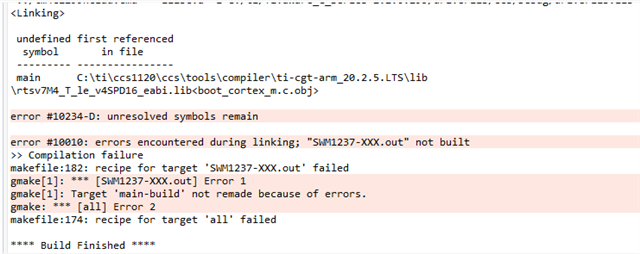
  • Sorry Xiaodong, I would like to re-open this. In CCS I switched to correct part TM4C1299NCZAD as you suggested but am getting compilation errors. I wanted to paste some screenshots here but the company is blocking them. Do you know an alternate way I can share pictures? In the meantime I will try to get this resolved on my end with IT department.

    Thanks

    Felix

    I

  • Hi Felix 

    I will be out of office tomorrow. I will check the detailed again and feedback early of next week

    Thanks

  • Hi Xiaodong,

    I am getting compilation errors. I copy links to some pictures. Please let me know if you are able to open them.

    Thanks

    Felix

  • Yes. I can open this link and see the images following

  • Hi Xiaodong, I was able to fix the compilation errors.

    Thanks for your help.

    Felix

  • Hi Felix

    Thanks for your feedback and glad to know your question has been solved.