MSPM0-SDK: Unable to connect target DAP Connection Error - MSPM0C1104(20 Pin) Controller

Part Number: MSPM0-SDK
Other Parts Discussed in Thread: MSPM0C1104, UNIFLASH

Hi Team,

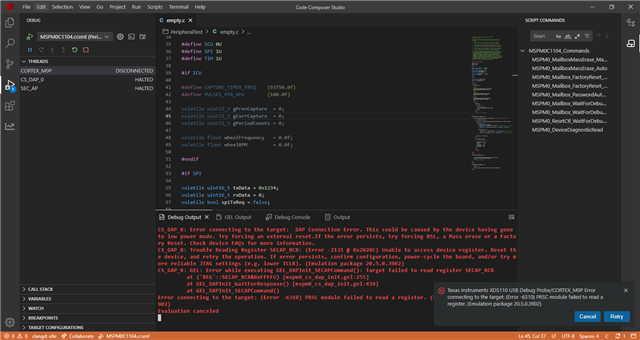
I am using the MSPM0C1104 microcontroller. While flashing the application, I encountered the error shown in the attached image.
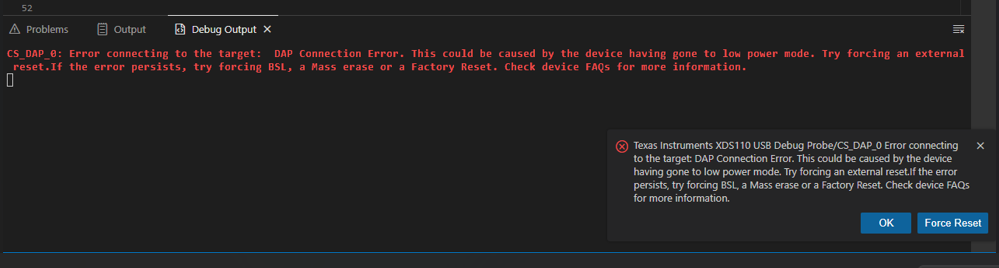
image.png

I reviewed previous forum discussions related to the same issue and followed the suggested recovery procedure of holding the reset pin and performing a factory reset. However, I was unable to complete the factory reset successfully.

I also attempted to perform a factory reset using UniFlash, the GUI tool, and CCS IDE, but the issue persists and I am still unable to flash the program onto the device.

Could you please help me resolve this issue?

Thank you.

  • In the Threads view, I connected to the target CORTEX_M0P and clicked View All Cores.

    It displayed CS_DAP_0 and SEC_AP. While holding the reset button, I selected Factory Reset Manual. However, the operation failed and I received the error shown like this.


  • Hi Nandini,

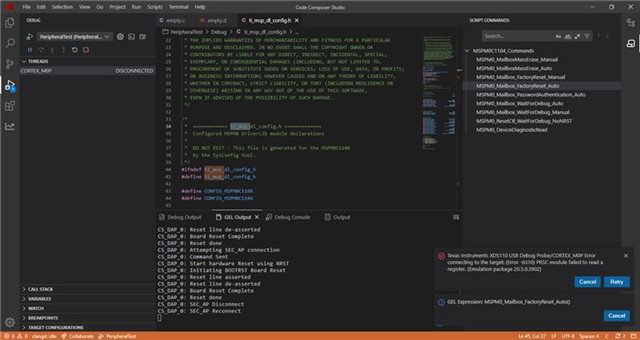
    In your first attached image it looks like you were able to connect to the DAP core. Can you do this again, run the Device Diagnostic Read script, and share the results?

    Best Regards,
    Brian

  • Hi Brian,
    Here the result when i run device diagnostic read script, I pressed NRST button while running the script.

  • Hi Nandini,

    Apologies for not clarifying earlier. When holding NRST, you are able to connect to the DAP but cannot access the CPU or its resources. Are you able to successfully connect to the DAP and run the device diagnostic read once NRST is released?

    If you cannot connect to the DAP core without holding NRST low, it could mean that NRST is not properly transitioning high, the clock is not being supplied, or the device is potentially damaged.

    If you can connect to the DAP without holding NRST low, but the returned code is 0x36, this means either NONMAIN was erased or SW-DP access is disabled and the BCR CRC check failed. In either case, the device is not recoverable.

    Best regards,
    Brian

  • Hi Brian,

    Sorry for the delayed response. I can't able to connect DAP without holding NRST low. So that means device is damaged?

  • Hi Nandini,

    The other possibility is access to the SW-PD port has been disabled:

    In the second screenshot of your last reply, It looks like you performed an auto factory reset instead of a manual. can you confirm which of these was executed? It is recommended to use the manual so you can control NRST. Additionally, when performing a factory reset is it also required to perform a BOOTRST or stronger. Otherwise, the new NONMAIN configuration settings will not take effect.

    Best Regards,
    Brian