EK-TM4C123GXL: EK-TM4C123GXL cannot get to work on my laptop

Part Number: EK-TM4C123GXL
Other Parts Discussed in Thread: LMFLASHPROGRAMMER

Hi Experts, 

So sorry for not responding, but I have a TM4C123GXL that I cannot get to work on my laptop at all, can you help me out please? 

It's not showing up on the device manager or on the LM Flash Programmer or the CCS, so I dont know what to do to get it to show up.

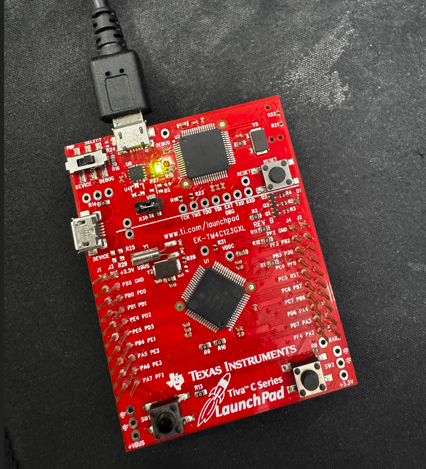
My TM4C123GXL when connected via DEBUG mode lights up the PWR LED but does not show on the laptop, so I cannot flash it or unlock it 

I attempted to press and hold RESET while connecting to PC, but still nothing is happening, and I tried to troubleshoot it, but I cannot 

I am using Tiva C Series LaunchPad Evaluation Kit EK-TM4C123GXL 

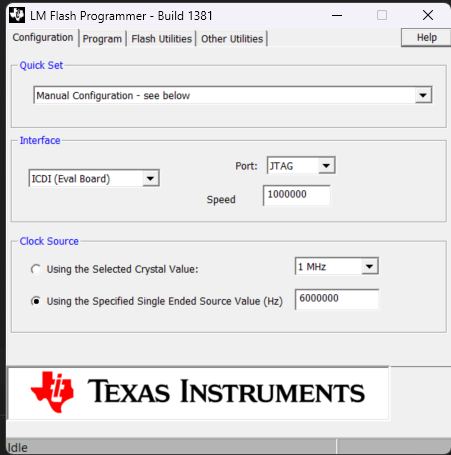
It was working before, but when I tried to do a firmware update using LMFLASHPROGRAMMER it instantly stopped responding and I cannot get it to respond any more. but the PWR LED is still ON, so it is getting power, but no longer connecting via USB.


Regards,

Josel

  • Hi Josel,

    can you try the below steps: 

    1. Disconnect the board from USB completely.
    2. On the LaunchPad, locate the two buttons near the USB connector — RESET (SW1) and a second button (SW2, sometimes unlabeled near the debug header).
    3. Press and hold SW2 (the button closest to the USB debug connector — NOT the reset button).
    4. While holding SW2, plug the USB cable into the DEBUG port.
    5. Continue holding SW2 for ~5 seconds, then release.
    6. Check Device Manager — you should see a "Stellaris Device Firmware Update" device appear under USB controllers or "Other devices."

    If it appears:

    • Open LM Flash Programmer
    • Go to the "Other Utilities" tab
    • Select "Reprogram" the ICDI firmware (there should be an option to re-flash the debug interface firmware)
  • Hi Erik,

    The TM4C123GXL has 3 buttons, RESET,SW1 and SW2, i tried doing the procedure for each of the buttons but none of them worked, and I still am not getting the device on my laptop. Can you help me out please? Thank you

    Regards,

    Josel

  • Hi Josel,


    Are you able to see the device in your com port?

  • Hi Erik,

    Nope, I don't see it anywhere at all  
    I don't know what else to do, but I've tried so many troubleshooting steps and I cannot seem to get it to show up at all on my laptop. It's being incredibly stubborn, and I was really hoping to get to learn on the Tiva, but if it's not even connecting, I can't even get started with it. 


    Regards,

    Josel

  • Hi Josel,

    I believe there's an issue with the XDS110 on the board. If you have another Launchpad you can flywire the XDS110 launchpads together. 

    Please let me know if you have another one available.

  • Hi Erik,

    Do you mean this chip?

     
    Unfortunately, I don't have any other LaunchPads, this is my only one, and they're not cheap where I am so I cannot easily just buy another one sadly. 
    Other than that, I still don't have any experience with the TivaC because I cannot even get it to work, so I can't really use it to get to know it.. 

    Regards,

    Josel
  • Hi Erik,

    If it would help, I could buy an STLink-V2 clone, they are pretty cheap, if that would solve the issue and get the board working. 
    I just wanted to mention that instead of waiting for another email since this is taking a really long time 

    Regards,

    Josel
  • Hi Josel,

    If you're ok with using a separate board you can flywire the pin header from a separate board like this one: https://www.ti.com/tool/LP-MSPM0G5187. the upper half of the board is just the XDS110 connection and should be able to connect with this directly.

    I wouldn't recommend the STlink as I haven't tested this before on one of our devices.

    For the firmware update you were trying could you please give more details. My concern is the XDS110 isn't functional. I can sync with the team here to see if there's an easy way to reprogram him.

  • Hi Erik,

    Hello, that board is just not available where I live, and it would cost more than a TivaC, so it's not really a viable option. Also the EK-TM4C123GXL doesn't have an XDS110 from what I see and from what I found on the TI Forum.
    This was almost two weeks ago now, so the detail might be fuzzy. For the firmware update, I just had the Tiva C connected to my laptop and followed the steps to update the firmware from the LM Flash Programmer, and as soon as I pressed the button, the Tiva C disconnected from my laptop and just wouldn't show up again since I pressed the Update Firmware button, so there's not a whole lot of information that I have on what happened. 


    Regards,

    Josel
  • Hi Josel

    Sorry for the late reply, for this launchpad really not supported now. Recommend to use XDS110 as debugger to the Tiva device.