AM2634-Q1: build error with big-endian option

Part Number: AM2634-Q1
Other Parts Discussed in Thread: AM2634

Hi Support Team,

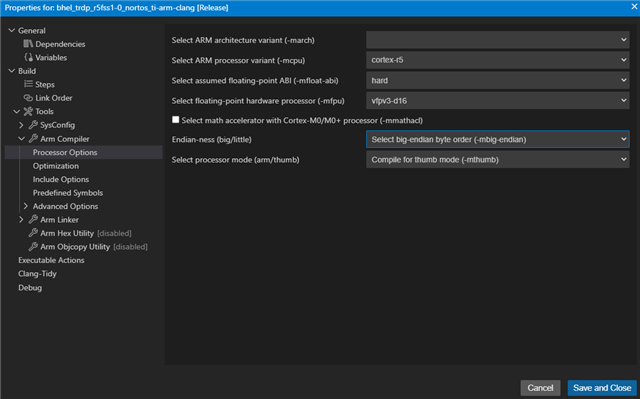
I am trying to build a udp server code with big-endian option enabled in compiler build options.

I get the below error.

[31]fatal error #16001: object files have incompatible byte orderings ("D:/ti/mcu_plus_sdk_am263x_11_00_00_19/source/kernel/nortos/lib/nortos.am263x.r5f.ti-arm-clang.release.lib<AddrTranslateP_null.obj>" = little endian, "./app_cpswconfighandler.o" = big endian)

Do I need to change anywhere else?

Regards

Varma

  • HI,

    The error shows that your application object files are compiled as big-endian, but the MCU+ SDK prebuilt libraries (like nortos.am263x.r5f.ti-arm-clang.release.lib) are compiled as little-endian. You cannot mix object files with different endianness.

    Solution Options:

    Option 1: Remove Big-Endian from Your Application (Recommended)
    - Remove the big-endian compiler flag from your project build options
    - ARM Cortex-R5F typically runs in little-endian mode, and all TI SDK prebuilt libraries are little-endian
    - Check your project's makefile or CCS project settings and remove any -mbig-endian or similar flags

    Option 2: Rebuild Entire SDK as Big-Endian (Complex)
    If you truly need big-endian:
    1. Rebuild all MCU+ SDK libraries (nortos, drivers, enet-lld, etc.) with big-endian compiler flags
    2. This requires:
    cd ${MCU_PLUS_SDK_PATH}
    # Add --endian=big to build flags in makefiles
    make -s -j8 PROFILE=release ENDIAN=big
    3. Link against the big-endian rebuilt libraries

    Check Your Build Settings:

    In CCS project properties or makefile, look for:
    - Compiler flags: -mbig-endian or --endian=big
    - Linker flags: Should match compiler endianness

    Questions:
    1. Why do you need big-endian? Most networking protocols handle endianness in software (htons/ntohs)
    2. What compiler flags did you add to enable big-endian?

    Regards,
    Shaunak

  • Hi Shaunak,

    I selected the big-endian option in the properties window.

    I am trying this as a worst-case solution. A major problem we are facing right now is that the AM2634 is not able to receive from client's node. AM2634 can send data to the client's node, it shows up on their system. Only their node's data is not received. Their data is being received at all other end-points in the network except for us. 

    The crooked issue is that we are able to send test data from our laptop within their network. But ultimately since we have to receive the data from client's node, we have to make this work.

    I am using TRDP protocol for railways application.

    Any idea what could cause the issue? the client uses a CISCO network device.

  • I do not think this is an issue with Endianness.

    1. Can you check your LWIP_STATS to see if you have received any data?

    2. If you dont see packets in LWIP_STAS, you can further check CPSW stats to know if your CPSW has received any data.

    3. This could also be an issue with your ALE memberships. Are you using multi-cast address or broadcast address?

    Regards.
    Shaunak

  • I already checked with LWIP_STATS. called UDP_STATS_DISPLAY every 5 secons. the udp_recv count was stuck at 4.

    How can I check the CPSW Stats?

    The client's node sends data every 100mS. Would the the CPSW stats slow the rx?

    Regards

    Varma

  • Hi,

    Refer to this to get CPSW stats: https://dev.ti.com/tirex/explore/node?isTheia=false&node=A__AaBu6ik6ZY8v2032wjLx6Q__AM26X-ACADEMY__t0CaxbG__LATEST

    the udp_recv count was stuck at 4.

    Either the CPSW stopped supplying packets to the host port (R5F running LWIP), or the device stopped receving packets itself. Based on CPSW stats you can verify if the issue is that device did not receive a packet (Rx count wont increase on the MAC Port, or if the count is increasing and the LwIP stopped getting packets from CPSW

    CPSW Stats interrupt would add some overhead but that would be a very few microseconds and i do not expect them to cause any issue/delays here.

    Regards,
    Shaunak