This thread has been locked.

If you have a related question, please click the "Ask a related question" button in the top right corner. The newly created question will be automatically linked to this question.

MSPM0G3518: Sample code is in Debug Configuration, Need to change to Release Configuration

Part Number: MSPM0G3518
Other Parts Discussed in Thread: MSPM0G3519

Hi,

Curretly I am using the MSPM0G3518 with XDS-110 debugger, the build configuration was default Debug mode I created the release mode as per the procedure shared in forum but unable to run independent of Debug XDS110.

  • Hello ABHISHEK,

    Sorry, could you please provide more details about your questions? I can't understand your question through this simply describtion,

    BR,

    Janz Bai

  • Sure..

    For our BMS board I have  created a new project non-rtos  with MPM0G3518 controller with Build configuration as DefaultI am able to run and debug the code in Debug mode using XDS-110 USB Debugger. Now I want to release the code with .hex and once I flash the code after power reset it should run independent of Debuuger which is not happening. I have created new Build Configurating in name of Release by copying the the debug configuration with following changes:

    1. Under properties->Arm Compiler->Optimization->3

    2. Under Properties-> Arm Compiler->Predefined Symbols removed

    But after selecting the release build the code is flashed but output is not coming without XDS110 debugger for example the CAN communication is working when I flash the project and let the XDS-110 debugger connected. Once i remove the debugger and power reset the board its not responding. 

  • It should run independently of the debugger even in the debug build configuration.

    Is this on your own board? Is the MCU getting power without the debugger attached?

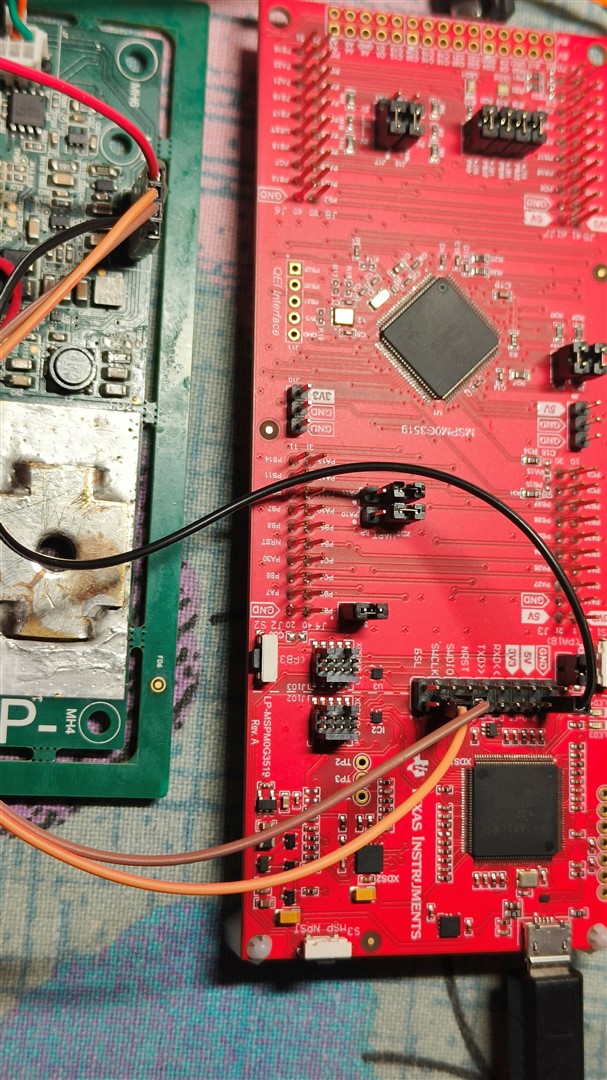
  • Yes its our own board and MCU(MSPMOG3518) we are powering from 3.3V regulator. I an using LP- MSPM0G3519 with inbuild XDS-110 debug(setup  snapshot attached)

    So I have tapped out only SWCLK, SWDIO and GND and connected to my board SWCLK,SWDIO and GND.

    When I flash the project and remove the SWDIO and SWCLK the Code is running which means CAN communication is happening/LED is toggling but I reset the power and reconnect again independent of SWCLK and SWDIO it wont work. Again I need to flash the project. Its look like the code is not going to flash its in RAM. Due to which at every power reset I need to re-program again.

    I tried the demo projects of MSPMOG3519 after changing the controller MSPM0G3518 but same result.