LP-MSPM0C1106: IWDT failure test

Part Number: LP-MSPM0C1106
Other Parts Discussed in Thread: SYSCONFIG

Hello,

I am developing firmware for the LP-MSPM0C1106 using Code Composer Studio and have a question regarding the Independent Watchdog Timer (IWDT).

I configured the IWDT in SysConfig with the following settings:
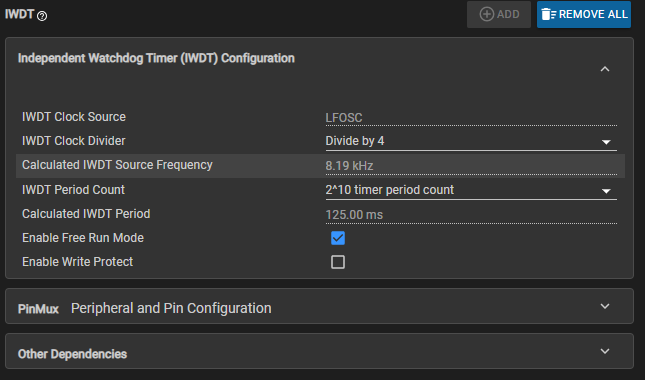
image.png

To verify that the IWDT is working, I intentionally do not call:

 
DL_LFSS_IWDT_restart(IWDT_INST);

In main(), I simply set a GPIO high and stay in an infinite loop:

int main(void)
{
SYSCFG_DL_init();
 
DL_GPIO_setPins(GPIO_PORT, GPIO_PIN);
 
while(1)
{
}
}

I expected the device to reset repeatedly after the IWDT timeout, but it does not.

I also read the watchdog registers:

 
WDTEN = 0x00000000
WDTLOCK = 0x00000001
WDTCTL = 0x00000053
Reset Cause = 0x0000001A

The test is currently being performed while running under the CCS debugger. The LED 101 remains red and the device does not appear to restart.

I am not sure the watchdog work or not. If it work, why WDTEN register value is disabled. It it does not work, how can I enable the watchdog?


  • Hi Emily,

    The Independent Watchdog Timer is not resetting your device because it is currently disabled (WDTEN = 0).

    WDTLOCK = 0x00000001 (Locked): The register block is write-protected. The hardware is ignoring your code's initialization commands.

    WDTCTL = 0x00000053 (Invalid Write): Modifying configuration settings requires a mandatory 8-bit password (0xCC). Because the block remained locked, this configuration write failed and WDTEN stayed at 0.

    Debugger Interference: By default, Code Composer Studio (CCS) automatically freezes/suspends watchdog counters when a debug session is active. This prevents resets while you analyze code. I would try disconnecting from the debug session and see if you still are not observing the IWDT working properly using the following sequence:

    • Flash the code using CCS.Click Terminate (red square icon) in CCS to completely disconnect the debugger.
    • Physically unplug and plug back in the LaunchPad's USB cable to execute a clean Power-On Reset (POR).
    • Without the debugger attached, the device should now repeatedly reset as expected once the infinite loop is reached.

    Let me know if this fixes the issue or if it still persists.

    -Brian