


Part Number: AM2612
Hi Experts,
I am working on a custom board featuring the AM2612 SoC and aiming to implement EtherCAT CiA 402 with custom PDO definitions. I am using the INDUSTRIAL-COMMUNICATIONS-SDK-AM261X (version 2026_00_00_06) and referring to the Official Documentation (EtherCAT SubDevice Beckhoff SSC Demo).
I have encountered two issues when using the Beckhoff SSC Tool (v1.5.3.0) to configure PDOs and generate the source code:
1. Missing TI_ESC_CiA402_8i3.xml in SDK release According to the SDK documentation and the README.txt under ${SDK_INSTALL_PATH}/source/industrial_comms/ethercat_subdevice/beckhoff_stack/patch/am261x/, there should be two XML files:
-
TI_ESC_8i3.xml -
TI_ESC_CiA402_8i3.xml
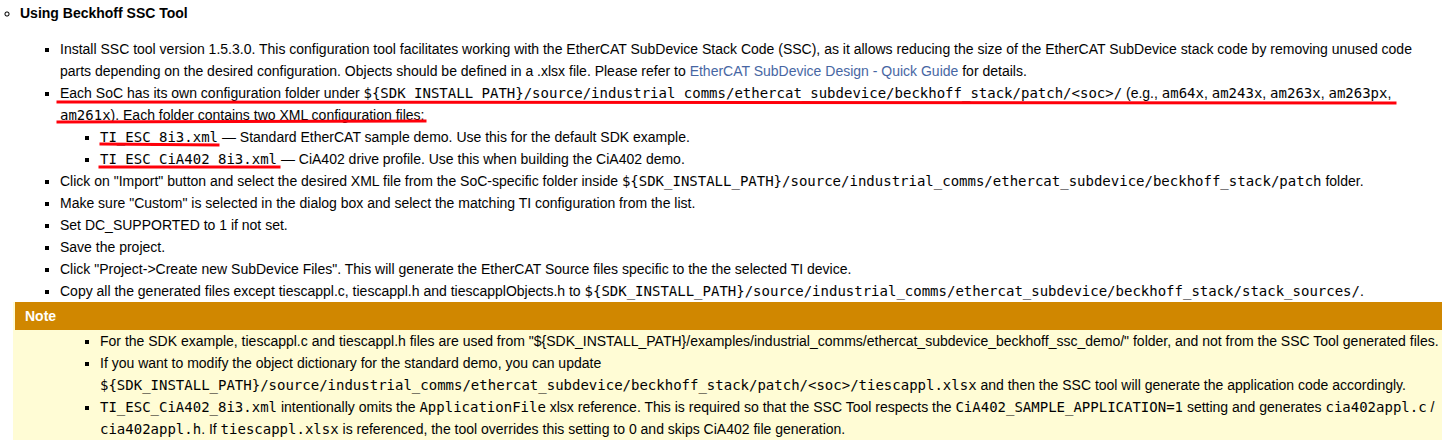
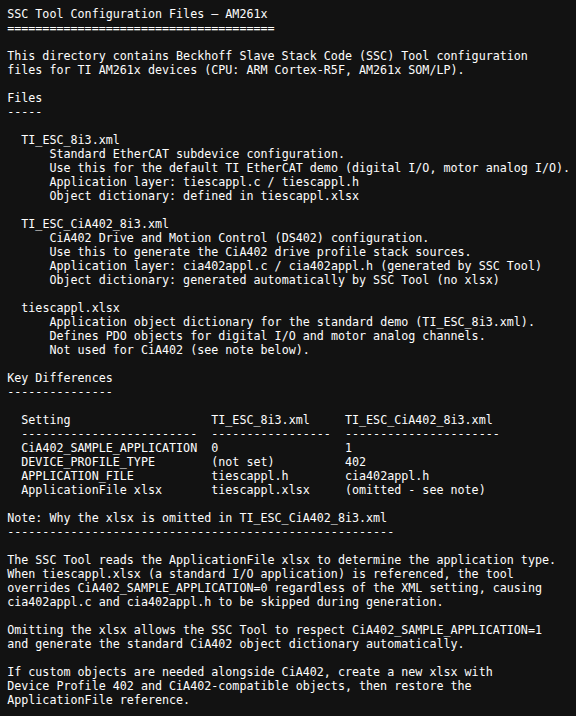
However, checking the actual directory in SDK v2026.00.00.06 reveals that TI_ESC_CiA402_8i3.xml is missing (only TI_ESC_8i3.xml, tiescappl.xlsx, and README.txt exist).
Additionally, in the parent directory ${SDK_INSTALL_PATH}/source/industrial_comms/ethercat_subdevice/beckhoff_stack/patch/, there is a TI_ECAT.patch file. Is there a separate patch file required specifically for CiA 402 implementation?
2. Importing custom PDO Excel overrides CiA402_SAMPLE_APPLICATION back to 0 To work around the missing XML file, I modified TI_ESC_8i3.xml as follows:
-
Set
CiA402_SAMPLE_APPLICATIONfrom0to1 -
Changed
APPLICATION_FILEfromtiescappl.htocia402appl.h -
Removed
<ApplicationFile>tiescappl.xlsx</ApplicationFile>
When importing this modified XML into a new SSC project, CiA402_SAMPLE_APPLICATION is correctly set to 1 and APPLICATION_FILE is set to "cia402appl.h". However, after importing a custom Excel file containing custom PDO configurations (where Device Profile is set to 402 and objects conform to CiA 402 specifications), SSC Tool automatically:
-
Resets
CiA402_SAMPLE_APPLICATIONback from1to0. -
Changes
APPLICATION_FILEto<project_name>.h.
Below is the step-by-step workflow of how I configured the project using the Beckhoff SSC Tool:
1. Step 1: Created a new project using my modified TI_ESC_8i3.xml configuration file.
2. Step 2 : Prior to importing the custom PDO Excel file, CiA402_SAMPLE_APPLICATION is set to 1, and APPLICATION_FILE is set to #include "cia402appl.h".
3. Step 3: Saved the project configuration under the name "test".
4. Step 4: Selected the custom PDO Excel configuration file (test.xlsx).
5. Step 5: Imported the custom PDO Excel configuration file.
6. Step 6: After the import completed, checking the Application node in SSC Tool shows that CiA402_SAMPLE_APPLICATION was automatically overridden to 0, and APPLICATION_FILE was updated to #include "test.h".
7. Details of my custom PDO configuration in the Excel file, where Device Profile is configured as 402 with CiA 402-compliant object dictionary entries.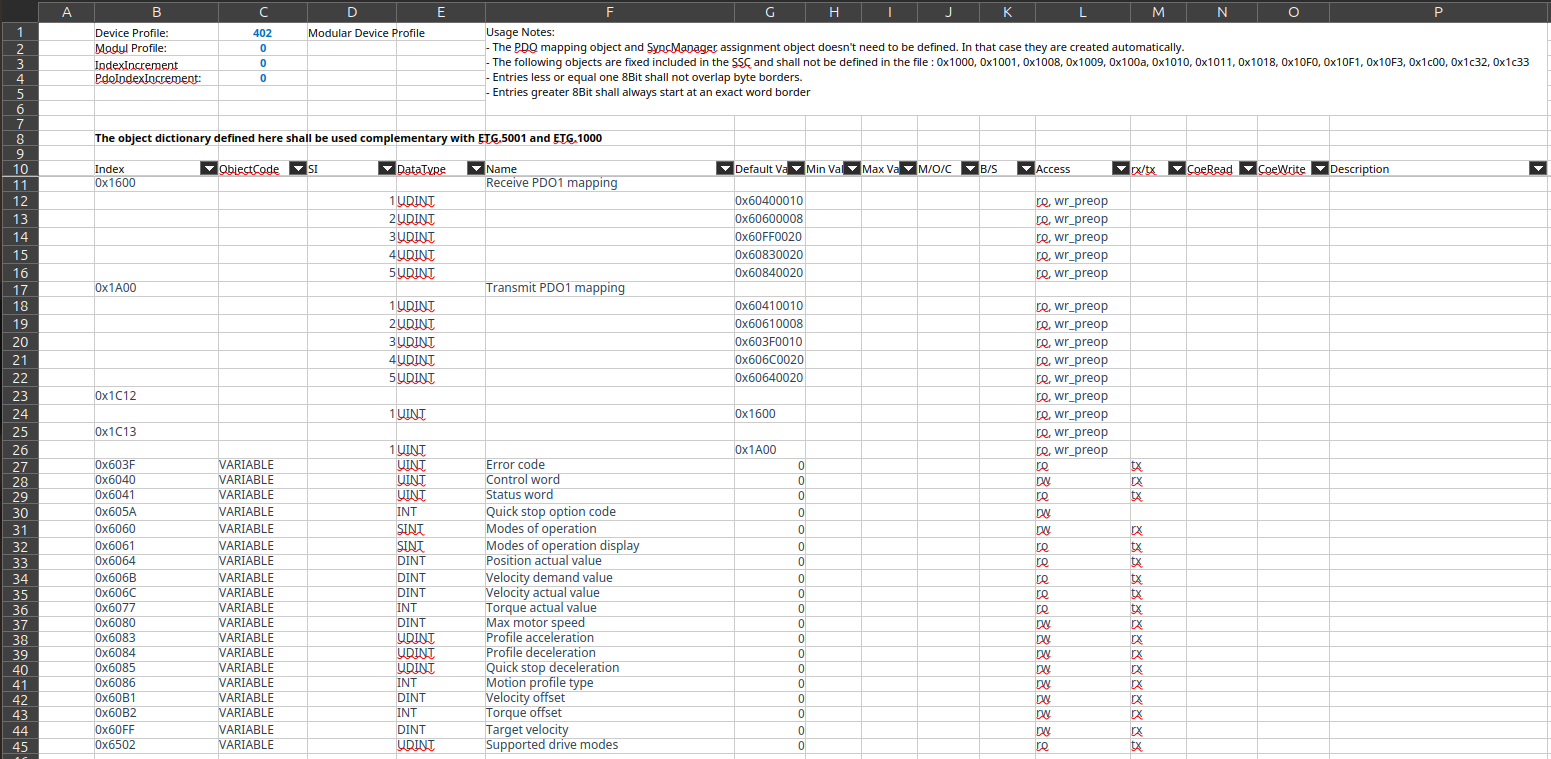
Could you advise on the correct workflow to define custom PDOs via an Excel file without having SSC Tool force CiA402_SAMPLE_APPLICATION back to 0?
Environment Information:
-
SoC/Board: AM2612
-
SDK Version:
ind_comms_sdk_am261x_2026_00_00_06 -
Tool Version: Beckhoff SSC Tool v1.5.3.0
Thank you for your assistance.


