This thread has been locked.

If you have a related question, please click the "Ask a related question" button in the top right corner. The newly created question will be automatically linked to this question.

AM2612: Modbus TCP connection drops after running for 12 minutes on custom board

Part Number: AM2612
Other Parts Discussed in Thread: DP83869, TCA6408, SYSCONFIG

Hi Experts,

Our customer is implementing a Modbus TCP application on a custom AM2612 board. They are experiencing a critical issue: the network connection drops consistently after running for about 12 minutes. Furthermore, if the system continues to run after the disconnection, some fixed data in the software get cleared or corrupted, resembling a memory leak/overflow behavior.

The customer has performed the following cross-tests:

  1. They loaded the custom application code(unchange almostly) onto the official AM2612 LaunchPad (with the .syscfg modified to match the LaunchPad configuration). The application runs perfectly without any disconnections.

  2. On their board, they are using the exact same PHY chip (DP83869) as the LaunchPad. However, the custom board still drops the connection after minutes.

Key differences between the Custom Board and the LaunchPad:

  1. The custom board does not use the TCA6408 IO which found on the LaunchPad. Instead, the MDIO and MDC lines are fixed and directly connected to the MCU. Basic MDIO/MDC communication works fine initially (since it can communicate normally for the first 12 minutes).

  2. Board Configuration: The file 'enet_custom_board_config.c' was modified to adapt to the custom board hardware.

  3. In SysConfig, "Custom Board" is selected and MII mode is enabled. Note that MII mode also works perfectly when tested on the official LaunchPad.

  • Hi Ethan,

    Thanks for reaching out. Our subject expert is currently out of office and will be back tmrw (2/9).
    Kindly expect a delay in response.

    Thanks,
    Naren

  • Hi Naren,

    This is Leo another MCU FAE for EURA. Any update here?

    Thanks

  • Hi Leo,

    To confirm if CPSW is behaving properly, can you run a test on the custom board without MODBUS stack and just layer-2 SDK example.

    1. Can you run the PHY Loopback example in a while loop so we keep transmitting and receive packets over a long time. Then we can check stats to see if we drop packets or run out of memory/encounter a memory leak. You can set the ENETLPBK_NUM_ITERATION to a large value in loopback_common.h file. If this runs fine, we can be sure that there is no issue on CPSW side.

    Example path: mcu_plus_sdk_am261x_26_00_00_06\source\networking\enet\core\examples\enet_loopback\enet_cpsw_loopback\loopback_phy_end

    2. Do you have any logs enabled in the example? If yes, can you share what logs do you see around failure mark?

    3. We might be running out of Rx packet descriptors, this is set by sysconfig, can you share both example.syscfg files (launchpad and custom board) so i can compare them. 

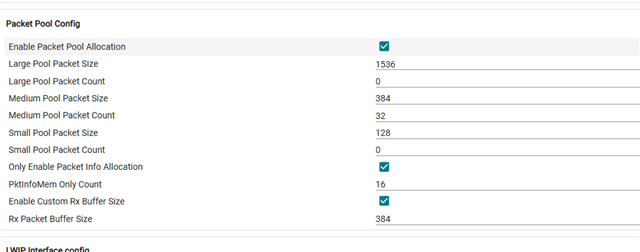
    4. Can you try increasing the number of Tx and Rx packets in the sysconfig. Reference documentation: https://software-dl.ti.com/mcu-plus-sdk/esd/AM261X/latest/exports/docs/api_guide_am261x/PACKETPOOL_CONFIG_TOP.html

    Basically increase the number of packets i have highlighted below. The Tx and Rx packet count should add up in the Packet pool config. If we are running out of packet pools, this should fix it.

    Regards,
    Shaunak

  • Hi, Shaunak

    Q1: The customer tried debugging the demo program under the example path, but isn't sure whether the debug was actually successful, since their custom board has many modifications and debugging a demo is time-consuming. Could this instead be verified using the existing Modbus TCP communication? Or, what symptoms would indicate a CPSW problem? It's possible that the existing Modbus TCP communication alone is enough to tell whether CPSW is working properly.

    Observed symptoms:

    1. Data is sent once per second; after roughly 750 successful sends, the connection drops. After about 3 failed send attempts, the connection succeeds again.
    2. Even when a memory-overflow-like issue occurs, the Ethernet (network port) communication itself remains normal.

    Q2: The customer's custom board does not have a serial port, so they are unable to capture logs.

    Q3: See attached files: example1.syscfg is for the custom board, and example2.syscfg is for the launchpad.

    Q4: The customer modified the configuration as instructed/suggested, which resulted in abnormal communication. The image show below. Is there anything in it that should be improved?

    Additional info:

    The disconnection issue occurs after running for about 10 minutes. During Modbus TCP communication, only 10 fixed addresses are read — there are no write operations or any other operations.

    A private E2E for EURA has already been created — should any further discussion on EURA issues take place there going forward?

    Private E2E Link: https://e2e.ti.com/e2eprivate/eura/eura---indsdk/f/ti-eura-indsdk-forum

    https://e2e.ti.com/cfs-file/__key/communityserver-discussions-components-files/908/example1.syscfghttps://e2e.ti.com/cfs-file/__key/communityserver-discussions-components-files/908/example2.syscfg

  • Hello Ethan,

    we inspected the provided configuration and did not find something suspicious on first look. The consistent failure at 12th minute indeed indicates a memory issue but we can't point out to something specific as of now. At this point more information about the failure from the customer will help us debug this issue. Questions to the customer:

    1. Could you share a Wireshark capture covering normal communication, failure and the following disrupted communication? Are the observed symptoms (750 tries and fail) something you observed with the demo? If so it would also help to receive a capture for this too.

    2. How exactly does the modbus side look like in your application? Did you already try a different polling interval or similar to see if this changes the failure time? 

    3. Could you provide more information about the failure and the following corruption: Is there a pattern to this or is it random? How did you observe this? Some info about the debug method you are using (CCS - JTAG or similar) is also helpful for meaningful suggestions from our side.

    4. What modifications did you do on the packet handling side, if any? 

    Best Regards,

    Aravind

  • Hello,

    I am the one who raised this question.I did other tests again。

    1.I have modified the bus transmission frequency,Still only running for twelve minutes.

    2.I only supply power to the customized board and have not established bus communication with the upper computer, but it can still only run for twelve minutes

    3.I keep lighting up an LED light,but the light will turn off after twelve minutes,Even if the bus communication is normal, all data inside the program will be read as zero

    4.According to these phenomenons,Should we still share a Wireshark capture covering normal communication?

    Thank you.

  • Hi ,

    1.Yes, a wireshark capture would help us analyse what exactly happens on the wire during the 12 minute mark, where communication breaks. Is it the MCU that stops responding, or what exactly happens

    2. Have you seen the same issue when you have active communication?

    have not established bus communication with the upper computer, but it can still only run for twelve minutes

    3. May you explain what exactly is the application doing? Is it just ModbusTCP Communication + LED blinks?

    I keep lighting up an LED light,but the light will turn off after twelve minutes,Even if the bus communication is normal, all data inside the program will be read as zero

    Regards,
    Shaunak

  • Default_00001.rar

    1.This is the data for thirty seconds before and after the error.

    2.Whether communicating or not,it can only run for twelve minutes.

    3.We have a red light,When no data is sent,the red light will turn on, but after twelve minutes,the red light turn off. 

    thanks.

  • Hi d XB,

    1. On a very different note, but one thought i was having was, since you very consistently see this exactly at 12 minutes, is there any watchdog that is active and at 12th minute not being serviced? do you see the device undergo a reset around 12 minutes? Once the device fails, are you able to connect to the debugger and read memory? Can you run CPSW Stats gel file (https://e2e.ti.com/support/microcontrollers/arm-based-microcontrollers-group/arm-based-microcontrollers/f/arm-based-microcontrollers-forum/1661923/faq-am2611-how-to-view-cpsw-registers-and-cpsw-stats-for-am26x-devices-using-gel-script?tisearch=e2e-sitesearch&keymatch=faq%3Atrue) and share these results.

    2. If you just run the GPIO LED Logic without modbus being a part of your application, do you still see it failing around 12 minutes? I know you were not able to test Non-modbus (only CPSW layer-2 communication), but that would help us a lot to understand if layer-2 ethernet communication is fine. I am trying to isolate and pin point to where the exact issue is emerging from.

      please let us know your thoughts on the wireshark dump.

    Regards,
    Shaunak

  • Hello.

    1.Can you tell me where to find the watchdog in Modbus TCP project.

    2.I found that after running for twelve minutes, it will turn into the one shown in the second picture. The first picture is normal.

    3.The following is the runtime data and picture . Maybe it's what you need

    GEL Output

    Cortex_R5_0: ***OnTargetConnect() Launched***
    Cortex_R5_0: AM261x Initialization Scripts Launched.
    Please Wait...
    Cortex_R5_0: ***AM261x Checks sequence Launched...
    Cortex_R5_0: AM261x_Cryst_Clock_Loss_Status() Launched
    Cortex_R5_0: Crystal Clock present
    Cortex_R5_0: AM261x_SOP_Mode() Launched
    Cortex_R5_0: SOP MODE = 0x00000003
    Cortex_R5_0: OSPI - 8S Functional boot mode
    Cortex_R5_0: AM261x_Read_Device_Type() Launched
    Cortex_R5_0: EFuse Device Type Value = 0x000000AA
    Cortex_R5_0: AM261x_dual_or_lockstep_mode() Launched
    Cortex_R5_0: r5fss0 = 0x00000101
    Cortex_R5_0: *** R5FSS0 is in Lockstep mode ***

    Cortex_R5_0: *** Note:Please call this function for Dual Core switch: Dual_core_switch()

    Cortex_R5_0: Control_MMR_Register_Unlock() Launched
    Cortex_R5_0: MSS_CTRL Control Registers Unlocked
    Cortex_R5_0: MSS_TOP_RCM Control Registers Unlocked
    Cortex_R5_0: MSS_RCM Control Registers Unlocked
    Cortex_R5_0: MSS_IOMUX Control Registers Unlocked
    Cortex_R5_0: TOP_CTRL Control Registers Unlocked
    Cortex_R5_0: CONTROLSS_CTRL Control Registers Unlocked
    Cortex_R5_0: Configure_R5F0() Launched
    Cortex_R5_0: ZFG - 13.25 mm x 13.25 mm Package
    Cortex_R5_0: ***PLL lock sequence Launched
    Cortex_R5_0: CORE PLL Configuration Complete for 500MHZ
    Cortex_R5_0: SYS_CLK DIVBY2
    Cortex_R5_0: DPLL_CORE_HSDIV0_CLKOUT0 selected as CLK source for R5FSS & SYS CLKs
    Cortex_R5_0: **Clocks Programmed** R5F=500MHz and SYS_CLK=250MHz
    Cortex_R5_0: AM261x R5F running at 500Mhz
    Cortex_R5_0: Switch to dual core mode
    Cortex_R5_0: AM261x Dual core switch
    Cortex_R5_0: R5F ROM Eclipse
    Cortex_R5_0: R5FSS0_0 Released
    Cortex_R5_0: R5FSS0_1 Released
    Cortex_R5_0: AM261x TCM MEM init Done
    Cortex_R5_0: L2 Mem Init Complete
    Cortex_R5_0: MailBox Mem Init Complete
    Cortex_R5_0: r5fss0 = 0x00000001
    Cortex_R5_0: *** R5FSS0 is in Dual core mode ***

    Cortex_R5_0: *** Enabling Peripheral Clocks ***
    Cortex_R5_0: Enabling RTI[0:3] Clocks
    Cortex_R5_0: RTI0 Clock Enabled (250MHz)
    Cortex_R5_0: RTI1 Clock Enabled (250MHz)
    Cortex_R5_0: RTI2 Clock Enabled (250MHz)
    Cortex_R5_0: RTI3 Clock Enabled (250MHz)
    Cortex_R5_0: Enabling RTI_WDT[0:3] Clocks
    Cortex_R5_0: WDT0 Clock Enabled (250MHz)
    Cortex_R5_0: WDT1 Clock Enabled (250MHz)
    Cortex_R5_0: Enabling UART[0:5]/LIN[0:5] Clocks
    Cortex_R5_0: LIN0_UART0 Clock Enabled (160MHz)
    Cortex_R5_0: LIN1_UART1 Clock Enabled (160MHz)
    Cortex_R5_0: LIN2_UART2 Clock Enabled (160MHz)
    Cortex_R5_0: LIN3_UART3 Clock Enabled (192MHz)
    Cortex_R5_0: Enabling OSPI Clocks
    Cortex_R5_0: OSPI0 Clock Enabled (166.67MHz)
    Cortex_R5_0: OSPI1 Clock Enabled (166.67MHz)
    Cortex_R5_0: Enabling ICSSM0/1 Core Clocks
    Cortex_R5_0: ICSSM0_CORE Clock Enabled (250MHz)
    Cortex_R5_0: ICSSM1_CORE Clock Enabled (250MHz)
    Cortex_R5_0: Enabling ICSSM0/1 UART0 Clocks
    Cortex_R5_0: ICSSM0_UART0 Clock Enabled (160MHz)
    Cortex_R5_0: ICSSM1_UART0 Clock Enabled (160MHz)
    Cortex_R5_0: Enabling I2C Clocks
    Cortex_R5_0: I2C Clock Enabled (48MHz)
    Cortex_R5_0: Enabling TRACE Clocks
    Cortex_R5_0: Trace Clock Enabled (250MHz)
    Cortex_R5_0: Enabling MCAN[0:1] Clocks
    Cortex_R5_0: MCAN0 Clock Enabled (80MHz)
    Cortex_R5_0: MCAN1 Clock Enabled (80MHz)
    Cortex_R5_0: Enabling GPMC Clocks
    Cortex_R5_0: GPMC Clock Enabled (100MHz)
    Cortex_R5_0: Enabling ELM Clocks
    Cortex_R5_0: ELM Clock Enabled (50MHz)
    Cortex_R5_0: Enabling MMCSD Clocks
    Cortex_R5_0: MMCSD Clock Enabled (48MHz)
    Cortex_R5_0: Enabling MCSPI[0:4] Clocks
    Cortex_R5_0: MCSPI0 Clock Enabled (50MHz)
    Cortex_R5_0: MCSPI1 Clock Enabled (50MHz)

  • Hi d XB,

    2.I found that after running for twelve minutes, it will turn into the one shown in the second picture. The first picture is normal.

    CPU being halted does not necessarily mean an error, can you share the function call stack which shows what was executing on the CPU when it was halted? You can find the function call stack in the same debug window, just a bit below your "threads" section, near your "expressions/variables" section

    3.The following is the runtime data and picture . Maybe it's what you need

    The gel output shared is not for CPSW, it is the general gel output which we get when connecting to the CPU. Lets connect on a call tomorrow to debug this. I have connected Ethan over email.

    Can you please confirm if the testing is performed on Custom PCB and not on TI EVM (am261x launchpad)

    Regards,

    Shaunak

  • Hi,

    I had a look at the wireshark capture and it seems for some reason a lot of frames are not captured by the tap. A strong observation was that there is no TCP re-connection and Modbus continues on the same established TCP connection and the Modbus communication looks to be fine from a data transfer point of view. However there were also potential disruptions in the TCP communication, which need to be explained from elsewhere. 

    The direction Shaunak is suggesting to investigate seems to be more relevant as of now - but if we need to take a look at this part more, I suggest capturing a longer duration (atleast 5-6 mins) covering more exchanges before and after the failure. 

  • Hello:

    1.When it stops, The call stack as shown in the picture.

    2.We confirm that the testing is conducted on  Custom PCB.

    Thanks

  • Hello Ethan,

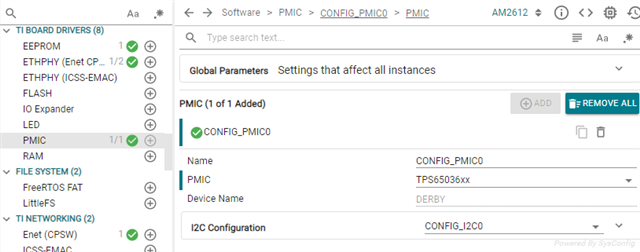
    as discussed in the call, please try the pmic related fix for WDT we discussed. Follow these steps to do so:

    1. Add the PMIC module to syscfg : 

    2. In CCS, add the following library path and the library:

    path : <mcu_plus_sdk_path>/source/board/pmic/lib

    library: lpmic_derby.am261x.r5f.ti-arm-clang.ti-arm-clang.freertos.${ConfigName}.lib

    3. rebuild the application and see if the error occurs again.

    let us know how this goes.

    Best Regards,

    Aravind

  • Hi:

        1.I have tried the pmic related fix for WDT ,and then the problem has been resolved . Thank you for your help.

        2.I want to know more about it .Are we adding PMIC to enable watchdog or disable watchdog.

        3.My colleague told me that we have disabled the watchdog on the hardware.

    Thanks

  • Hi d XB,

    Glad to know the issue has been resolved.

    .Are we adding PMIC to enable watchdog or disable watchdog.

    If the PMIC part is same as the AM261x, the we are adding PMIC in syscfg to disable the pmic watchdog. Certain PMIC parts have their own integrated watchdog for safety. It either needs to be serviced or disabled.

    https://software-dl.ti.com/mcu-plus-sdk/esd/AM261X/latest/exports/docs/api_guide_am261x/RELEASE_NOTES_10_02_00_PAGE.html

    Regards,
    Shaunak