AM263P4-Q1: How To Extract A Copy Table As Hex File

Part Number: AM263P4-Q1

Hello,

I need to extract the initializers for .data variables which are used for such things as conversion from ADC value to physical value (i.e. the m and c in y = mx +c) into a hex file. The hex file is then imported into Vector CANape and modified as part of calibration activity.

The initializers are of course the contents of a copy table. I have already switched off copy table compression to make this feasible.

In my application, the copy table in question starts at CAL_DATA_SECTION load address + 8. The offset of 8 bytes is because the first 8 seem to be a copy length specifier which I don't need.

.cinit     0    70137268    000078d8     
                  70137268    00006a20     (.cinit..data.load) [load image]
                  7013dc88    000006f0     (.cinit.CAL_DATA_SECTION.load) [load image]

In this build, I want to extract, address 0x7013DC90 (= load address 0x7013DC88 +8)
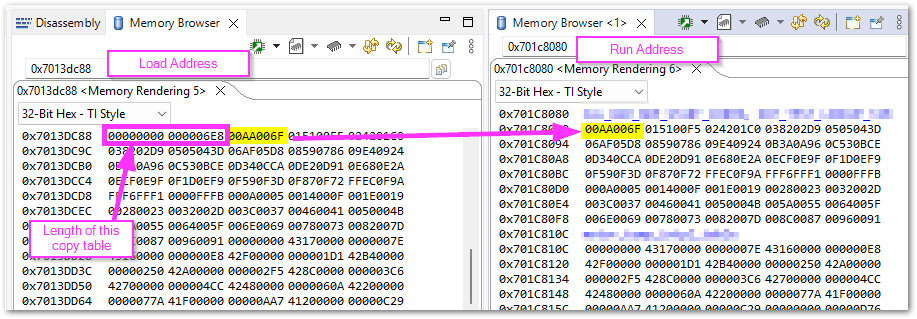
image.png

With reference to the tiarmhex utility 19. Hex Conversion Utility Description — TI Arm Clang Compiler Tools User's Guide, I first tried specifying by a SECTIONS directive:

SECTIONS
{
    .cinit.CAL_DATA_SECTION.load
}

But got the error:

warning: section .cinit.CAL_DATA_SECTION.load not found in
   (./core_0/core_0.out)
fatal error: no initialized sections in input files

However, after some trial and error, with the following script:

"./core_0/core_0.out"
--intel
--image
--exclude .text*
--exclude .vectors
--exclude .rodata
ROMS
{
    cal_data_section : origin=0x7013dc90, length=0x6F0, memwidth=8
}

I managed to get a file called core_0.i0 containing the expected data:
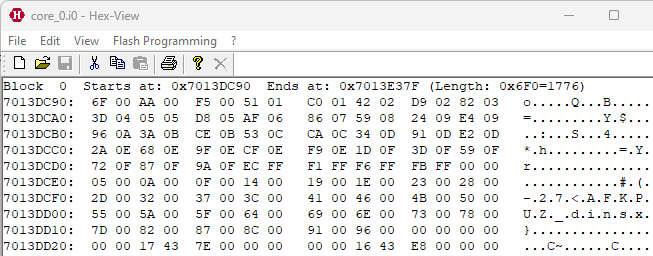
image.png

My problem now is that I don't know at link time the load address nor length of the copy table for CAL_DATA_SECTION. A problem that could be avoided if the SECTIONS directive worked.

To start with, can I fix the load address of CAL_DATA_SECTION please?

  • SECTIONS { .cinit.CAL_DATA_SECTION.load }

    Hi Kier,

    In the CINIT initialization table, .cinit.CAL_DATA_SECTION.load does not refer to a section of the same name.  The name identifies a CINIT record corresponding to the load address of the section named CAL_DATA_SECTION.  So specifying ".cinit.CAL_DATA_SECTION.load" as a section name will not work.  In the map file you're looking at, there is a section for LINKER GENERATED COPY TABLES that will indicate the records (and corresponding sections) for the CINIT initialization table (__TI_cinit_table).  It will tell you the names of the initialized sections.  That may be an easier reference to navigate the layout of the initialization table.

    In answer to your general question, there are ways to bind the placement of sections in the linker (See the User Guide section on section placement using the linker command file for details).

    Finally, I would like to suggest that instead of using the Hex Utility (tiarmhex), check out tiarmobjcopy, which may be easier to use.  See its documentation for more information.

    -Alan

  • Hi Alan,

    Thanks for the reply.

    Further to your advice, I have the following in my map file:

    LINKER GENERATED COPY TABLES
    
    __TI_cinit_table @ 7013ea7c records: 24, size/record: 8, table size: 192
    	.data: load addr=70137268, load size=00006a20 bytes, run addr=7012dbe0, run size=00006a18 bytes, compression=copy
    	CAL_DATA_SECTION: load addr=7013dc88, load size=000006f0 bytes, run addr=701c8080, run size=000006e8 bytes, compression=copy

    I tried to put just the section name in the SECTIONS directive:

    SECTIONS
    {
        CAL_DATA_SECTION
    }

    But I get the same error:

    fatal error: no initialized sections in input files

    I opened the .out file with ASAP2 Demo and I can see now that CAL_DATA_SECTION only appears as a run address section. All of the copy tables including the copy table for CAL_DATA_SECTION must be wrapped up in the .cinit section and cannot be further decomposed by the tiarmhex utility.

    I doubt then that the 'tiarmobjcopy' will have any better idea where the .cinit.CAL_DATA_SECTION resides than the above GUI tool. Let me know if you disagree.

    I might have to look at a different approach.

  • Hi Kier,

    If all you need is the initialized section data from CAL_DATA_SECTION in a hex file, I suggest linking with --ram_model in your example and then use tiarmobjcopy to convert the CAL_DATA_SECTION to hex.  When linking with --ram_model, the section will contain its data and a runtime initialization table will not be created for it.  Do this solely for the purpose of hex conversion and not to load the linked executable.

    -Alan

  • I fixed this issue by adding 'volatile const' qualifiers to all the CAL_DATA_SECTION symbols.

    - const changes CAL_DATA_SECTION to be effectively .rodata. This means a copy table is not required and it is much easier to extract the hex image.

    - volatile prevents the compiler inserting string literals into the code instead of fetching the value from data memory which is my intention.

    I am then able to use a SECTIONS directive with the tiarmhex utility. Also, to generate a single hex file I had to set memwidth to 8. Here's the full script:

    "core_0.out"
    /* Intel hex format */
    --intel
    /* Only memwdith=8 outputs a single file called core_0.i0. */
    --memwidth=8
    
    SECTIONS
    {
        CAL_DATA_SECTION:
    }