AM13E23019: Simulink Error group AM13xPILpref does not exist

Part Number: AM13E23019
Other Parts Discussed in Thread: SYSCONFIG

Hello,

I am trying to follow the SDAA440 app note on PIL benchmarking with Simulink on AM13. However when I try to switch the hardware to AM13E230x after installing the HSP, the configuration gives me this error:
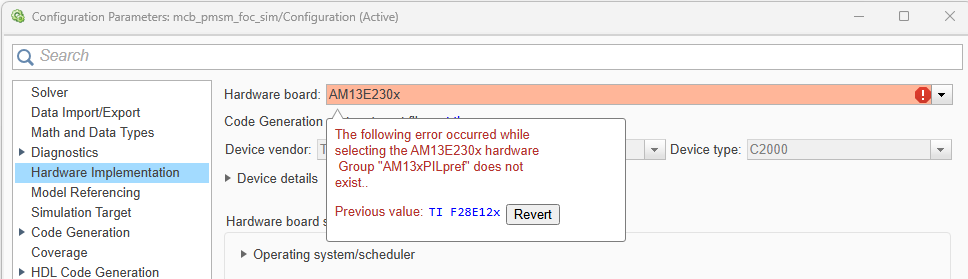
image.png

I ran the command `mpminstall am13x_ti_hsp` to install the hsp, downloading and trying to double click on the hsp file to install caused matlab to crash.

Any idea on how I can fix this error?

Munan

  • Hi,

    I did manage to get the hsp installed correctly... two things I ran into:

    1. Following the recommendations on github repo for the am13 hsp, I had to change the matlab default add on path to MATLAB_Add-ons from "Matlab Add-ons" because of the no space recommendation. I don't know if this was 100% necessary.

    2. running the hsp_am13x_setup.m script yielded errors on unable to write the files and to check my filesystem permissions for: "C:\Users\xxx\AppData\Roaming\MathWorks\MATLAB_Add-Ons\am13x_ti_hsp@26.1.0\am13x-hsp-RELEASE_26_1_0\toolchain\am13x\+matlabshared\+toolchain\+ti_arm_clang\tool_install_paths.mat" 
        I had to manually delete the file and then it wrote a new tool_install_paths.mat without error. This happened with ti_arm_clang, IAR toolchains and gcc toolchains. Not sure if there is a way to update the write so that it can open the existing file and just update the values.

    The matlab commands to install this hsp do not work like I mentioned previously the download from mathworks is not a .zip and crashed matlab when I tried to open it. The command line tool did not work. I also could not find the AM13 HSP in the add on marketplace as described in the github documentation. 

    I think if the mathworks provided ways to install this hsp don't work we need to be a lot clearer on what the supported ways to install this package are. 

    Munan

  • A few more issues I'm running into:

    1. The flashing script breaks with spaces in the path name so the loadAndRun.m script I modified:
      commandStr = ['"' ccsScriptingTool '" "' deployerJS '" "' ccsRoot '" "' ccxmlPath '" ' coreArch ' "' executableFile '"']; so that each path is quoted and doesn't break the interpreter.
    2. It looks like the pil_tmu_am13x.syscfg does not instantiate a UART for the communication to simulink:

      What is the correct sysconfig file to use here? There is a default one further up the directory tree is that the one we are to use? The app note references specifically this PIL syscfg but it doesn't work. the UART doesn't send anything, it doesn't receive anything, the comms time out to simulink. I ran the .out file in the debugger and it looks like it's just waiting in the rtio receive function.

    Munan

  • Hi Munan
    For issue 1: Which path contains space? Is it codegen folder/executable file? or the deployerJs script (hsp install path)? Good to see you have modified the script. In general, it's good to use both hsp install location and codegen folder special characters (space, +, etc...) free. Let us know if this issue is still open. Next version of the the release we will improve this.

    For issue2: Configuration of UART is done in this source file am13x-hsp/src/rtiostream_serial_am13x.c at main · TexasInstruments/am13x-hsp.

    Serial port and baud rate has to be supplied in the Simulink model -> Hardware settings -> Hardware Implementation -> Target hardware resources -> Connectivity section.  This baud rate is consumed by both target via the rtiostream_serial_am13x.c source file via macro AM13x_BAUDRATE extracted from the saved preference and also matlab host will have the same baud rate applied. 

    In general, if there is a PIL communication failure, delete all previous codegen, clear mex file for the model, and retry with board reset. Also try with a reduced baud rate like 921600/115200. So, keep using the pil_tmu_am13x.syscfg uart HAL configuration happens outside the SysConfig settings.

    Great to see you have resolved the download and setup issue. In general, try to use the download from Github and extract to folders containing no spaces. And run the hsp_am13x_setup.m

    What MATLAB version are you using? We will take action to revisit the installation via add-ons and other methods and resolve then in the next release.

    -Arun