This thread has been locked.

If you have a related question, please click the "Ask a related question" button in the top right corner. The newly created question will be automatically linked to this question.

Importing Tivaware projects

Other Parts Discussed in Thread: DRV8312, TM4C123GH6PM, TM4C1236H6PM

Hello, I am starting a new project with your new Tiva TM4C123GH (formerly lm4f232).  I hope to get the part today.  But in the mean time, I have been using your LM4f211 control card along with the DRV8312 motor kit.  I have been focusing on just getting familiar, and have run most of the sample programs for the LM4f211 from the Stellarisware libraries.

This week, at a TI tech day, I spoke with someone regarding the tivaware package, and they recommended that I install it, and use it to work with my new parts so I don't have to go back later and change things.  So I downloaded Tivaware, and installed it.  When trying to import the projects, I was getting errors regarding the ARMv5 compiler (sorry, it was a day ago, and I didn't write it down).  I then checked code composer for updates, and went from Ver 5.2->5.3, and installed the ARM update that was listed. Now, I am able to import the Tivaware project, but am getting errors.

 When trying to run "blinky", I get:

-Error: gmake: *** No rule to make target `clean'. blinky Unknown C/C++ Problem

-Error: This project was created using a version of compiler that is not currently installed: 5.0.3 [ARM]. Please install the compiler of this version, or migrate the project to one of the available compiler versions by adjusting project properties. blinky properties TI Problem Marker

-Warning: Invalid project path: Include path not found (\include). blinky pathentry Path Entry Problem

I have reviewed the Stellarisware to Tivaware migration document SPMA050A, but maybe I missed something. Are there any other documents you might be able to point me to to help me out? Any other tips for using TivaWare?  Or should I stick to StellarisWare for the time being?

Thanks!

  • Hi Samo.

    I downloaded TivaWare, and built blinky for the LM4F211 control card, I didn't get the errors that you encountered. Did you download ccs 5.3.0.00090 build number from the web? This is the version of ccs that I use.

    When you say "Trying to run blinky", did you mean to say "Trying to compile blinky"? the errors are more like build errors rather than runtime errors.

    Did you have trouble to build driverlib as well?

    Best regards,

    Angela


  • Hi Angela,

    I did upgrade to the 5.3.0.00090 build.  You are correct, I did mean I was trying to 'build' blinky, not run it.

    I tried building the 'driverlib' from Tivaware, and it built just fine.  So I dug a bit further.  When looking at project Properties>General, the 'driverlib' project that compiles has compiler version TI v4.9.5 selected.  the Tiva version of 'blinky' has compiler version TI v5.0.3 (Is this different than the ARMv5 compiler I updated to prior to posting this message?).  Also strange is that the 'driverlib' project also has "Effective compiler version" automatically set to "TI v4.9.8" below 'Compiler version'.  the Tiva blink project only has 'compiler version', not the 'effective' one.

    I then change my compiler in my Tiva 'blinky' project to TI v4.9.8.  The build finishes, and no errors/warnings.  Looks good!  I try to run on my LM4F211 board, and I get the error "Error connecting to the target".  If I hit retry, it says "Frequency is out of range".  When I hit cancel, code composer crashes...  I tried playing around with this for awhile, and it was never able to connect to the dev board.  

    I then tried bringing up the Stellarisware version of 'blinky', and it compiles fine, but it crashes the same when I try to run.  I also tried running an older project that was running/debugging fine, and it also crashes Code composer when trying to debug.

    So did the update kill my code composer?  I hesitate to try any more updates without reason as they take literally hours to download on my PC.

    Thanks

  • Hi Samo.

    My ccs is 5.3.0.00090 as well. After reading your response, I ran blinky on LM4F211 control card by pressing "debug" button on css, it works for me. And I looked at the blinky project properties, it has TI v5.0.3 as compiler version, and I didn't have to change a thing to get it to compile, perhaps something went wrong during ccs update. I hate to ask, but I don't have any other better suggestions. Would you please do a complete uninstall and make sure the whole folder for ccs is deleted, and do a clean install?

    Before you try re-insall ccs, can you try to connect the board with LMFlash Programmer or use Keil if you have it, this will rule out any hardware related issues.

    In the meanwhile, I will try to do a clean install as well, just to see if I can re-create the problems you are seeing.

    Sorry about the problems that it has caused you.

    Best regards,

    Angela

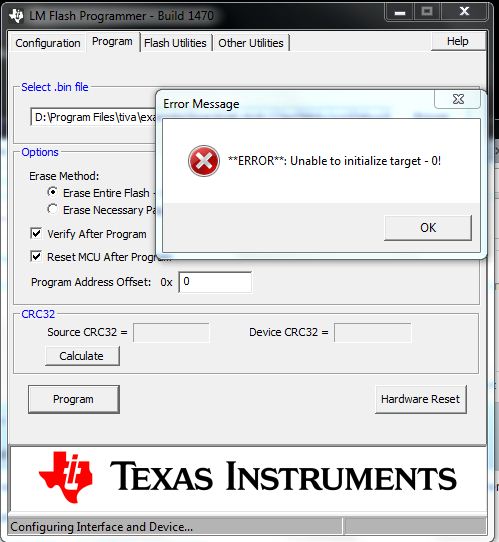
  • I uninstalled Code Composer, and restarted my PC.  I installed a fresh copy of the LM Flash Programmer, and then tried to program my LM4F211 controlcard, and I get the error "**ERROR**: Unable to initialize target - 0!".

    I followed the instructions in the controlcard's manual (6740.MDL-LM4F211CNCD_UM.pdf).  

    I also tried on an identical LM4F211 controlCARD belonging to a colleague, and I got the same error.  So I think the problem is on my PC, not the cards.  

    Could this be the cause of the errors in code composer?

    EDIT:  I tried the LM Flash Programmer on my home PC and it was able to program my board.  So my dev board still seems to be working.

  • I got Code Composer fully re-installed, and it seems to work now.  I still get the error regarding using a different compiler version, but it compiles fine, and runs, so I'm happy.  

    Thanks for your help!

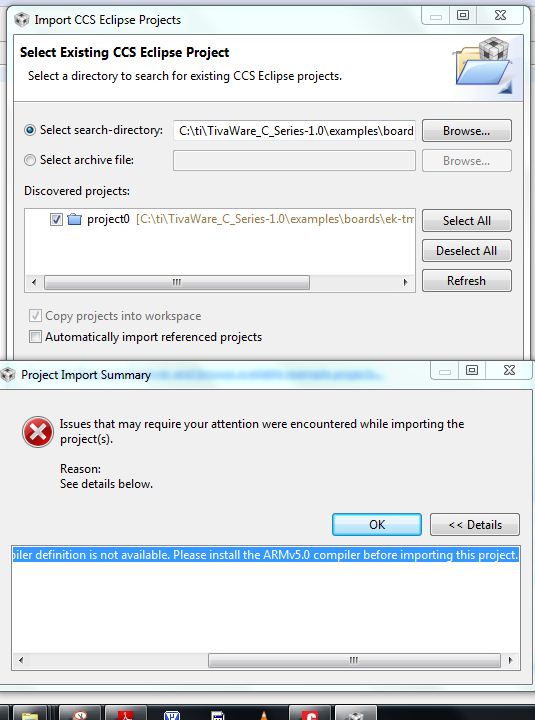
  • Im using stellaris LM4120H5QR launchpad board. LM4120H5QR project0 is work bt  when I import tiva TM4C123GXL project0 its make following error , anyone know the reason? ( data sheet say TM4C123GH6PM is identical to LM4F230H5QR)

    See details below.


    Error: Import failed for project 'project0' because its compiler definition is not available. Please install the ARMv5.0 compiler before importing this project.

  • You will need to install CCSv5.4 in order to pick up the support for Tiva C series parts. Even though the hardware is identical, but CCS tool treats the parts differently.

    Angela

  • Im using stellaris LM4f120 H5QR launchpad board.  i need to program TM4f1236h6pm  uging JTAG port (Debug Out) . i used keil for compilig. when i debug 

    it say unable to initialize target.

    bellow show the error massage when i use LM flash progaramer to load bin file.


  • Could you try the second option for erase method which is "only erase the necessary pages"? Does that help?

    Angela

  • same error display again..but when i program on board lm4f120 ic there is no error...
    may i know  what is the meaning of  "crystal vale" in LM flash programmer configuration window? because i used 20MHz external crystal to out board  processor 

  • I don't think LMFlash programmer detects your target at all. Could you please clarify something for me? There is no debug out on Launchpad board, did you blue-wire it to your custom board which has TM4C1236H6PM part on it? If so, can you describe how you connect the launchpad with your own board?.

    Angela

  • dear madam ,

    This is the case..
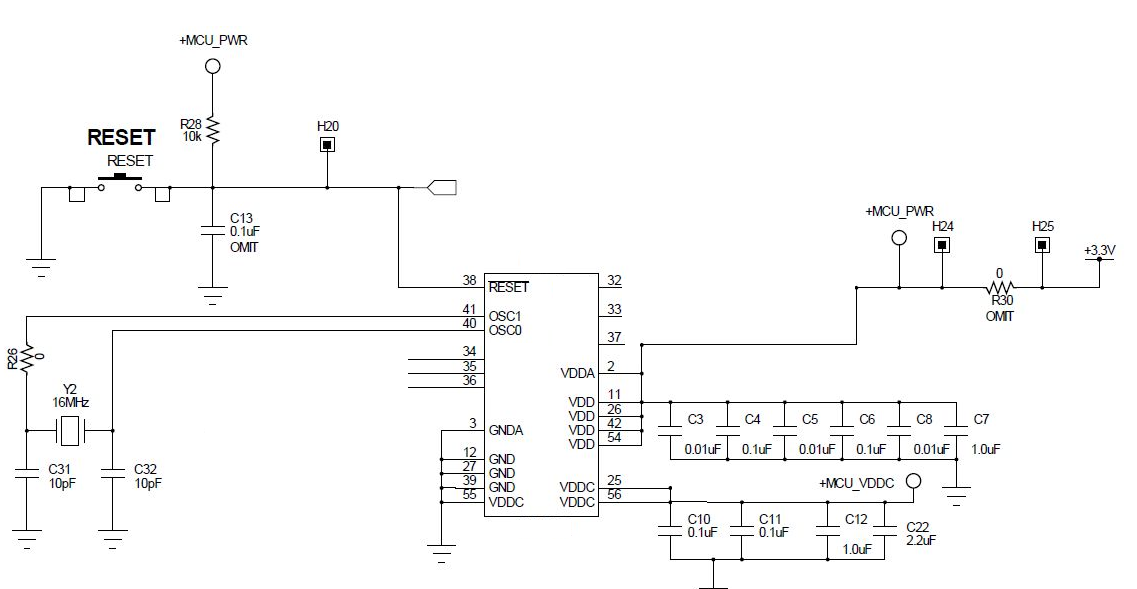
    I already have LM4f120h5qr stellaris launchpad board...and i made my own  board which has TM4C1236H6PM part on it. (SHOW  circuit diagram . crystal value should be 20MHz )
    so then i need to program my own board using stellaris launch pad and lm flash programmer/keil or ccs.  

    then use the following steps to use the ICDI to program and debug an off-board device.

    • Remove the power jumper located just below the green power present indicator LED.
    • Connect the JTAG signals to my target processor.


    srellaris launchpad   I   TM4C1236H6PM
    ...................................................................
    TCK               ->     TCK   (pin )
    TMS              ->     TMS   (pin )
    TDO              ->     TDO   (pin )
    TDI                ->     TDI     (pin )
    • Connect a common ground reference between the two systems.

    so may i know what should be the next steps i need to follow avoid this errors ..
    thank you..


  • VDDC(pin55) is connected to the ground, this cannot work. Is that a typo? if not, please make sure it isn't directly connected to ground.

  • sorry there is mistake in figure ,
    pin 55 is not a VDDC pin. it is GND pin.so circuit is ok and addition to that  i check the VDDC votage ( LDO output ). it arrroun 1.22V according to data sheet. ..

    thank you..

  • I don't notice anything obvious in your schematics. You can use a scope and see if the 4 JTAG pins have any activity, especially whether there is a clock or not. 

    There is wiki page about how to do the debug out with Launchpad, here is the link if you haven't seen it. You might want to connect the reset pin on the launchpad to your target processor. 

    http://processors.wiki.ti.com/index.php/Stellaris_LM4F120_LaunchPad_Debug_How_To

    Angela

  • ok i will try again...
    but may i know
    1) In data sheet show JTAG pins can be I/O or TCK, TMS, TDO,TDI.

    so do i need to unlock the JTAG port before program customer board? how it done?

    otherwise that pins can be digital output.

    2)  do i need to install new software or update drivers to detect tiva series IC to Lm4f120 stellaris launchpad jtag. (I can debug on-board IC with out any problem)