This thread has been locked.

If you have a related question, please click the "Ask a related question" button in the top right corner. The newly created question will be automatically linked to this question.

usb_dev_serial example isshue..

I work on EK-LM4F232 board, and i test the usb_dev_serial example.
I'm using HypertTerminal and i can send character to the board (with keyboard), and watch the number of characters sent on the LCD display.

My intention was to send chars over the internal USB device controller to the PC.Hows this possible???

And how can i check both the Tx and Rx functions of this example is to connect your PC to both the ICDI USB andHOST/DEVICE/OTG USB ports???

In device Manger -> Of  MY Computers ->Properties it is showing only One Com port & i.e. Virtual serial Port

  • If you can successfully build and program your board with sample USB serial code and still do not see serial port device under Device Manager you probably forgot to install drivers.

    You will find drivers under following folder: [,,,]\TivaWare\windows_drivers

    Regards,
    Maciej 

  • Hi Vidushi,

    How is it possible that you are able to test the usb_dev_serial example if you don't have the Stellaris Virtual COM Port Drivers Installed? You should see this under Ports->Stellaris ICDI COM Port.

    Might I suggest first learning how to send chars to PC using the uart_echo project. It is less complicated to understand compared to the USB examples. Most USB examples for LM4F232 employ their own way of transferring data to the PC. You would need to learn how to transfer characters from these USB examples.

    -kel

  • Vidushi,

    The two USB ports on the LM4F232 have very different purposes. The one by the screen is the In Circuit Debug Interface, aka ICDI, it is used for loading and debugging code via the chip on the bottom of the board. It also supplies power to the board if you do not supply it otherwise. The second USB connector is labled USB OTG, this connector is what is used to send and receive data for the example. Both must be connected to your computer, the ICDI to power and load code to the board, and the OTG connection to send data back and forth from the program.

    Assuming you have installed the drivers correctly you should see the OTG connection show up under device manager ->ports, and the ICDI should show up under Device Manager -> Stellaris In Circuit Debug Interface.

    Regards,

    -Austin

  • hi Maciej 


    I have already installed all drivers..

    as successfully build and program my board with sample USB serial code(USB_dev_serial) on OLED it display Tx buf & Rx buf.

    as i send/write bytes on hyper terminal then Rx buf size goes on increasing as i write on hyper terminal(Com port - Stellaris Virtual Serial port )

    but didnt get anything in Tx buf...

    so what i have to do Transmit that same??


    Regards

    Vidushi

  • Hi Kel,

    I have the Stellaris Virtual COM Port Drivers Installed >Stellaris ICDI COM Port is having these two Drivers.

    Stellaris ICDI COM Port. ->Stellaris ICDI DFU Device

                                               -> Stellaris ICDI JTAG/SWD Interface.

    Regards

    Vidushi

  • Hi Austin,

    Yaa there is two USB ports on the LM4F232 have very different purposes that i have studied from Pdf "StellarisLaunchpadworkbook" 

    One is near Oled to supply Board & another one is OTG(J2) connected with mini USb Cable A & on the other side of cable Usb cable is connected to communicate with PC. In short Both ports are connected to PC

    ya its is not showing OTG Connection in Device manager what i have to do now??

    --> And is there any working module to communicate with USB(Pendrive) ??

    Regards

    Vidushi


  • Vidushi,

    Is your device visible in usbview? Maybe you are connecting your device and it stays as unknown device. As a result you see only ICDI serial in device manager. ICDI drivers have nothing to do with USB examples. You need to install drivers from \windows_drivers folder in TivaWare (or StellarisWare). You will find there usb_dev_serial.inf.

    Regards,
    Maciej 

  • Vidushi,

    so when you plug and unplug the OTG connection you see no change in device manager? I would suggest as said, install the other drivers from the windows directory.

    To answer your other question about USB pendrive examples: yes, there is one, it's in the USB folder marked MSC (mass storage class).

    Regards,

    -Austin

  • Hi Maciej

    1.) I'm able to run usb_bulk_example 
    But unable to run usb_dev_serial module...

    Is there any prob in connection or way of running module???

    Thanks n regards
    Vidushi

  • Hi Austin & Maciej

    1.) I'm able to run usb_bulk_example 
    But unable to run usb_dev_serial module...

    Driver is already installed when i plug & unplug OTG Connection then i found new driver already installed as USB Mass storage & USB Composite Device but when i run Module usb_dev_serial & Transmit data through Hyperterminal then Rx & RxBuf start receiving bytes & saved in buffer shown on Oled but not transmiting anything to PC.

    2.)And Austin I hav tried usb_dev_msc
    But in that sdCard found is write on oled when sdCard is inserted.. But not started reading n writing or idle state as written in code. When I debug then I found that msc_disconnected so not go in case of reading writing msc???

    Is there any prob in connection or way of running module???

    Thanks n regards
    Vidushi

  • Sorry I am out of ideas. I wish you best of luck.

    Maciej

  • Thanks Maciej for your continuous support & Response..


    can you tell me what to do if i want interfacing with sd card to read particular file type(.xml) & send complete file to PC ???

    is there any module for that ??

    i have sdcard demo which show all files of sdcard by writing help in hyperterminal.. 


    If any one can help me regarding this then please

    Thanks & Regards'

    Vidushi

  • Hi Austin,

    I'm trying usb_dev_bulk example code with lm4f232, I am able to build the code, but not able to send r receive data.

    I'm following stellaris Launch Pad Workbook and I have installed StellarisWare Windows-side USB examples(from

     www.ti.com/sw-usb-win),

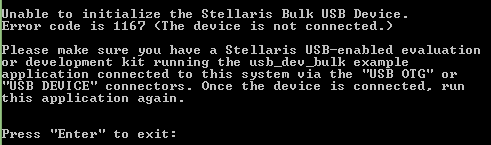
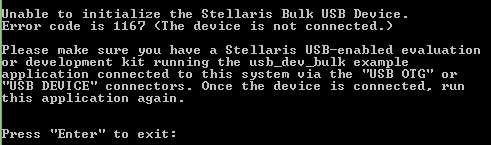
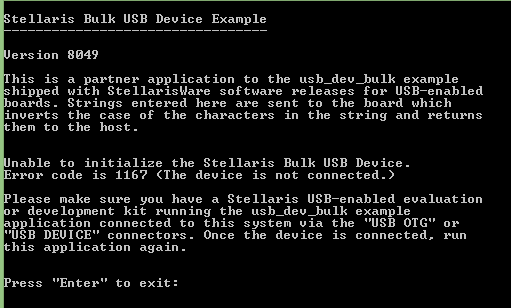
    After loading the code, on oled I can see usb-dev-bulk, waiting for host, Tx bytes:, Rx bytes: ,but in USB Bulk

    example i'm getting error as shown below,   

    Actually in the device manager, it is showing warning symbol and even not able to install it also.

    Can you please help me out where i'm going wrong.

    Regards,

    Mamatha

  • Hi,

    Now it is working fine, i updated the driver.

    Regards,

    Mamatha