I was wondering if anyone here has any experience with multi-threading, where I am hoping to use it on a TIVA TM4C123G micro controller.
A C/C++ code example or any direction would be really appreciated.
This thread has been locked.
If you have a related question, please click the "Ask a related question" button in the top right corner. The newly created question will be automatically linked to this question.
I was wondering if anyone here has any experience with multi-threading, where I am hoping to use it on a TIVA TM4C123G micro controller.
A C/C++ code example or any direction would be really appreciated.
Hi Elad,
Your best be maybe running a RTOS, if using a launchPad you might want to try TI-RTOS or Free RTOS. If you have any troubles with the TI-RTOS there a forum for it. If this isn't what you were looking for let me know.
Sheldon
Hi Sheldon,
Thank you for your reply.
From what I was able to understand this is some sort of an operating system which I need to have installed on my board. However, if possible I would like to avoid such a thing since all I have is a "simple" code. Is there a C/C++ library I could use which introduces support for multi-threading without the need for operating system?
Maybe this will explain better what I would like to do:
I would like to have a feature which saves data periodically in the background without having to call it all the time in my code. Thus, it would called once at the beginning and the software will automatically call it every X seconds...
Thanks in advance.
Elad
Elad,
For something simple like that I would recommend using either a timer interrupt, Systick or even DMA is you want it to happen completely in the background. All three of those should get you to your desired goal. There are examples of all three in Tiva-Ware.
Hope that helps,
Sheldon
@ Petrei,
"scheduler.c" - truly inspired find & presentation mon ami.
So much more appropriate than (one assumes the relatively new poster) chose, (i.e. "multi-threading")
Anti-KISS too often "alive/well" here/elsewhere - adding complexity "up-front" not fully, "best practice."
BTW - had you the time/chance to actually run "scheduler.c" under its rebrand format? (as you are aware - multiple "hiccups" have been reported w/certain apps/functions - unfortunate result of "collateral damage" when widespread change attempted... Have no such knowledge as regards scheduler.c - simply asking if you have "confirmed" its operation...)
Hi Sheldon,
Thank you for your reply.
I am already using the Systick function to calculate time differences etc. However, I have not noticed any functionality which allows me to set a function to execute every X number of ticks without literary having to call her in my code
(which is something I am trying to avoid as my code gets larger and has many sub functions).
Could you please be more specific or direct me to the right example?
Thanks in advance.
Elad
Elad,
If you are using systick for something else and don't want to completely rework your code i would recommend using a different timer. Interrupt examples found in "timers.c". If you are willing to rewrite your code a bit you can use scheduler.c like was suggested by Petrei and approved by cb-1.
Sheldon
Sheldon,
I am really sorry for all my questions but I am really new to this ARM programming. Not to mention that I am not an expirienced programmer at all.
I have found the following timers example. This is what I understood and correct me please if I am mistaken:
1. There are two different timers (one for each handler).
2. The two timers run in the background, where no matter at what stage the main is the code will execute.
However, I was not able to understand the follows:
1. When exactly the handlers are being called? Or where in the main are they declared?
2. Assuming one of the process takes more time than 0.5 seconds would the second one still be starting on time? Or would it have to wait for the other one to finish? I am asking because I would like to have to timers - one the systick and another to save data to a file periodically. However, I want to make sure the timer is still being able to count the time correctly even when the saving process takes a few seconds for example.
Thank you in advance.
Elad
//*****************************************************************************
//
// timers.c - Timers example.
//
// Copyright (c) 2005-2012 Texas Instruments Incorporated. All rights reserved.
// Software License Agreement
//
// Texas Instruments (TI) is supplying this software for use solely and
// exclusively on TI's microcontroller products. The software is owned by
// TI and/or its suppliers, and is protected under applicable copyright
// laws. You may not combine this software with "viral" open-source
// software in order to form a larger program.
//
// THIS SOFTWARE IS PROVIDED "AS IS" AND WITH ALL FAULTS.
// NO WARRANTIES, WHETHER EXPRESS, IMPLIED OR STATUTORY, INCLUDING, BUT
// NOT LIMITED TO, IMPLIED WARRANTIES OF MERCHANTABILITY AND FITNESS FOR
// A PARTICULAR PURPOSE APPLY TO THIS SOFTWARE. TI SHALL NOT, UNDER ANY
// CIRCUMSTANCES, BE LIABLE FOR SPECIAL, INCIDENTAL, OR CONSEQUENTIAL
// DAMAGES, FOR ANY REASON WHATSOEVER.
//
// This is part of revision 9453 of the EK-LM3S2965 Firmware Package.
//
//*****************************************************************************
#include "inc/hw_ints.h"
#include "inc/hw_memmap.h"
#include "inc/hw_types.h"
#include "driverlib/debug.h"
#include "driverlib/gpio.h"
#include "driverlib/interrupt.h"
#include "driverlib/sysctl.h"
#include "driverlib/timer.h"
#include "drivers/rit128x96x4.h"
//*****************************************************************************
//
//! \addtogroup example_list
//! <h1>Timer (timers)</h1>
//!
//! This example application demonstrates the use of the timers to generate
//! periodic interrupts. One timer is set up to interrupt once per second and
//! the other to interrupt twice per second; each interrupt handler will toggle
//! its own indicator on the display.
//
//*****************************************************************************
//*****************************************************************************
//
// Flags that contain the current value of the interrupt indicator as displayed
// on the OLED display.
//
//*****************************************************************************
unsigned long g_ulFlags;
//*****************************************************************************
//
// The error routine that is called if the driver library encounters an error.
//
//*****************************************************************************
#ifdef DEBUG
void
__error__(char *pcFilename, unsigned long ulLine)
{
}
#endif
//*****************************************************************************
//
// The interrupt handler for the first timer interrupt.
//
//*****************************************************************************
void
Timer0IntHandler(void)
{
//
// Clear the timer interrupt.
//
TimerIntClear(TIMER0_BASE, TIMER_TIMA_TIMEOUT);
//
// Toggle the flag for the first timer.
//
HWREGBITW(&g_ulFlags, 0) ^= 1;
//
// Update the interrupt status on the display.
//
IntMasterDisable();
RIT128x96x4StringDraw(HWREGBITW(&g_ulFlags, 0) ? "1" : "0", 48, 32, 15);
IntMasterEnable();
}
//*****************************************************************************
//
// The interrupt handler for the second timer interrupt.
//
//*****************************************************************************
void
Timer1IntHandler(void)
{
//
// Clear the timer interrupt.
//
TimerIntClear(TIMER1_BASE, TIMER_TIMA_TIMEOUT);
//
// Toggle the flag for the second timer.
//
HWREGBITW(&g_ulFlags, 1) ^= 1;
//
// Update the interrupt status on the display.
//
IntMasterDisable();
RIT128x96x4StringDraw(HWREGBITW(&g_ulFlags, 1) ? "1" : "0", 90, 32, 15);
IntMasterEnable();
}
//*****************************************************************************
//
// This example application demonstrates the use of the timers to generate
// periodic interrupts.
//
//*****************************************************************************
int
main(void)
{
//
// Set the clocking to run directly from the crystal.
//
SysCtlClockSet(SYSCTL_SYSDIV_1 | SYSCTL_USE_OSC | SYSCTL_OSC_MAIN |
SYSCTL_XTAL_8MHZ);
//
// Initialize the OLED display and write status.
//
RIT128x96x4Init(1000000);
RIT128x96x4StringDraw("Timers example", 18, 24, 15);
RIT128x96x4StringDraw("T1: 0 T2: 0", 24, 32, 15);
//
// Enable the peripherals used by this example.
//
SysCtlPeripheralEnable(SYSCTL_PERIPH_TIMER0);
SysCtlPeripheralEnable(SYSCTL_PERIPH_TIMER1);
//
// Enable processor interrupts.
//
IntMasterEnable();
//
// Configure the two 32-bit periodic timers.
//
TimerConfigure(TIMER0_BASE, TIMER_CFG_PERIODIC);
TimerConfigure(TIMER1_BASE, TIMER_CFG_PERIODIC);
TimerLoadSet(TIMER0_BASE, TIMER_A, SysCtlClockGet());
TimerLoadSet(TIMER1_BASE, TIMER_A, SysCtlClockGet() / 2);
//
// Setup the interrupts for the timer timeouts.
//
IntEnable(INT_TIMER0A);
IntEnable(INT_TIMER1A);
TimerIntEnable(TIMER0_BASE, TIMER_TIMA_TIMEOUT);
TimerIntEnable(TIMER1_BASE, TIMER_TIMA_TIMEOUT);
//
// Enable the timers.
//
TimerEnable(TIMER0_BASE, TIMER_A);
TimerEnable(TIMER1_BASE, TIMER_A);
//
// Loop forever while the timers run.
//
while(1)
{
}
}
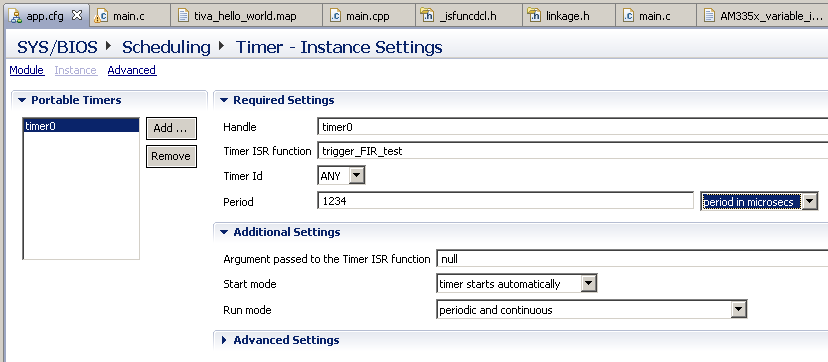
Have you seen SYS/BIOS?Elad Rind said:I am already using the Systick function to calculate time differences etc. However, I have not noticed any functionality which allows me to set a function to execute every X number of ticks without literary having to call her in my code
(which is something I am trying to avoid as my code gets larger and has many sub functions).
SYS/BIOS is supported for Tiva devices and allows user functions to be called at periodic intervals using a configuration GUI. E.g.:
[The TI-RTOS which was a previous suggestion uses SYS/BIOS for the Kernel]
@cb1_mobile,
To answer your question: no, I did not run yet this re-branded scheduler - but just make "diff" with the old one - and no differences encountered, except for small one, if I want to be pedantic - the local variable *pi16Task in SchedulerRun() function is named as you can see instead to be *puint32Task (get an address to a function) but i think it does not harm.
As for "hiccups" - I think these are due mainly to the user - since the application must follow the "run to completion" paradigm (since no context switching) and depends also on interrupts, their duration, priorities.
One more thing - I do not remember to see someone on TI *_arm forums complaining about this file.
Regards,
Petrei
Chester,
Thank you very much for this tip. I have noticed that it is already installed on my machine however I still haven't figured out how to find the GUI but I am sure I will soon.
Elad
Probably beyond what you can handle right now but the next step up from scheduler and before full blown tasking in a run to completion (RTC) executive.
The Cortex micros are paricularly well set up for this. The priority scheme on the interrupts let you use the interrupt hardware to build a simple pre-emptive RTC executive without needing to figure out task switching. You get 255 levels of distinct priority with 8 levels of preemption (sounds more constrained than it actually is). You can "borrow" unused interrupts to provide tasks and trigger them in software.
The downside is since it is a RTC setup the tasks cannot block (that is the reason it is called a run to completion executive) so some inter-process communication schemes are harder to do. With tasks running off of spare interrupts though you can easily trigger them based on other events so you do not need to sit polling on every input (ie rather than waiting on a queue as a conventional tasker does in a RTC executive an entry added to a queue will trigger a task to start, making it ready to run when it is the highest priority task).
Google Run To Completion Kernal (Embedded systems Programming had an article on this a decade back or so, slightly over-hyped but a good overview). Run to Completion Executive will likely get you a few articles as well.
Also, if you go a tasking route either with an RTC executive or more conventional tasker, it is worth at least taking a quick read on Rate Monotonic Analysis (RMA). It may save you some time otherwise wasted because you got your task priorities backwards. RMA is a lot simpler than it sounds.
Robert