This thread has been locked.

If you have a related question, please click the "Ask a related question" button in the top right corner. The newly created question will be automatically linked to this question.

Help with trying to program target tiva using launchpad as programmer


I've got some hardware up and running using the TM4C123GH6PMI Tiva C arm.  My question is about the VDDC pins.  I accidentally connected them to my VCC (3.3V) rail in my layout.  I powered up the circuit like this and it basically shorted out the board.  I realize this is probably damaging, but I was wondering if it would destroy the part or not.  I wasn't sure if there was some kind of diode protection or not.  The pins are now lifted so they are not connected to VCC and just floating.  I know now they are supposed to be connected to a cap specified in the datasheet, which I've found, but whats done is done.  Should I assume this part is bad and just build up another board since I'm getting "error communicating with target" and "frequency out of range"? The board shows up fine in windows device manager.  I also have the jumper under the power led removed per link:

http://processors.wiki.ti.com/index.php/Stellaris_LM4F120_LaunchPad_Debug_How_To

Also, I'm trying to program a second board using a Tiva C launchpad.  My connection header is shown below in a screenshot.  It sounds like, from reading TI's wiki page on programming target devices using the Tiva C launchpad as a  programmer, that you just connect TCK, TMS, TDO and TDI and ground.  Is this correct?  My board doesn't seem to be recognizable by CCS and I'm wondering if I'm missing a signal or something.  I've also tried connecting the reset pin on my board to the reset pin on the launchpad and still no luck. 

The actual error that I get is "frequency out of range".  I can get this to go away if I don't connect the EXTERNAL DEBUG pin on the launchpad to ground.  If I let that float then CCS just freezes up upon entering debug mode.  I've tried to copy the schematics for the launchpad as  closely as I could regarding   the wake pin which I have tied high through a 100k and the HIB pins i floating.  The VBAT pin is tied high as well directly to the 3.3V rail just like the launchpad schematics.  I've also added a 4.7uF cap across vddc pins by moding the second board (which didn't experience the VDDC problem as described above) and still no luck.

I tried to copied the launchpad schematics as much as I could for some of the odd pins.  HIB is floating, WAKE is tied to ground, VDDC is now connected to a 4.7uF cap and all of the VDD pins have 0.1uF decoupling caps and VBAT is tied to VDD.
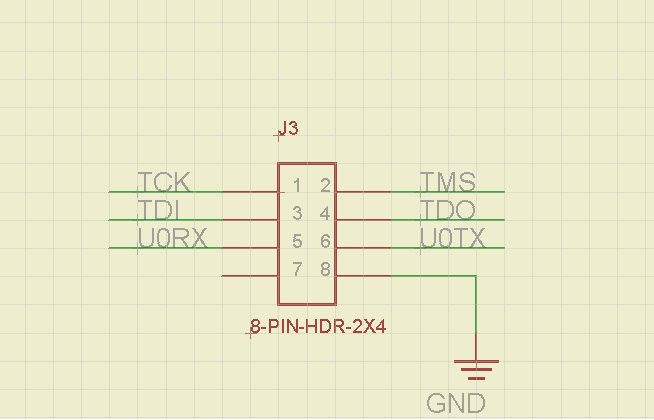
Thanks,

Rob

  • Hi Rob,

    I'm sorry for your troubles.  There could be a lot going on here.  First a couple of comments:

    1. I would assume that the part that was subjected to 3.3 V on VDDC is damaged.  
    2. 4.7 uF on VDDC is a bit high.  The spec is 2.5 to 4 uF.
    3. The System Design Guidelines app note is a great resource to help you review your design and ensure that you have a sound hardware platform.
    How do you have the debugger configured in CCS?  Open the target_config.ccxml file inside your project and check the following:
    1. On the Basic tab, the connection should be specified as Stellaris In-Circuit Debug Interface, and select the part you are using.
    2. On the Advanced tab, click on CORTEX_M4_0 and ensure that the JTAG Frequency is 1000000 Hz or less.  Try something slower and see if you get any different results.
    Open the project properties box and click on the Target tab, and then select the LM3x Flash Settings.  Ensure that the crystal frequency matches your board frequency.
    You can also try using LMFlash Programmer to see if you get different results.
    Regards,
    Sue
  • Sue,


    Thank you so much for the input.  I finally got my target board programmed.  I went though all of your suggestions which were very enlightening, but the problem was that the chip was locked.  I could connect the header on the launchpad and program that chip fine, but could not switch over to my target.  After I ran the unlock utility in LM Flash programmer (following the directions in the pop windows after starting the unlock routine) I got it successfully programmed. 

    I also changed the 4.7uF cap to two 4.7uF caps in series cutting the capacitance in half which also may have been one of my problems. 

    Some notes for others:  If you are trying to do the same thing make sure to check each pin in detail to know how to load it so you don't make similar mistakes to the ones I made with VDDC.  Also, if you do not tie the reset signal into your target from the launchpad (like i didn't) you will have to manually reset your target board to reprogram.  At least thats what I have to do.  I left Ext. Debug disconnected and everything seems to work fine.  I also have a additional 10k pullup on the JTAG signals.  Make sure you have a common ground between the target board and the launchpad as noted in the wiki.


    Sue, could you explain why these chips are locked from the factory?  I have never run into this.  What is the purpose of this? 

    Thanks again for the help!!

    Rob

  • Hi Rob,

    I'm glad you got it working.  The parts should be shipping unlocked from the factory.  If you are receiving parts that are locked, please RMA them to us (before you unlock them) so that we can check them out.

    Regards,

    Sue

  • So I've been coding/debugging on this board now the last two nights with out any noticeable problems.  Tonight though, I went to reset the board like I've done probably 50 times and then reprogram it.  Upon resetting it, it didn't seem to come  back up and now I'm unable to program it. 


    The strange thing here is that if I use the unlock utility and go through the steps to unlock the ARM I can then reprogram it with CCS one time.  I can't debug though.  The code loads and the debugger opens and I git run, but I cannot pause, break etc...or CCS will crash and I get the windows force close program alert.  To reprogram it after this I have to run the unlock utility again.  I haven't made any modes to this board after I got it running.

    When I don't unlock the board I get an error from CCS that it can't establish communication to the device.  I've check all my settings as Sue as advised and they are all still correct.  My reset pin is also still working like normal as in it isn't stuck low or anything. 

    Does this make sense to anyone?  Why does unlocking the part with the LM flash utility allow me a single shot at programming the device?

  • Hi Robbie,

    I cannot assist you with your question regarding the need to unlock. I just have a question about using the Tiva C Launchpad as a programmer. 

    I am particularly interested in its performance. Is it the same speed as programming the Tiva C LaunchPad's MCU?

    I have been looking at programmers, and the XDS100 looks painfully slow in both uploading code and debugging. The XDS200 looks good though, and I'd likely get one of these, but would be good to use one of the many Tiva C LaunchPads I have if needed.

    Glenn.

  • I'm not sure I completely understand your question.  I am using the launchpad front end (USB debugger/programmer portion) to program a Tiva chip that is just on a different board.  I haven't noticed any speed problems in using the launchpad as a debugger/program other than when debugging it runs a little bit past your break points.  I tie signals to LEDs and keep my debugging very simple and specific.  If there is something going on the debugger can't handle speed wise I just tie flags to LEDs and measure with a scope.  I've gone through a good bit of my product development and using the this and it's been great when you compare the price of a launchpad to the price of a top notch programmer. 

    I haven't used anything except the launchpad so I can't really speak for the XDS100 or 200.  You basically just follow the wiki and tie off the JTAG lines from the launch pad to the JTAG lines of whatever target you want.  Make sure you have a ground and make sure ALL the power/ground and special pins on the ARM are terminated correctly.  Some of my programming problems came from the fact that I had TOO MUCH capacitance on the VDDc.  Make sure you have no more than 4uF (I think that is the spec in the datasheet) because I used 4.7uF since it was a handy value I had in stock and it didn't work!!

    From my experience I'd recommend using the launchpad.  Programming specifically doesn't seem slow at all to me, but I've only got ~20k of code.

  • Thanks Robbie, you have answered my question. 

    Still cannot help you with your question, hope someone else or TI can chime in with an answer.

    Glenn.

  • hello, you can see my blog where is described how to use launchpad as external debugger http://ucsolutions.blogspot.com/2014/08/ti-launchpad-as-external-debugger-with.html