This thread has been locked.

If you have a related question, please click the "Ask a related question" button in the top right corner. The newly created question will be automatically linked to this question.

LIDD Mode


Can anyone please explain to me how to use the LIDD mode for a character LCD Display with an example?

There are no examples for this mode in the documents provided.

And even from the given API's, a person new to this field wont even understand the meaning of commands like

LIDD_CONFIG_SYNC_MPU68 and other commands like this one as they have been described VERY briefly.

Thanks in Advance :)

  • Hello Vikas

    Which LCD Character Panel are you planning to use? Is it a Hitachi type or MPU68 or Intel80 type interface panel?

    Regards

    Amit

  • I am using a normal 16x2 LCD display.

    But I think, according to the API's given, only the following three LCD types can be configured (correct me if I am wrong) :-

    1. MPU68

    2. Hitachi

    3. Intel80

  • Hello Vikas

    You would need to dig deeper into the LCD Display Data Sheet. The manufacturer does mention what type of interfacing is required

    Regards

    Amit

  • Note that as a long time purveyor of such character LCDs - these are most always 6800 MCU based.  Thus a R/W and E requirement - rather than I80's: /RD and /WR.  Months past - this very forum - I posted the timing abstract from Hitachi's original (HD44780 - lcd char cntlr) data manual.

    You thus require 3 control signals (2 if you never "read" the Lcd) and either 4 or 8 bits of data.  Application software floods the net...

  • Ok..

    As soon as I get the information about the interface panel, I will post it here..

    Thanks

  • Its a Hitachi Interface Panel..

    Please give me a sample program for LIDD mode

  • Hello Vikas

    I will help you setup a program for the Panel with pointers

    1. Based on the system clock you have to first decide the correct MCLK for the LCD. This MCLK is used to generate all the timings as required for Setup, Hold of data signal and the width of the control signals

    2. In the LCDCTL mode you have to then select the correct mode for the LCD Controller

    3. In the LCDLIDDCTL, the polarity of the DIR, ALE and CS have to be configured along with the type of LIDD Interface

    4.The configure the LIDDCSnCFG register based on which CS is being used for the timing parameters

    5.Then use the LIDDCSnADDR and LIDDCSnDATA register to address the panel and send or recieve data

    Based on the above description, and data sheet parameters for the Panel, you would need to come up with sequence, which we can review and then implement.

    Regards

    Amit

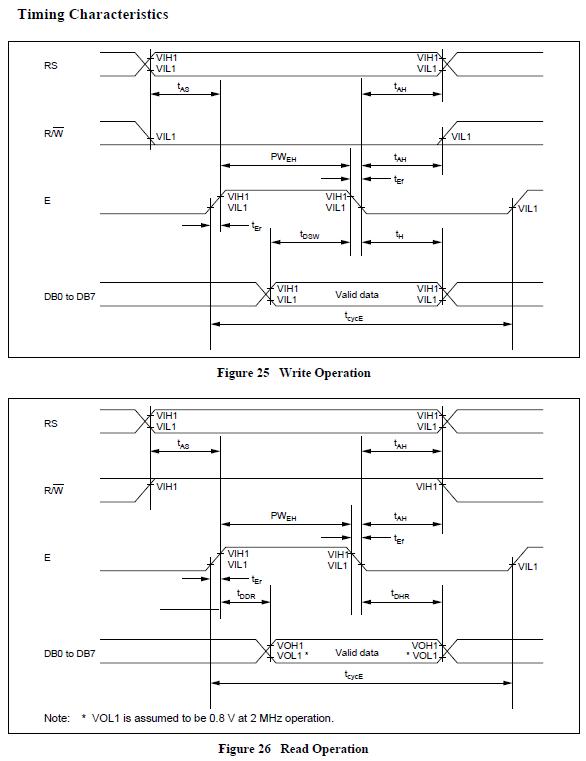
  • To achieve a successful interface both the signal source and its target must be well known/described.  To that end - here is the spec for the "father" of most all LCD Character Displays.  (HD44780 begat many clones - and certain of these clones are more accepting of narrower strobes & set-up/hold timings...)  User must determine the fitness - however the signal shape & order is well reflected below...

    Note that the Character Lcd's "E" signal requirement must follow the RS signal and that data must remain stable both prior to and post the negative toggle of "E." 

    In addition to this signal management - the Lcd Controller must be properly initialized - the 4 bit initialization is especially demanding - my suggestion is to avoid 4 bit until 8 bit has been well mastered...

    Armed with this signal requirement of your "target" - you can better search the signal delivery capability of your MCU - and devise the best/closest match...

  • To achieve a successful interface both the signal source and its target must be well known/described.  To that end - here is the spec for the "father" of most all LCD Character Displays.  (HD44780 begat many clones - and certain of these clones are more accepting of narrower strobes & set-up/hold timings...)  User must determine the fitness - however the signal shape & order is well reflected below...

    Note that the Character Lcd's "E" signal requirement must follow the RS signal and that data must remain stable both prior to and post the negative toggle of "E." 

    In addition to this signal management - the Lcd Controller must be properly initialized - the 4 bit initialization is especially demanding - my suggestion is to avoid 4 bit until 8 bit has been well mastered...

    Armed with this signal requirement of your "Lcd target" - you can better search the signal delivery capability of your MCU - and devise and/or select the best/closest match...