This thread has been locked.

If you have a related question, please click the "Ask a related question" button in the top right corner. The newly created question will be automatically linked to this question.

Launchpad Error during Debug.

Other Parts Discussed in Thread: LMFLASHPROGRAMMER

I am new to the Launchpad environment, having previously worked on the LPC series from NXP, this is my first try at TI.

I have used the TI lab examples to get started,

and the blinking LED example worked fine till now.

It is giving the following error now.

CORTEX_M4_0: GEL Output:
Memory Map Initialization Complete
CORTEX_M4_0: GEL: Encountered a problem loading file: C:\TM4C123G_LaunchPad_Workshop\lab2\project\Debug\lab2.out Could not open file
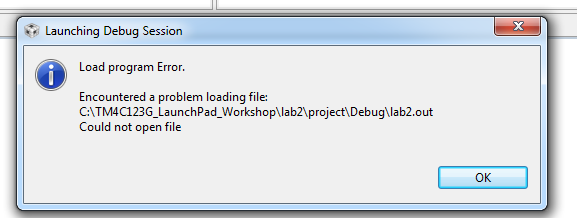
 

is it something to do with the project settings?

please help

  • arun kumar87786 said:
    CORTEX_M4_0: GEL: Encountered a problem loading file: C:\TM4C123G_LaunchPad_Workshop\lab2\project\Debug\lab2.out Could not open file

    The debugger is reporting that it is unable to open the C:\TM4C123G_LaunchPad_Workshop\lab2\project\Debug\lab2.out exectuable. Does that file exist?

    Did the project compile successfully?

  • Yes it did....

    i receive the following message on the console when i click on build ( The hammer)

    "C:\\ti\\ccsv5\\utils\\bin\\gmake" -k all
    gmake: Nothing to be done for `all'

  • Hi Arun,

         Is the blinking led example from the lab examples or is it from the Tivaware example programs?

    -kel

  • thank you Markel Robregado, but i am unable to decipher what went wrong, a simple reboot of my host fixed the issue.

    It was a Lab example, but it does not matter now

  • Hello Arun,

    Can you erase the flash using LMFlashProgrammer and then try the same?

    Regards

    Amit

  • yeah... its working fine now, No problemo

  • Hello Arun,

    For the larger community can you mention what the issue was? And what the resolution was as well...

    Regards

    Amit

  • ArunMKumar said:
    thank you Markel Robregado, but i am unable to decipher what went wrong, a simple reboot of my host fixed the issue.

    I often had similar problems, where CCS5 refused to connect to my targets for debugging. I have the feeling that this is due to windows driver or ressource allocation issues, and often, when nothing seems to work, closing the CCS5 IDE and reconnecting the target helps.

    At the moment i have these problems sometimes, because i have an application that strains a lot of current out of the USB port, and sometimes the driver crashes if i don't have a backup supply. So this is how i'd rehabilitate the target :-).

  • Janos said:
    At the moment i have these problems sometimes, because i have an application that strains a lot of current out of the USB port, and sometimes the driver crashes if i don't have a backup supply. So this is how i'd rehabilitate the target :-).

    That can be a reason, in my case it was a simple blinking LED example.

    Janos said:
    I have the feeling that this is due to windows driver or ressource allocation issues

    I feel that may be the reason too... The thing is I put my Host machine on sleep mode in between... after which these things started to happen. Also please note that closing and then relaunching CCS did not work, neither did Disconnecting and then reconnecting the launchpad worked..

    so all in all the issue must be in the OS drivers. Reboot can be frustrating but they may e the only solution here.

    If anybody knows how to unload and reload drivers in Windows, that may be a good solution.

  • ArunMKumar said:

    so all in all the issue must be in the OS drivers. Reboot can be frustrating but they may e the only solution here.

    If anybody knows how to unload and reload drivers in Windows, that may be a good solution.

     This is not a solution but I checked both suspend (sleep) and Hybernate in Linux and after awakening is still working.

     Atop I use a VBOX windows for LMFlash, this restart working after unplugging USB. Did you try'd on native windows if it restart after a real plugging-out USB socket?

  • well, the problem occurred again.

    I started the debug session without putting the board in debug mode and got an error, fair enough...

    now when i put the board in debug mode and try to connect with the board, again it does not links up..

    this is the error that is received.